
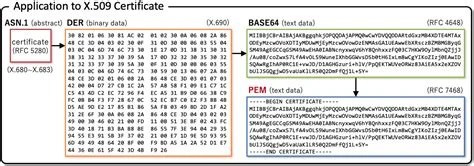
Anyone who has opened a certificate or key file in a text editor has probably wondered: are PEM files Base64 encoded? The short answer is yes, and understanding why gets into how certificates, keys, and other cryptographic objects get packaged for storage and transport across systems that were never designed to handle raw binary data.
Are PEM files Base64 encoded? Yes. A PEM file wraps a binary cryptographic object, typically DER-encoded, in Base64 text bounded by header and footer lines like -----BEGIN CERTIFICATE-----. The Base64 encoding turns unpredictable binary bytes into plain ASCII text that can survive email systems, copy-paste, and text-based configuration files without corruption.
PEM stands for Privacy Enhanced Mail. The name is a leftover from the early 1990s, when the format was designed as part of an effort to add encryption and authentication to internet email. That original email scheme never caught on widely, but the container format it introduced turned out to be useful for something else entirely: packaging cryptographic material in a way that could survive being pasted into a text file or sent through systems that only handled plain text.
Today, PEM has almost nothing to do with email. It is the standard container format for X.509 certificates, private keys, public keys, and certificate signing requests. When you download an SSL certificate for a web server, generate an RSA key pair, or export a certificate authority's root certificate, there's a good chance you're looking at a PEM file. The extension you'll commonly see is .pem, though .crt, .cer, and .key files often use the same internal format.
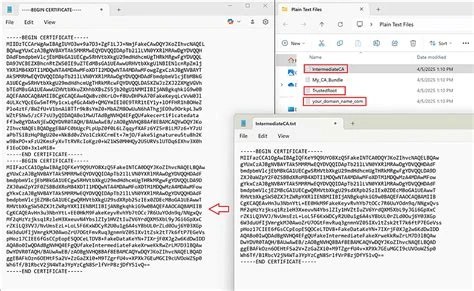
A PEM file has a very predictable shape. It starts with a header line, such as -----BEGIN CERTIFICATE----- or -----BEGIN RSA PRIVATE KEY-----, and ends with a matching footer line like -----END CERTIFICATE-----. Between those two lines sits a block of text made up of upper and lowercase letters, digits, and a few symbols, usually broken into lines of 64 characters each.
That block of text is not the certificate or key itself in any form a computer would recognize as meaningful data structures. It's an encoded representation of the underlying binary object. The header and footer aren't decorative; they tell parsing software what kind of object is inside, so a program can decide whether it's looking at a certificate, a private key, a public key, or a certificate request, and decode it accordingly.
Base64 is a binary-to-text encoding scheme. It takes arbitrary binary data, sequences of bytes that could contain any value from 0 to 255, and converts them into a string made up of only 64 printable characters: uppercase and lowercase letters, digits, plus + and /, with = used for padding at the end when needed.
The reason this matters is that a lot of infrastructure built for handling text, like email systems, JSON fields, XML documents, and older transport protocols, chokes on raw binary bytes. Control characters and non-printable bytes can get mangled, stripped, or misinterpreted. Base64 sidesteps all of that by encoding three bytes of binary data into four ASCII characters, at the cost of about a 33% increase in size. The scheme has been around for decades; for more on its background, see when Base64 was invented. It shows up constantly outside of certificates too, including in Base64 PDF encoding.
Yes. The body of a PEM file, everything between the header and footer lines, is Base64-encoded binary data. Specifically, it's the Base64 representation of a DER (Distinguished Encoding Rules) structure, which is the actual binary format that ASN.1-defined objects like X.509 certificates and RSA keys are encoded in at the byte level.
So a PEM certificate is really a DER certificate that has been run through Base64 encoding and wrapped with the BEGIN/END delimiters. If you strip the header and footer and decode what's left, you get back the exact same binary DER data that a system like a browser or TLS library actually parses. The relationship between the two formats is covered in more detail in Base64 vs. DER certificate differences, but the core fact stands: the text you see in a PEM file is a decodable, reversible transformation of binary data, not the binary data itself.
You can confirm a file is Base64-encoded just by looking at it, without running any tool. A few things to check:
+ and /, with = appearing only at the very end as padding.If a file claiming to be PEM shows random-looking bytes, odd symbols outside that character set, or no clear delimiters, something is off, it may be a DER file mislabeled with a .pem extension, or it may be corrupted.
Turning a PEM file back into its raw binary DER form is a two-step process: remove the header and footer lines, then Base64-decode what remains. On most Unix-like systems, this can be done with a single command combining grep or sed to strip the delimiter lines and base64 -d or openssl base64 -d to decode the rest.
OpenSSL also handles this conversion directly without manual stripping. A command like openssl x509 -in cert.pem -outform DER -out cert.der reads the PEM file, decodes the Base64 body internally, and writes out the resulting binary DER file. Programming libraries follow the same logic: most cryptography libraries in Python, Java, or Go expose a PEM-loading function that does exactly this decode step before handing you a usable certificate or key object. For a broader look at decoding mechanics and edge cases, see the Base64 decode technical reference.
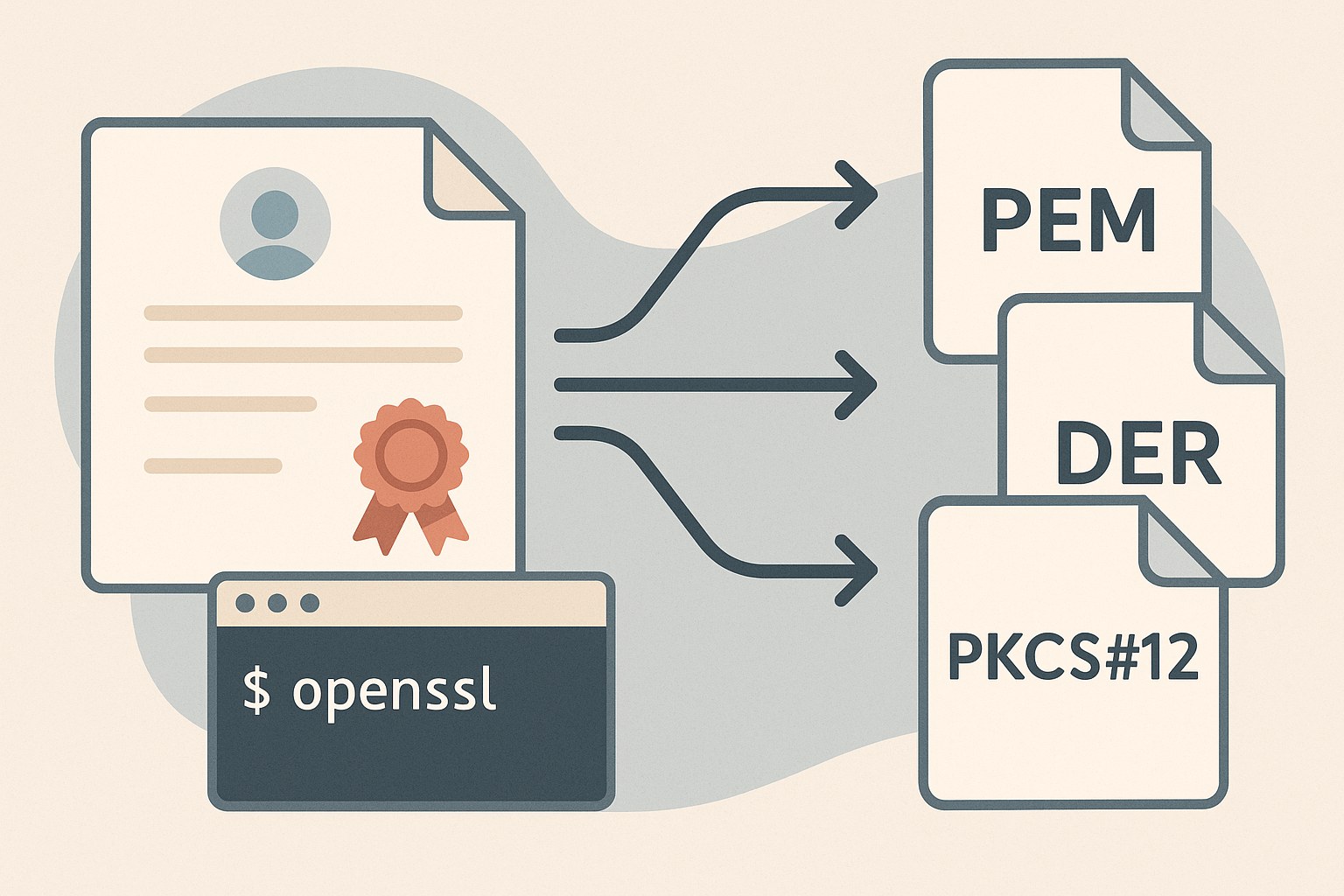
PEM's Base64-wrapped format shows up across most of the common cryptographic objects used in TLS and public-key infrastructure:
-----BEGIN CERTIFICATE-----.-----BEGIN RSA PRIVATE KEY----- or -----BEGIN EC PRIVATE KEY-----.-----BEGIN CERTIFICATE REQUEST-----.All of these share the same underlying pattern: a DER-encoded ASN.1 structure, Base64-encoded, and wrapped with delimiters describing the content type.
PEM isn't the only way certificates and keys get stored. DER is the raw binary form, no Base64, no header or footer, just the bytes as defined by ASN.1 encoding rules. DER files are smaller and faster to parse since there's no decoding step required, but they can't be safely pasted into a text file, emailed inline, or dropped into a config file that expects plain text.
PKCS#12 (commonly .p12 or .pfx) is a different kind of format altogether: a binary archive that can bundle a private key, certificate, and certificate chain together, usually protected by a password. It isn't Base64 text at all, and it isn't meant to be human-readable.
PEM's advantage is that its Base64-encoded body is plain ASCII, so it survives copy-paste, works fine inside YAML or JSON config values, and can be concatenated or split with a plain text editor. That's why it's the default format for most command-line certificate tools, web server configs, and version-controlled infrastructure code, even though it's less compact than DER and can't bundle multiple protected objects the way PKCS#12 can.
A few mix-ups come up often enough to be worth clearing up directly.
PEM is a container format, defined by its header, footer, and line-wrapping conventions. Base64 is the encoding used inside that container. It's accurate to say a PEM file's contents are Base64-encoded, but it's not accurate to call PEM itself an encoding scheme in the same sense as Base64 or hex.
Because certificates are the most visible use case, people sometimes assume "PEM file" means "certificate file." In reality, PEM is used for private keys, public keys, CSRs, and even things like DH parameters. The BEGIN/END header tells you what's actually inside.
This is probably the most important misconception to clear up. Base64 encoding is fully reversible by anyone, with no key or password required, it's just a different textual representation of the same data. It provides zero confidentiality. A private key stored as PEM is Base64-encoded but not encrypted unless it was generated with a passphrase that triggers actual encryption of the key material (commonly seen as -----BEGIN ENCRYPTED PRIVATE KEY-----). This distinction is explored fully in Base64 is not encryption.
Install and renew TLS certificates for services like Apache and nginx, which almost universally expect certificate and key files in PEM format.
Store certificates and keys as text values in configuration management tools, Kubernetes secrets, and environment variables, relying on PEM's plain-text nature to fit into YAML and JSON structures.
Exchange Certificate Signing Requests and issued certificates as PEM text blocks, often pasted directly into web forms or email during the issuance process.
Parse PEM files programmatically in languages like Python, Go, or Java, decoding the Base64 body into DER structures before extracting certificate fields or key parameters.
Inspect certificate chains and private key files during assessments, decoding PEM content to binary to verify key sizes, algorithms, and certificate validity periods.
Yes. Since the body is Base64-encoded ASCII text, a PEM file opens cleanly in any text editor, showing the BEGIN/END delimiters and the encoded block in between.
No. They contain the same underlying data, but DER is raw binary while PEM is that same binary Base64-encoded and wrapped with header and footer lines.
No. Base64 encoding provides no confidentiality at all. Anyone can decode it instantly. Security for a private key comes from separate encryption applied to the key data itself, not from Base64.
This comes from the format's origin in email systems, which historically had line-length limits. The convention stuck even though it has no functional necessity outside of readability today.
Yes, the conversion is lossless in both directions. Since PEM is just Base64-encoded DER with delimiters, decoding to DER and re-encoding to PEM produces byte-identical results to the original.
The confusion around whether PEM files are Base64 encoded usually comes from treating PEM and Base64 as competing formats rather than layered ones. PEM is the wrapper, with its delimiters and line-wrapping rules; Base64 is the encoding that makes the binary DER content inside safe to store and move as plain text. Once that layering is clear, working with certificates, keys, and CSRs in any text-based system stops being mysterious and becomes a matter of knowing which layer you're looking at.
Stay up to date with new tools, blogs, and improvements.
We respect your privacy. No spam, unsubscribe anytime.