
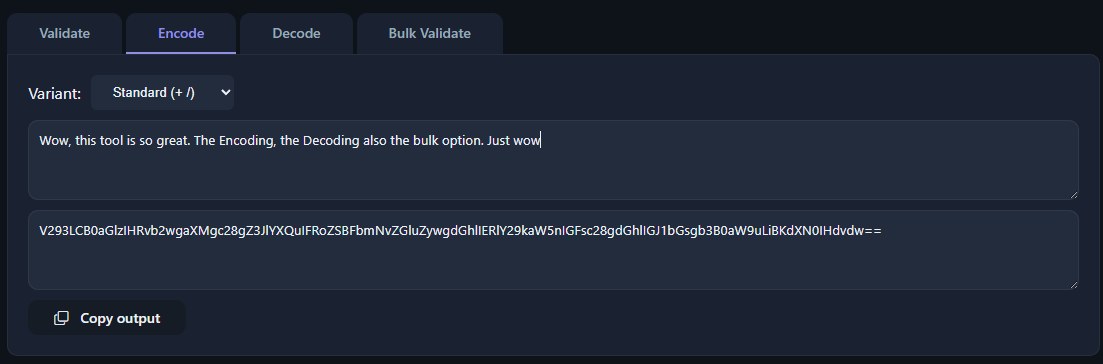
Base64 decode is the algorithmic inverse of base64 encoding, a binary-to-text encoding scheme that transforms arbitrary byte sequences into a safe, printable ASCII representation. Understanding base64 decode requires a firm grasp of the encoding process, as the decoder must accurately reverse a specific set of mapping and padding rules to reconstruct the original binary data without corruption.
What is base64 decode? Base64 decode is the process of converting a base64-encoded ASCII string back into its original binary form. It reverses the encoding algorithm by mapping each of the four base64 characters per group back into their 6-bit values, recombining them into the original 8-bit bytes, and discarding any padding characters.
Base64 encoding is a technique used to convert binary data into a sequence of printable ASCII characters. It is formally defined in RFC 4648 and is widely used for transmitting data over media that are designed to handle text. The core idea is to represent binary data using a radix-64 representation rather than the usual base-2 or base-16.
The output of a base64 encode operation is a string that consists solely of characters from a predefined set of 64 characters (the base64 alphabet), plus a padding character. This ensures that the encoded data can pass through text-based protocols, such as SMTP for email or JSON for web APIs, without being misinterpreted as control characters or special commands. A base64 decode operation is the precise reversal of this process, extracting the original binary payload from the text string.
The primary reason why base64 encoding is used is to ensure data integrity when binary data must traverse systems that were built exclusively for text. Early email systems, governed by the SMTP protocol, could only reliably handle 7-bit ASCII characters. Any byte with the high bit set (values 128-255) risked being mangled in transit.
To solve this, the MIME (Multipurpose Internet Mail Extensions) standard adopted base64 encoding to safely attach images, archives, and other binary files to emails. Beyond email, base64 encoding is heavily used for embedding binary data directly into HTML, CSS, and JavaScript via data URIs (e.g., data:image/png;base64,...). It is also the standard method for storing or transmitting binary fields within JSON or XML documents, as it avoids the need for complex escaping of non-printable or control characters.
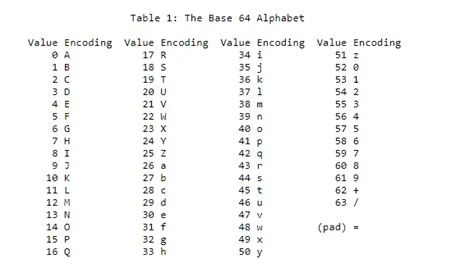
The standard base64 alphabet consists of 64 distinct, printable ASCII characters. The mapping is as follows:
These 64 characters form the core of the encoding scheme. In addition to the alphabet, a special padding character, =, is used to signify that the final chunk of encoded data contains fewer than three bytes of input. The base64 alphabet is carefully chosen to be universally representable across all major character encodings, ensuring that a base64 string remains intact regardless of the text encoding in use.
Every character in the base64 set was deliberately selected to be safe for text-based protocols. The base64 characters fall entirely within the ASCII range (specifically, ASCII values 43, 47, 48-57, 65-90, and 97-122). This avoids the encoding ambiguities that plague high-ASCII or multi-byte characters.
Crucially, the alphabet excludes characters that are commonly problematic in text processing. For example, the space character, carriage return, and line feed are not part of the alphabet. Similarly, characters that have special meaning in markup languages or programming string literals, such as <, >, &, ', and ", are avoided. This predictability is what makes base64 decode straightforward: the decoder can strictly validate the input string against a known set of allowed base64 characters before attempting to reconstruct the binary data.
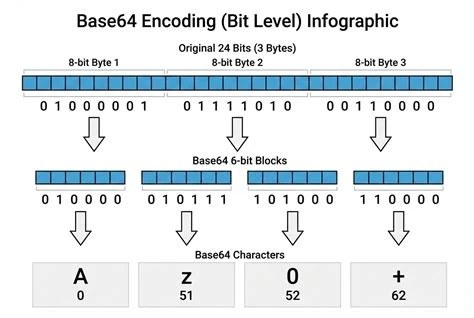
Understanding how does base64 work is essential for implementing or debugging a base64 decode routine. The encoding process operates on a stream of bytes in 3-byte (24-bit) groups.
If the input binary data's length is not a multiple of three bytes, the encoder adds padding. For a final block containing only one byte, the encoder produces two base64 characters and pads with two = characters. For a final block containing two bytes, it produces three base64 characters and pads with one = character. This ensures that the output length is always a multiple of 4.
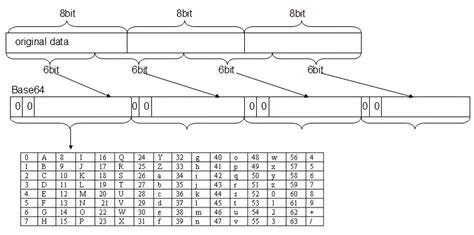
Base64 decode is the direct inverse of the encoding process. A base64 decode operation takes a base64 string as input and produces the original binary data as output.
=) is mapped back to its corresponding 6-bit value using the reverse lookup of the base64 alphabet.=) at the end of the string. Two padding characters indicate that the original data ended with one byte (and the decoder should ignore the last 16 bits of the decoded group). One padding character indicates the original data ended with two bytes.The result of a successful base64 decode is a byte array that is bit-for-bit identical to the original binary input.
It is a critical distinction that base64 binary decode always produces a raw byte array, regardless of whether the original data represented text, an image, or a compressed archive. The term "binary decode" emphasizes that the output is not a string, but a sequence of bytes.
When a developer performs a base64 binary decode, they must handle the output as binary data. If the original content was a UTF-8 text file, the resulting byte array can be safely converted to a string using the correct character encoding. However, if the original content was a PNG image or a ZIP archive, treating the decoded bytes as a string will likely result in data corruption. The base64 decode itself is encoding-agnostic; it simply reverses the base64 encoding to yield the exact original binary payload. For specific use cases like extracting compressed files, see the guide on Base64 ZIP Decode.
A base64 string is the text representation produced by the encoder. During base64 decode, robust handling of the input string is necessary to avoid errors.
Validation: Before decoding, the string should be validated to ensure it contains only valid base64 characters (A-Z, a-z, 0-9, +, /) and the padding character (=). The length of the string (excluding padding) must be a multiple of 4.
Whitespace Tolerance: Many base64 decoders are configured to silently ignore whitespace characters (spaces, newlines, carriage returns) that may have been introduced by the transport layer (e.g., MIME line wrapping). A strict decoder, however, should reject any invalid character.
Malformed Strings: Common errors include incorrect padding (e.g., a single = at the end), invalid characters in the alphabet, and incorrect string length. A well-implemented decode function will detect these issues and raise an error rather than producing corrupted output. You can use a dedicated Base64 Validator, Encoder & Decoder to check whether a string is well-formed before attempting to process it manually.
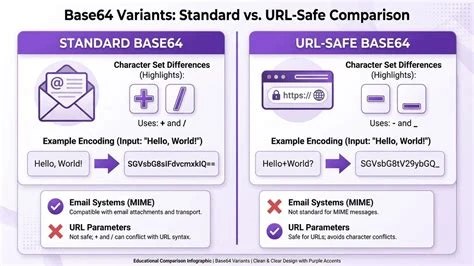
The primary difference between base64 vs base64url lies in the alphabet used and the handling of padding. Standard base64 uses + and / as its 62nd and 63rd characters. These characters have special meaning in URLs: + is often interpreted as a space, and / is a path separator.
Base64url, also defined in RFC 4648, addresses this by substituting - (hyphen) for + and _ (underscore) for /. Furthermore, base64url typically omits the = padding characters, as the padding is unnecessary for decoding when the string length is known. This makes base64url safe for use in URL query parameters, filenames, and JWT (JSON Web Tokens) without requiring percent-encoding. Decoding a base64url string requires a decoder that understands this modified alphabet and can optionally re-add padding before performing the decode. For a broader comparison with other encoding schemes, see Base64 vs Hex and Base64 vs Base62.
While indispensable, base64 decode has inherent limitations that developers must consider.
Decode base64 data from API responses, configuration files, or JWT tokens to access the underlying binary or JSON payload.
Decode base64 strings found in network logs or malware payloads to reveal hidden commands, IP addresses, or exfiltrated data.
Decode data URIs embedded in HTML or CSS to extract images, fonts, or other binary assets for caching or analysis.
Decode base64-encoded secrets or configuration data used in Kubernetes secrets, CI/CD pipeline variables, or cloud initialization scripts.
Decode MIME base64 attachments from .eml or .msg files to recover original documents and media for investigation.
Decode binary data stored as base64 strings in database tables or CSV files to reconstruct images, audio, or serialized objects for model training.
Yes, nearly all modern programming languages (Python, JavaScript, Java, Go, C#, PHP, Ruby) have built-in libraries or standard functions for base64 decode. The underlying algorithm is the same, though API nuances exist for handling padding, whitespace, and output format.
Most standard decoders will throw an error or return a failure indicator if the input string contains characters outside the base64 alphabet, has incorrect padding, or has a length that is not a multiple of 4. It is best practice to validate the string before decoding.
Yes, base64 decode is a perfectly lossless operation. If a valid base64 string was produced from an original binary file, decoding it will yield an exact, bit-for-bit copy of that original file.
If the original data was binary (e.g., an image, archive, or serialized object), decoding it to a text string will produce unreadable characters. The output should be treated as a byte array and handled according to its original file type.
URL-safe base64 strings use - and _ instead of + and /, and often lack padding. You must use a base64url decoder or replace - with + and _ with / and re-add padding (=) before using a standard base64 decode function.
Base64 decode is a foundational operation in modern computing, quietly enabling the reliable transport and storage of binary data across text-centric systems. By rigorously reversing the mapping of 6-bit indices back into their original 8-bit bytes, it reconstructs the exact binary payload intended by the encoder. A thorough understanding of the base64 alphabet, padding mechanics, and variant handling (such as base64url) is essential for any developer or engineer working with data interchange formats, ensuring that the decoded output remains faithful to the source.
Stay up to date with new tools, blogs, and improvements.
We respect your privacy. No spam, unsubscribe anytime.