
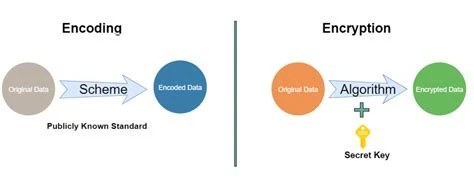
Search forums and developer chats long enough and you'll find someone asking how to "decrypt" a base64 string, or suggesting that sensitive data be "encrypted with base64" before storage. Both phrases point to the same false belief: that base64 is not encryption, yet is often treated as if it were. This article explains what base64 actually does, why it gets mistaken for a security tool, and where the real line between encoding and encryption sits.
Base64 is not encryption. It's a binary-to-text encoding scheme that converts data into a text-safe format so it can travel through systems built for plain text. Anyone can reverse it instantly with no key or password required, which means it provides zero confidentiality.
The confusion isn't rare or new. It shows up in code reviews, in Stack Overflow questions, and occasionally in production systems where someone stored a password by running it through a base64 function and calling it done. The output looks like gibberish, so it feels secure. That feeling is wrong, and the gap between how base64 looks and what it actually does is the whole reason this misconception persists.
The goal here is straightforward: separate what base64 is from what encryption is, explain why the two get confused so often, and lay out what base64 should and shouldn't be used for.
Base64 encoding is a method for representing binary data as text, using a fixed alphabet of 64 characters (letters, digits, plus two symbols like + and /). It doesn't compress data, doesn't scramble it in any secret way, and doesn't require a key. It's a mechanical, publicly documented conversion: every 3 bytes of binary input become 4 characters of text output, following a fixed table anyone can look up.
The reason it exists is practical. Many systems, protocols, and formats, email being the classic example, were built to handle plain ASCII text and choke on raw binary bytes. Base64 lets you take an image, a PDF, or any other binary blob and represent it as text that can pass safely through those systems without corruption. This is why it shows up constantly in email attachments, data URLs, and JSON payloads that need to carry binary content.
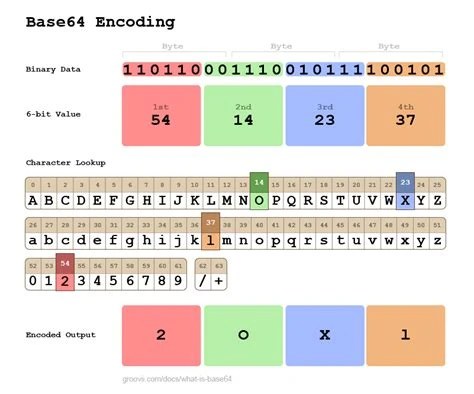
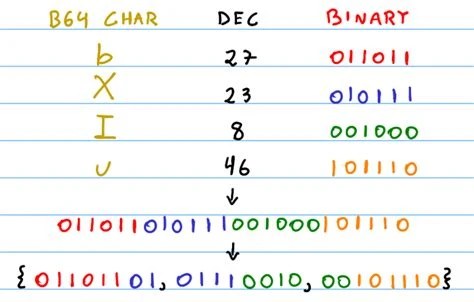
If you want a deeper technical walkthrough of the reverse process, the Base64 Decode technical reference covers exactly how decoding works step by step.
The phrase "what is base64 encryption" gets searched a lot, and the reason is visual. Base64 output is dense, unfamiliar-looking text with no obvious meaning to a human eye. That's exactly what people expect encrypted data to look like, so the assumption forms naturally, even though it's incorrect.
The confusion gets reinforced by where base64 actually shows up. It appears in API tokens, in the encoded portions of JWTs, in configuration files holding credentials, and in URLs that look deliberately obscured. In every one of these contexts, security is the thing people expect to be present. Seeing base64-looking strings in a security-sensitive spot makes it easy to assume the encoding itself is providing the protection, when in reality any protection present is coming from something else entirely, or isn't there at all.
Laid out directly, base64 encoding or encryption are not two flavors of the same thing. They solve different problems and behave in fundamentally different ways.
The algorithm behind base64 is published, standardized, and identical everywhere it's implemented. There's no variant that's "more secure" because there's no secret component to vary. That's the core distinction that separates it from any real cipher.
Because base64 uses a fixed, public conversion table, decoding it requires no more than recognizing that it's base64 and running it through any decoder. There's no key to guess, no password to crack, nothing to brute-force. Anyone, human or machine, can reverse a base64 string in a fraction of a second.
This is why calling something "encryption like base64" is a dangerous phrase to use, even casually. It implies a level of protection that simply isn't present. If a string of sensitive data is base64-encoded and someone intercepts it, they read the original data as easily as if it had been left as plain text with a costume on. The encoding adds a visual disguise, nothing more.
This misunderstanding causes real problems, not just theoretical ones. Developers under time pressure sometimes base64-encode a password or API secret before storing it in a database or config file, treating the encoding as if it were a lightweight substitute for hashing or encryption. It isn't. Anyone with read access to that database or file can decode the value in seconds.
The same mistake shows up in transmission: sending confidential data over a network as a base64 string with no TLS or actual encryption layer underneath. The data is fully exposed to anyone capturing the traffic. The danger here isn't just that the protection is weak, it's that the encoding creates a false sense of security. A password stored in plain text at least looks alarming. The same password base64-encoded looks handled, which makes the vulnerability easier to overlook during review.
None of this means base64 is a bad tool. Used for what it's actually designed for, it's the right choice in plenty of situations:
Each of these uses is about data format compatibility, not data protection. For more detail on how this applies specifically to images, the Base64 Image Encoding and Decoding Guide walks through the process, and the Base64 PDF Encoding and Decoding guide covers the same idea for document files. If you're weighing base64 against alternative encoding schemes for a given format, Base64 vs Hex and Base64 vs Base62 both cover the tradeoffs.
Use base64 to embed binary attachments in API responses or JSON payloads, while relying on separate encryption layers like TLS or AES for any actual confidentiality.
Rely on base64 as part of the MIME standard to carry image and file attachments through mail servers built for plain text.
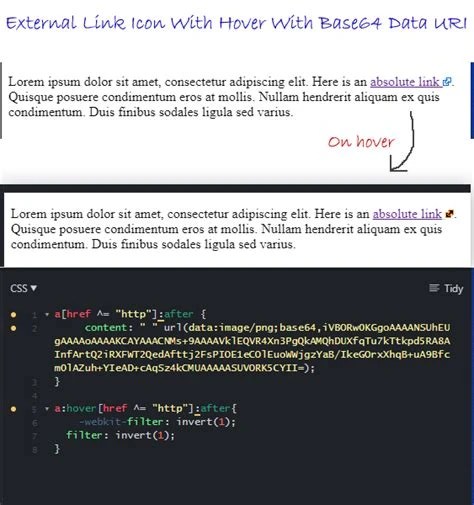
Use base64 data URLs to inline small icons or fonts into CSS or HTML, cutting down on separate network requests.
Watch specifically for base64-encoded credentials or secrets mistaken for protected data during code reviews and penetration tests.
Use the encoding/encryption distinction as an early, concrete example of why "looks unreadable" doesn't mean "is secure."
Base64 is a data representation format, nothing more. It turns binary data into text so it can travel through systems that only handle text safely, and that's the whole job it does. It was never built to hide information from anyone, and it doesn't, because reversing it takes no key at all.
When confidentiality actually matters, real encryption algorithms like AES or RSA are the tools for the job, since they require a secret key that determines whether the original data can be recovered. Avoiding the phrase "base64 encryption" entirely is a good habit, since it keeps the two concepts from blurring together in conversation, documentation, and code.
Yes, but the security comes entirely from the encryption step. Base64 is often applied afterward just to make encrypted binary output safe to store or transmit as text. The encoding itself still adds no protection.
No. Hashing is a one-way function that can't be reversed to recover the original input. Base64 is fully reversible by design, which makes it unsuitable for password storage in either encoded or "encrypted" form.
The base64 alphabet mixes uppercase, lowercase, digits, and symbols, which produces a visually dense string with no obvious pattern to an untrained eye. That appearance is a side effect of the character set, not evidence of any hidden or scrambled content.
No, it actually increases size, typically by about 33%, since every 3 bytes of binary becomes 4 text characters. Its value is compatibility with text-only systems, not efficiency.
Use an established encryption algorithm such as AES for data at rest or TLS for data in transit, both of which require a secret key and provide actual confidentiality guarantees that base64 cannot.
Once the distinction is clear, base64 stops looking mysterious and starts looking like what it is: a plumbing tool that moves binary data safely through text-only pipes. Confidentiality is a separate job, handled by separate tools, and no amount of encoding changes that.
Stay up to date with new tools, blogs, and improvements.
We respect your privacy. No spam, unsubscribe anytime.