
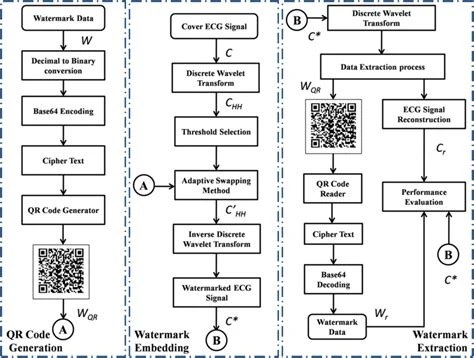
A base64 qr code is a QR code that stores a Base64-encoded string instead of plain text, a URL, or raw bytes. It's a common way to squeeze binary data, like a small image, a certificate, or an encryption key, into a format that QR encoders and scanners handle reliably. The Base64 layer acts as a bridge between data that's naturally binary and a symbology that was originally built around text.
A base64 qr code is a standard QR code whose payload is a Base64-encoded string rather than raw text or bytes. It lets binary or structured data (files, JSON, keys) be represented in an alphanumeric form that's compatible with QR code character sets. Generating one means Base64-encoding the source data first, then encoding that string into the QR image; decoding reverses both steps.
QR codes were designed to hold text, numbers, and a limited set of symbols efficiently. Binary data, like the bytes of a small image file or a cryptographic key, doesn't map cleanly onto that model. Base64 solves this by converting any binary sequence into a string made up of 64 printable ASCII characters: uppercase and lowercase letters, digits, plus + and / (with = used for padding). Once the data is in this form, it behaves like ordinary text and can be embedded in a QR code without special handling.
The result is a QR code that, when scanned, produces a Base64 string rather than a directly readable message. Whatever application receives that string is expected to know it needs decoding before it becomes usable data again. This two-step arrangement, Base64 first, QR code second, is what defines the term.
Base64 encoding takes binary input and groups it into chunks of three bytes (24 bits), then splits each chunk into four 6-bit groups. Each 6-bit value (0, 63) maps to one character in the Base64 alphabet. This is why the encoded output is always about a third larger than the original input: three bytes become four characters. If the input length isn't a multiple of three, one or two = padding characters are appended at the end to keep the output length a multiple of four.
This matters for QR codes because of how QR encoding modes work. QR codes support several data modes, including numeric, alphanumeric, and byte mode, each with different bit-efficiency and character restrictions. The standard QR alphanumeric mode only supports 45 characters: digits, uppercase letters, and a handful of symbols. Base64's use of lowercase letters and the +// characters actually falls outside that restricted alphanumeric set, so most Base64 QR codes end up encoded in byte mode rather than true alphanumeric mode. The advantage of Base64 isn't QR-mode efficiency, it's universal text-safety: any system that can read and write plain ASCII strings can pass a Base64 payload along without corrupting it, which isn't guaranteed for arbitrary raw binary.
A base64 qr code generator typically works in two stages. First, the source data (a file, a JSON blob, a key) is Base64-encoded into a string. Second, that string is fed into a standard QR code encoder, which chooses a version (the QR code's size/grid, from version 1 up to version 40) and an error correction level (L, M, Q, or H) based on the string's length and the desired resilience.
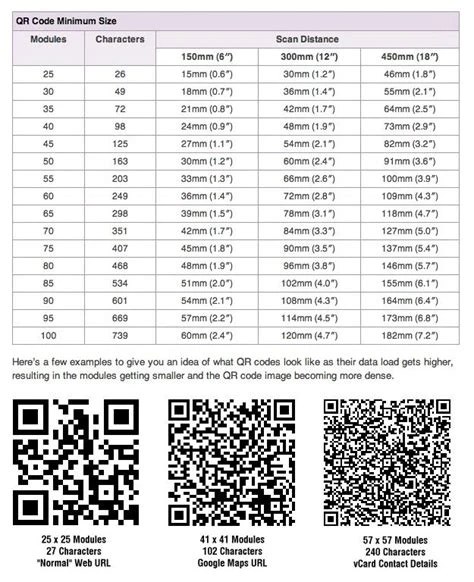
Because Base64 strings are typically longer than their source data, the choice of version and error correction level matters more here than with a short plain-text QR code. A longer Base64 string pushes the generator toward a higher version, which means a denser, larger QR code image with smaller individual modules, and correspondingly less tolerance for scanning at a distance or from a damaged surface.
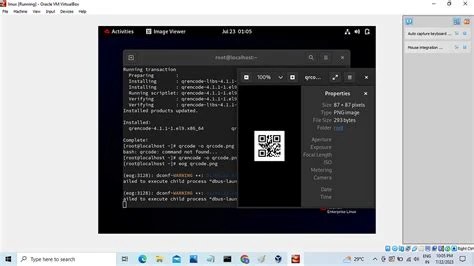
In practice, generation is handled by libraries such as qrcode (Python), zxing (Java), or command-line tools like qrencode, combined with a Base64 encoding step from a standard library or a dedicated Base64 validator and encoder. Many workflows separate the two steps explicitly: encode the file to Base64 text first, verify it's valid, then pass the resulting string to the QR generator as its data payload. This separation makes debugging easier, since a malformed QR scan can be traced back to either the Base64 step or the QR encoding step rather than treated as one opaque failure.
Reading a base64 qr code back into usable data is a two-step reversal of generation. A scanner or camera app reads the QR code's modules and outputs the embedded string, exactly as it was encoded, which is the Base64 text. That string then needs a separate base64 qr code decode step to reconstruct the original binary or text data.
This second step needs to be handled carefully. Base64 decoding is sensitive to a few details: correct padding (missing or extra = characters can cause decode errors), the right character set variant (standard Base64 versus URL-safe Base64, which swaps +// for -/_), and the original character encoding of the decoded bytes if the underlying data is text (UTF-8 versus another encoding). A detailed walkthrough of these mechanics is covered in this Base64 decode technical reference.
Corruption is another practical concern. If the QR code itself is scanned incompletely, due to glare, damage, or low resolution, the extracted string may be truncated or contain substituted characters. Because Base64 decoding expects a clean, correctly padded string, even a single dropped character can make the entire decode fail rather than degrade gracefully, unlike some raw binary formats that tolerate partial corruption.
Base64 QR codes show up wherever a system needs to move binary or structured data through a channel that only reliably handles text. Common examples include:
For cases involving images specifically, the encoding mechanics overlap closely with what's described in the Base64 image encoding and decoding guide, since a small embedded icon or photo follows the same byte-to-Base64 conversion before it ever reaches the QR encoder.
They embed a Base64-encoded certificate or signature in a QR code so a device can validate authenticity without a network connection.
They distribute encryption keys or one-time setup tokens as scannable Base64 QR codes for secure device provisioning.
They use Base64 QR codes to pass structured JSON configuration data between apps or onboarding flows without needing a server round trip.
They encode small compressed assets or product metadata as Base64 QR codes printed directly on physical packaging.
They generate QR codes carrying Base64 payloads required by third-party systems, such as certain payment or ticketing protocols.
The biggest practical constraint is size. Base64 encoding inflates data by roughly 33%, and QR codes have hard capacity limits depending on version and error correction level. A version 40 QR code with the lowest error correction (L) can hold around 2,953 bytes in byte mode, but that ceiling drops significantly at higher error correction levels. Since Base64 expands the payload before it ever reaches the QR encoder, the effective amount of original data that fits in a single QR code is meaningfully smaller than the raw QR capacity would suggest.
Error correction level is a trade-off, not a free upgrade. Higher levels (Q or H) let the code survive more physical damage or partial obstruction, but they consume more of the QR code's data capacity for redundancy, leaving less room for the actual Base64 string. Choosing L or M maximizes payload capacity but leaves less margin for scanning errors.
Scanning conditions also matter more with Base64 QR codes than with short plain-text ones, simply because the codes tend to be denser. Low camera resolution, poor lighting, or a damaged print can cause partial reads that break the Base64 string's padding or introduce invalid characters, causing the decode step to fail outright rather than produce a partially readable result.
Base64 isn't the only way to get binary data into a QR code. QR codes natively support byte mode, which stores raw 8-bit binary data directly without any text conversion, avoiding the ~33% size penalty Base64 introduces. If the goal is purely to maximize how much binary data fits in a QR code, byte mode is more space-efficient than Base64.
Base64 becomes the better choice when the data needs to pass through systems, APIs, logs, or protocols, that are only guaranteed to handle printable text safely, or where the QR payload has to match a Base64 field expected by a downstream application. Other text-safe encodings exist too: hexadecimal is simpler but roughly doubles data size rather than adding 33%, and Base32 uses a smaller, case-insensitive alphabet that's more error-tolerant for humans transcribing codes by hand, at the cost of being less space-efficient than Base64. The trade-offs between Base64 and its close relative Base32/Base62 are detailed further in this comparison of Base64 and Base62 encoding.
Because a Base64 string is just text once decoded from the QR image, any generator or decoder that processes it needs to validate the string before trusting it. A malformed or maliciously crafted Base64 payload, one that decodes to unexpected binary, an oversized file, or a crafted script, can cause problems if the receiving application executes or parses the decoded content without checks. Input validation at the decode stage, confirming the string is well-formed Base64 and that the decoded content matches an expected format or size, is a basic safeguard.
Error correction levels in the QR code itself help with physical damage but don't protect against tampering; a QR code can be perfectly scannable and still encode a modified or hostile Base64 string. For that reason, systems that rely on Base64 QR codes for anything sensitive, such as authentication tokens or encrypted keys, often add a checksum or digital signature inside the decoded payload itself, so the application can verify integrity independent of the QR code's own error correction. Related encoding patterns that combine Base64 with additional transformations, such as XOR-based obfuscation, are discussed in this guide to Base64 and XOR encoding, and similar care applies when the encoded payload is a compressed archive, as covered in the Base64 ZIP decode reference.
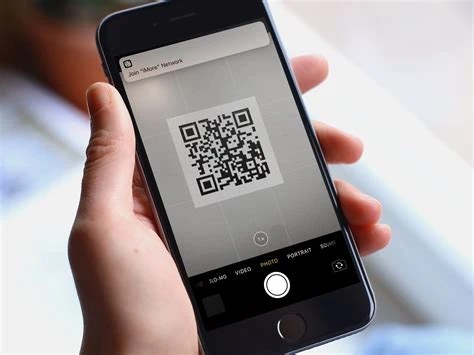
Any standard QR scanner can read the raw string out of the code, but it will return the Base64 text itself, not the original data. A separate Base64 decoding step, done in an app or with a decoding tool, is needed to recover the original file or text.
Because Base64 encoding expands the data by about a third, the underlying string is longer than the original data, which pushes the QR encoder to a higher version with more modules packed into the image.
No. Base64 is an encoding, not encryption. It changes the format of the data so it can be represented as text, but it provides no confidentiality, anyone can decode it back to the original bytes without a key.
It depends on the QR version and error correction level chosen. Higher versions and lower error correction allow more raw capacity, but since Base64 inflates the payload by roughly 33%, the actual amount of original data that fits is less than the QR code's raw byte-mode capacity would suggest.
A partial or corrupted scan often breaks the Base64 string's padding or introduces invalid characters, which usually causes the decode step to fail completely rather than return partial or degraded data.
Base64 QR codes exist to solve a narrow but recurring problem: getting binary or structured data through a channel built for text. The trade-off is consistent across every use case, more universal compatibility in exchange for larger payloads and less room for error correction, which is why the choice between Base64 and raw byte-mode QR encoding usually comes down to what the receiving system expects rather than which method is objectively more efficient.
Stay up to date with new tools, blogs, and improvements.
We respect your privacy. No spam, unsubscribe anytime.