
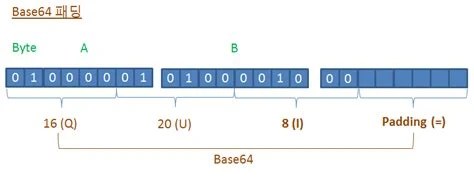
If you've ever tried to allocate a buffer, set a database column width, or estimate bandwidth for encoded data, you've probably asked how long are base64 strings compared to the raw bytes they represent. The answer is a fixed ratio you can calculate exactly, without guessing or rounding by feel.
A Base64 string's length is calculated from the input byte count using the formula ceil(bytes / 3) * 4, since every 3 bytes of input become 4 output characters. A 32-byte input, for example, always produces a 44-character Base64 string, including padding.
Base64 shows up everywhere: embedding images in HTML or CSS, encoding binary data in JSON payloads, storing authentication tokens, or transmitting file attachments over email. In all of these cases, the encoded string takes up more space than the original data, and knowing exactly how much more matters for practical reasons.
If you're allocating a fixed-size buffer to hold encoded output, an underestimate causes truncation or a crash. If you're storing tokens in a database column, you need to know the maximum length a given key size will produce. If you're estimating how much bandwidth an API request will use, the difference between raw byte count and encoded string length can be significant, especially at scale. For a deeper look at why this overhead exists in the first place, see Base64 Size Increase: Why It's 33% Bigger.

The relationship between input size and output size in Base64 is fixed and predictable. It comes down to two numbers: how many bits Base64 uses per character, and how those bits map back to bytes. Base64 how many bits per character? Six. Base64 how many bytes per character? None directly, since a single output character represents a fraction of a byte, but every group of 4 characters (24 bits) corresponds to exactly 3 input bytes (also 24 bits).
That gives the core formula: output length = ceil(input_bytes / 3) * 4. This single expression answers how long are base64 strings for any input size, as long as you round the division up to the nearest whole number before multiplying.
To understand where that formula comes from, it helps to look at the mechanics. A byte is 8 bits. Base64 encodes data using an alphabet of 64 characters, and since 64 is 2^6, each character can represent exactly 6 bits of information.
The encoder takes input data 3 bytes at a time, which is 24 bits, because 24 is the smallest number divisible by both 8 (bits per byte) and 6 (bits per Base64 character). Those 24 bits are split into four 6-bit chunks, and each chunk is mapped to one of the 64 characters in the Base64 alphabet. That's the source of the "3 bytes in, 4 characters out" ratio that governs every length calculation. If you want the reverse process explained in detail, Base64 Decode: A Technical Reference covers how those characters get turned back into bytes.
Applying the formula is straightforward once you know the input size in bytes:
That final number is the total length of the Base64 string, padding characters included. For example, 10 bytes divided by 3 is 3.33, which rounds up to 4, times 4 gives 16 characters. This works regardless of whether the input divides evenly by 3, which is exactly where padding comes into play.
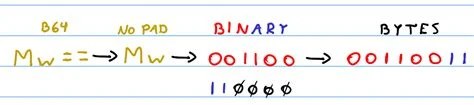
Not every input is a clean multiple of 3 bytes. When it isn't, the encoder still needs to produce complete groups of 4 characters, so it pads the final group with one or two = characters to fill the gap.
If the input length modulo 3 is 0, no padding is needed. If it's 1 (one leftover byte), the last group gets two padding characters. If it's 2 (two leftover bytes), the last group gets one padding character. The padding characters count toward the total string length, which is why the ceil(bytes/3)*4 formula already accounts for them without needing a separate adjustment. The reasoning behind why = specifically was chosen as the padding symbol is covered in Why Base64 Has == Padding.
A common case worth walking through directly: what happens when Base64 and 32 bytes long input meet, such as a 256-bit cryptographic key or hash? Using the formula: 32 divided by 3 is 10.67, which rounds up to 11. Multiply by 4 and you get 44.
So a 32-byte input always produces a 44-character Base64 string. Since 32 mod 3 equals 2, the final group needs one padding character, meaning the string ends in a single =. This is a frequent size in practice, since many hash functions (like SHA-256) and symmetric encryption keys are exactly 32 bytes, so recognizing the 44-character output length is useful for spotting or validating these values at a glance. You can confirm this behavior directly using a Base64 Validator, Encoder & Decoder.
Larger inputs follow the same math. For 1024 bytes: 1024 divided by 3 is 341.33, rounded up to 342. Multiply by 4 and the result is 1368 characters.
Since 1024 mod 3 equals 1, the last group needs two padding characters. This example is a useful benchmark because 1 KB is a common unit for file sizes and buffer allocations, and it illustrates that the encoded output runs roughly 33% larger than the input, consistent across any input size once you account for rounding at the edges.
Small inputs show the padding rules clearly and reveal the minimum possible Base64 string length:
Notice that all three produce a 4-character string. This confirms that 4 characters is the minimum output length for any non-empty input in standard Base64, since even a single byte still requires a full group of 4 characters to encode.
A few mistakes come up repeatedly when people try to estimate how long are base64 strings without applying the formula carefully:
= symbols add to the actual string length in storage and transmission.Use the length formula to size database columns and API response fields that store encoded tokens, keys, or file data.
Rely on the 32-byte-to-44-character relationship to quickly recognize encoded hashes and cryptographic keys in logs or configuration files.
Calculate buffer sizes ahead of time when encoding images or files for embedding, avoiding memory allocation errors.
Estimate payload size increases when binary data must be sent as Base64 inside JSON, which affects request size limits.
Write automated tests that verify encoded string lengths match expected values for known input sizes, catching encoding bugs early.
The table below lists common input sizes and their resulting Base64 string lengths, using the ceil(bytes/3)*4 formula:
These values apply to standard Base64 with padding. Variants that omit padding, or use a different character set such as Base64URL, follow the same core ratio but may differ slightly in final length; the differences between encoding schemes are covered in Base64 vs Base62: Key Differences in Encoding.
Yes, for large inputs the encoded string is roughly 33% larger than the original byte count, but this is an approximation, not an exact figure, and doesn't hold precisely for very small inputs due to rounding and padding.
No. The formula depends only on the number of input bytes, not on whether the data is text, an image, or binary. This is why Base64 Image Encoding and Decoding Guide uses the same length math as any other binary format.
No. Base64 always produces output that is equal to or larger than the input size, since it uses 4 characters to represent every 3 bytes, never fewer.
Roughly reverse the formula: multiply the string length (excluding padding) by 3, then divide by 4. Subtract 1 byte for each padding character present to get the exact original size.
No, padding only affects the character count of the encoded string. It tells the decoder how many bytes to discard from the final group, and doesn't alter the accuracy of the decoded data.
Once you know that each 3 bytes of input map to 4 characters of output, with padding filling in incomplete groups, calculating how long are base64 strings becomes a matter of one formula applied consistently, whether you're sizing a database field for a 32-byte hash or estimating the payload size of a multi-megabyte file.
Stay up to date with new tools, blogs, and improvements.
We respect your privacy. No spam, unsubscribe anytime.