
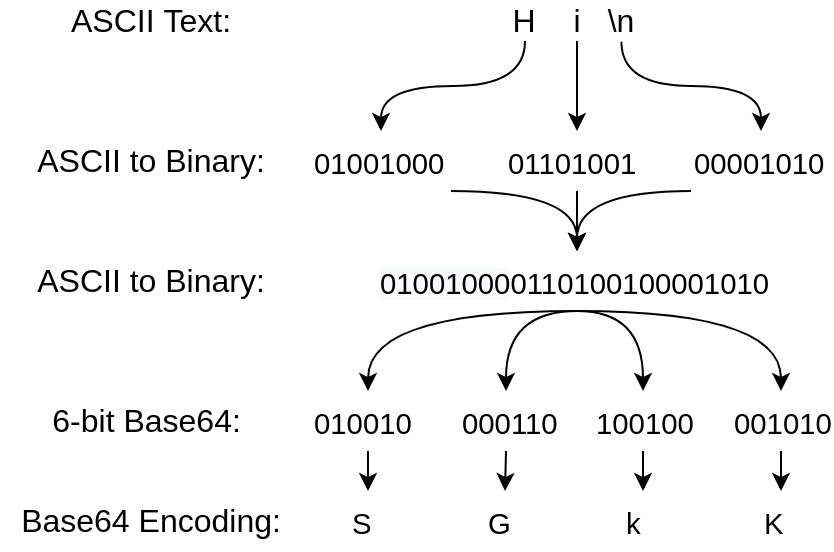
Binary data, whether it's an image, an encryption key, or a chunk of compiled code, doesn't play well with systems built around text. When developers need to move that data through text-based channels, they turn to encoding schemes, and the base64 hex comparison is one of the most common questions that comes up when deciding which one fits a given job. Both convert raw bytes into printable characters, but they do it in very different ways, with different trade-offs in size, readability, and use.
Base64 and hex are both methods for representing binary data as text, but hex maps each byte to two characters from a 16-symbol set (0-9, A-F), while base64 maps every three bytes to four characters from a 64-symbol set. Hex is more human-readable and doubles data size, while base64 is more compact (about 33% larger than the original) but harder to read at a glance.
Computers store everything as binary, but a lot of the infrastructure we send data through, email systems, JSON payloads, URLs, config files, was designed for text. Raw binary bytes can contain values that break these systems: null bytes, control characters, or byte sequences that get misinterpreted depending on character encoding. So instead of sending binary directly, applications encode it into a restricted set of text characters that's guaranteed to survive the trip intact.
Two schemes dominate this space: hexadecimal and base64. Both take arbitrary bytes and turn them into printable ASCII characters, but they use different alphabets and different rules for grouping bits. This article walks through how each works, then does a direct base64 vs hex comparison across length, readability, performance, and practical use, so the choice between them stops being a guess.
Hex encoding represents each byte using two characters drawn from a 16-symbol alphabet: 0 through 9 and A through F (or a through f, since hex is typically case-insensitive on decode). Because a byte has 256 possible values and 16×16 = 256, this mapping is exact: every byte becomes exactly one pair of hex digits, no more, no less.
This one-to-one relationship between nibbles (4-bit halves of a byte) and hex digits is what makes hex so intuitive to read. A byte like 0xFF is simply "FF." A byte like 0x0A is "0A." There's no ambiguity, no grouping across byte boundaries, and no padding characters needed, because every byte independently produces a clean two-character output.

This directness is why hex shows up so often in memory dumps, hash digests (MD5, SHA-1, SHA-256 output), color codes, and low-level debugging tools. When someone needs to eyeball raw bytes and reason about them, hex is usually the format on screen.
Base64 works on a different scale. Instead of a 16-character alphabet, it uses 64 symbols: uppercase A-Z, lowercase a-z, digits 0-9, plus two extra characters, typically + and / in standard base64. Because 64 = 2^6, each base64 character can represent exactly 6 bits of data.
Since bytes are 8 bits and base64 characters are 6 bits, the two don't line up evenly. The scheme resolves this by grouping input into chunks of three bytes (24 bits total), which splits cleanly into four 6-bit groups, mapped to four base64 characters. If the input length isn't a multiple of three, the final group is padded with one or two = characters to signal how many bytes of "real" data were in that last block.
For a deeper walkthrough of this padding behavior and the official specification behind it, see this reference on RFC 4648 encoding. The mechanics of decoding base64 back into bytes are also covered in more detail in this technical reference on base64 decode.
The character sets alone explain most of the size difference in base64 vs hex encoding. Hex uses 16 symbols and needs 2 characters per byte, a 100% size increase over the raw data. Base64 uses 64 symbols and needs roughly 4 characters per 3 bytes, which works out to about a 33% size increase.
The math behind this comes down to information density per character. A hex character encodes 4 bits (log2(16) = 4), so it takes 2 hex characters to cover a full 8-bit byte. A base64 character encodes 6 bits (log2(64) = 6), so it takes fewer characters overall to represent the same data. This is the core mathematical reason base64 is more space-efficient than hex, and it's covered in more depth in this piece on why base64 increases size by 33%.
For anyone weighing encoding options beyond just these two, it's also worth comparing against alternatives like the one covered in Base64 vs Base62, which trims the character set further for URL-safety reasons at a small cost in efficiency.
Hex wins clearly on human readability. Because each byte maps to exactly two characters with no cross-byte grouping, a person reading a hex string can mentally map characters back to bytes without much effort. This is why hex dumps are the standard in tools like hex editors, debuggers, and checksum outputs.
Base64 sacrifices this readability for compactness. Because three bytes get folded into four characters, there's no clean one-to-one visual correspondence between a byte and a character in the output. A single character change in a base64 string can represent a shift that spans across byte boundaries, making manual inspection much harder.
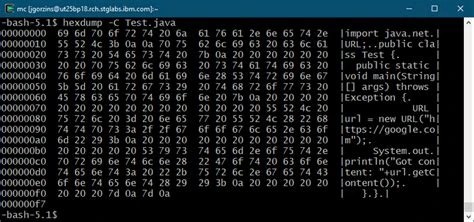
In debugging contexts, this difference matters. Developers troubleshooting binary protocols or examining raw packet data usually prefer hex because they can spot patterns, repeated bytes, and specific byte values at a glance. Base64 is more common where the goal is transport and storage rather than human inspection, such as embedding images in HTML/CSS via data URIs or encoding attachments in email.
Hex encoding and decoding are computationally simple. Each byte is split into two 4-bit nibbles, and each nibble is mapped to a single character through a lookup table. There's no cross-byte state to track, no grouping logic, and no padding to calculate. This makes hex conversion fast and easy to implement correctly, even by hand.
Base64 requires more bit manipulation. The encoder has to buffer bytes in groups of three, shift and mask bits to extract six-bit segments, and handle the edge cases at the end of the input when the byte count isn't divisible by three. Decoding reverses this process and also has to correctly interpret padding characters. None of this makes base64 slow in absolute terms, modern implementations handle it efficiently, but it is inherently more involved than hex's simple nibble-to-character mapping.
In practice, the performance gap rarely matters for typical application use. It becomes more relevant in high-throughput systems processing large volumes of data, where the extra bit-shifting work in base64 and the larger output size (compared to hex's simpler but doubled output) both factor into total processing time.
Decoding is where the two schemes diverge in how forgiving they are of malformed input. Hex decoding is largely case-insensitive (A-F and a-f both work) and has no padding requirement, since every byte always produces exactly two characters. A valid hex string simply has to have an even number of characters drawn from the 16-symbol alphabet; anything else is invalid.
Base64 and hex decoding differ mainly around padding and character set strictness. A valid base64 string's length must be a multiple of four (counting padding characters), and a decoder has to correctly interpret trailing = characters to know how many bytes to reconstruct in the final group. Some base64 variants (URL-safe base64, for instance) swap out + and / for - and _, so a decoder built for standard base64 will fail or produce garbage on URL-safe input, and vice versa.
The choice between base64 or hex usually comes down to what the data is for. Hex is the better fit when data is small, when a human needs to read or compare it directly, or when the context is inherently byte-oriented, like displaying a cryptographic hash, a memory address, or a color value. Its 100% size overhead is rarely a problem at these small scales.
Base64 is the better fit when data is larger and needs to travel efficiently through text-based channels: embedding binary files in JSON, encoding attachments for email, representing binary blobs in URLs (using the URL-safe variant), or storing binary data in text-based formats like XML. Its 33% overhead is a real cost, but it's still meaningfully smaller than hex's doubling.
In cryptography, both show up, but for different purposes. Hash digests are typically displayed in hex because they're short and meant to be compared or logged. Encryption keys, certificates, and larger binary payloads (like the contents of a public key file) are more often base64-encoded because they're bulkier and need to move through text protocols efficiently. It's worth remembering, though, that neither format provides any security on its own, a point covered directly in Base64 Is Not Encryption, since both are fully reversible with no key required.
There's no direct shortcut for converting base64 to hex or hex to base64 without going through the underlying binary data. Because the two schemes use completely different groupings (2 characters per byte for hex, 4 characters per 3 bytes for base64), you can't map characters directly from one alphabet to the other.
The correct process is always a two-step conversion: decode the source format back into raw bytes, then re-encode those bytes into the target format. To go from base64 to hex, decode the base64 string into its original binary bytes, then encode those bytes as hex pairs. To go from hex to base64, decode the hex string into bytes, then group those bytes into threes and encode as base64, adding padding if needed.
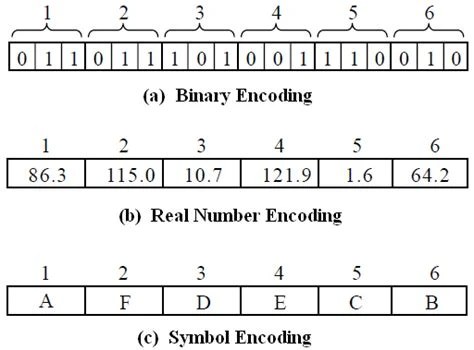
Any tool or library that claims to convert base64 directly to hex is, under the hood, still performing this decode-then-encode process. Understanding that intermediate binary step is useful for debugging conversion errors, since a mistake in the decode stage (like mishandling padding) will produce wrong output in the second encode stage even if that second step is implemented correctly.
Neither base64 nor hex is inherently insecure on its own, they're encodings, not encryption, and both are trivially reversible by anyone. But the choice between them affects compatibility and can introduce subtle issues depending on context.
Standard base64's + and / characters aren't safe in URLs or file paths without escaping, which is why URL-safe base64 variants exist, substituting - and _. Hex has no such problem since its full character set (0-9, A-F) is already safe in URLs, file names, and virtually every text environment. This makes hex a simpler default in contexts where compatibility across many systems matters more than compactness.
Case sensitivity is another consideration: hex is generally treated as case-insensitive, but base64 is strictly case-sensitive, since uppercase and lowercase letters represent different values in its 64-symbol alphabet. This means a base64 string transformed by a case-insensitive file system or email gateway can become corrupted in ways a hex string would not. On the security side, systems that decode base64-encoded ciphertext and then check padding validity can be vulnerable to padding oracle attacks if error messages or timing differences reveal whether padding was correct, an issue tied to how the underlying cryptographic scheme handles padding, not to base64 encoding itself.
They often need to inspect payloads quickly, and hex's byte-level clarity makes it easier to spot malformed data or unexpected values during debugging sessions.
They use base64 to inline images, fonts, or small files directly into HTML, CSS, or JSON without extra HTTP requests, accepting the size overhead for the convenience of self-contained files.
They read hash digests in hex for quick comparison, while handling certificates and keys in base64 (PEM format) because those payloads are larger and need efficient text transport.
They rely on hex dumps to inspect raw memory, network packets, and binary file formats where exact byte values matter more than compactness.
They use base64 to encode binary files (images, PDFs) into JSON request bodies, since JSON has no native binary type and base64's overhead is an acceptable trade-off for compatibility.
They compare hex and base64 side by side to understand bit-grouping, padding, and the general concept of encoding binary data as text.
For the same input data, yes. Base64 output is about 33% larger than the original binary, while hex output is 100% larger, so base64 is consistently more compact.
No. Because the two formats group bits differently (6 bits per base64 character vs 4 bits per hex character), you must decode to raw bytes first, then re-encode into the target format.
Base64 is more common for larger keys and certificates because of its size efficiency, while hex is often used for shorter values like hash digests where readability matters more than compactness.
No, hex is generally case-insensitive; both uppercase (A-F) and lowercase (a-f) are valid and decode to the same values. Base64, by contrast, is case-sensitive.
Neither does. Both are fully reversible encoding schemes with no key involved, meant for safe transport and representation of binary data, not for protecting its contents.
The base64 vs hex decision isn't about one format being objectively better, it's about matching the encoding to what the data needs to do. Hex offers direct, human-readable byte mapping at the cost of doubling data size, making it the natural choice for small values, hashes, and debugging. Base64 trades some readability for a smaller footprint, making it the better fit for larger payloads moving through text-based systems like JSON, XML, or email. Context, specifically size, readability needs, and the transport medium, should drive the choice every time rather than defaulting to whichever format is more familiar.
Stay up to date with new tools, blogs, and improvements.
We respect your privacy. No spam, unsubscribe anytime.