
Yes, you can base64 encode twice. There's nothing in the Base64 algorithm that prevents you from running it again on its own output, and doing so is a fairly common thing to encounter in web development, scripting, and data transfer scenarios. But the fact that you can do it doesn't mean it behaves the way people often assume, and understanding what actually happens at each step matters if you're troubleshooting a string that looks like gibberish twice over.
Can you base64 encode twice? Yes. Base64 encoding a string a second time just treats the first encoded output as plain text and encodes it again, producing a longer string that must be decoded twice, in reverse order, to get back the original data. It's fully reversible and lossless, but it adds size and offers no real security benefit.
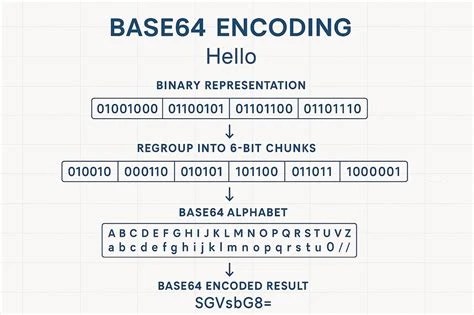
Double Base64 encoding means applying the Base64 algorithm to the output of an earlier Base64 encoding step, rather than to the original raw data. The first pass converts binary or text data into a string made up of the standard 64-character Base64 alphabet (A-Z, a-z, 0-9, plus + and /, with = padding at the end). The second pass then takes that resulting string, treats it as if it were any other piece of text, and encodes it again using the same algorithm.
The result is a string that looks like ordinary Base64 on the surface, but decoding it once doesn't give you back the original data. It gives you back another Base64 string, which then needs to be decoded a second time. Each encoding pass also grows the data by roughly a third, so a twice-encoded string is noticeably longer than a once-encoded one, and considerably longer than the source data it started from.
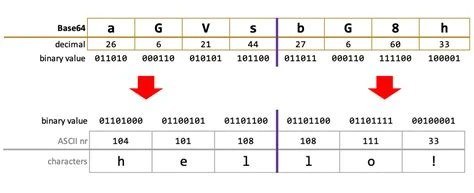
The process is mechanically simple, even though the output can look confusing. In the first pass, the encoder reads the original data in 3-byte chunks and maps each chunk to four Base64 characters, padding the end with = if the data doesn't divide evenly into groups of three. This produces a text string that represents the original binary data safely, using only ASCII characters that survive things like email systems, URLs, and JSON fields without corruption.
The second pass doesn't know or care that its input happens to be Base64 already. It just sees a sequence of characters, converts those characters to their byte values, and runs the same 3-byte-to-4-character mapping again. This is the key thing to understand: the encoder has no concept of "already encoded" data. It's encoding text, full stop, and that text happens to be the product of a prior encoding step. If you want to see this mechanic in isolation before layering it, the technical reference on Base64 decoding walks through the single-pass process in detail.
The question of why double base64 encode comes up more often than people expect, and the reasons are usually practical rather than exotic.
Yes, and this is one of the more reassuring facts about the process. Base64 encoding is deterministic and fully reversible at every step. Each encoding pass maps input bytes to output characters using a fixed, known scheme, and the corresponding decode operation reverses that mapping exactly. There's no compression, no hashing, no rounding, and nothing probabilistic involved.
Because of that, encoding twice doesn't destroy or alter any information. It just wraps the data in an extra layer of representation. As long as you decode in the correct order, outer layer first, then inner layer, you get back precisely the original data, byte for byte. This is a meaningful difference from operations like hashing, where the original input can't be recovered from the output at all.
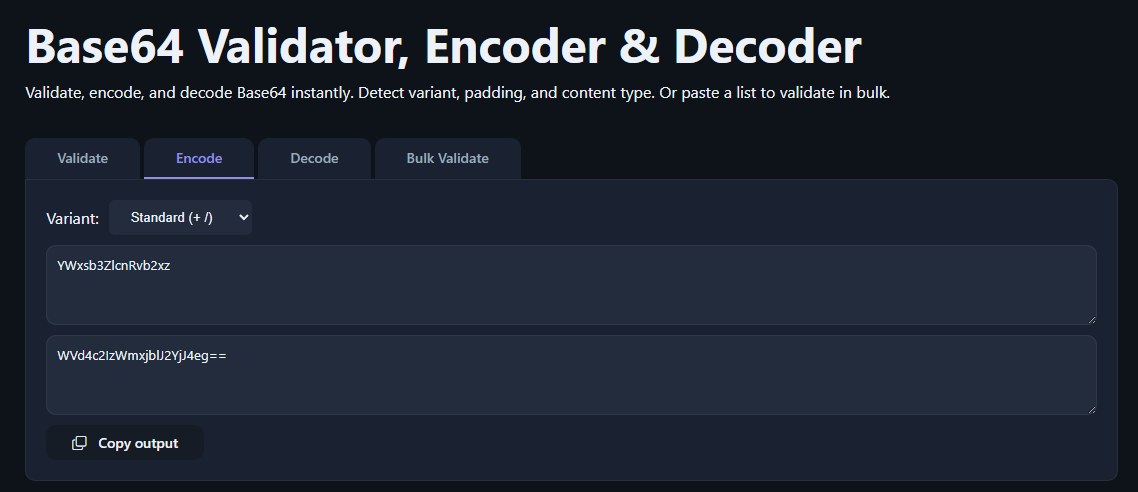
Decoding a double-encoded string just means reversing the two encoding steps in the opposite order they were applied.
+, /, possible = padding, and a length divisible by 4), that's your signal it needs decoding again rather than being the final answer.A tool like the Base64 Validator, Encoder & Decoder is useful here, since it can confirm whether a string is valid Base64 at each stage, which helps you figure out whether you're looking at one layer or two before you commit to decoding. If the fully decoded result turns out to be binary content like an image or a compressed file rather than readable text, guides on image encoding and decoding or decoding Base64-encoded ZIP files cover what to do with that final output.
It's worth being direct about this: double Base64 encoding provides no cryptographic security whatsoever. Base64 is an encoding scheme, not a cipher. It doesn't use a key, doesn't scramble data in a way that resists analysis, and can be reversed by anyone with a decoder and a moment's effort, regardless of how many times it's been applied. Adding a second layer doesn't change that math; it just adds a second, equally trivial step. For a fuller explanation of this distinction, see Base64 Is Not Encryption: Encoding vs. Encryption Explained.
That said, double encoding does show up in security-relevant contexts, usually as an evasion technique rather than a protection mechanism. Attackers targeting web applications sometimes double-encode malicious payloads, such as SQL injection strings or script tags, to slip past input filters or web application firewalls that only check for and decode a single layer of encoding. If a filter decodes once, sees nothing suspicious, and passes the data through, a hidden second layer can smuggle the actual malicious content past that check, only to be decoded again by the application logic further downstream. This is why security tools and code reviewers treat unexpected double-encoded strings as worth investigating rather than dismissing as harmless formatting.
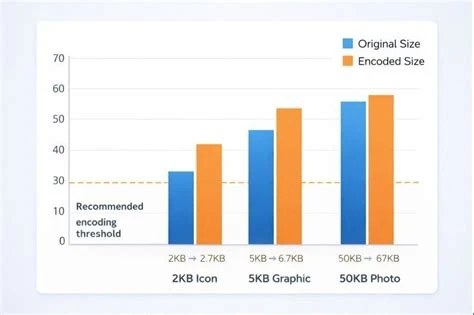
Each Base64 encoding pass increases data size by roughly 33%, since every 3 bytes of input become 4 bytes of output. Encoding twice compounds this: a piece of data that grew by a third after the first pass grows by another third on top of that after the second, meaning the final string can end up close to 77% larger than the original, depending on padding and chunk alignment.
This matters more in some contexts than others. For small strings like short tokens or identifiers, the extra size is negligible. But for larger payloads, like an encoded PDF or image file discussed in guides on Base64 PDF encoding and decoding, doubling the encoding adds real bandwidth and storage overhead. There's also a computational cost: each encode or decode pass takes CPU time, and doing it twice means twice the processing on both the sending and receiving ends. For high-throughput systems processing large volumes of data, this overhead can add up in ways that are worth measuring rather than assuming away.
Unless a specific protocol or system genuinely requires two layers, double encoding is usually something to avoid. It bloats the data unnecessarily, makes the string harder to read or spot-check by eye, and introduces an easy source of confusion when debugging. A developer troubleshooting a broken payload might decode once, see what still looks like corrupted or malformed data, and waste time assuming something else is wrong, when the real issue is simply that a second decode pass was needed.
Double encoding also complicates data interchange between systems that don't expect it. If one part of a pipeline encodes data once and another part encodes it again without coordination, whoever consumes the final output needs to know to decode twice, which isn't always documented or obvious. The safest default is to encode data exactly as many times as necessary for it to survive its transport, and no more.
Use double encoding intentionally when nesting encoded payloads inside JSON, URLs, or headers that themselves require Base64-safe text, and need to track how many layers are applied end to end.
Look for double-encoded strings in logs and traffic as a possible sign of filter evasion or obfuscated attack payloads, and decode layer by layer to inspect the underlying content.
Debug unexpected double encoding that happens when one service pre-encodes a field and a downstream library encodes the entire request body again automatically.
Encounter double-encoded values in configuration files or environment variables and need to decode them correctly to recover secrets or connection strings.
Experiment with encoding and decoding chains to understand how Base64 actually works under the hood, rather than treating it as a black box.
No. It adds obfuscation at best, not security. Base64 in any number of layers can be reversed by anyone with a standard decoder.
Decode it once and check the result. If that result still matches the pattern of valid Base64, letters, digits, +, /, and length divisible by 4, it likely needs a second decode pass.
Yes, there's no technical limit on how many times you can chain encoding passes. Each additional pass just adds more size and requires an equal number of decode steps in reverse.
This usually happens when one layer of a system encodes a field for safe transport, and a separate library or framework further downstream encodes the entire payload again without knowing the field was already encoded.
No. Base64 has no keys and no cryptographic strength at any number of passes. It's purely a reversible text representation, unlike encryption, which is designed to be computationally infeasible to reverse without a key.
Double Base64 encoding is a real, working technique with legitimate uses in nested protocols and light obfuscation, and it's completely reversible when you decode it in the right order. The main things to keep straight are that it adds meaningful size overhead, offers nothing in the way of actual security, and should only be used when a specific technical requirement calls for it rather than as a default habit.
Stay up to date with new tools, blogs, and improvements.
We respect your privacy. No spam, unsubscribe anytime.