
If you've ever pasted a JWT into a decoder and watched it turn into readable JSON, you've seen the truth firsthand: jwt tokens are base64 encoded, not encrypted. But the specific encoding used isn't quite standard base64. It's a close relative called base64url, and the difference matters if you're building, parsing, or debugging tokens by hand.
JWT tokens are base64url encoded, not standard base64 and not encrypted. Each of the three parts of a JWT (header, payload, signature) is base64url-encoded separately and joined with dots, which means anyone can decode the header and payload without a key.
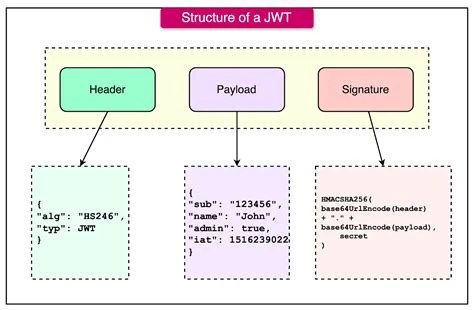
A JWT, or JSON Web Token, is made of three parts separated by periods: a header, a payload, and a signature. Written out, it looks like a long string with two dots in it, something like xxxxx.yyyyy.zzzzz. Each of those three sections started life as a JSON object (or, for the signature, raw binary data) and got run through an encoding process before being stitched together.
That encoding process is where the common claim comes from: jwt tokens are base64 encoded. It's true, but incomplete. The JWT specification (RFC 7519) doesn't use plain base64. It uses base64url, a variant designed specifically to survive being placed in URLs, HTTP headers, and cookies without extra escaping. Understanding that distinction clears up a lot of confusion people run into when they try to decode a token using a generic base64 tool and get an error instead of readable JSON.
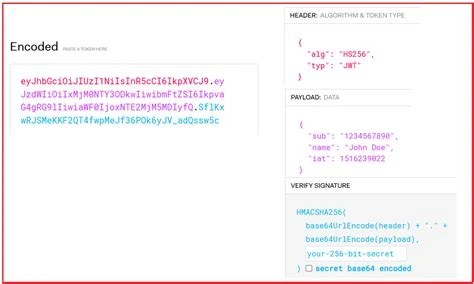
Standard base64 encoding takes binary data and represents it using 64 characters: A-Z, a-z, 0-9, plus two symbols, + and /. It also pads the output with = characters when the input length isn't a clean multiple of three bytes. This works fine for encoding data in emails or files, but it causes problems in URLs, since + and / already have reserved meanings there, and = can conflict with query string syntax.
Base64url solves this by swapping the two problem characters: + becomes -, and / becomes _. Padding characters are also typically dropped entirely in JWT implementations. So when someone asks whether it's jwt base64 or base64url, the answer is base64url specifically, using the URL-safe alphabet without padding. This is why copying a JWT into a plain base64 decoder sometimes fails or produces garbage: the decoder is looking for characters that simply aren't there, and chokes on the missing padding. For a deeper look at how this variant works outside of JWT, the base64 URL encoding reference covers the mechanics in more detail, and the general rules behind the alphabet are laid out in the RFC 4648 base64 reference.
All three segments of a JWT go through base64url encoding, though what they contain before encoding differs:
{"alg":"HS256","typ":"JWT"}. This gets base64url-encoded into the first segment.So to directly answer the recurring questions, are jwts base64 encoded and are jwt base64: yes, every part of a JWT is base64url encoded. None of the three segments are stored as raw JSON or raw binary in the final token string. The dots separating the segments are the only characters in a JWT that aren't part of the base64url output itself.
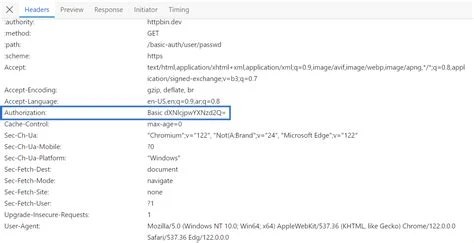
This is where terminology often gets mixed up. "Bearer token" describes how a token is used, not what format it's in. When an HTTP request includes Authorization: Bearer <token>, it means whoever holds (bears) that token is granted access, regardless of how the token itself is constructed.
A JWT is one common type of bearer token, and when it's used that way, it is indeed base64url encoded, following everything described above. But not all bearer tokens are JWTs. Some systems use opaque tokens, random strings with no internal structure that only make sense to the server that issued them, looked up in a database on each request. Those opaque tokens have no base64 encoding requirement at all; they might be a UUID, a hex string, or just about anything the issuing system chooses. So are bearer tokens base64 encoded? Only if the bearer token happens to be a JWT (or another format that specifically calls for it). The "bearer" label itself says nothing about encoding.
The most persistent misconception is that base64url encoding provides some kind of security. It doesn't. Base64 and base64url are encoding schemes, not encryption. They convert data into a different text representation so it can travel safely through systems that expect text, not scramble it so only authorized parties can read it. Anyone who intercepts a JWT can decode the header and payload in seconds with no key, no password, and no special tool. This point is worth internalizing fully, and the article on why base64 is not encryption goes through the reasoning in more depth.
A second misconception involves the signature. Some assume the signature is a hash of the base64url text strings themselves. It's actually computed over the raw concatenated string base64url(header) + "." + base64url(payload) using the algorithm named in the header, such as HMAC-SHA256 or an RSA-based scheme. The signature verifies that the header and payload haven't been altered since signing; it does nothing to hide their contents, since those are still sitting in plain, decodable base64url text right next to it.
A third mistake is assuming a JWT's payload is safe to fill with sensitive data because it's "encoded." Passwords, secrets, or personal data placed in a JWT payload are exposed to anyone who gets the token, including in browser storage, log files, or proxy logs. Encoding hides nothing from a determined or even casual reader.
Decoding a JWT's header and payload doesn't require any cryptographic key, since it's just base64url decoding followed by parsing JSON. In a browser console, this can be done with a small adjustment to JavaScript's built-in atob function, which expects standard base64 rather than base64url:
- with + and _ with / to convert it back to standard base64.= padding so the string length is a multiple of four.atob() to get the raw JSON text, then parse it with JSON.parse() if needed.The signature segment can be decoded the same way to see the raw signature bytes, but since it's binary data rather than JSON, it won't display as readable text. Tools built for this exact workflow, such as the general-purpose base64 decoding reference, cover the underlying mechanics that apply whether you're decoding a JWT segment, a URL parameter, or an embedded base64-encoded image. The process is identical: convert the URL-safe alphabet back to standard, restore padding, then decode.
Debug authentication issues by manually decoding a JWT's payload to check claims like expiration or user roles without needing the signing secret.
Audit applications to confirm sensitive data isn't being placed in JWT payloads, since anyone with the token can read it without decrypting anything.
Inspect tokens issued by third-party identity providers (OAuth, OpenID Connect) to verify the header's algorithm and the payload's claim structure match expectations.
Decode a JWT stored in local storage or a cookie to display user information in the UI without making an extra API call.
Paste a reported bug's token into a decoder to check expiration timestamps or issuer values when troubleshooting login failures.
Yes. The header and payload are just base64url-encoded JSON, so they can be decoded and read by anyone. The secret key is only needed to verify or generate the signature, not to read the contents.
Because it uses base64url, not standard base64. The characters - and _ aren't part of the standard base64 alphabet, and JWTs typically omit padding, both of which trip up generic decoders expecting the standard format.
No. Bearer token describes a usage pattern (whoever holds it gets access), while JWT describes a specific token format. A JWT is often used as a bearer token, but bearer tokens can also be opaque strings with no base64 encoding at all.
No. Base64url encoding only changes the text representation of the data; it provides no confidentiality. Security in a JWT comes from the signature (and encryption, if the token is a JWE instead of a plain JWT), never from the encoding itself.
Because JWTs are frequently passed inside URLs, HTTP headers, and cookies, where the standard base64 characters +, /, and = can cause parsing conflicts. Base64url avoids that by using URL-safe characters and dropping padding.
The short version holds up under all the detail: JWT tokens are base64url encoded for practical transport reasons, not to hide anything. The header and payload are open JSON the moment someone decodes them, and the signature exists to detect tampering, not to keep secrets. Anyone building or debugging systems that use JWTs should treat the token's contents as visible by default and rely on the signature and, where needed, actual encryption, for anything that truly needs protection.
Stay up to date with new tools, blogs, and improvements.
We respect your privacy. No spam, unsubscribe anytime.