
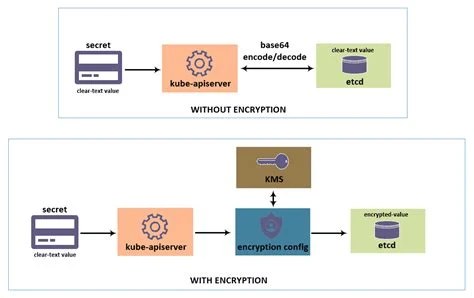
Yes, Kubernetes secrets are Base64 encoded by default. If you've ever run kubectl get secret my-secret -o yaml and stared at a wall of jumbled text, that's Base64 doing its job: turning arbitrary binary data into a plain-text-safe string. But the question people usually mean to ask is different: does this encoding actually protect anything? The short answer is no, and understanding why matters if you're storing anything sensitive in a Kubernetes cluster.
Are Kubernetes secrets Base64 encoded? Yes, by default, secret data stored in Kubernetes is encoded using Base64 before being written to the API and etcd. This encoding is not encryption, however, and provides no meaningful confidentiality on its own.
Base64 is a scheme for representing binary data using a set of 64 printable ASCII characters. It takes raw bytes and converts them into text that can safely travel through systems that expect plain text, like YAML files, JSON payloads, or HTTP headers. Nothing about the process is secret or reversible only by authorized parties. Anyone with the encoded string can decode it in one step, with no password or key involved.
When you create a Kubernetes Secret object, the values you supply, whether a database password, an API token, or a TLS certificate, get stored as Base64 strings inside the object's data field. This is a structural requirement of the Kubernetes API, not a security feature. The API needs a way to safely embed binary data inside a text-based manifest, and Base64 solves that problem cleanly. It does not solve the problem of keeping the data confidential.
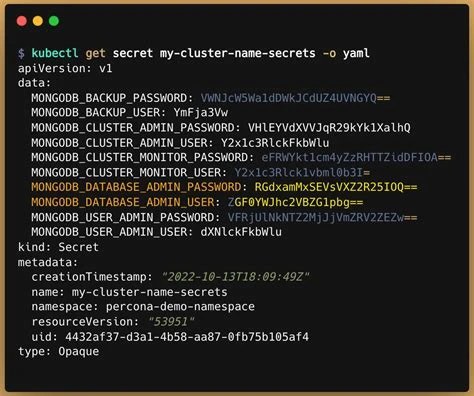
By default, when the Kubernetes API server writes a Secret object, both the field values and the object itself are stored in etcd, the cluster's backing key-value store, with the sensitive values Base64 encoded. This applies to every entry in the secret's data map, whether it's a single password string or a multi-line certificate file. The keys, like username or password, remain as plain field names, but the corresponding values are always encoded.
It's worth being precise here: encoding happens to the values you place under data. If you use the stringData field instead when creating a manifest, you can supply plaintext directly, and Kubernetes will Base64-encode it for you automatically before storage. Either way, what ends up persisted in etcd and returned by the API is the encoded form. Unless you've explicitly configured encryption at rest, that's also the form the data sits in on disk, which is a point covered in more detail later in this article.
Decoding a Kubernetes secret is a simple, two-step process using standard command-line tools. First, pull the encoded value out of the object, then run it through a Base64 decoder.
kubectl get secret my-secret -o yamldata for the key you want, for example the string under password.echo '' | base64 --decode Kubernetes also offers a shortcut using JSONPath so you don't have to copy values by hand: kubectl get secret my-secret -o jsonpath='{.data.password}' | base64 --decode. This pulls the value and pipes it straight into the decoder in one line. For deeper background on how the decode operation itself works, including edge cases like padding and line-wrapping, see this technical reference on Base64 decoding. The same underlying mechanics apply whether you're decoding a Kubernetes secret, a JWT token, or an image embedded in HTML.
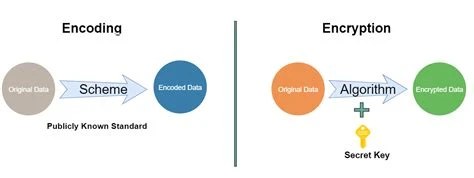
Encryption and encoding solve different problems. Encoding exists to make data compatible with a system that expects a certain format, like text-safe transport. Encryption exists to make data unreadable to anyone without a specific key. Base64 has no key. Anyone who has the encoded string can reverse it instantly with a single command or a five-second lookup in a browser console. There's no secret involved anywhere in the process.
This distinction trips people up constantly, not just in Kubernetes but across web development generally. The same confusion shows up with JWT tokens, which are also Base64 encoded rather than encrypted, and it's covered in general terms in Base64 Is Not Encryption: Encoding vs. Encryption Explained. In every case, the underlying rule is the same: if you can reverse a transformation without needing anything beyond the data itself, it isn't providing confidentiality.
Treating Base64 as a protective layer creates a false sense of security, and that's the real danger. A secret that "looks" obfuscated can lull teams into being less careful about where it ends up. In practice, Base64-encoded secrets show up in places they shouldn't all the time:
None of these situations are hypothetical. They're common failure modes in real clusters, especially ones set up quickly without a dedicated security review. The core issue is that Base64 was never designed to gatekeep access to anything; it just changes the shape of the data, not who can read it.
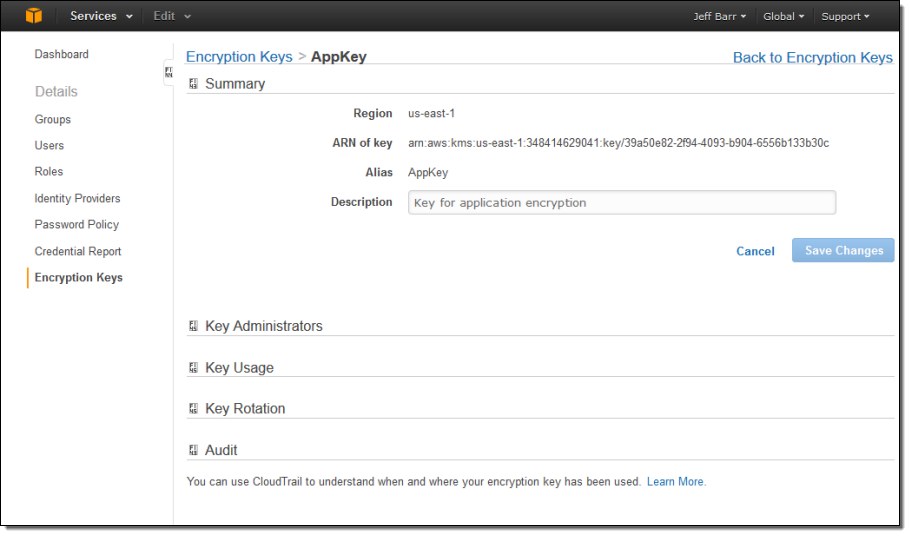
Kubernetes supports encryption at rest for etcd, but it isn't enabled by default. This is configured through an EncryptionConfiguration resource on the API server, which tells Kubernetes to encrypt secret data before writing it to etcd using a provider such as AES-CBC, AES-GCM, or a Key Management Service (KMS) plugin integrated with a cloud provider's key management system.
Beyond the platform-level controls above, day-to-day operational habits matter just as much. Avoid ever committing raw secret manifests, even Base64-encoded ones, to version control; treat that encoded string exactly as you would a plaintext password, because that's effectively what it is. Rotate secrets on a regular schedule and immediately after any suspected exposure, such as a leaked log file or a misconfigured public repository.
Many teams move sensitive values out of native Kubernetes Secret objects entirely, using external secret managers like HashiCorp Vault, AWS Secrets Manager, or Azure Key Vault, paired with an operator or CSI driver that injects secrets into pods at runtime rather than storing them as cluster objects at all. This reduces the attack surface significantly, since the values never sit in etcd in any form, encoded or otherwise. For related encoding contexts you might run into while working with secrets and configs, see the notes on Base64 URL encoding for safely embedding data in URLs and the guide to Base64 image encoding, both of which use the same underlying encoding scheme in different contexts.
Configure etcd encryption at rest and KMS integration as part of cluster hardening, since Base64 encoding alone leaves secret data readable to anyone with etcd access.
Need to decode secrets during pipeline debugging without accidentally exposing them in build logs or committing decoded values to shared scripts.
Review clusters for secrets committed to git repositories, checking whether teams mistakenly treated Base64 encoding as sufficient obfuscation.
Retrieve and decode secrets like database credentials or API keys when debugging pods locally or writing initialization scripts.
Rotate and re-encrypt secrets after a suspected leak, verifying that exposed values were actually encrypted at rest and not just Base64 encoded in etcd backups.
Yes. Base64 decoding requires no password or key. Anyone with the encoded string, whether from a YAML file, a log, or an etcd backup, can decode it with a single command.
No. Kubernetes Base64-encodes secret values by default but does not encrypt them at rest unless you explicitly configure an encryption provider or KMS integration on the API server.
No, even though the values appear as Base64 strings, they are trivially reversible. Treat them as plaintext credentials and avoid committing them to version control regardless of encoding.
ConfigMaps store plain text values with no encoding transformation applied. Secrets are Base64 encoded to support binary data and to signal that the contents are sensitive, but that encoding provides no additional protection over a ConfigMap.
Both end up Base64 encoded in storage. stringData is a convenience field that lets you write plaintext in your manifest, and Kubernetes encodes it automatically; data requires you to supply the already-encoded value yourself.
Base64 encoding explains how Kubernetes stores secret values in a text-safe format, not how it protects them. The encoding is reversible by design, with no key required, so any real confidentiality has to come from separate measures: encryption at rest, TLS in transit, tight RBAC, and often an external secret manager sitting outside the cluster's own storage layer.
Stay up to date with new tools, blogs, and improvements.
We respect your privacy. No spam, unsubscribe anytime.