CPM formula calculation turns ad spend and impressions into a rate for 1,000 ad impressions. When both figures cover the same campaign period and use the same currency, the equation can also find the missing cost or impression total. The standard equation, reverse calculations, display campaign examples, and spreadsheet formulas all use the same relationship.
What the CPM formula measures
CPM measures the cost for 1,000 impressions. The term means cost per mille, and mille means thousand.
Total ad spend is the amount paid during one campaign period, while total impressions count every ad display in that period, so you can compare matching figures cleanly. Match currency and period for both. Check both before you calculate. Otherwise, the equation mixes unlike inputs.
What counts as an impression
Use the platform's definition of an impression when you fill the denominator. The IAB describes an impression as a response to an ad request from the user's browser. It should be filtered for robotic activity and recorded as late in delivery as possible, close to the user's opportunity to see the ad, as set out in the IAB global guideline.
A raw server entry isn't automatically the right number for this calculation. Different counting points can produce different CPMs.
Before comparing vendors, check whether they use client-initiated counting. The IAB requires that approach and doesn't accept server-initiated counting, which records an impression when page content is served. That is the point furthest from the user seeing the ad, according to the IAB counting rule.
If one CPM uses server-initiated impressions and another uses client-initiated impressions, the first can overstate exposure. Include the counting method in any cross-platform comparison.
Filtering invalid traffic changes the denominator too. The IAB guidance covers specific identification of suspected non-human activity and activity-based filtration through pattern analysis, described in the filtration guidance. If two platforms spend the same amount but one removes more suspected robotic activity, it may report fewer impressions and therefore a higher CPM. Check how each platform filters traffic before treating the difference as a price change.
Historical desktop display data needs the same check. The measurement revision changes the minimum from "count-on-ad-insertion" to "count-on-begin-to-render," bringing desktop measurement closer to mobile and digital video, as explained in the desktop measurement revision. A CPM based on the older insertion count can't be assumed comparable with a current CPM based on begin-to-render counting.
For a rendered-impression calculation, the ad must be loaded and at least begin to render in the user's browser. The count must also be filtered for invalid traffic and recorded late in delivery, according to the rendered-impression guidance. Served and rendered impressions can give different CPMs for the same campaign if an ad call never produces creative because of an error or blocking.
Platform implementation may differ from a rendered or viewability count. Google Ad Manager uses a census-based process: it counts when the ad server acts on the ad call and issues the ad content, before the ad is displayed to the user, as described in Google's compliance documentation. Treat this CPM as a server-level delivery measure, not as a confirmed user view, when comparing it with a viewability vendor.
Does one figure cover a month while the other covers a week? Change one before you calculate. Same scope. That's the whole trick.
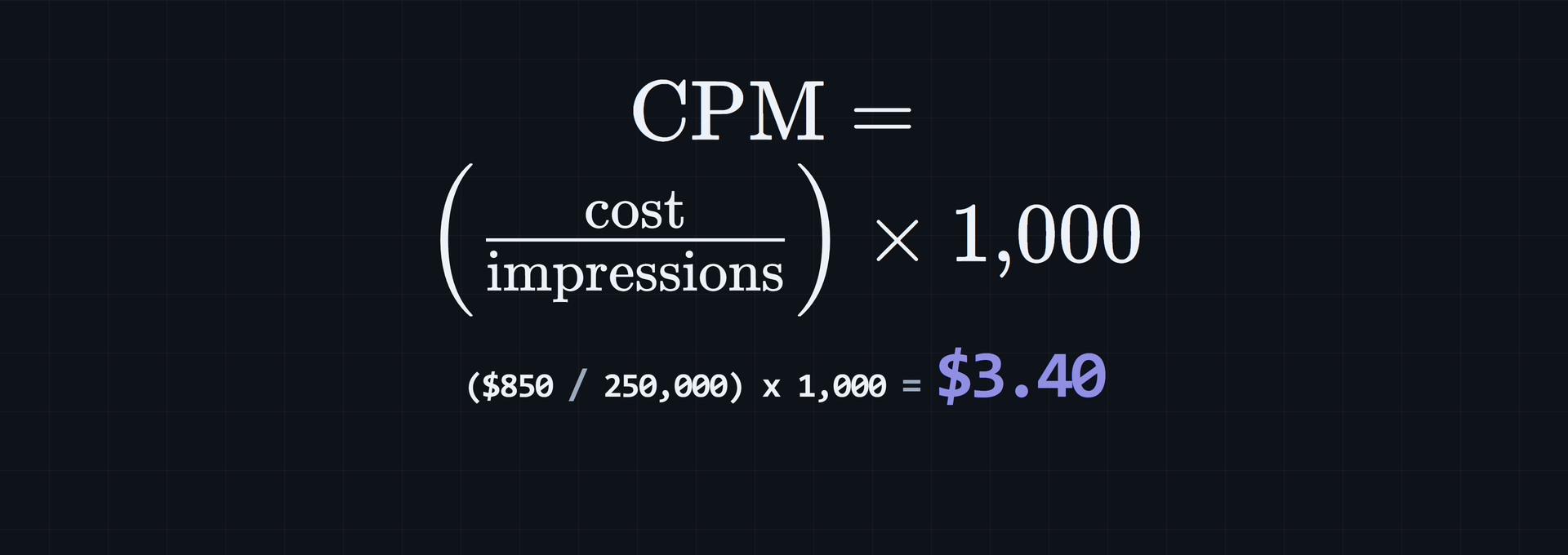
CPM = (total ad spend / total impressions) x 1,000Divide spend by impressions first. That gives the price for one impression. Then scale it by 1,000, which puts the result on the CPM scale.

Served and viewable impressions use different denominators
Raw CPM and viewable CPM answer different questions about exposure. Some advertisers calculate vCPM with viewable impressions in the denominator instead of total served impressions. The MRC framework separates served, measured, and viewable impressions with the measured-rate and viewable-rate equations in the MRC viewability guidelines:
| Rate | Equation |
|---|---|
| Measured Rate | (Viewable Impressions + Non-Viewable Impressions) / Total Served Impressions |
| Viewable Rate | Viewable Impressions / (Viewable Impressions + Non-Viewable Impressions) |
Don't compare vCPM and raw CPM as if they used the same denominator. Viewability can change the measured and viewable rates without changing spend. If fewer served impressions qualify as viewable, vCPM can be higher.
How to rearrange the CPM formula
Start with CPM = (cost / impressions) x 1,000 and isolate the missing value. Which value is missing? Your known pair tells you which line to use.
To find cost, divide both sides by 1,000, then multiply by impressions:
CPM / 1,000 = cost / impressions
cost = (CPM / 1,000) x impressions
To find impressions, divide the equation by 1,000, then solve for impressions:
CPM / 1,000 = cost / impressions
impressions = (cost / CPM) x 1,000
The 1,000 factor stays because CPM is priced per 1,000 impressions. Cost stays in currency, and impressions stay as a count. You can't calculate CPM with zero impressions. The reverse formula can't use a zero CPM.
Choose the line with the two values you know and the result you need.
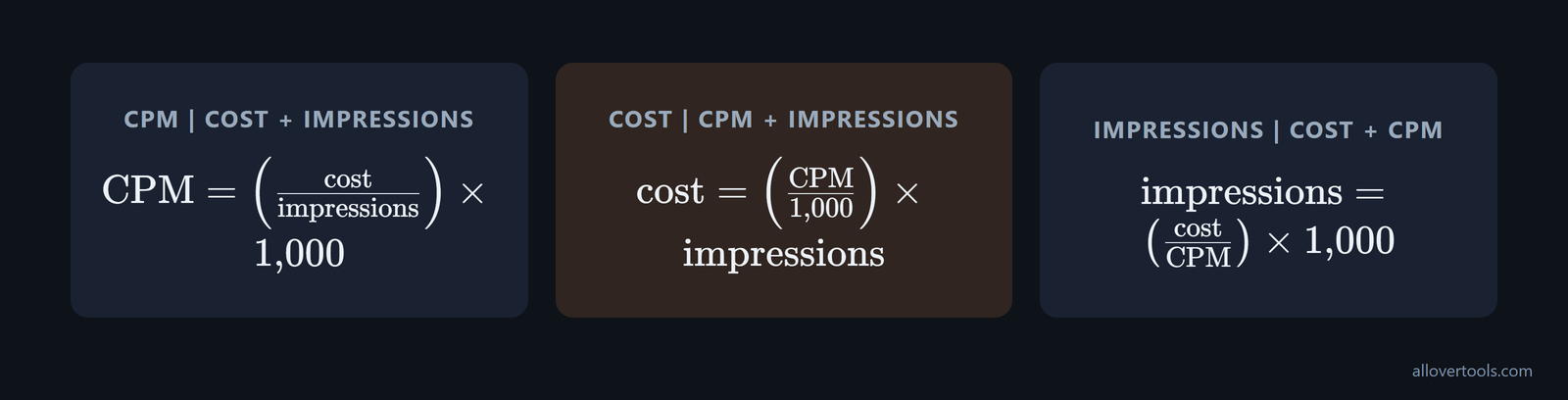
The three usable equations
These three lines cover CPM, campaign cost, and total impressions. Each needs two inputs, shown in brackets.
CPM         = (cost / impressions) x 1,000   [cost + impressions]
cost        = (CPM / 1,000) x impressions     [CPM + impressions]
impressions = (cost / CPM) x 1,000             [cost + CPM]
Which two figures do you have? Match them to the bracketed inputs.
Calculate CPM from spend and impressions
To calculate cost per thousand impressions, divide total ad spend by total impressions, then use the 1,000 scale while keeping the units visible, because that makes a bad input easier for you to spot early.
The display campaign values below are chosen for illustration: $850 in ad spend and 250,000 impressions. They aren't reported campaign data. That's why the arithmetic stays easy to check.
Display campaign example: CPM from cost and reach
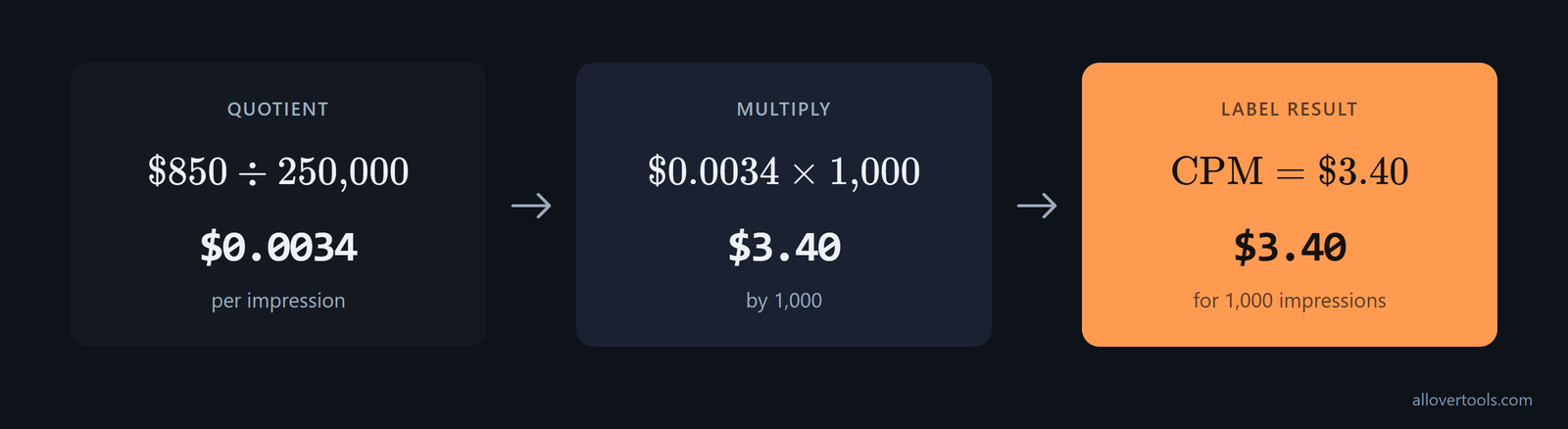
With $850 in spend and 250,000 impressions, the CPM is $3.40. First, find the smaller per-impression value.
- Start with the quotient:
$850 / 250,000 = $0.0034per impression. - Multiply by 1,000:
$0.0034 x 1,000 = $3.40. - Label the result: CPM is
$3.40for 1,000 impressions.
CPM = ($850 / 250,000) x 1,000
CPM = $0.0034 x 1,000
CPM = $3.40
$0.0034 is the single-impression cost. $3.40 is the cost at the 1,000-impression scale. Same calculation. Different unit.
Compare a calculated CPM with industry and format benchmarks
Arithmetic is only one reason a CPM may be high or low. Compare it with similar inventory. A Semrush study using AdClarity data across 956 domains in 13 US industries from January 2021 to May 2023 reported the figures below, including a Food Delivery CPM high of $7.63, in the industry benchmark study:
| Industry | CPM |
|---|---|
| Food Delivery | $7.63 high |
| Travel | $7.12 |
| Finance | $6.52 average |
| Dating | $4.44 |
| Media | $4.27 |
Format matters too. In the same dataset, mobile video had an $11.10 CPM, in-app and social videos each had a CPM of $9 or more, and desktop display averaged $2.50, as shown in the format comparison. Calculate your own rate, then compare it with a benchmark for the same industry and format.
| Ad format | CPM |
|---|---|
| Mobile video | $11.10 |
| In-app video | $9 or more |
| Social video | $9 or more |
| Desktop display | $2.50 average |
Verify the result in the CPM Calculator
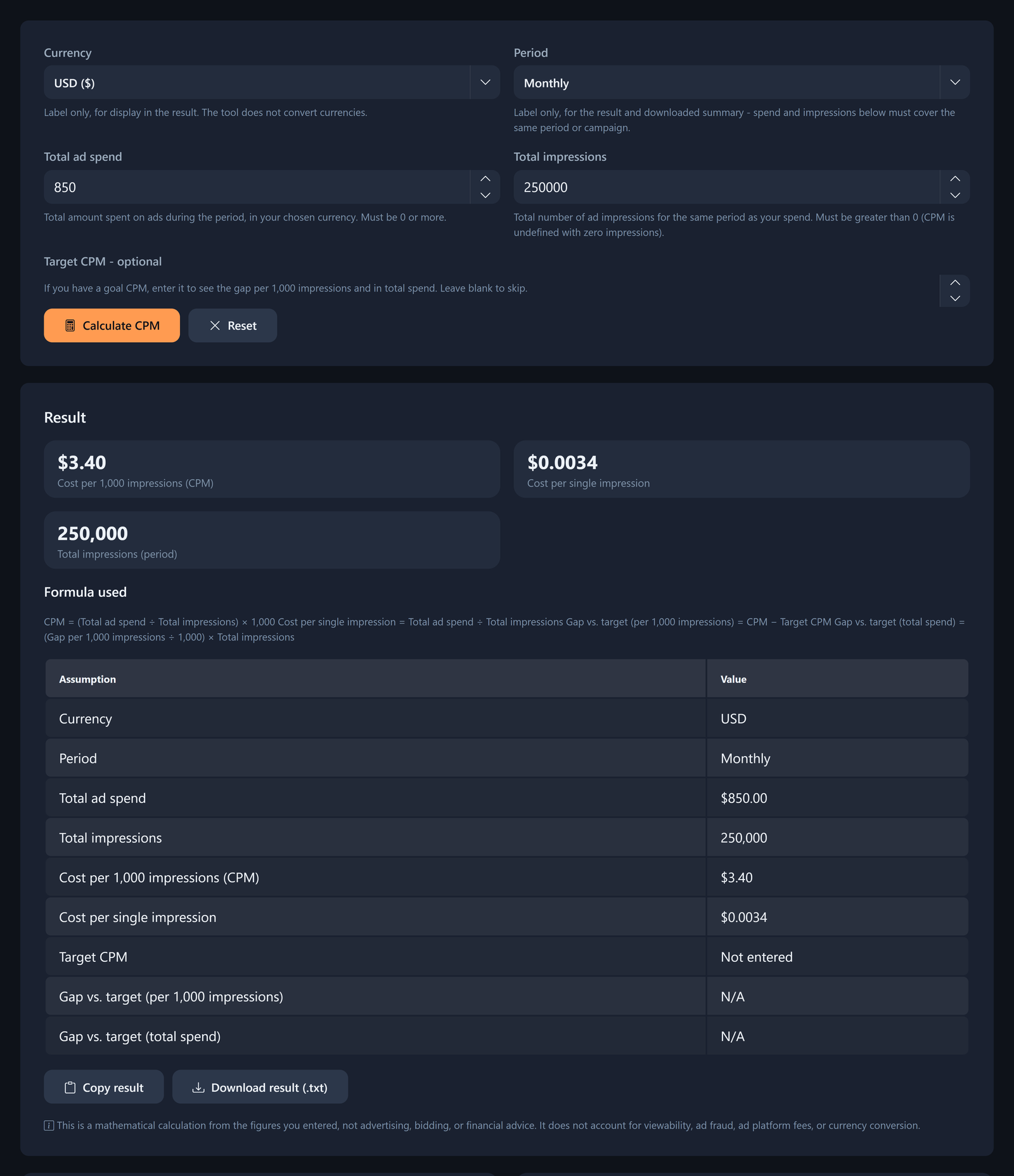
Enter the example values in the CPM Calculator and inspect its result view. Want a quick arithmetic check? Use the same figures.
Choose USD under Currency and a matching period label under Period. Enter 850 under Total ad spend and 250000 under Total impressions. Leave Target CPM - optional blank, then select Calculate CPM. You'll be done.
What should you see? Your Result should show Cost per 1,000 impressions (CPM) of $3.40, Cost per single impression of $0.0034, and Total impressions (period) of 250,000. Formula used should show the equation behind those values.
To check a vendor invoice, use the total billed campaign price, including all fees, and the views delivered. Divide the views by 1,000, then divide the billed price by that number, following the invoice-checking workflow:
- Confirm that the price is the total billed price for the campaign.
- Confirm the delivered view count covers the same campaign scope.
- Express the views in thousands by dividing total views by 1,000.
- Divide the total price by the number of thousand views and compare the result with the billed CPM.
Currency labels the display; it doesn't convert the amount. Period labels the result, so spend and impressions must describe one period or campaign.
The script processes the values in your browser and makes no network request with them.
Use reverse CPM formulas for cost and impressions
When CPM is known, the same relationship can find campaign cost or total impressions, which lets you solve for the missing value without changing the underlying rate. Which equation fits your known values?
Keep CPM and cost in a matching currency. The examples use chosen display-campaign values.
CPM measures exposure, not results. It tells you the cost of showing an ad 1,000 times, but it doesn't measure conversions, revenue, or another outcome. As Pearson's CPM explanation notes, CPM is only one part of performance. Use the reverse equations to plan spend or reach, then pair CPM with CTR, CPC, and CPA when clicks or conversions drive the decision.
Find campaign cost
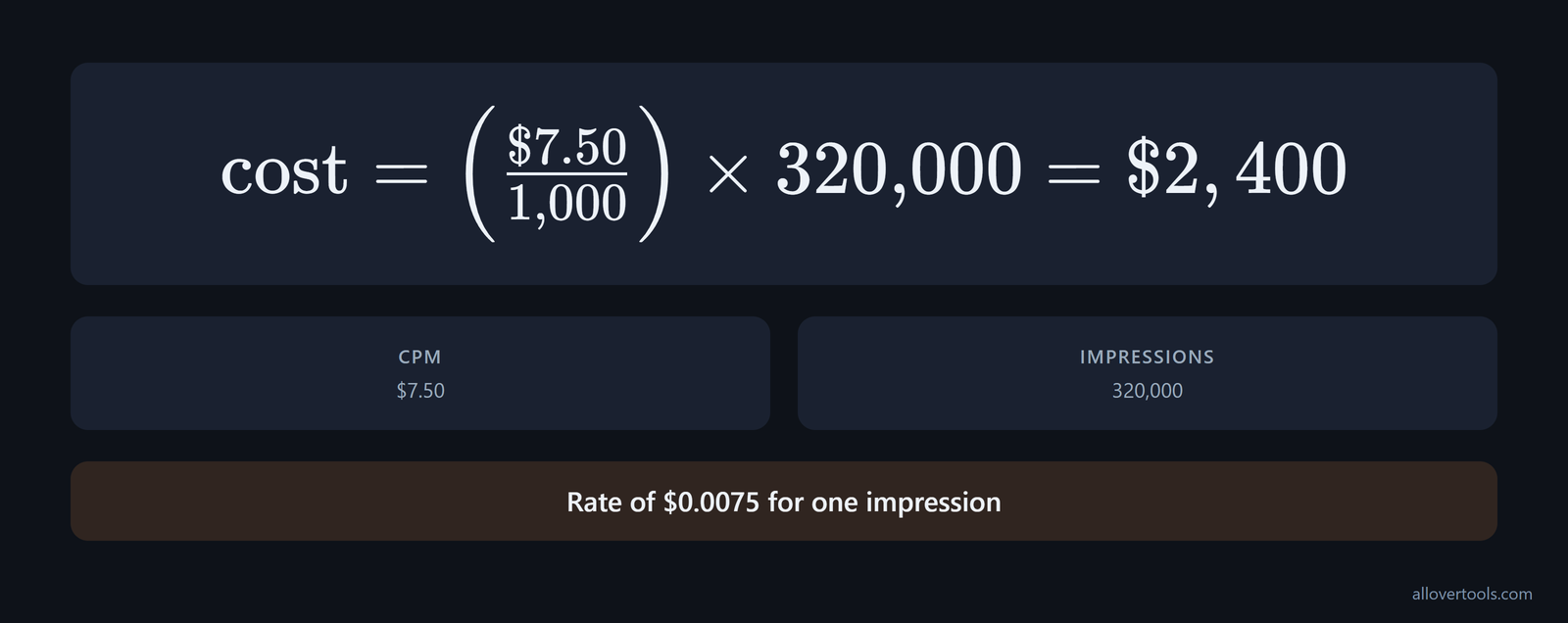
Use cost = (CPM / 1,000) x impressions with CPM and impressions as inputs. A CPM of $7.50 with 320,000 impressions gives a campaign cost of $2,400.
cost = ($7.50 / 1,000) x 320,000
cost = $0.0075 x 320,000
cost = $2,400
Dividing $7.50 by 1,000 gives a rate of $0.0075 for one impression. Multiply that rate by 320,000. The campaign cost is $2,400.
The equation gives matching spend when the rate and impression total are known, because the currency and campaign scope also match the original figures for that campaign period.
Find total impressions
Use impressions = (cost / CPM) x 1,000 with cost and CPM as inputs. A cost of $1,500 at a $6.00 CPM represents 250,000 impressions.
impressions = ($1,500 / $6.00) x 1,000
impressions = 250 x 1,000
impressions = 250,000 impressions
If the inputs don't divide evenly, the result may be fractional. Keep the full value during the calculation. Round the impression count only for the final display.
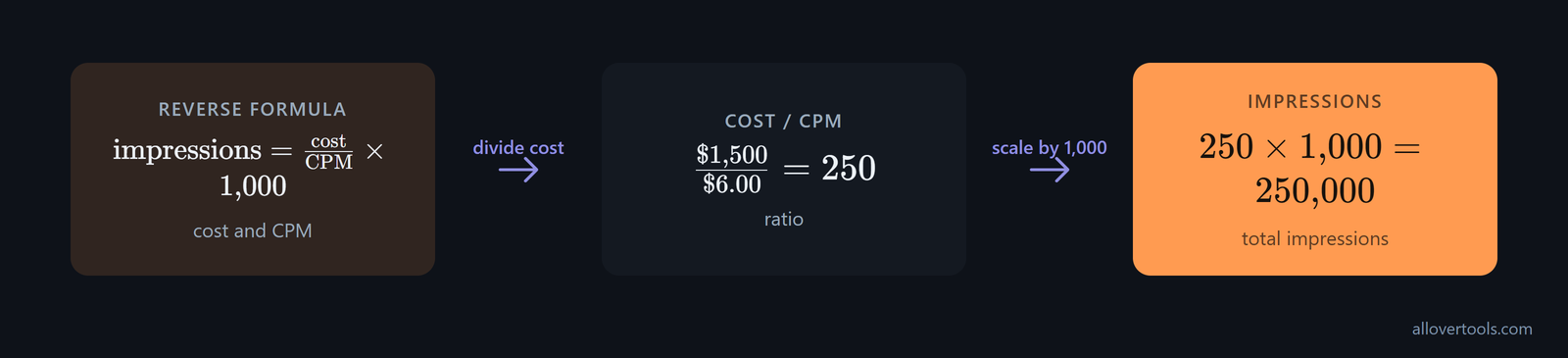
To verify the cost example, enter $2,400 and 320,000 at the CPM Calculator; check for a $7.50 CPM. For the impressions example, calculate CPM from $1,500 and 250,000, which returns $6.00 and confirms the estimated impression volume for the chosen campaign. Target CPM - optional can show a gap against a target, but it isn't part of either core equation.
Translate CPM and CTR into an implied CPC
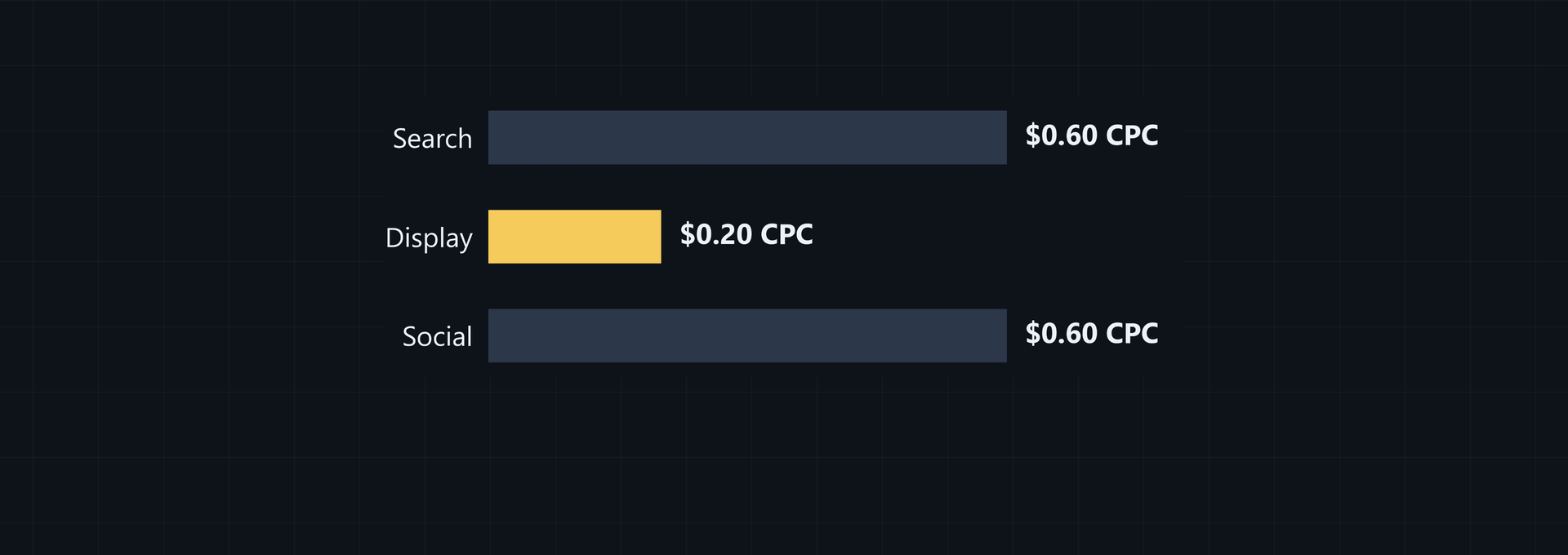
Combine CPM with click-through rate when you need a click-based figure for a channel comparison. At a $3.00 CPM and a 1% CTR, 1,000 impressions produce about 10 clicks. Divide $3.00 by 10 to get an effective CPC of $0.30, which the cited channel example states is three times cheaper than Google Search Ads.
Keep the units straight: CPM gives the cost for 1,000 impressions, CTR gives the share that becomes clicks, and CPC expresses that spend per click. Use the CPM and CTR for the comparison at hand. A lower CPM alone doesn't establish a lower cost per click.
Platform fees can change the comparison too. Effective CPM, or eCPM, is CPM after platform fees. One channel-ranking methodology uses Gartner's 2026 Digital Ad Benchmark Report, Forrester's Q4 2026 Paid Media Wave, and proprietary Clari models. It lists these weights in the channel evaluation method:
The method weights effective CPM after ad platform fees at 40%, click-through rate and conversion rate at 30%, audience targeting precision at 20%, and scalability at 10%.
Use raw CPM for the formula it represents. For a broader channel comparison, use eCPM alongside the other stated criteria, not exposure cost alone.
Avoid CPM unit, rounding, and input mistakes
Most CPM errors come from mismatched inputs, a misplaced 1,000 factor, or early rounding. Check the figures before you calculate. A correct formula can't repair inconsistent inputs.
Check the units before calculating
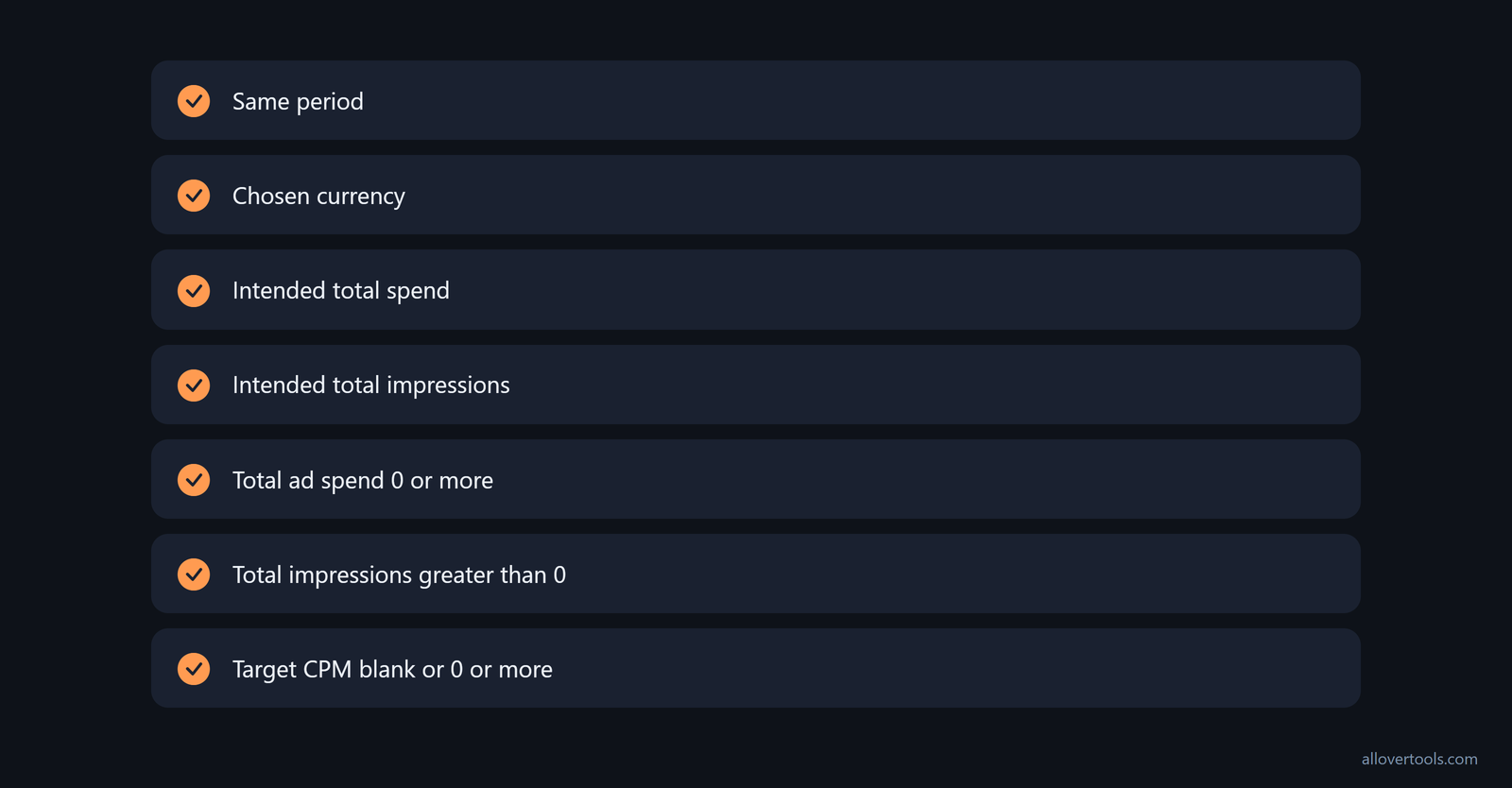
Confirm four things before you press calculate: spend and impressions cover the same period, spend and CPM use the chosen currency, total spend is the intended amount, and total impressions is the intended count.
- Cost divided by impressions gives the one-impression price. Apply the 1,000 multiplier for CPM.
- Zero impressions make CPM undefined, and zero CPM makes solving for impressions undefined.
- Mixed periods or currencies change the campaign scope.
- CPM isn't a single-impression price. The single-impression value is CPM divided by 1,000.
The CPM Calculator requires Total ad spend to be 0 or more and Total impressions to be greater than 0. Target CPM - optional may be blank or 0 or more. Invalid or zero-impression input hides the result until it's fixed.
Round only the final displayed result
Calculate with the full quotient, then round a displayed CPM to two currency decimals. Early rounding can make a reverse calculation differ from the starting cost, especially when the per-impression value has several decimal places and you reuse it later.
For the $850 and 250,000 example, keep that small rate as $0.0034 and display the CPM as $3.40. Rounding the smaller value to $0.00 would suggest no cost.
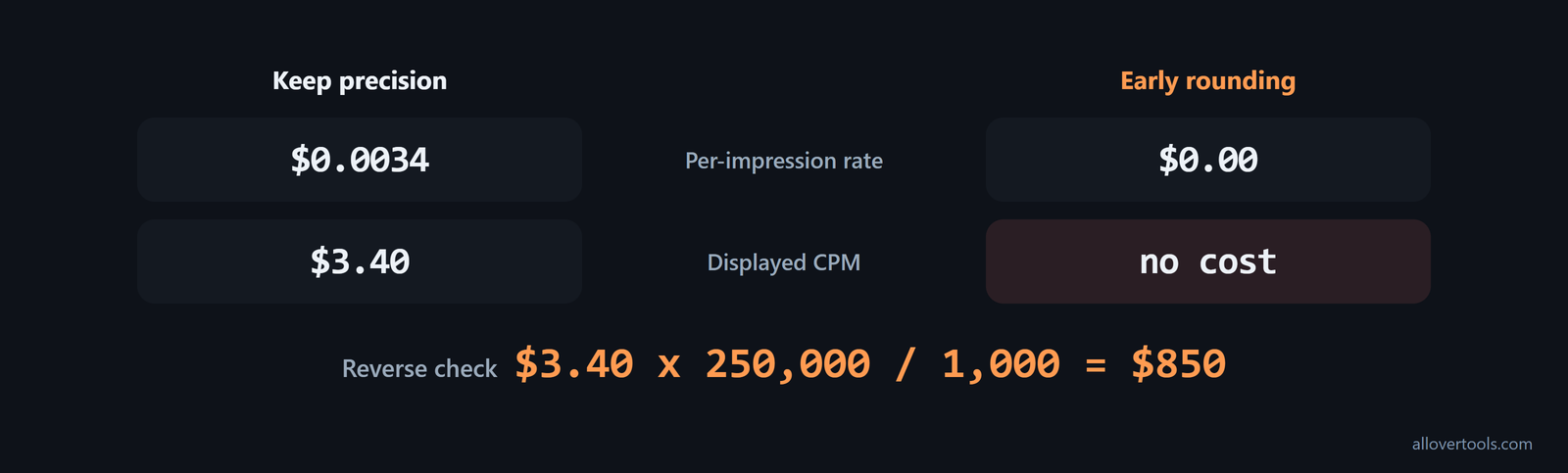
For a reverse check, use cost = CPM x impressions / 1,000. With the example values, $3.40 x 250,000 / 1,000 = $850. The starting cost returns.
Put CPM formulas in a spreadsheet
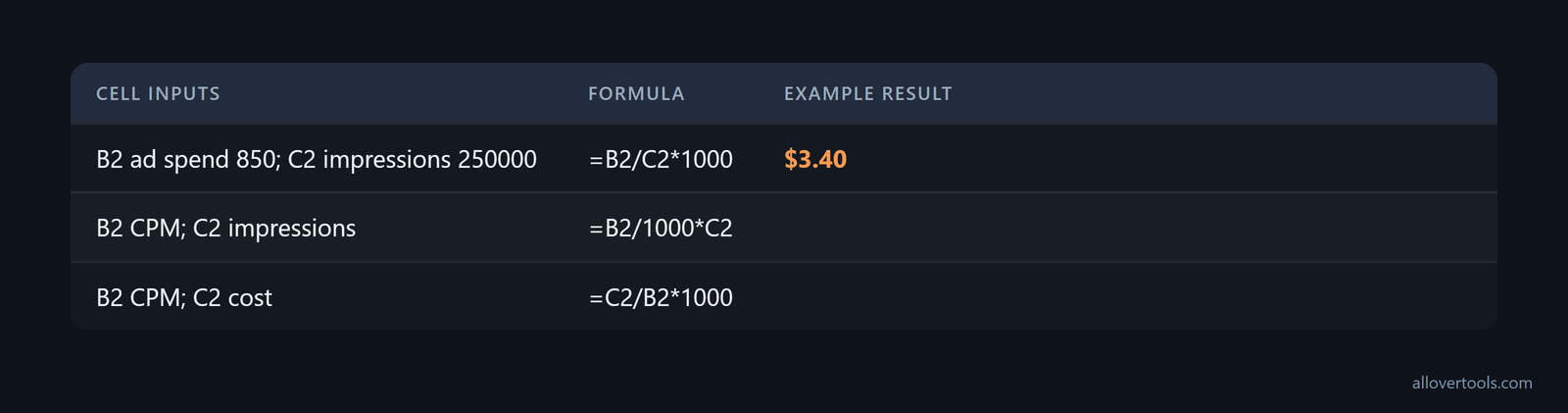
Assign the two known values to B2 and C2. Then use the formula that matches those cells.
Put total ad spend in B2 and total impressions in C2. Use:
=B2/C2*1000Put CPM in B2 and impressions in C2. Use:
=B2/1000*C2Place CPM in B2 and cost in C2. Use:
=C2/B2*1000Format CPM and cost as currency. Format impressions as a count. Check for blank or zero denominators before calculating. With B2 set to 850 and C2 set to 250000, you get $3.40 from =B2/C2*1000.
Use the CPM Calculator result view to check the visible formula and assumptions before you select Copy result or Download result (.txt), which lets you compare the saved result with the spreadsheet.
Frequently asked questions
What is the basic CPM formula?
Use CPM = (total ad spend / total impressions) x 1,000. This is the cost for each 1,000 impressions in the same period.
How can ad cost be calculated from CPM?
Use cost = (CPM / 1,000) x impressions. Pair CPM with the impression total from the same campaign scope and currency.
How can impressions be found from cost and CPM?
Use impressions = (cost / CPM) x 1,000. CPM can't be zero. Keep the result precise until you display the impression count.
Why can a CPM calculation be wrong by a factor of 1,000?
When spend is divided by impressions, the result is the rate for one impression. Scale that result to CPM with 1,000. Did spend and impressions match the same period?