

Marketing efficiency ratio (MER) compares total revenue with total marketing spend for the same scope and period. It gives a blended view across channels, while ROAS helps inspect individual rows. The article covers the formula, a multichannel example, a spend cap, CLV context, and the limits of tracking one ratio over time.
What is marketing efficiency ratio?
Marketing efficiency ratio is total revenue divided by total marketing spend for a defined scope and period. It blends the included channels. It doesn't pin revenue to one channel.
A 3.00x result means three units of total revenue per unit of marketing spend, but you can't read it as profit because product costs and fulfilment sit outside it, as do payroll and other operating costs.
For blended spend, MER can act as the break-even gate. It gives finance a headline measure for a go/no-go decision by comparing revenue efficiency with break-even, according to Omniconvert's MER guidance. It's still not profit, so review the costs outside the ratio as well.
A typical good-MER benchmark is 3.0 or higher: $3 in revenue for each $1 spent on marketing. Use that as a reference, not a universal pass mark. What counts as good depends on margins and growth goals, as this benchmark guidance makes clear.
Set the denominator first. Which marketing spend belongs there? Use the matching revenue scope in the numerator. If spend covers selected acquisition channels, keep that same boundary in the revenue total.
MER still works when user-level tracking is less complete. It looks at total investment and business outcomes, so it doesn't require reconstructing every cookie-based journey. In cookieless conditions, it still compares total revenue with total spend, as this cookieless context explains.
The MER formula
Use this formula: MER = Total revenue / Total marketing spend.
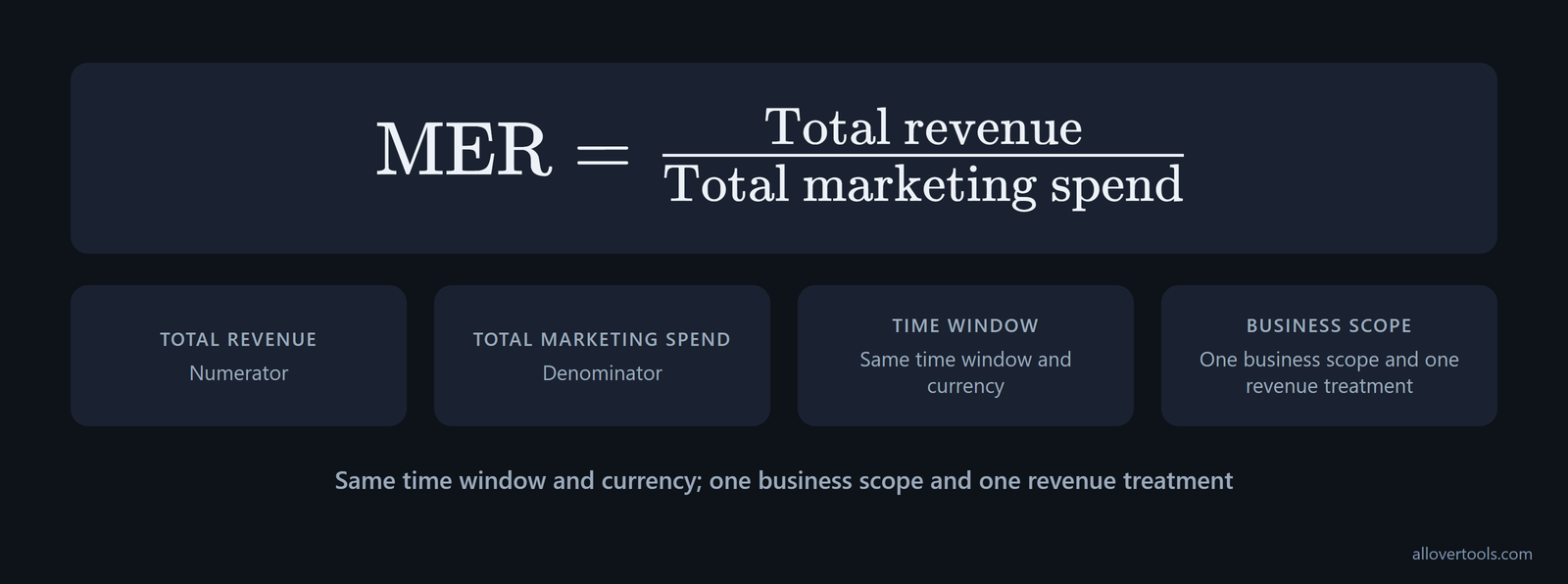
MER = Total revenue / Total marketing spendUse the same time window and currency, with one business scope and one revenue treatment, because a ratio is useful only when both totals describe the same slice of activity. The result is a ratio, not a percentage. A zero marketing-spend denominator can't give you a meaningful MER.
The formula leaves cost structure untouched. It doesn't subtract product cost or fulfilment. Payroll and other operating costs stay out too, so 3.00x isn't a 3.00x profit result.
Use the costs carried by the chosen scope to build the denominator. Ad spend alone isn't enough. The marketing spend breakdown lists these components:
- Ad Spend
- Agency Fees
- Tools & Platforms
- Creative & Influencers
The worked example totals $10,000 + $2,000 + $500 + $1,000 = $13,500. Include those non-media costs and the ratio is lower than it would be if you divided revenue by ad spend alone. Record each denominator component before comparing MER periods.
Check the convention before comparing a benchmark or calculator. An alternative definition puts total marketing expenses over total marketing revenue: $10,000 / $25,000 = 0.4 and $10,000 / $100,000 = 0.1. With that inverted convention, the lower MER indicates greater efficiency, as the inverted MER convention shows. This article uses revenue divided by spend, so the direction is reversed.
How to calculate MER from total revenue and spend
Start with the matching totals. Divide total revenue by total marketing spend. Then round only the displayed result.
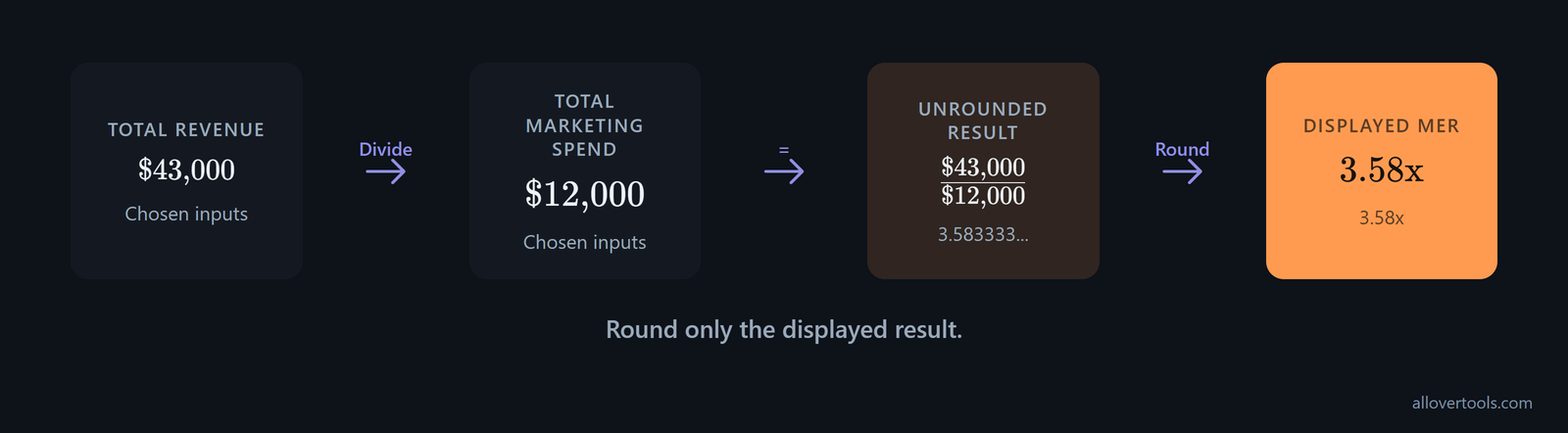
Total revenue: $43,000
Total marketing spend: $12,000

MER = $43,000 / $12,000
MER = 3.583333...
Displayed MER = 3.58x- Choose your period and currency. Add one business scope and one revenue treatment.
- Add the revenue included in that scope.
- Add every marketing cost included in the same scope.
- Divide the unrounded revenue total by the unrounded spend total.
- Round the displayed ratio, while keeping the source totals for later checks.
For a period comparison, choose one scope and name it, so you can keep that choice unchanged when you compare later results across matching periods and spot real movement. Does it cover every channel or one acquisition set? Handle refunds and taxes consistently.
Do the same with one-time revenue and agency fees. Include creative costs in that choice too. The formula doesn't pick an accounting treatment for you.
A chosen-value MER example
Chosen inputs: $43,000 revenue and $12,000 spend.
Total revenue: $43,000
Total marketing spend: $12,000
MER = $43,000 / $12,000
MER = 3.583333...
Rounded result: 3.58x
You get $3.58 of revenue for each $1 of included marketing spend in that period, but it isn't $3.58 of profit because the ratio leaves other operating costs outside.
MER versus ROAS in a multichannel business
ROAS uses attributed revenue and spend for a channel or campaign row. MER uses the combined revenue and spend for the included business scope. Keep the scope visible when you compare them.
Platform-reported ROAS can overstate results by 15 to 40 percent. It uses attributed revenue; MER uses real store revenue and can reconcile with the P&L. Use ROAS to inspect an individual row, then use MER to check the blended result against actual business totals, as the ROAS inflation estimate explains.
Don't total channel ROAS as if each figure were a slice of total revenue. A platform's ROAS is its attributed revenue divided by its own ad spend. Because attribution can overlap, the ROAS figures together may exceed actual revenue. MER divides all shop revenue by all marketing spend, so ROAS may add up to more than revenue while MER can't, according to the platform total warning.
Keep the denominator visible when a report uses blended ROAS. Blended ROAS divides all revenue by paid media spend. MER divides all revenue by all marketing spend, including email and SMS. Both are blended, but MER is the broader profitability metric; blended ROAS isolates paid efficiency, as the blended ROAS distinction sets out.
| Scope | Spend | Revenue | Calculation | Result |
|---|---|---|---|---|
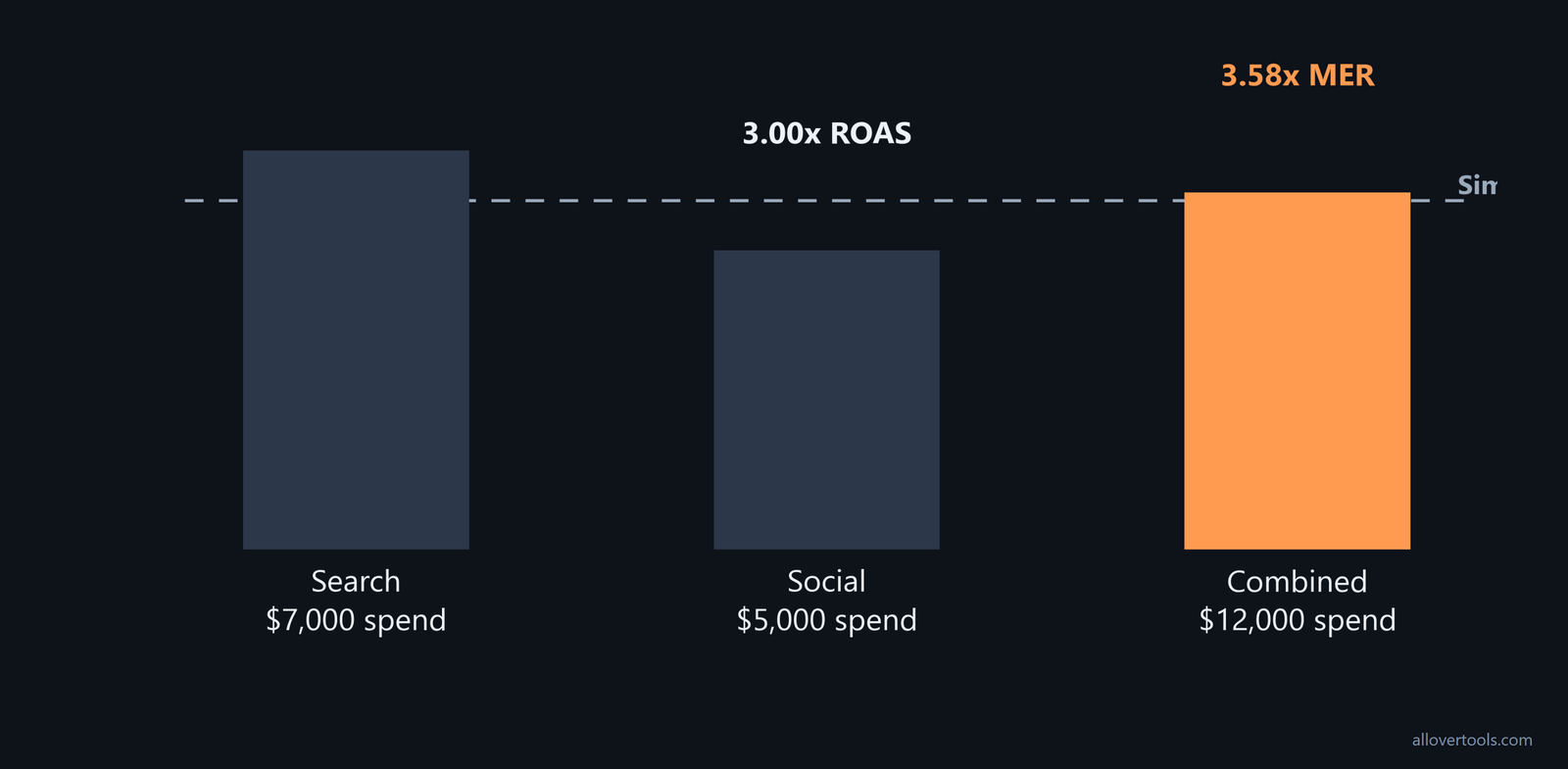
| Search | $7,000 | $28,000 | $28,000 / $7,000 | 4.00x ROAS |
| Social | $5,000 | $15,000 | $15,000 / $5,000 | 3.00x ROAS |
| Combined | $12,000 | $43,000 | $43,000 / $12,000 | 3.58x MER |
The blended result isn't the simple average of 4.00x and 3.00x, because spend weights each line rather than giving both channels equal influence, so you can see why the 3.50x average does not represent the combined calculation. Why not? That average is (4.00 + 3.00) / 2 = 3.50x, while the combined calculation is $43,000 / $12,000 = 3.583333..., shown as 3.58x.
For row-level marketing metrics, use the Marketing Metrics Calculator to see each row.
The visible controls cover Campaign name and Spend. They also cover Impressions and Clicks. Conversions and Revenue appear too. Currency and Attribution assumption appear too.
Add campaign row and Calculate metrics appear there. Results appears too. Numerators and denominators are shown. Copy results and Download CSV finish the set.
It calculates ROAS and CPM. It also calculates CPC and CTR, plus conversion rate, from entered rows. It doesn't calculate MER or assign conversions automatically.
You enter 100,000 impressions and 5,000 clicks for Search. The row also has 350 conversions. Its spend is $7,000, with $28,000 in revenue.
Social uses 200,000 impressions and 4,000 clicks. It has 240 conversions. Its spend is $5,000, with $15,000 in revenue.
Search: CPM $70.00, CPC $1.40, CTR 5.00%, conversion rate 7.00%
Social: CPM $25.00, CPC $1.25, CTR 2.00%, conversion rate 6.00%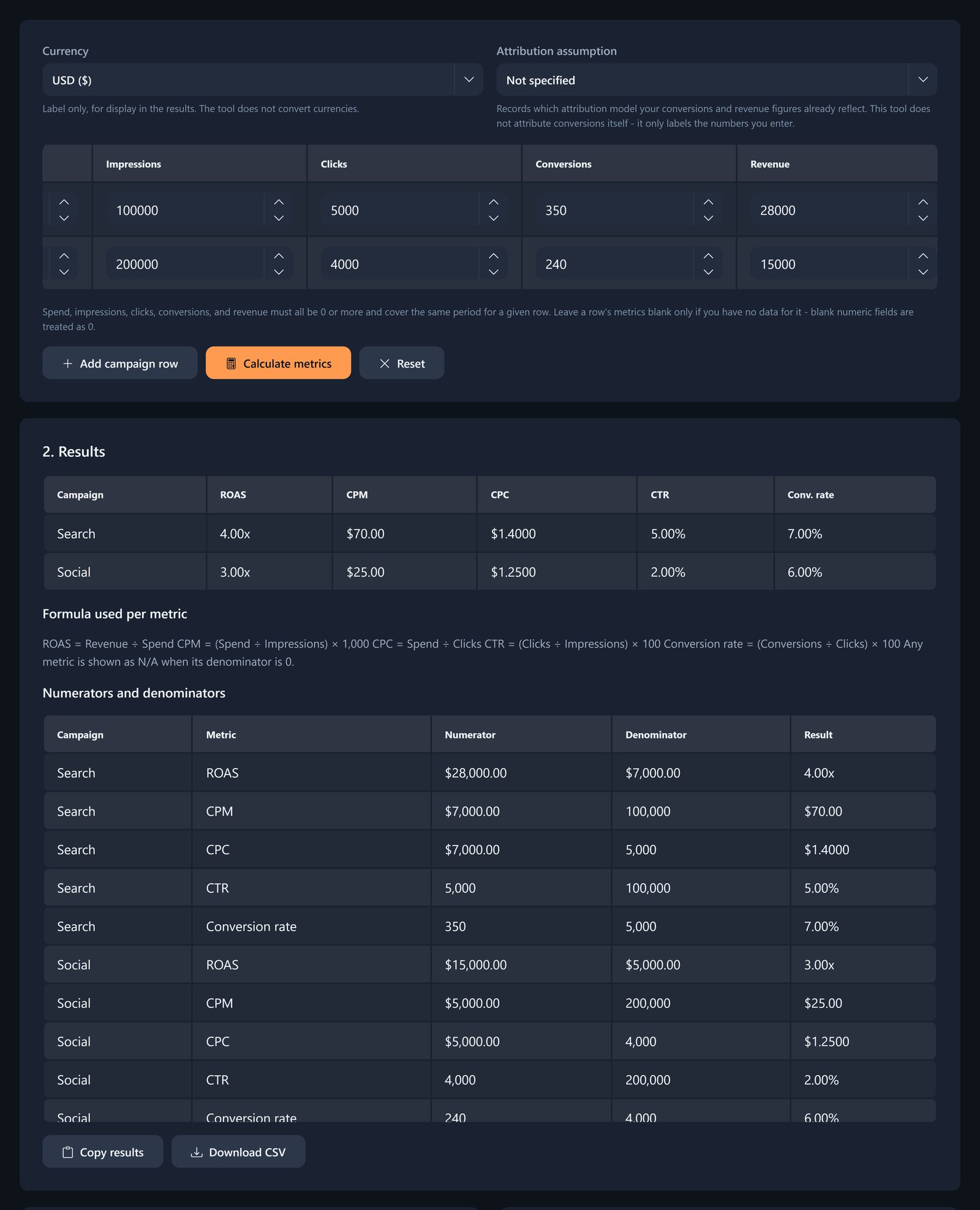
The calculator does the arithmetic in your browser. It doesn't connect to ad platforms or send visitor-entered calculation values to a server, because its code makes no network request with that content at all.
What each metric answers
ROAS asks how much attributed revenue a particular spend line produced. MER asks how much total revenue the included marketing program produced per total included spend. Which question fits your need? ROAS answers the channel question; MER answers the blended one.
| Metric | Question it answers | Use |
|---|---|---|
| ROAS | What revenue did this channel or campaign row get credit for? | Diagnose or compare channel rows. |
| MER | What revenue did the included program produce per included spend? | Read the blended operating view. |
Neither replaces the other. Use ROAS to investigate the rows inside the blended result. Use MER to see what the combined scope did.
Why the blended result can differ
Each channel's spend weight shifts the blended result, so Search's $7,000 of the $12,000 total gives its 4.00x ROAS more weight than Social's 3.00x ROAS.
Together, the chosen Search and Social inputs produce a 3.58x MER.
Attributed MER sits between ROAS and MER
Use attributed MER when you need a single blended view but the revenue data is still based on attribution. MER is total sales divided by total media spend. Attributed MER combines attributed revenue across platforms and divides it by combined ad spend. aMER is an intermediate metric: broader than a single channel's ROAS, but not true MER because it doesn't use full store revenue. Keep the label next to the result so it's clear whether the numerator is attributed revenue or total sales, as the attributed MER definition distinguishes them.
In marketplace reporting, MER is similar to Amazon's TACoS. Both compare marketing effort with total company revenue, rather than only sales attributed to ads. Use that analogy to translate a marketplace dashboard into the broader blended view described here, following the marketplace analogy.
Use MER as a budget cap, then check it against CLV
A simple MER budget cap divides an assumed revenue level by a chosen target MER. You still need to check the result against channel and margin, while also checking cash and customer-value context.
A simple MER spend cap
Here, matching-period revenue is $60,000 and the chosen target is 4.00x, so the spend cap is $15,000 before the separate plan check.
Spend cap = expected total revenue / chosen target MER
Spend cap = $60,000 / 4.00
Spend cap = $15,000
If you plan to spend $18,000, that sits above the cap.
$60,000 / $18,000 = 3.333333...
Displayed implied MER = 3.33x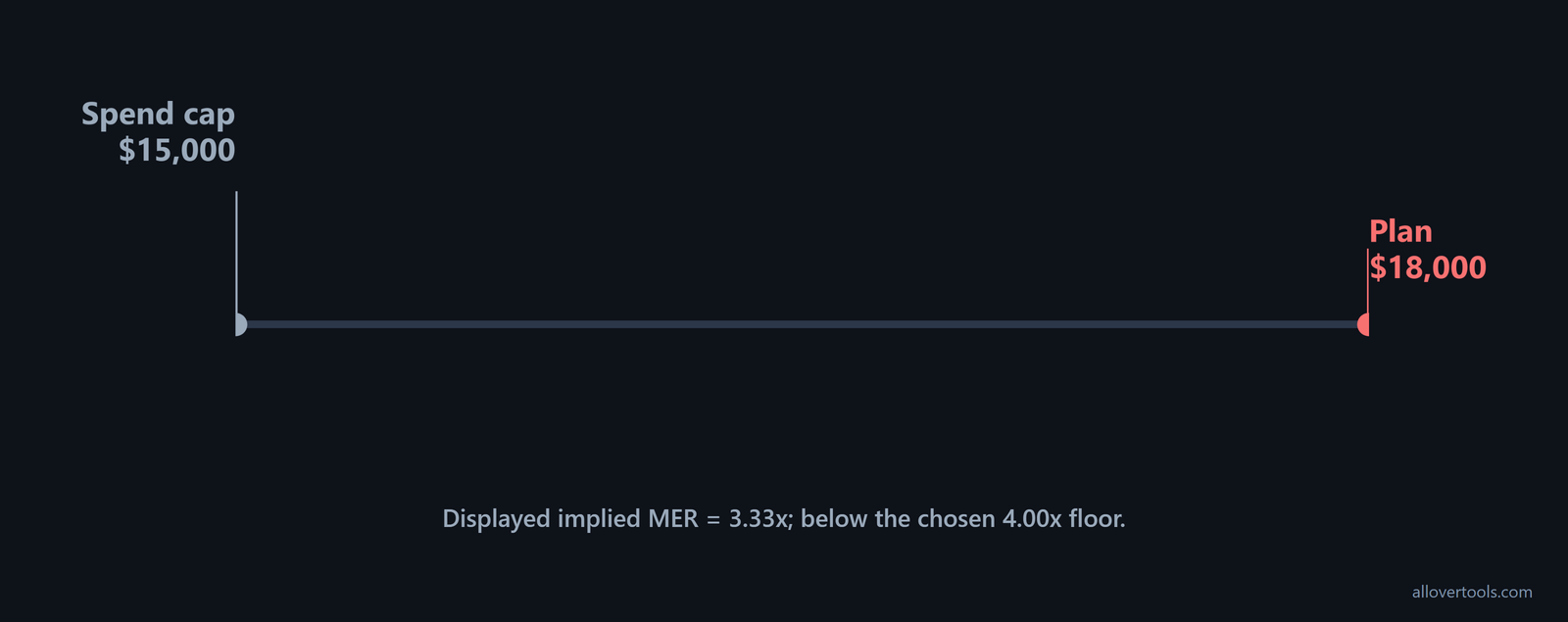
The implied 3.33x is below the chosen 4.00x floor, but this guardrail assumes the revenue level and doesn't decide which channel receives the money or prove profit.
Pair it with channel checks and contribution margin. Add cash context too.
For executive reporting, treat MER as a board-level profitability number, not a tactical channel score. It uses real store revenue and can reconcile with the P&L, so it fits finance discussions and budget decisions alongside channel detail, as the P&L framing explains.
Why CLV changes the interpretation
MER covers one period and combines the included channels, while CLV estimates value across a customer relationship, so the same MER can sit beside different retention and margin patterns, as well as lifespan or acquisition-cost patterns.
The LTV Calculator provides customer-value context. Its controls include Period and Currency symbol. They also include Average revenue per customer (ARPU), per period. You'll also see Gross margin (%).
Churn rate or Retention rate is next. Customer acquisition cost (CAC) - optional is also present.
Calculate LTV and Result are available. You can use Copy result. Download result (.txt) is also available.
ARPU: $50
Gross margin: 80%
Churn rate: 5%
CAC: $200

Gross margin per customer per period = $50 x 80% = $40
Average customer lifespan = 1 / 5% = 20 periods
Estimated LTV = $40 x 20 = $800
LTV:CAC ratio = $800 / $200 = 4.00:1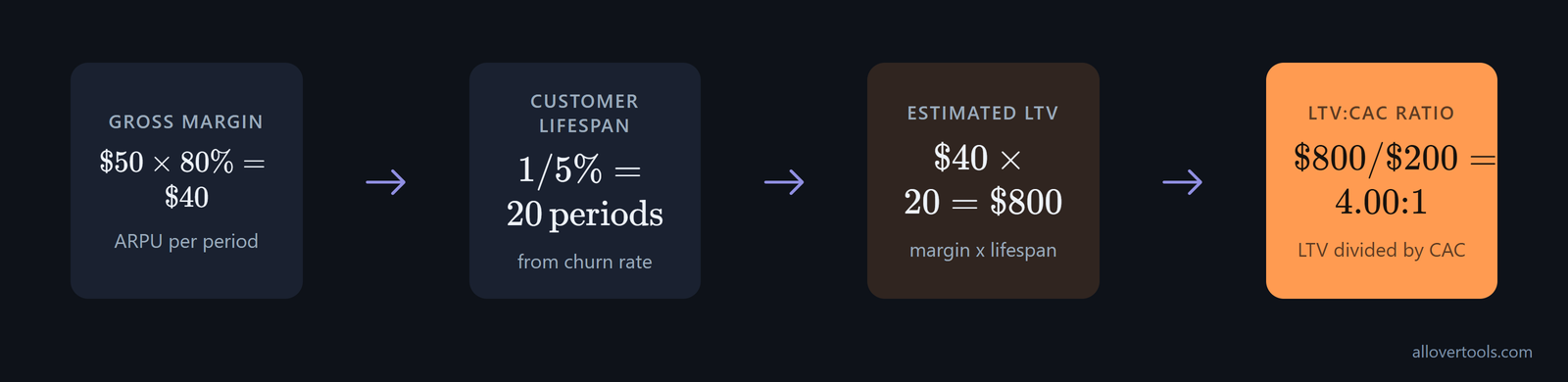
MER doesn't contain churn or retention. It also lacks gross margin and lifespan. CAC is separate. CLV is a context check, not a replacement for the blended formula.
The LTV calculator uses the entered values in your browser. It doesn't fetch billing or CRM records. Its code makes no network request with visitor-entered calculation values.
Track MER over time without losing the cause
Fix revenue and spend definitions first. Then calculate one ratio per matching period and keep the source totals beside each result.
Period 1: $30,000 / $10,000 = 3.00x
Period 2: $35,000 / $10,000 = 3.50x
Period 3: $36,000 / $12,000 = 3.00x

Combined MER = ($30,000 + $35,000 + $36,000)
               / ($10,000 + $10,000 + $12,000)
             = $101,000 / $32,000
             = 3.15625
Displayed combined MER = 3.16x
If you average the displayed period ratios, (3.00 + 3.50 + 3.00) / 3 = 3.166666..., the result is 3.17x. That differs from the ratio of summed values, 3.16x, because the combined view is weighted by spend.
Calculate the trend from matching periods
Keep your unrounded revenue and spend columns with every observation, then inspect channel ROAS and the surrounding business context when the blended ratio changes.
Mark scope and channel-mix changes. Mark revenue timing and tracking-definition changes too. A movement after one of those changes isn't automatically a campaign performance change.
Use MER to show that the blended outcome changed, then use a method that can explain the change. Marketing mix modeling breaks the blended result into channel and driver effects when attribution data is noisy or contradictory: MMM explains why, while MER only shows that something changed.
Pitfalls of focusing only on MER
MER has limits because a blended ratio can hide the source and timing, plus cost and customer quality behind the total. One number can't show all those details.
Before acting on a result, separate the blind spots. this MER/ROAS blind-spots summary identifies two different failures:
- Because MER is blended by design, it hides which channel is working and the baseline-versus-paid mix.
- ROAS can hide cannibalized organic sales and double counting across platforms. It also misses halo effects it can't see.
A high MER can hide an underfunded channel or an unmeasured channel. The ratio doesn't identify which channel caused the revenue.
A low MER can reflect a deliberate test or an incomplete conversion window. Before you change budget, check the scope and timing.
Periods also become hard to compare when agency fees and creative production enter the totals inconsistently, because discounts and refunds need the same treatment, while taxes and organic revenue need that treatment too. Keep your treatment consistent.
MER doesn't show margin or cash timing. It also misses retention and customer quality. Pair it with channel ROAS and conversion rate. Add contribution economics and CLV when those details affect your decision, because the blended figure can't answer every business question about quality or scale.
Optimizing only for MER can favor short-term revenue and miss acquisition quality or future value. Use MER as the blended guardrail. Use ROAS for channel diagnosis. Use CLV with margin and cash context when judging quality and scale.
Questions to ask before acting on a change
Did the numerator and denominator keep the same scope? Did channel mix or attribution assumptions change? Were revenue timing and refunds treated consistently? Were costs handled the same way?
Does channel ROAS explain the blended movement? Does CLV or margin change the quality of the revenue? These checks separate a change in the ratio from a change in the measurement.

Frequently asked questions
How is marketing efficiency ratio calculated?
MER equals total revenue divided by total marketing spend. Keep the numerator and denominator in the same period and scope, and you get a ratio such as 3.58x.
Is marketing efficiency ratio the same as ROAS?
ROAS uses attributed revenue and spend for a channel or campaign, while MER combines total revenue and total marketing spend, so you get the blended view and can inspect the rows with ROAS.
Can MER work for a business with several marketing channels?
Yes. Add revenue and included marketing spend across the same channels and period, then divide the totals. Keep channel ROAS beside it because MER doesn't identify which channel caused the blended outcome.
How does CLV affect the interpretation of MER?
MER is a period-level revenue-to-spend ratio, while CLV adds customer lifespan and gross margin. It also brings churn or retention and optional CAC context. MER isn't a complete measure of customer quality or future value.
Does a higher MER always mean better marketing performance?
No. A higher blended ratio can coexist with missing spend or delayed conversions. It can also coexist with weak retention and low margin. An underfunded growth program is another case, so you should check the other measures before changing budget.
Check scope and channel ROAS. Also check margin. Review cash timing and CLV before you change budget.