People searching for cpc ctr conversion rate are usually trying to follow one paid-traffic path: impressions become clicks, then clicks become conversions. CTR is clicks divided by impressions times 100. CPC is total ad spend divided by clicks.
Conversion rate is conversions divided by clicks times 100. Both rates are percentages. CPC is a currency amount per click.
How CPC, CTR, and conversion rate fit together
Each metric marks a different handoff in the same funnel. CTR shows how often an impression becomes a click. CPC shows the spend assigned to each click. Conversion rate shows how often a click becomes the chosen result.
Use a benchmark to frame the row you're calculating, not to replace it. For US search campaigns on Google Ads and Microsoft Ads, the April 2025 to March 2026 WordStream and LocaliQ edition reports a median CPC of $5.42, a median CTR of 6.64%, a median conversion rate of 8.18%, and a median cost per lead of $66.69. The figures appear in the 2026 benchmark.
| Metric | US search median |
|---|---|
| Cost per click | $5.42 |
| Click-through rate | 6.64% |
| Conversion rate | 8.18% |
| Cost per lead | $66.69 |
Campaign data matters more than one internet-wide CPC. Google doesn't publish an average CPC, and no single figure fits every account. The often-repeated claim of about $2.96 CPC and 3.52% CTR isn't supported by the WordStream or LocaliQ editions; they report the 2026 medians above, according to the benchmark warning. Compare like with like: channel, period, market, and industry.
Industry changes the conversion-rate yardstick before you judge a landing-page change. In the same dataset, median conversion rates run from 2.64% in Finance and Insurance to 16.22% in Animals and Pets. That spread is documented in the industry comparison.
A separate 2026 summary reports a 6.66% all-industry average CTR and a 7.04% to 7.52% average conversion rate for search campaigns. It puts Animals and Pets at 13.41% and Apparel and Jewelry around 2-3%, as reported in the cross-industry summary.
One broader overview reports median CTRs from 1.75% to 7.52% and median conversion rates from 2.61% to 13.90%, with most industries between 2.61% and 7.25%, in the broader benchmark ranges. Use the range for the campaign's vertical when you decide whether a change is meaningful.
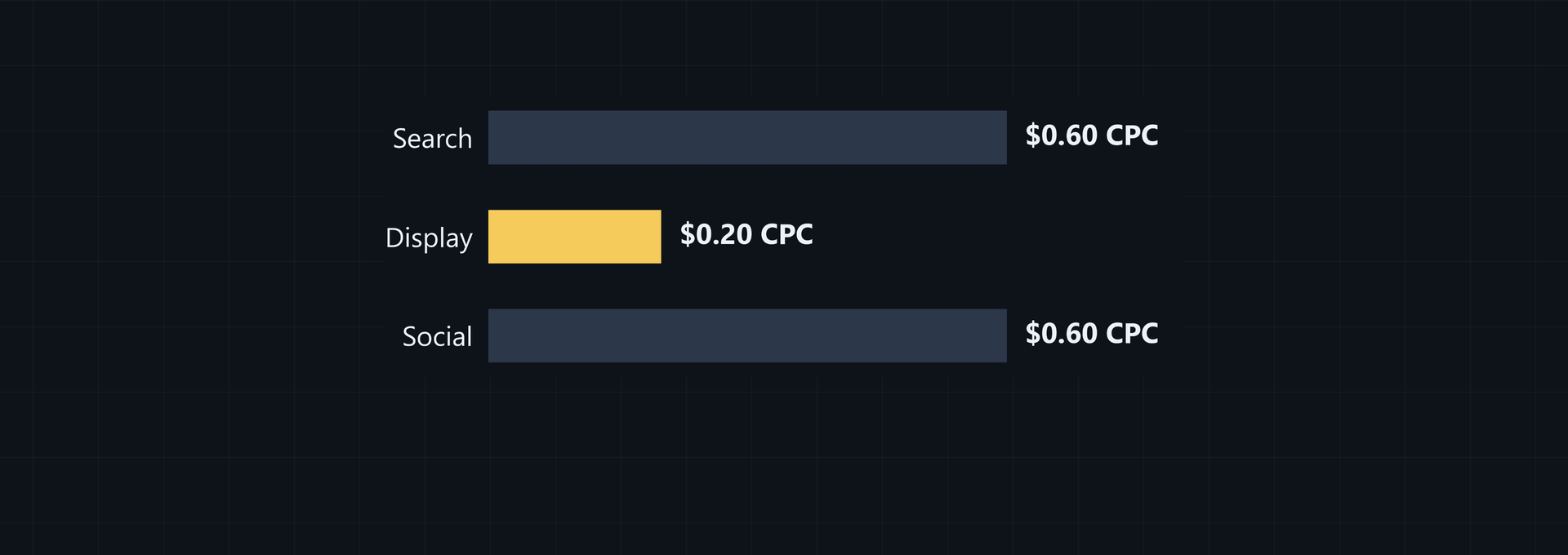
Compare CTR with benchmarks from the same network. Search ads average 3% to 5%, with top performers at 7% to 10%. Display ads average 0.05% to 0.1%, while shopping ads land at 0.8% to 1.2%, according to the network benchmarks.
| Network | CTR range |
|---|---|
| Search ads | 3% to 5% average; 7% to 10% for top performers |
| Display ads | 0.05% to 0.1% |
| Shopping ads | 0.8% to 1.2% |
That changes how you read the number. A 0.1% display CTR can sit inside the reported display range, while the same number is far below the reported search range. Don't carry a search CTR target into a display or shopping audit without changing the comparison set.

Follow that path when you check a paid campaign. These are basic PPC funnel metrics: CTR is a share of impressions, conversion rate is a share of clicks, and CPC is a currency amount, so each measure needs the same period.
Use these chosen values as an example, not a benchmark: 20,000 impressions, 400 clicks, $320 spend, and 20 conversions. Put 400 in Clicks and 20,000 in Impressions in the CTR Calculator, then choose Calculate CTR. You'll get 2%.
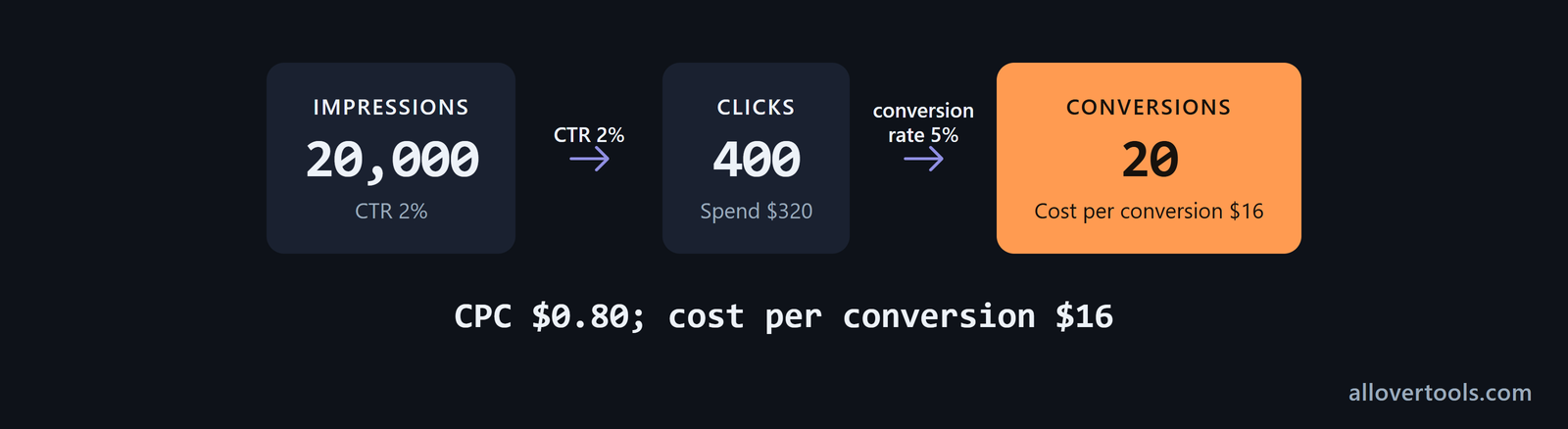
For CPC, enter $320 for spend and 400 for clicks in the CPC tool, then choose Calculate CPC. You'll get $0.80 per click. You enter a small input and get a clear answer.
For the post-click step, set Denominator type to Clicks. Enter 20 in Conversions and 400 as the matching total in the conversion tool, then choose Calculate conversion rate. You'll get 5%.
CTR = 400 / 20,000 * 100 = 2%
CPC = $320 / 400 = $0.80
Conversion rate = 20 / 400 * 100 = 5%
Cost per conversion = $320 / 20 = $16
All four values are chosen for this example, not a benchmark. CTR describes the ad's response, conversion rate describes what happened after the click, and CPC describes the spend attached to each click. Which stage needs your attention?
How CPC becomes cost per lead or sale
CPC becomes the cost of a lead or sale only after the calculation includes conversions. Define the conversion event first, whether it's a lead, sale, signup, or another chosen action, and use that definition whenever you compare costs.
CPC affects conversion cost after you pair spend per click with a conversion rate.
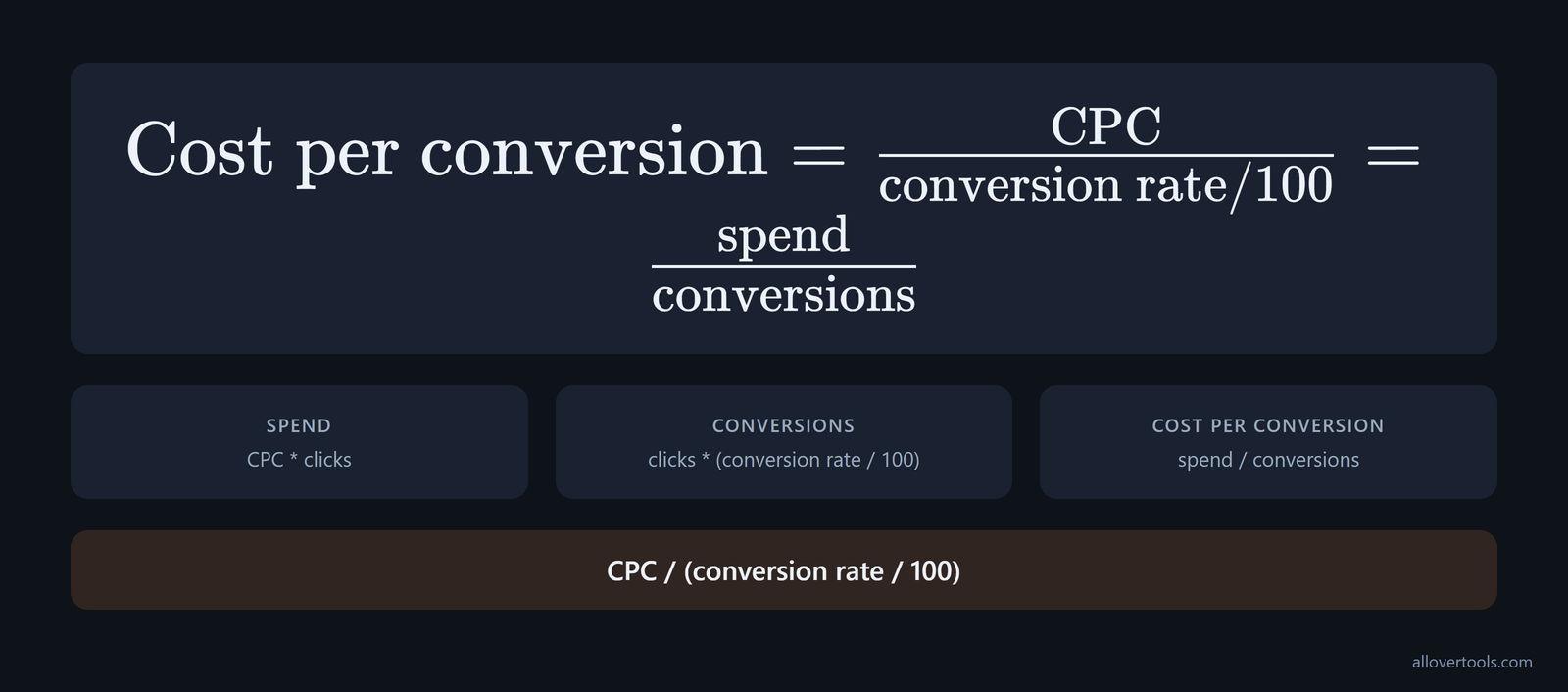
Spend = CPC * clicks
Conversions = clicks * (conversion rate / 100)
Cost per conversion = spend / conversions
Cost per conversion = CPC / (conversion rate / 100)
The cost-per-conversion formula
There are two equivalent ways to find cost per conversion. Divide CPC by the conversion-rate decimal, or divide total ad spend by conversions.
In the chosen example, 5% becomes 0.05. The first calculation is $0.80 / 0.05 = $16. The direct check is $320 / 20 = $16. If they don't agree, check the denominator.
Multiplying CPC by clicks gives total spend. Outcome cost needs that spend divided by conversions. Cost per conversion is spend split by results.
If the conversion is a lead, use cost per lead. Name a sale by its own cost.
Keep the stages separate when a lead isn't the final business result. Conversion to a lead is a microconversion. Conversion from that lead to a sale is a macroconversion, and the two metrics are different, as the funnel distinction explains.
Track click-to-lead and lead-to-sale separately. CPC and the first conversion rate can look healthy while the second stage performs poorly and raises the real cost per sale.
- Calculate CPC with Currency, Period, Total ad spend, Total clicks, and Calculate CPC inside the CPC Calculator.
- Calculate conversion rate with Clicks selected for Denominator type in the Conversion Rate Calculator.
- Convert the percentage to a decimal, divide CPC by that decimal, and compare the result with direct spend divided by conversions. You'll catch data slips here.
Run the same chain before you spend a planned budget and again after the campaign ends. Use CTR to estimate traffic from impressions, CPC to forecast spend, conversion rate to model lead or sale volume, and CPL to compare acquisition cost with sales economics, following the forecasting guide.
- Clicks = budget / CPC.
- Conversions = clicks × CVR.
- CPA = spend / conversions.
Enter the planned figures into the calculators, then compare the forecast with the actual row using the same conversion definition. The formulas show which assumption changed the volume or acquisition cost. They don't turn a benchmark into a promise.
Use the combined metrics tool when one campaign row needs to show CPC and Conv. rate together. It calculates from the figures you enter; live rates and ad-platform data sit outside this workflow.
Zero conversion rate. Cost per conversion is undefined, not zero. Zero clicks make CPC and click-based conversion rate undefined. Fix the zero denominator before you compare campaigns.
Check the platform denominator before copying a reported conversion rate into the click-based calculator. Google Ads defines conversion rate as the average number of conversions per ad interaction. It divides conversions by total ad interactions that can be tracked to a conversion in the same period, according to Google's definition. For some campaign types, that interaction count is broader than clicks.
A reported conversion rate can legitimately exceed 100% when more than one conversion action is tracked or the setting counts "Every" conversion. More than one conversion can be counted for each interaction, as Google Ads explains. Treat this as a counting-definition issue, not a broken percentage, and identify the denominator before comparing it with the article's click-based examples.
Why a high CTR can still mean expensive conversions
A high CTR measures the ad response, while the landing page and offer determine whether the click becomes the intended action.
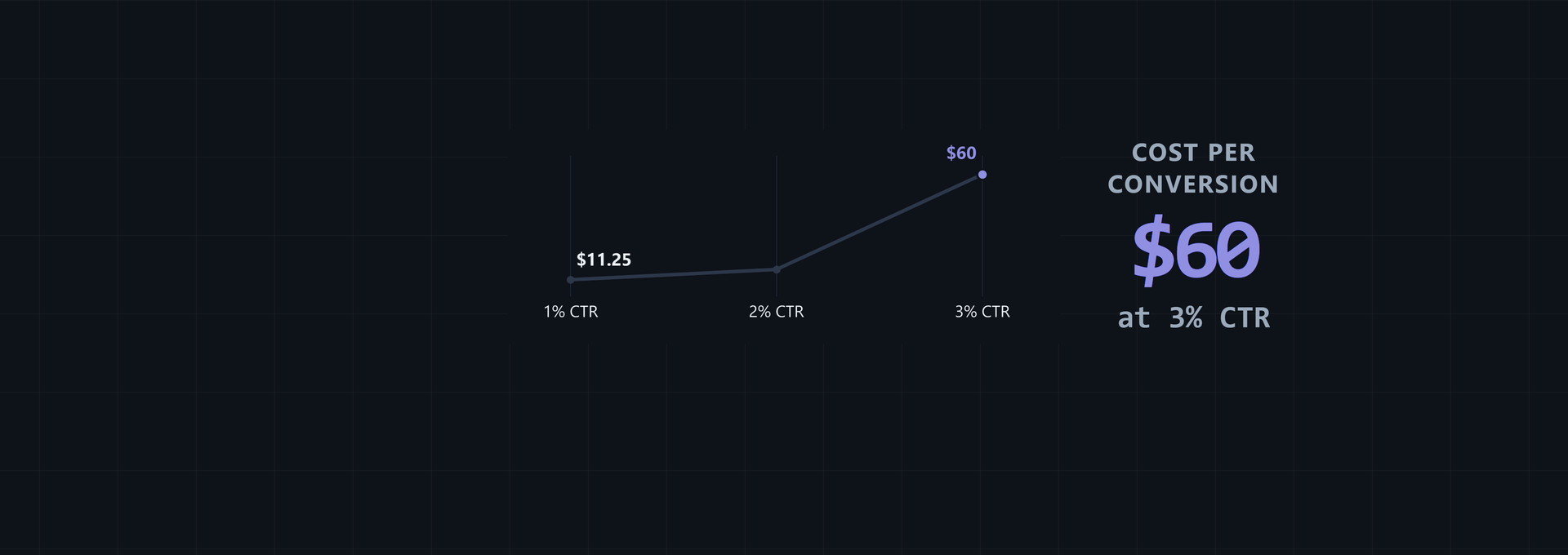
Consider this chosen high-CTR, low-conversion scenario: 20,000 impressions, 600 clicks, $360 spend, and 6 conversions. The CTR is 3%, CPC is $0.60, conversion rate is 1%, and the result is $60 per conversion.
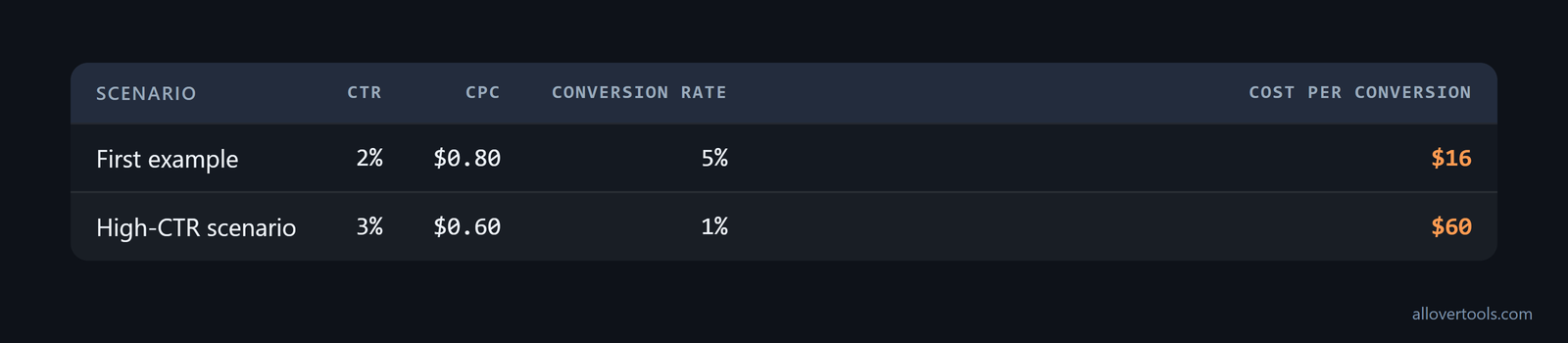
CTR = 600 / 20,000 * 100 = 3%
CPC = $360 / 600 = $0.60
Conversion rate = 6 / 600 * 100 = 1%
Cost per conversion = $360 / 6 = $60
Only 6 of the 600 clicks convert. Compared with the first chosen example, this scenario has more clicks and a lower CPC, but each conversion costs $60 instead of $16.
The 2026 Meta lead-generation benchmark gives a similar warning. Instant-form campaigns average 2.59% CTR and $1.92 CPC, while cost per lead rose 21% to $27.66 as conversion rate fell to 7.72%, according to the Meta benchmark. Check the post-click rate and CPL even when CTR and CPC look acceptable.
Similar CTRs can still produce very different lead costs when the auction and conversion rate differ. These Meta lead-campaign figures show the comparison in one view, from the industry tables.
| Industry | CTR | CPC | Cost per lead | Conversion rate |
|---|---|---|---|---|
| Restaurants & Food | 2.97% | $0.74 | $3.16 | 18.25% |
| Attorneys & Legal Services | 2.11% | $4.10 | $18.17 | 10.53% |
Read the four columns together. The CTRs are close, but CPC, conversion rate, and cost per lead measure different things. Industry economics determine what the click and conversion are costing.
Those 19,400 impressions belong to the pre-click stage, so inspect the search query and ad promise first, then check whether the landing page keeps that promise.
An ad that matches the searcher's need can draw a click and may affect CPC in an auction, while conversion still depends on the page and offer, so check the destination next.
For campaigns priced by impressions, CTR connects CPM to effective CPC. Use CPC = CPM / (CTR × 10). At a CPM of 25 rubles and a CTR of 1%, the resulting CPC is 2.5 rubles, as illustrated by the CPM example. This shows whether a lower effective CPC came from a higher click rate rather than a lower impression price.
The ad-relevance check
The ad-relevance check separates the initial response from the result after the click.
Check whether ad wording sets an accurate expectation and the audience fits the offer. Then ask whether the destination continues it, which separates ad response from post-click result. Ad relevance can influence CTR and CPC, while conversion rate depends on what happens after the click.
Match the fix to the stage instead of asking one metric to explain the whole funnel. The practical mapping in the metric guide is:
For CTR, sharpen the headline and offer, match the ad to search intent, add extensions, and tighten targeting.
For CPC, raise Quality Score, add negative keywords, lift CTR, and bid on tighter intent.
For conversion rate, improve landing-page match, shorten forms, add trust signals, and speed up the page.
To check click share, use the CTR Calculator with Clicks and Impressions. To check spend per click, use the CPC Calculator with Total ad spend and Total clicks. You'll know which stage changed before you inspect the landing page.
Why a low CTR can still produce efficient traffic
Fewer clicks come from fixed impressions. A strong post-click rate can still cut conversion cost.
Use these chosen values for a second comparison: 20,000 impressions, 200 clicks, $180 spend, and 16 conversions. The CTR is 1%, CPC is $0.90, conversion rate is 8%, and the result is $11.25 per conversion.
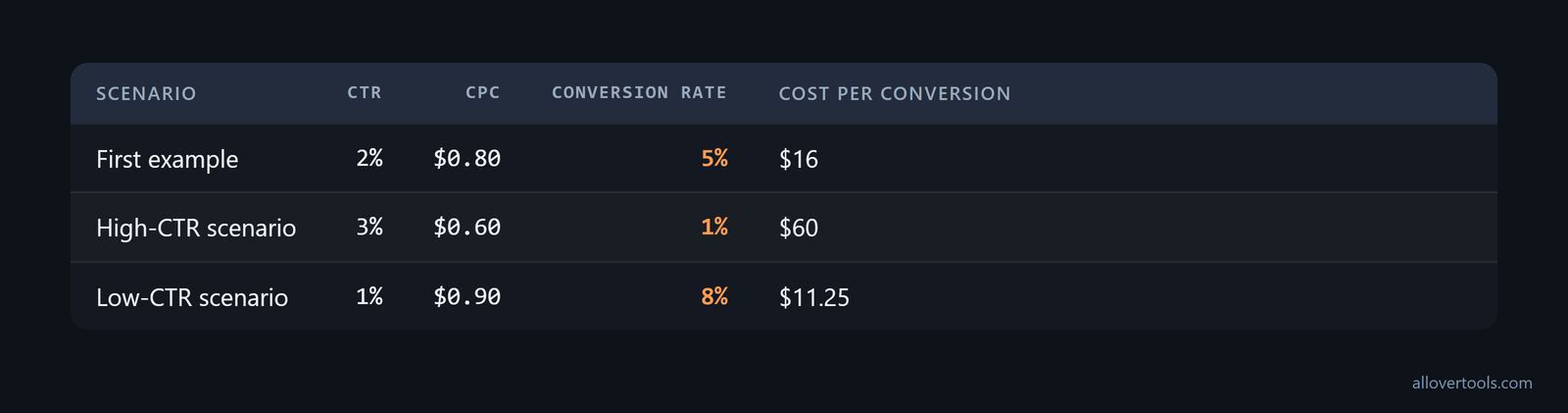
CTR = 200 / 20,000 * 100 = 1%
CPC = $180 / 200 = $0.90
Conversion rate = 16 / 200 * 100 = 8%
Cost per conversion = $180 / 16 = $11.25
This chosen scenario has a lower cost per conversion than the high-CTR scenario. A landing page can increase the share of clicks that convert when it continues the ad's promise, makes the next action clear, and removes unnecessary form or navigation friction.
Judge the landing-page result against the campaign type before calling it efficient. WebFX reports overall conversion rates of 3% to 5%, with ecommerce at 2% to 3%, B2B services at 5% to 10%, and lead-generation campaigns at 7% to 12%, in the campaign-type benchmarks. The same CPC and CTR can lead to different acceptable costs because the conversion-rate range depends on whether the campaign sells products, generates B2B leads, or drives general inquiries.
Looking at CPC and CTR without conversion rate leaves out the post-click result. A low click share doesn't tell you whether the clicks are valuable. What did the click buy you?
If the page weakens the match or hides the action, conversion rate falls and the cost for the chosen outcome rises even when CPC is unchanged. Keep the conversion definition and period the same when you judge a page change.
The landing-page check
The landing-page check asks whether the same click volume produced the same kind of conversion during the same period.
Here, 16 / 200 = 8%, and $180 / 16 = $11.25. Keep impressions, clicks, conversions, spend, and the conversion definition aligned to one period before you attribute a change to the page.
Set Denominator type to Clicks, enter 16 in Conversions and 200 as the matching total in the conversion checker. If spend or clicks changed, recalculate CPC before you compare the resulting cost.
How to audit the funnel one variable at a time
Audit the funnel with one campaign row first. Calculate its metrics, change one input, and calculate again. You change one input at a time.
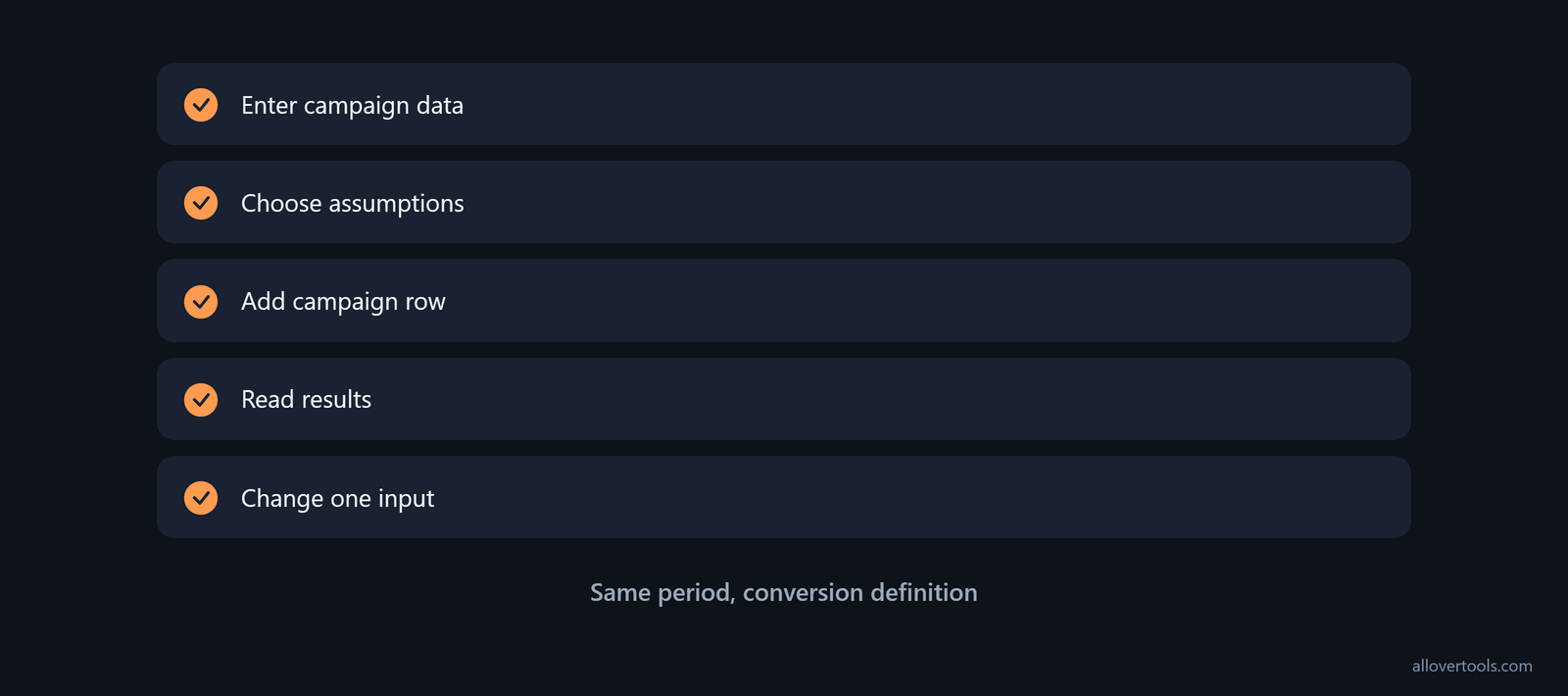
- Enter a Campaign name and the visible fields Spend, Impressions, Clicks, Conversions, and Revenue in the metrics row tool.
- Choose Currency and Attribution assumption, then choose Calculate metrics.
- Choose Add campaign row for a second scenario, enter its values, and calculate again.
- Read Results for CPC, CTR, and Conv. rate. Read Numerators and denominators for the values behind each result.
- Change one input, label the scenario, and compare it with the same period and conversion definition. Don't move the goalposts mid-check.
The tool calculates CPC as Spend / Clicks, CTR as Clicks / Impressions * 100, and Conv. rate as Conversions / Clicks * 100. A zero denominator displays as N/A.
Currency changes the display only. Attribution assumption records the model already reflected in the entered figures; conversion assignment sits outside this calculation. You'll use the figures you enter for arithmetic.
What to change first
Change the input that matches the stage where the numbers moved. CPC points to spend per click, CTR points to click volume from impressions, and conversion rate points to post-click results. Which number moved first?
Tie the decision to business output. CTR is engagement, not revenue, and CPC shows auction pressure rather than performance by itself. A high CPC can reflect a competitive auction, stronger intent, or weak Ad Rank, as the benchmark guidance explains.
- Don't read high CTR as profitable traffic.
- A cheap click isn't automatically a good click.
- Check conversion rate and cost per lead before you call a row the winner.
That final check is also the practical advice in the practitioner guidance. Focusing too much on CPC can produce cheaper clicks that don't convert, so read conversion rate and cost per lead in relation to CPC.
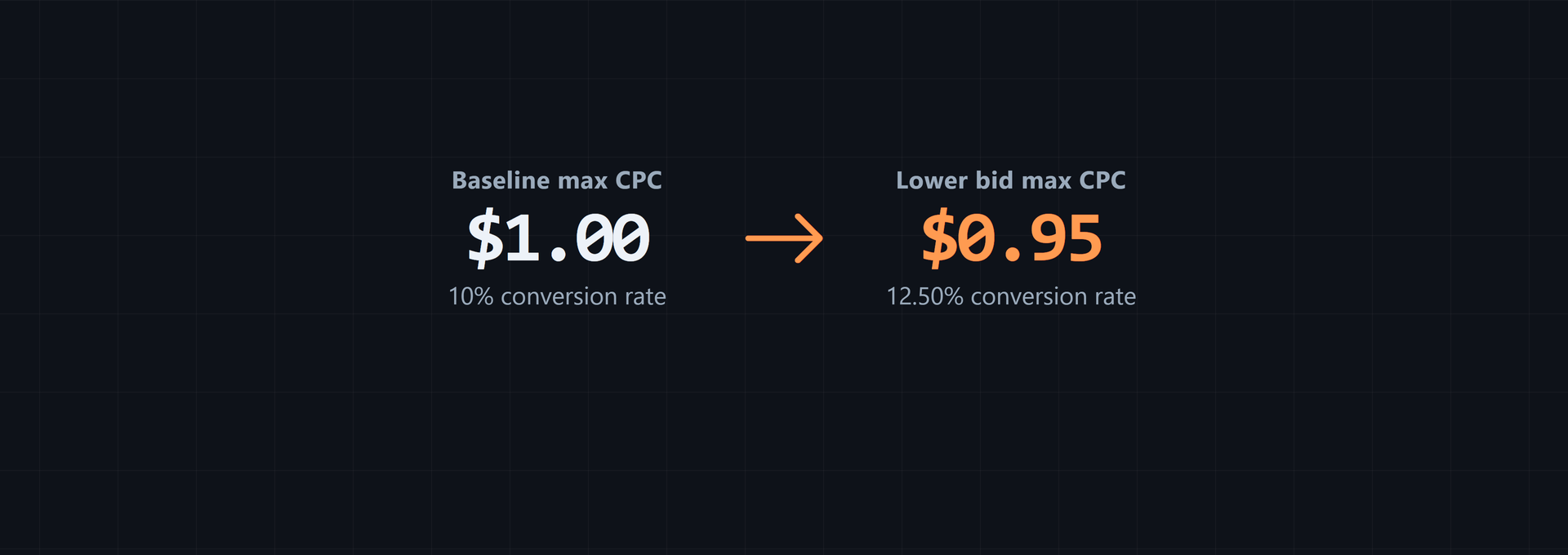
These are chosen arithmetic examples, not forecasts or benchmarks. With 400 clicks and 20 conversions, changing CPC changes both spend and the result per conversion, so you can isolate the effect of that one input.
$0.60 CPC -> $240 spend -> $12 per conversion
$1.00 CPC -> $400 spend -> $20 per conversion
With 20,000 impressions, $320 spend, and a 5% conversion rate, changing CTR changes the click count. You'll see the downstream figures move with it.
2% CTR -> 400 clicks -> $0.80 CPC -> 20 conversions -> $16 per conversion
3% CTR -> 600 clicks -> $0.5333 CPC -> 30 conversions -> $10.67 per conversion
With 400 clicks and $0.80 CPC, changing the post-click rate changes the conversion count. Your spend stays put.
5% conversion rate -> 20 conversions -> $16 per conversion
8% conversion rate -> 32 conversions -> $10 per conversion
Change one cell at a time so the next calculation has a clear cause. Change several inputs together and you'll lose the trail, because no single number can claim the result.
Repeat the check after each single input change.
What the combined calculator can and cannot tell you
The combined calculator shows the arithmetic and how it handles zero denominators. Traffic quality, attribution validity, ad relevance, and landing-page causes need separate checks.
Choose the next diagnostic step from the stage where the number changed. A CTR change points toward the query and ad promise. A conversion-rate change points toward the landing page or conversion counting. A CPC change points toward spend and click volume.
For this calculator workflow, the tool-specific code has no fetch, XMLHttpRequest, sendBeacon, or form post carrying the entered calculator values, so these calculations stay in the browser. That limit applies to this workflow, not unrelated page features.
Frequently asked questions
How do CPC, CTR, and conversion rate work together?
CTR turns impressions into clicks, CPC assigns spend to each click, and conversion rate turns clicks into leads or sales. Together they determine spend per conversion through CPC / (conversion rate / 100).
What is the formula for cost per lead from CPC?
Divide CPC by the conversion rate written as a decimal. For example, $0.80 CPC and a 5% conversion rate produce $0.80 / 0.05 = $16 per lead or sale.
Can a high CTR still have a low conversion rate?
Yes. A relevant-looking ad or broad promise can attract clicks that don't match the offer or landing page. In the chosen example, a 3% CTR and 1% conversion rate produce $60 per conversion.
How does a landing page affect CPA?
The landing page affects the share of clicks that complete the chosen conversion. With spend and clicks fixed, a lower conversion rate means fewer conversions and a higher cost per acquisition, while a higher rate lowers that cost.
Which calculator should I use for CPC, CTR, and conversion rate?
For CPC, enter Total ad spend and Total clicks with the CPC Calculator. Use the CTR Calculator for Clicks and Impressions, the Conversion Rate Calculator for Conversions and a denominator, and the Marketing Metrics Calculator for the three campaign metrics in one row.