
Gross vs net burn gives two views of the same cash picture. Gross burn shows the full monthly cost of operating before inflows. Net burn subtracts collected cash revenue and shows the shortfall when the result is positive. Reading both figures together separates the spending requirement from the cash pressure that affects runway.
What gross burn rate measures
The total cash operating expense for a selected period is the gross burn rate, converted to a monthly amount when needed. It includes outflows such as payroll, rent, and tools. Revenue and other cash inflows stay out of this calculation.
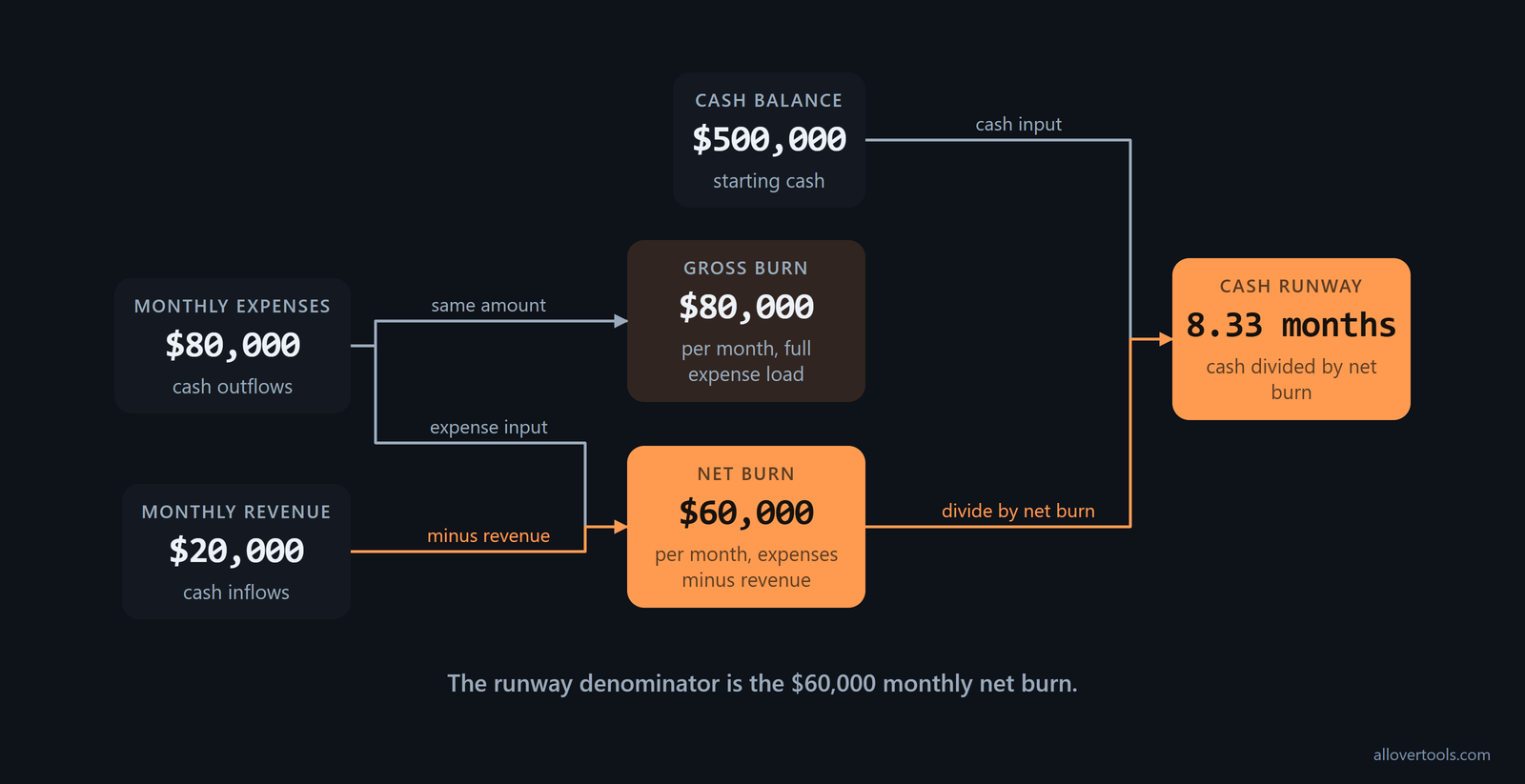
That makes it a worst-case spend view. It answers how much the company would need to fund if incoming cash did not offset expenses. It is not the same as a fall in the cash balance. If a company spends $80,000 and collects $20,000 in the same month, its gross burn is $80,000 and its cash shortfall is $60,000.

Gross burn = monthly expenses
The formula is simple: Gross burn = Monthly expenses.
Gross burn = Monthly expensesMonthly expenses means cash operating expenses for one matching period. A monthly input is already in the right unit. A quarterly or other period amount must be converted to a monthly value first.
Revenue does not reduce this expense figure. It remains useful when revenue exists because it keeps the full spending requirement visible for funding and cost-control decisions.
What net burn rate measures
Net burn rate is monthly cash expenses minus monthly cash revenue collected in the same period.
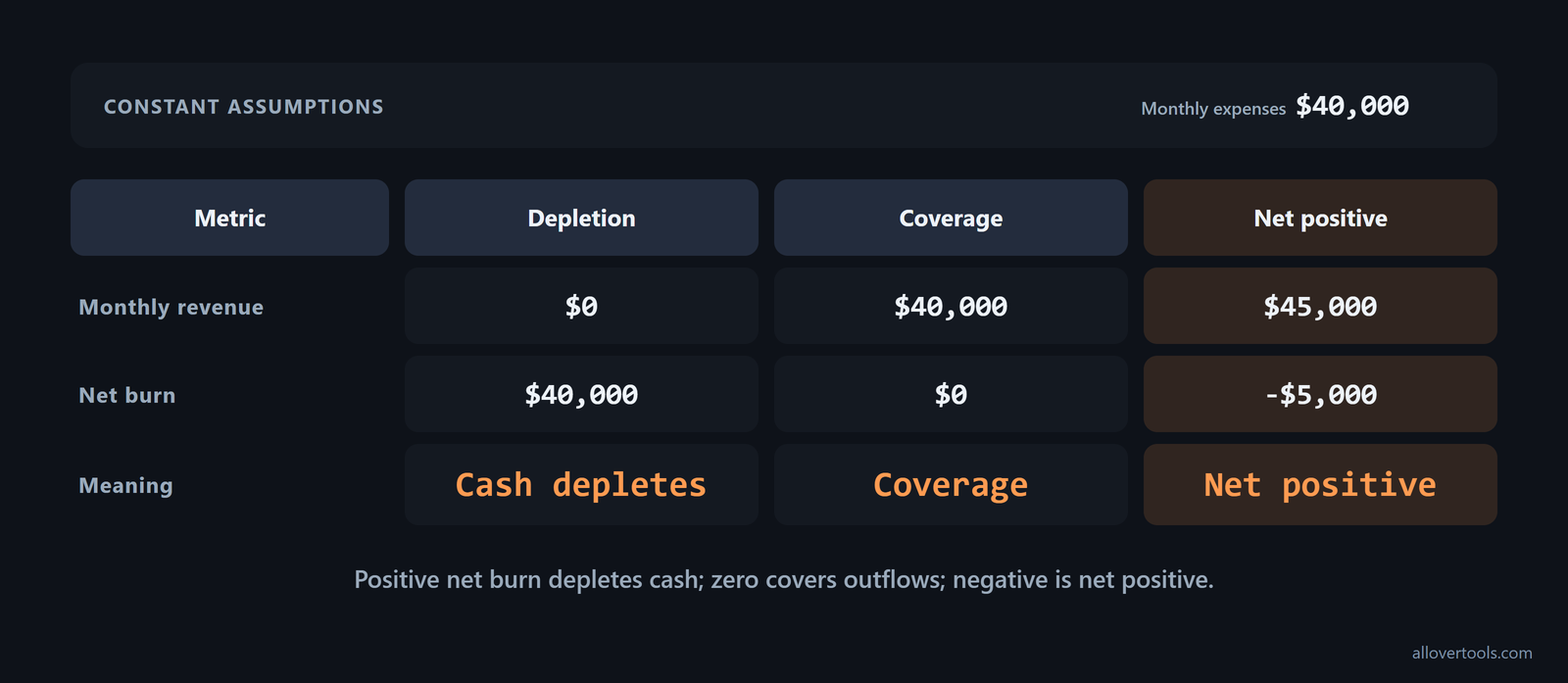
Net burn = Monthly expenses - Monthly revenueA positive result means cash is being depleted. Zero means inflows cover outflows. A negative result means revenue exceeds expenses, so cash is growing under this calculation. The calculator labels that result as net positive and does not treat it as a positive cash-burn amount.
Revenue and expenses must cover the same period before subtraction. One month of revenue paired with one quarter of expenses mixes two different cash periods. For a pre-revenue company, revenue is zero, so net burn equals gross burn. The same figure can then be used for monthly cash needs and runway.
The cash burn vs net burn distinction is the inflow offset. Net burn includes collected revenue; gross burn leaves the complete expense amount in view.
Use cash activity, not accounting profit, as the starting point for burn. Leave out non-cash charges such as depreciation and stock-based compensation, revenue earned but not collected, and financing flows such as equity raises and loan proceeds. Reconcile the figures against the operating section of the cash flow statement, not the accrual income statement or financing section, as this cash-burn guidance sets out.
Revenue in a monthly net-burn input is not limited to product sales. It can include sales income, rentals, royalties, interest, and other income, according to this revenue definition. Count those streams when they belong to operating cash, and leave financing inflows out.
Net burn includes cash inflows
Put revenue and expenses into the same monthly unit, subtract revenue from expenses, and read the sign of the result.
- Normalize revenue and expenses to the same monthly unit.
- Subtract monthly revenue from monthly expenses.
- Interpret the sign: positive is cash depletion, zero is coverage, and negative is net positive.
For a pre-revenue company, $40,000 of monthly expenses minus $0 of revenue gives $40,000 of net burn, the same as gross burn. If revenue and expenses are both $40,000, net burn is $0. If revenue is $45,000 and expenses are $40,000, the result is -$5,000, which means revenue exceeds expenses in the simple calculation.
When the cash balance is reliable, use this as a second check: Net burn = (Starting cash balance - Ending cash balance) / Number of months. For monthly accounts, you can also subtract total monthly revenue from total monthly expenses. Compare the two methods when you reconcile bank movements, as this cash-balance formula describes.
When to use gross burn or net burn
Use gross burn to inspect the operating spend base, estimate funding needed without inflows, or build a worst-case cash-planning view. Use positive net burn when the question is how quickly the current cash balance is shrinking and how long it may last.
Some readings can cause trouble. The full expense load is not automatically the monthly cash loss when revenue is collected. Net burn does not replace a review of total expenses. A low net burn can reflect strong inflows while the expense base remains high.
A pre-revenue company has no inflow offset, so gross and net burn are equal. Once revenue exists, read the figures together. Start with the cost load, then check revenue and net burn for cash pressure. Use positive net burn with the current cash balance for runway.
Let the decision determine the metric. Gross burn shows the fixed cost base and how much the company is carrying; net burn shows how the path to profitability changes as revenue moves, as this burn-rate comparison summarizes. Use gross burn for a hiring freeze or cost review. Put net burn beside it for pricing or revenue-growth work.
Net burn is usually the more useful figure in investor and operating discussions because it shows the cash loss after inflows. Put it first in pitch decks and board discussions, but show gross burn beside it. Otherwise, a lower net figure can look like a smaller spending base, as this investor guidance explains.
Gross burn is the worst-case spend view
For funding and cost control, ask what the operating spend would require if no incoming cash offset it. The answer is the selected period's cash expenses, including payroll, rent, and tools. A rising expense amount remains visible even when revenue rises.
Collected revenue changes the cash shortfall, not the expense load. Monthly expenses of $80,000 and monthly revenue of $20,000 produce $80,000 of gross burn, but the cash shortfall from those inputs is $60,000.
Before comparing gross-burn figures, check what each report counts. Some practitioners and data providers include all operating expenses, capital expenditures, and other cash outflows, not just operating expenses. That wider version may include interest and taxes. Reconcile the scope first, then decide whether the two figures actually disagree; this gross-burn definition shows the wider treatment.
Net burn is the runway view
Positive net burn fits a cash-runway calculation because it represents monthly cash depletion under the selected inputs. Keep the expense figure beside it. Revenue can lower net burn while total expenses continue to rise, and the two figures make that difference visible.
Board reports and burn multiple calculations use net burn too. Keep the same convention from one period to the next when you report runway, board metrics, or cash burned for each unit of new recurring revenue; this founder reporting guidance groups those uses together.
Some finance references use a gross-margin version of net burn instead of subtracting total revenue from expenses: (Monthly Revenue - Cost of Goods Sold) - Gross Burn Rate = Net Burn Rate. It can produce a different result from the calculator's expenses-minus-revenue method. Before comparing figures, check which definition the board, investor, or tool uses, as this gross-margin formula shows.
Track net burn changes over time
A single net-burn figure cannot tell you whether cash performance is getting better or worse. Calculate it for one period, such as the last quarter, then compare that period with a second one using the same inputs and convention. One published change metric is: Sum(Net Burn in First Time Period) - Sum(Net Burn in Second Time Period) / Sum(Net Burn in First Time Period). Report the result as a percentage so the board update shows both the direction and size of the change, not just the latest monthly amount. Use this burn-change formula to report the trend.
Worked example: calculate both metrics from one month
The values below are chosen for illustration, not a benchmark or reported company data. Enter the same monthly data in the Burn Rate Calculator to inspect its formula and assumptions output. The calculator does the arithmetic locally in the browser from entered values. It does not fetch live financial data or upload the visitor's figures.
Inputs chosen for the example
- Current cash balance: $500,000
- Revenue for this period: $20,000
- Total expenses for this period: $80,000
- Period for revenue & expenses below: Monthly
These are chosen values, not a benchmark or reported company data. Monthly uses 12 periods per year, so the factor is:
Monthly factor = 12 / 12 = 1Gross burn, net burn, and runway
Normalize the entered values first:
Monthly revenue = $20,000 x 1 = $20,000
Monthly expenses = $80,000 x 1 = $80,000
Then apply the burn formulas:
Gross burn = $80,000 per month
Net burn = $80,000 - $20,000 = $60,000 per month
Cash runway = $500,000 / $60,000 = 8.333333333333334 months
Displayed to two decimals: 8.33 months
The $80,000 result is the full cash expense load. The $60,000 result is the chosen-month cash shortfall after the chosen $20,000 inflow. The runway figure is an arithmetic estimate from these inputs; it does not predict later cash behavior.
Average several months when one month has an unusual spend or revenue pattern. In this three-month example, quarterly operating expenses are £340,000 and revenues are £250,000, leaving a quarterly loss of £90,000. Divide by three to get average monthly net burn of £30,000: £340,000 - £250,000 = £90,000, then £90,000 / 3 = £30,000 per month. Compare that figure with a single-month result when the period is volatile, as this three-month example demonstrates.
How the calculator normalizes a reporting period
Revenue for this period and Total expenses for this period must cover the same period. The Burn Rate Calculator converts each entered amount to a monthly value before calculating gross burn, net burn, and runway.
Match revenue and expenses before normalizing
For either entered amount, the monthly-normalization formula is:
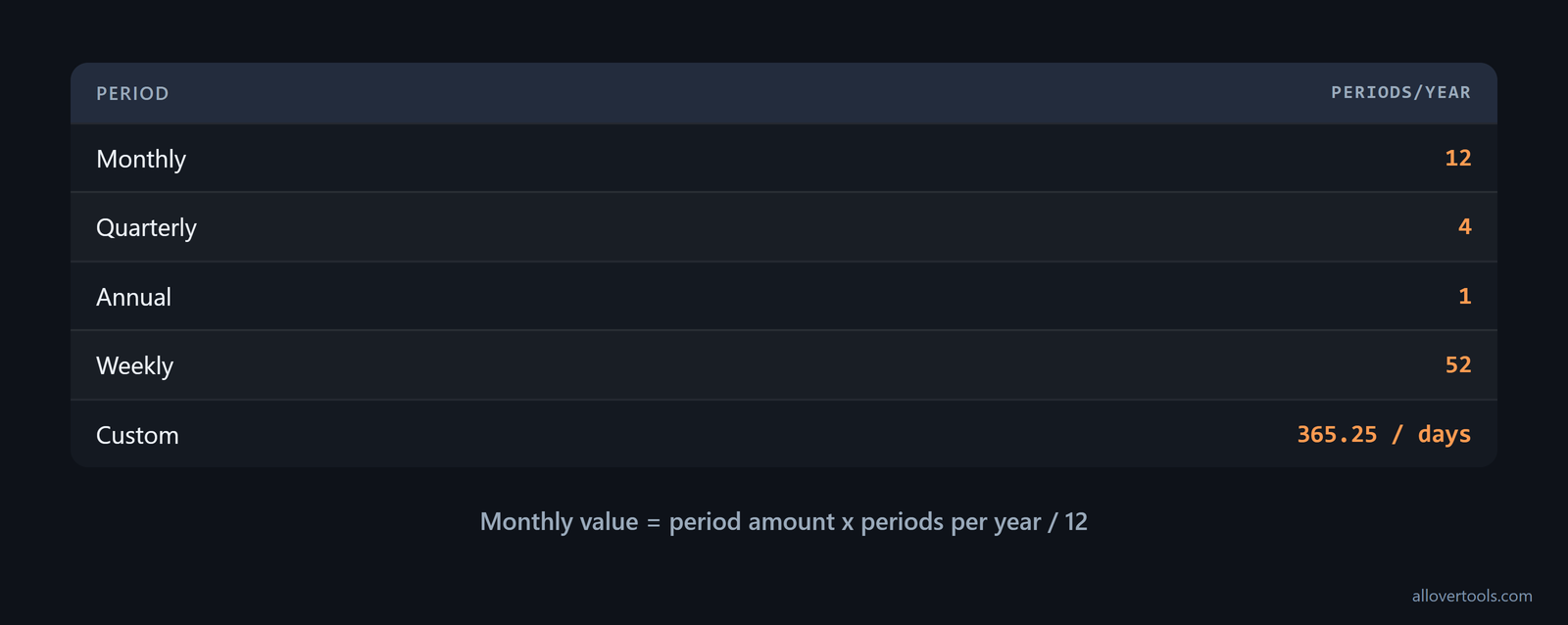
Monthly value = entered period amount x periods per year / 12The visible Period for revenue & expenses below choices use these periods per year:
- Monthly: 12
- Quarterly: 4
- Annual: 1
- Weekly: 52
The Custom period length... path uses the visible Days per period control. Its factor is 365.25 divided by days per period, and the tool requires a whole number of at least 1 for that field. Currency symbol changes the displayed label only; it does not convert values or apply an exchange rate.
Do not pair one month of revenue with one quarter of expenses. Normalization changes the unit, but it cannot make inputs from different cash periods comparable.
Do not use one noisy month as the planning figure when spending moves around. Startups usually track net burn monthly, but early-stage spending can vary a lot from month to month. Add operating expenses and revenues across three, six, or twelve months, calculate the total loss, and divide by the number of months for a smoother average, as this averaging practice recommends.
Payroll timing is another reason to use a trailing average. With biweekly payroll, two months each year contain three paychecks, which can make gross and net burn look artificially high for one calendar month. Calculate burn for each of the last three months, add the figures, and divide by three for reporting and runway planning; this trailing-average guidance identifies the distortion.
Use positive net burn to estimate cash runway
The basic formula is:
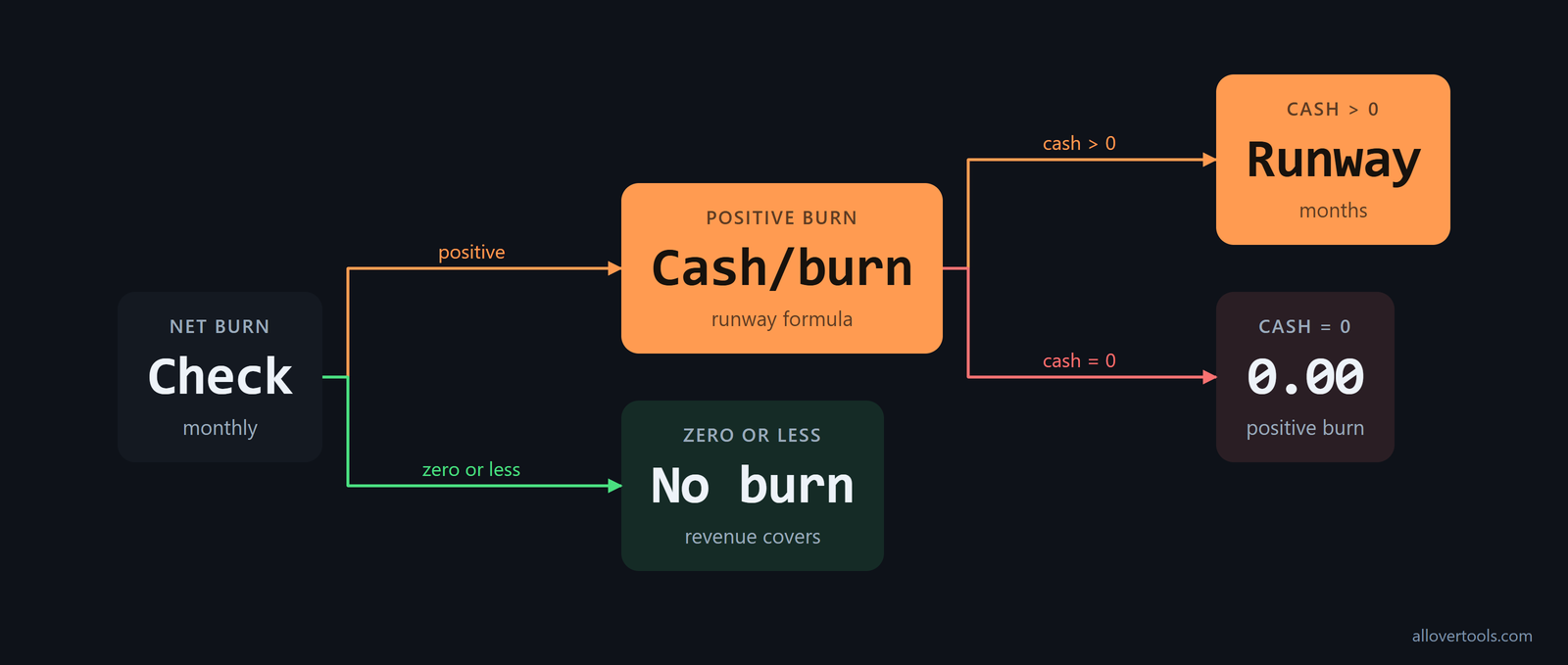
Cash runway (months) = Cash balance / Net burn rateUse it only when net burn is positive. If net burn is zero or less, the calculator shows "Not burning cash (revenue covers or exceeds expenses)". If cash balance is zero and net burn is positive, it shows 0.00 months.
This estimate assumes normalized revenue and expenses stay constant. It does not model seasonality, one-time charges, financing events, or later changes in spending and revenue. The result is an arithmetic estimate, not a complete forecast.
Runway formula and edge cases
Positive net burn is the denominator because it represents monthly cash depletion. A zero or negative denominator does not describe depleting cash, so the calculator uses its not-burning-cash message instead. A positive denominator with zero cash leaves no cash period to cover, which produces 0.00 months.
When a month-by-month projection is needed
For changing monthly inputs, use the Cash Runway Calculator. Its supported inputs include monthly revenue, monthly expenses, optional monthly revenue and expense growth rates, and a projection length. Each month updates ending cash with:
Cash(m) = Cash(m-1) - Net burn(m)The result uses the first month whose ending cash reaches or falls below zero. When net burn is positive, it interpolates the depletion timing within that month. Use gross burn to stress the spending requirement and net burn to estimate current cash depletion, then revisit both when the assumptions change.

Frequently asked questions
What is the difference between gross burn and net burn?
Gross burn is total monthly cash expenses before revenue is offset. Net burn subtracts monthly cash revenue from monthly expenses, so a positive result shows the cash shortfall.
How do you calculate net burn rate?
Normalize revenue and expenses to the same month, then use Net burn = monthly expenses - monthly revenue. For a pre-revenue company, revenue is zero, so net burn equals gross burn.
Should a pre-revenue startup use gross burn or net burn?
Use gross burn to see the full operating spend and net burn to estimate cash depletion. Before revenue begins, both figures are the same. Pair the burn figure with the current cash balance when assessing runway.
Can net burn be negative?
Yes. If normalized revenue exceeds normalized expenses, net burn is negative, so the simple calculation shows cash growing rather than burning. The calculator labels this net positive and does not produce a depleting-cash runway.
How many months of runway does net burn give you?
Divide current cash balance by positive monthly net burn. The result assumes constant revenue and expenses and does not account for changing inputs or one-time cash events.