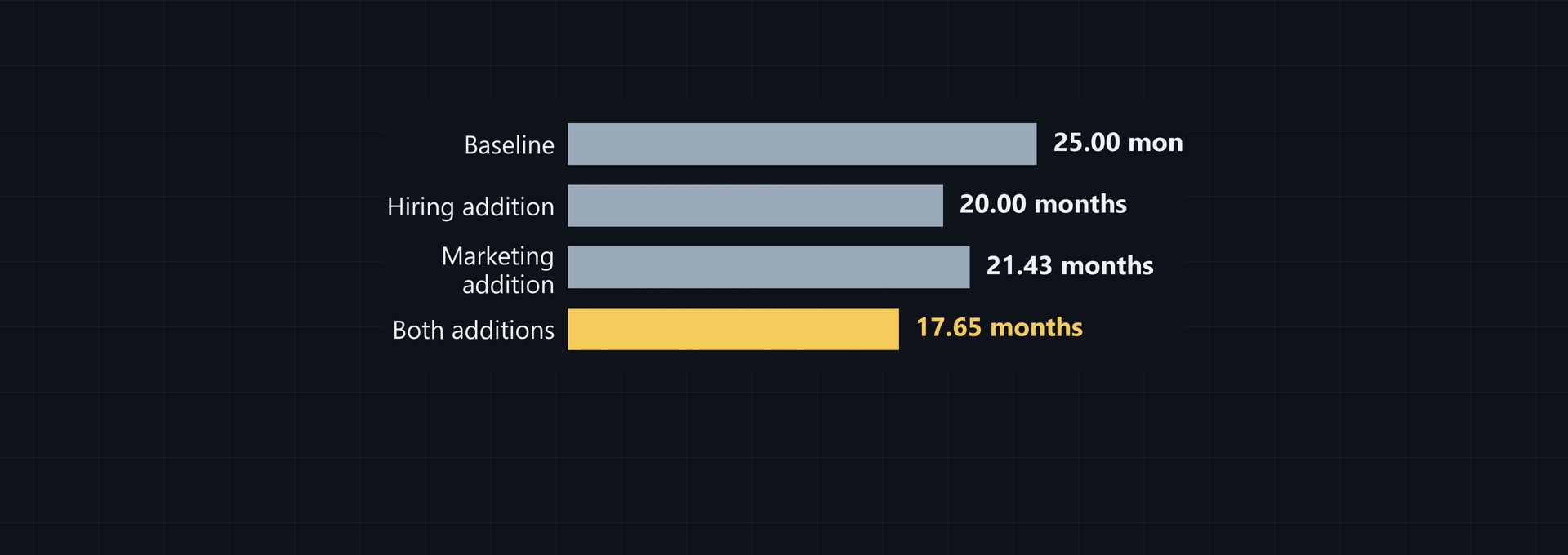
Use net burn rate cash runway math with the cash assumption you want to test. Gross burn counts monthly cash operating expenses without an inflow offset. Net burn subtracts operating cash collected in the same period. Use net burn for the operating view, and gross burn for a labeled no-inflow downside view.
Gross burn vs net burn: what each rate measures
Gross burn is total monthly cash operating expenses, with no operating inflow offset. Net burn is gross burn minus operating cash collected in the same period.
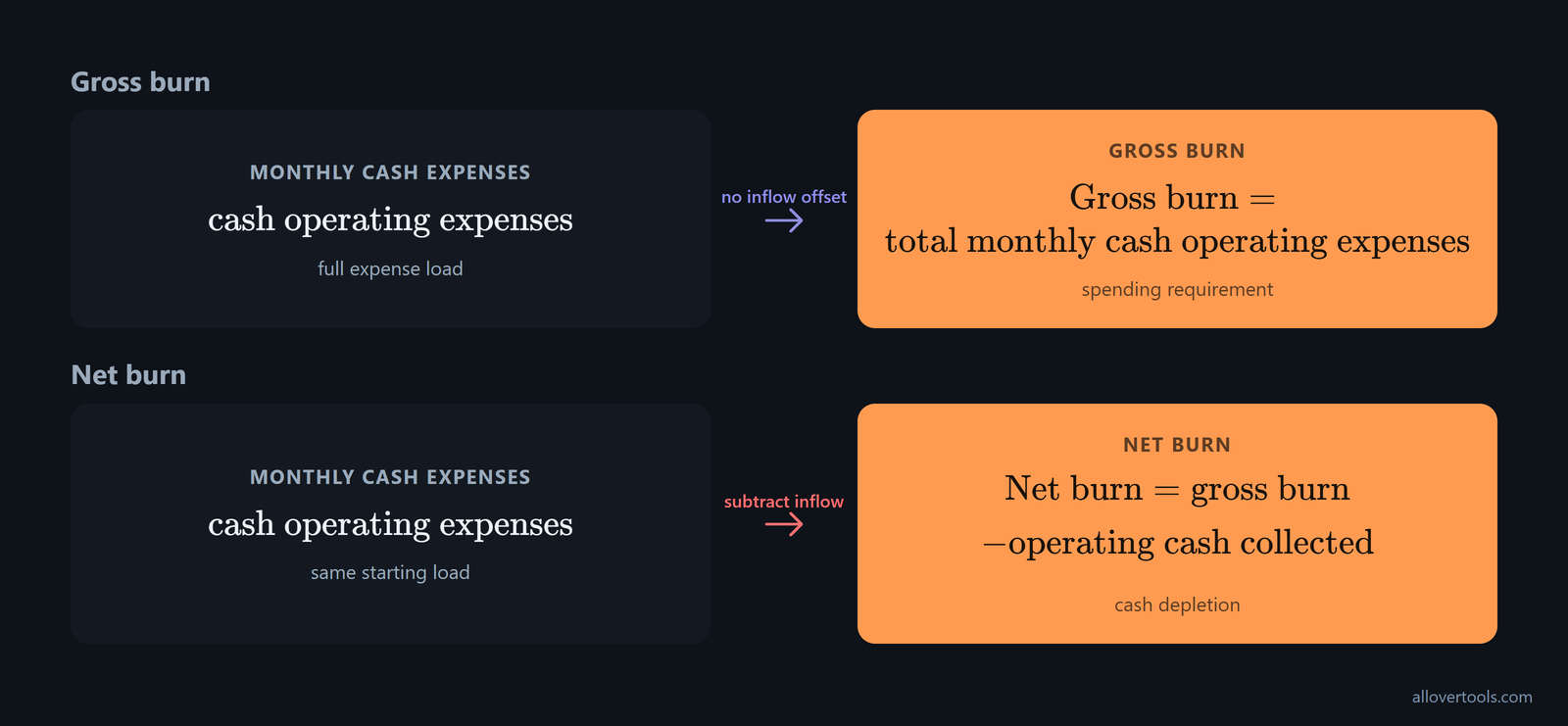
Both rates are monthly after normalization. The unit matters. Gross burn shows the spending requirement. Net burn shows how quickly cash is depleted under the stated inflow assumption.
If you need the expense load by itself, use gross burn. If you want operating collections included in the runway, use net burn. Label the assumption beside each rate so the reader doesn't have to infer it.
The net burn rate definition is simple, but the cash basis still matters. Recognized revenue isn't a substitute for cash collected from operations. Financing proceeds aren't operating cash collected either, so you don't include either one in the subtraction.
Some reports use an all-in cash-flow convention and count common cash inflows such as investor funds, sales, and loans. A funding round or loan can temporarily reduce reported net burn or even reverse it. If you share this figure with investors or a board, label it separately from operating net burn, as Brex's cash-flow definition describes.
If you are measuring total cash depletion rather than core operating economics, use net burn = total monthly cash outflows - total monthly cash inflows. This broader version can help when accounting categories are messy. To show what drove the result, separate operating, investing, and financing flows, following Mercury's cash-flow formula.
The dollar amount is only part of the picture. Bench's example divides a monthly operating loss of -$1,500 by $50,000 of initial cash invested: -$1,500 / $50,000 = 0.03, or 3% after multiplying by 100. Use the percentage alongside the dollar figure to show how quickly the starting capital is being eroded. Keep the cash denominator beside it, as Bench's percentage example demonstrates.
The Burn Rate Calculator shows both rates beside the cash runway, which makes the assumption easier to check.
Calculate gross and net burn on the same period
Enter the cash balance. Match the revenue and expense periods. Then run the calculation. This catches the common unit error before the formulas matter.
- Enter Current cash balance.
- Choose Period for revenue & expenses below.
- Enter Revenue for this period and Total expenses for this period.
- Choose Currency symbol if you want a different displayed label.
- Select Calculate burn rate.
The formulas are:
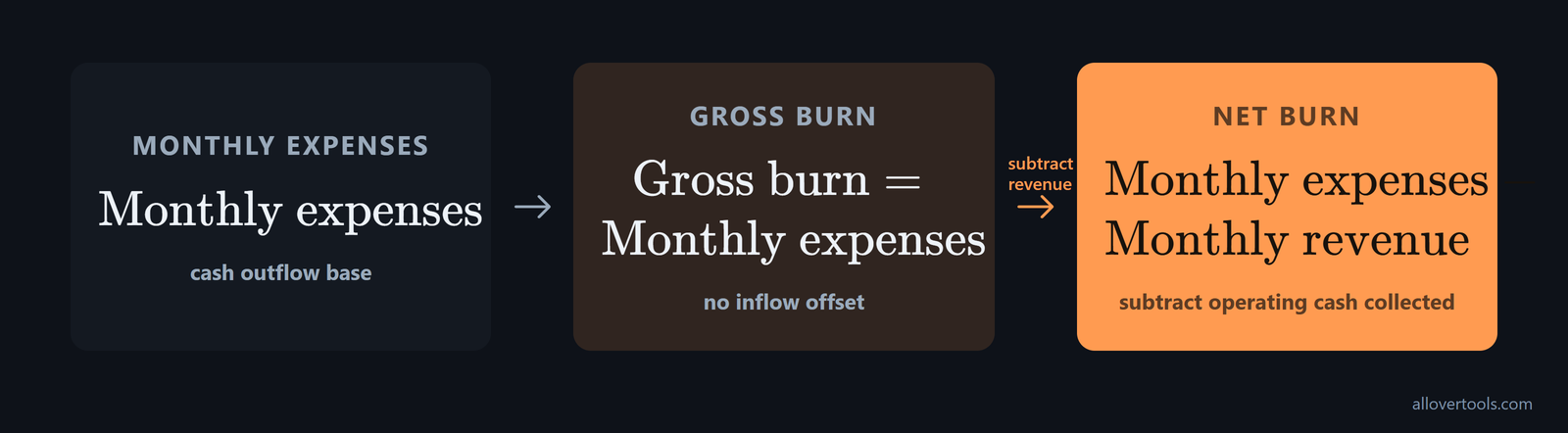
Gross burn = monthly expenses
Net burn = monthly expenses - monthly revenue
The gross burn monthly cash expenses figure is the normalized monthly expenses amount. Operating cash collected isn't offset against it.
Net burn has two common calculations, so choose based on the data you have. If opening and closing balances are reliable but period-by-period accounting is incomplete, use (Starting cash balance - Ending cash balance) ÷ Number of months. If monthly accounting is in place, use Total monthly expenses - Total monthly revenue; Bluevine's two-formula guide sets out both conventions.
The balance-change method shows historical cash loss, not necessarily pure operating burn. It includes all cash movements between the two dates, so remove financing and one-off cash flows when you need operating burn, as Ordio's burn calculator explains.
Monthly, Quarterly, Annual, and Weekly inputs use 12, 4, 1, or 52 periods per year. The calculator applies the matching monthly factor to both entered amounts before subtracting revenue from expenses, so a quarterly amount doesn't get compared directly with a monthly amount.
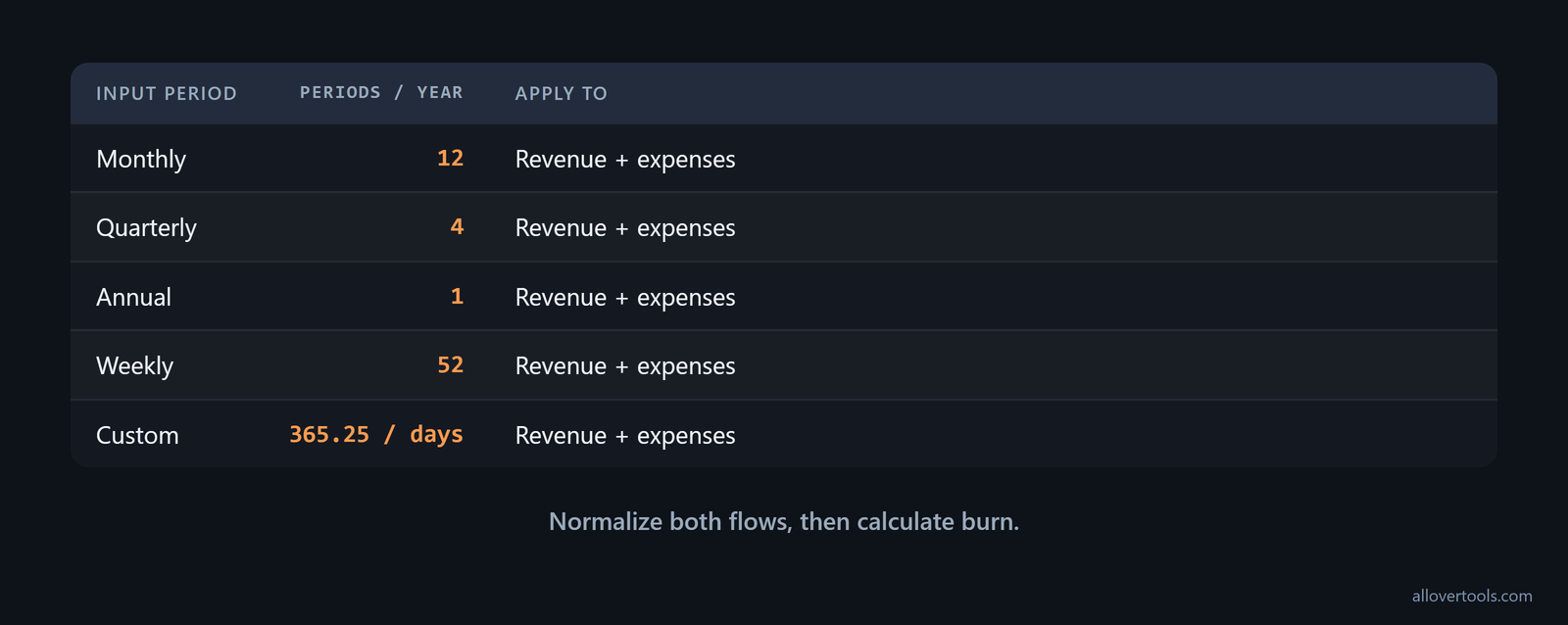
For Custom period length…, the periods-per-year value is 365.25 / Days per period. Both flows receive that factor before the monthly calculation. If you change the period, you'll need to enter both flows for that period, because the new period changes both normalized monthly amounts before the subtraction.
Currency symbol changes the displayed label only. It doesn't change the values or apply an exchange rate. Missing, invalid, non-finite, or negative cash, revenue, and expense values prevent a result.
The result fields are Gross burn rate (per month), Net burn rate (per month), and Cash runway. An assumptions table shows the inputs and monthly values. You can also use Copy result or Download result (.txt) to take the calculation elsewhere.
With a bank export, use this order so cash movements stay in the right categories:
- For each month, total the operating cash outflows, including payroll, vendor payments, and rent.
- For each month, total the operating cash inflows, including customer payments and subscriptions.
- Set gross burn to that month's outflows; set net burn to outflows minus inflows.
- Average the monthly figures over several months to account for volatility. Mercury's bank-data method sets out this four-step workflow.
This turns raw transactions into a repeatable rate even when accrual accounting is incomplete. If the export also contains investing or financing activity, keep the operating-only result separate from the all-in cash-flow result.
Keep the revenue and expense periods matched
Revenue and expenses must cover the same period before either burn rate is calculated.
Quarterly revenue can't be subtracted directly from monthly expenses because the units differ. The calculator converts both entered amounts to monthly values first, then computes gross burn and net burn. You need the same unit on both sides of the subtraction. Keep units aligned.
Check that Current cash balance means current cash and cash equivalents. It isn't total assets or revenue. Cash is held now. Revenue is a flow during a period.
Are your revenue and expense figures on the same period? Check that before you inspect the runway. Then confirm that the cash balance is available now.
Calculate cash runway with net burn
Cash runway with net burn equals cash balance divided by positive net burn rate, in months.
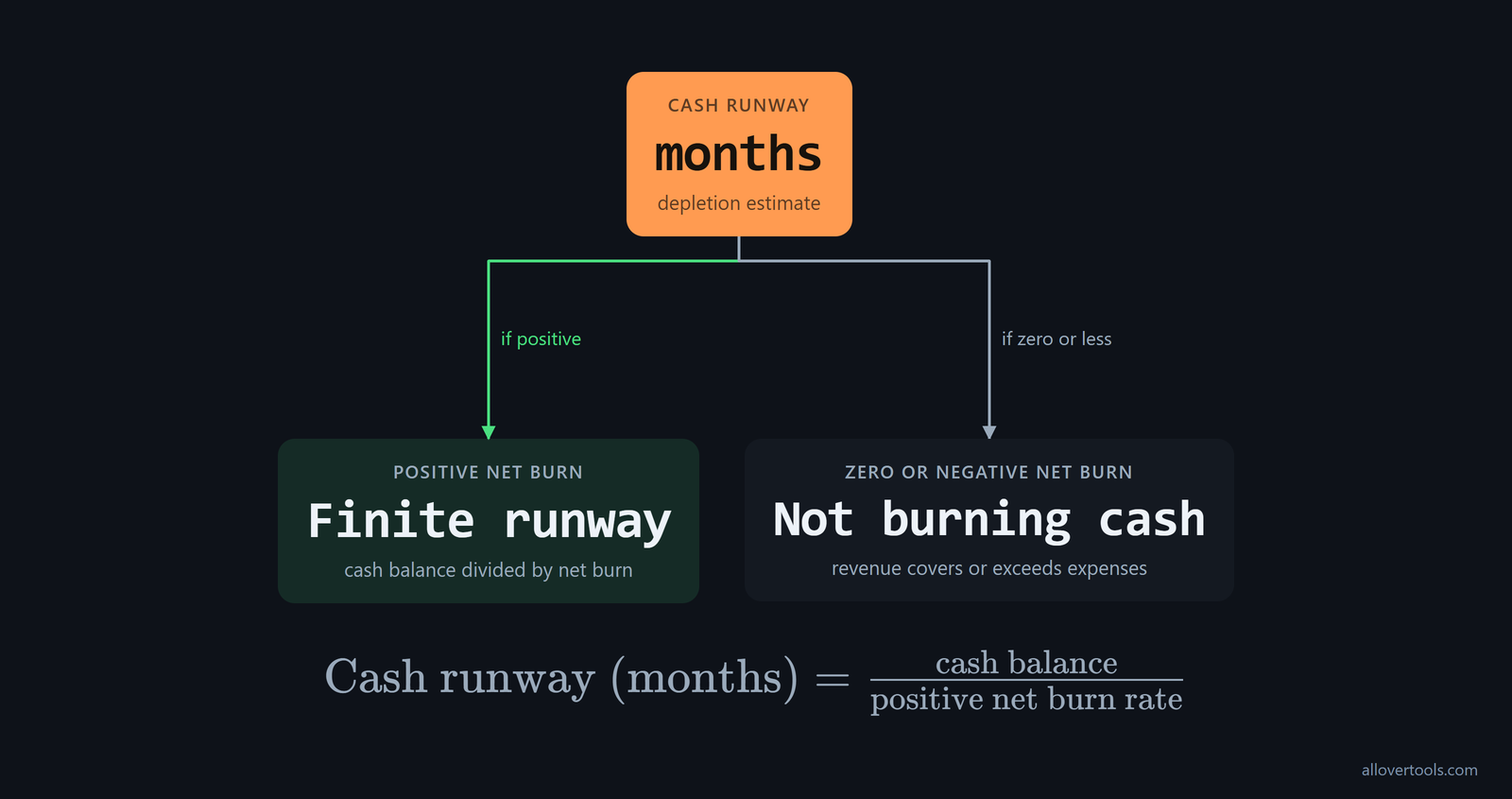
Cash runway (months) = cash balance / positive net burn rateThis is a constant-rate estimate. It assumes normalized operating cash inflow and cash expenses stay unchanged, so it isn't a month-by-month forecast.
Burn rate tells you the pace of monthly cash spending. Runway tells you how many months that pace can continue. Burn shows how aggressive the current spending is; runway shows how long it is sustainable. CRV's runway explanation describes this as speed versus distance. Under the same cash assumption, lowering the rate extends the distance, so report both numbers.
One month can distort runway if it includes a one-off payment or a seasonal collection. Calculate burn for each month, add the monthly burns, and divide by the number of months to get an average. Then use Total cash held ÷ Average burn rate for the runway, as Pilot's averaging method recommends. Averaging reduces the effect of one-off spikes and seasonal variation; the current-month figure shows the latest pace.
Some financial references subtract cost of goods sold before calculating net burn. Under that convention, use (Monthly Revenue - Cost of Goods Sold) - Gross Burn Rate = Net Burn Rate. It can produce a negative net burn when the company generates more cash than it spends, according to Investopedia's burn-rate formula. When comparing figures, check whether COGS is separate or included in operating expenses.
If net burn is zero or negative, the Burn Rate Calculator reports Not burning cash (revenue covers or exceeds expenses). Don't present a finite depletion runway for those inputs, because the division describes depletion only when the denominator is positive.
For a month-by-month projection, use the Cash Runway Calculator, where you enter Monthly revenue (month 1), Monthly expenses / burn (month 1), Monthly revenue growth rate (optional), and Monthly expense growth rate (optional).
Those growth fields let the projection change by month, while the burn-rate calculation holds the normalized flows constant. Which question are you answering: how long cash lasts under a fixed rate, or what happens as revenue and expenses change?
Both calculator scripts use the entered figures locally and make no request that sends them to a server. Your input stays in the browser.
Use gross burn for a downside view
Gross-burn runway is cash balance divided by gross burn when operating inflows are unavailable for the view.
This asks how long current cash covers the expense load without collections. The downside is deliberate. When revenue is positive, it's more conservative than the net-burn view because the net view includes operating cash collected.
Write \"no operating inflows\" beside the gross-burn result. It isn't the actual cash runway when the business continues collecting operating cash.
Show net and gross values together when both the operating case and the downside case matter. Don't call the gross result expected runway unless the no-inflow assumption is actually intended.
The cash balance stays fixed. Only the treatment of operating inflows changes, so the gap between the results shows how much of the runway depends on collections rather than on a different cash balance or expense figure.
Before a startup generates income, divide total available cash by total monthly expenses to calculate runway. This is gross-burn runway because there are no operating inflows to subtract. JPMorgan's runway guidance makes this distinction for startups not yet generating income. Use this view until the first material revenue arrives. When moving to net burn, state the operating-inflow assumption. Do not present a net-burn result based on an operating inflow that is zero or not yet available. Before revenue, the question is how long current cash covers the expense load.

Worked examples: compare net and gross runway
These examples use chosen values, not company benchmarks. Each case keeps its cash balance fixed while the gross view removes operating inflows from the runway calculation.
Case 1: monthly cash runway
Case 1 uses monthly inputs, so the entered revenue and expenses already equal their monthly amounts.
Chosen inputs:
Current cash balance: $300,000
Revenue for this period: $40,000
Total expenses for this period: $100,000
Period: Monthly

Monthly revenue: $40,000
Monthly expenses: $100,000
Gross burn: $100,000
Net burn: $100,000 - $40,000 = $60,000
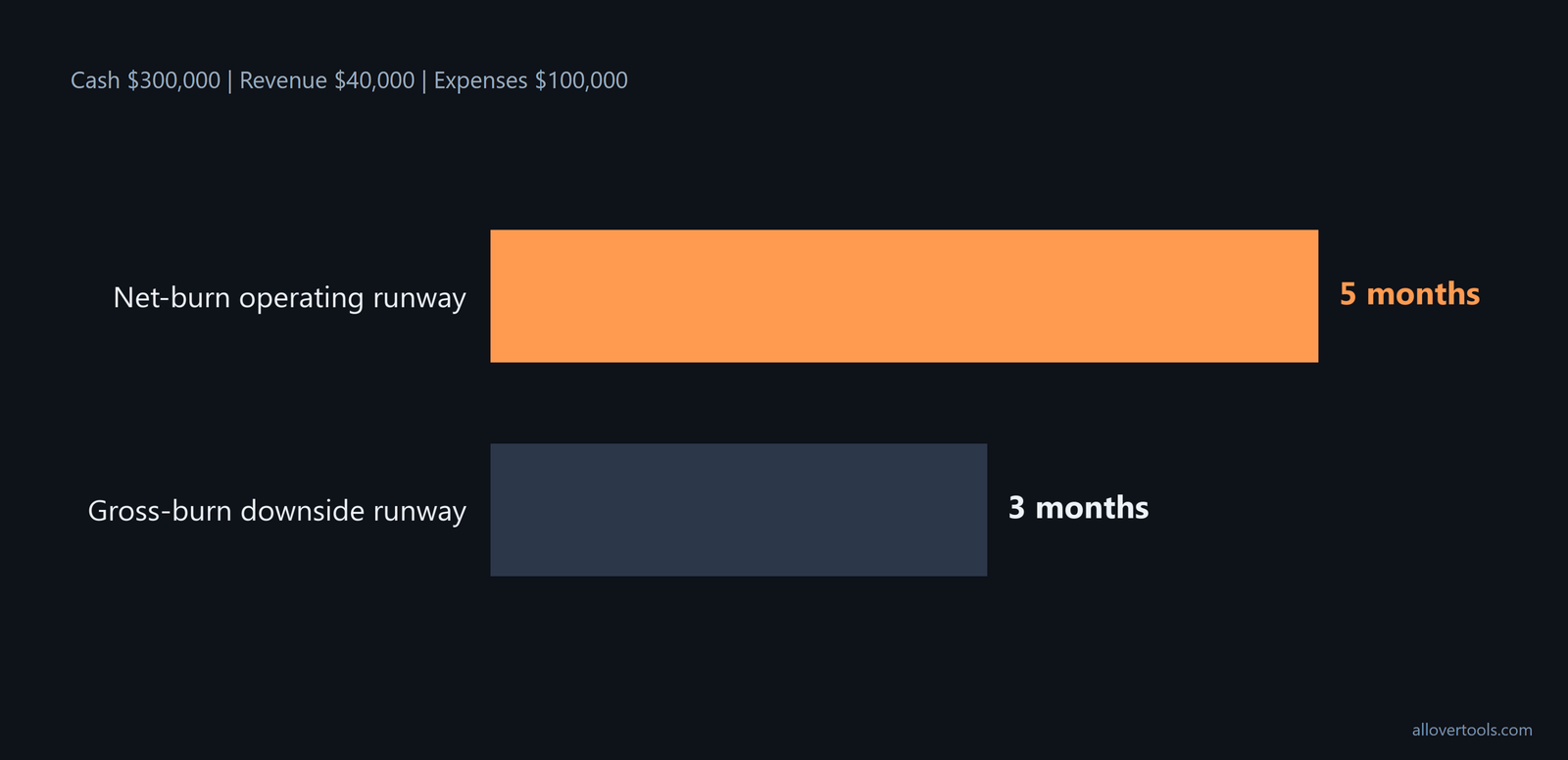
Net runway: $300,000 / $60,000 = 5 months
Gross-burn downside runway: $300,000 / $100,000 = 3 months
The operating view gives 5 months because it includes $40,000 of monthly operating cash collected. The downside view gives 3 months because it assumes that inflow is unavailable. If you report both, put the assumption next to each result.
Case 2: quarterly inputs normalized to months
Case 2 uses quarterly inputs, so both flows receive the same normalization factor before subtraction.
Chosen inputs:
Current cash balance: $240,000
Revenue for this period: $60,000
Total expenses for this period: $180,000
Period: Quarterly

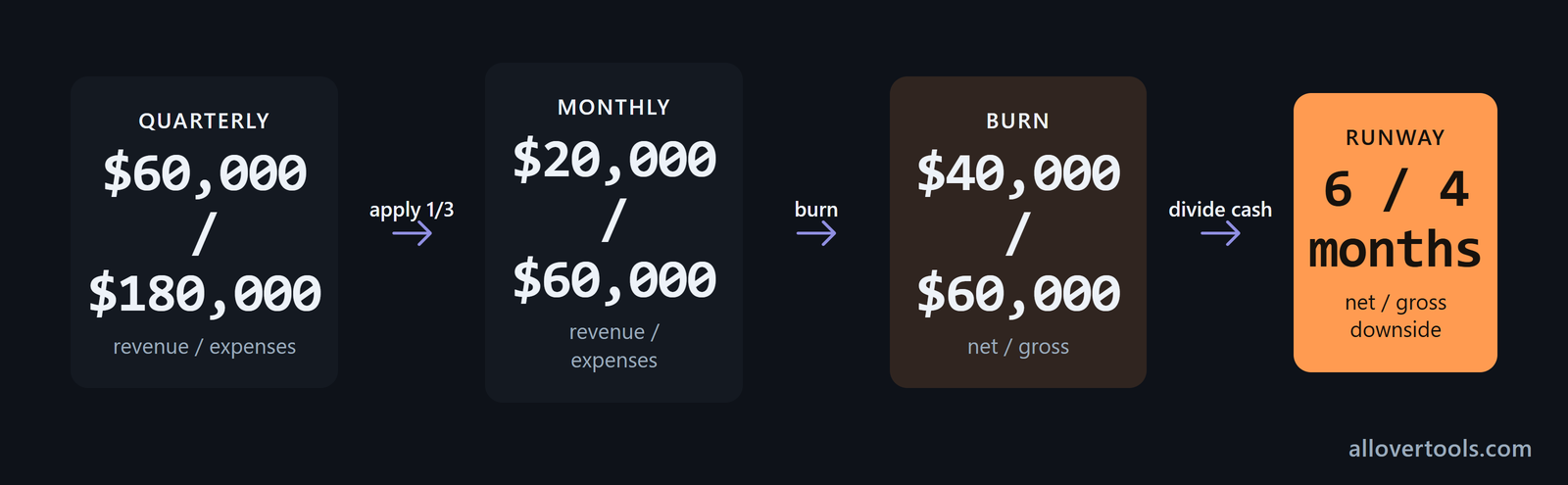
Normalization factor: 4 / 12 = 1/3
Monthly revenue: $60,000 x 1/3 = $20,000
Monthly expenses: $180,000 x 1/3 = $60,000
Gross burn: $60,000
Net burn: $60,000 - $20,000 = $40,000
Net runway: $240,000 / $40,000 = 6 months
Gross-burn downside runway: $240,000 / $60,000 = 4 months
The pair is 6 months versus 4 months. The gap comes from including normalized operating inflow in the net view, not from a different cash balance or a second expense figure.
| View | Case 1 | Case 2 | Assumption |
|---|---|---|---|
| Net-burn runway | 5 months | 6 months | Operating cash collected is included. |
| Gross-burn downside runway | 3 months | 4 months | Operating inflows are unavailable. |
When an investor asks for net burn
Answer a request for net burn with the period, cash basis, and calculation rather than a bare number. If you're writing an investor update, the reader should be able to reproduce the result from the line beside it.

State gross burn first, then operating cash collected. Show net burn = gross burn - cash collected, followed by the cash runway based on positive net burn.
When the normal case includes collections, say so. Add the gross-burn downside when the reader needs to see how much the result depends on those collections.
If net burn is at or below zero, describe cash as not depleting under the stated inputs instead of giving a finite runway. You can't turn that result into a finite number without changing the assumption.
List one-time expenses, seasonality, and financing events as separate assumptions. Don't fold them silently into a recurring rate, because the reader won't know what the rate represents. Keep the period next to every reported number.
Common mistakes when mixing gross and net burn
Most errors are mundane. They come from mismatched inflows, periods, or runway assumptions.
Subtracting recognized revenue instead of cash collected uses the wrong inflow. Use operating cash collected for the same period.
Combining monthly revenue with quarterly expenses creates a false net burn. Normalize both amounts to months before subtracting.
Calling gross-burn runway the expected runway hides the no-inflow assumption. Label it as the no-inflow downside when the plan relies on revenue.
Dividing cash by net burn when net burn is zero or negative creates a finite runway even though cash isn't being depleted. Report that cash isn't being depleted under the inputs.
Hiding one-time charges or financing inflows inside a recurring rate makes the period hard to explain. Show them separately and state the recurring-rate assumption.
Every reported burn figure needs its period, numerator, inflow treatment, and runway interpretation. Without those details, two correct calculations can look like a disagreement even when they use different assumptions. Labels prevent this.
If your update has one rate, add the assumption that makes it meaningful.
Check the inputs before checking the runway
Audit the runway in this order: verify the cash balance, match the revenue and expense period, confirm cash collected rather than accounting revenue, recalculate gross and net burn, and label the view as normal or downside.

Did you keep the cash balance separate from revenue? That check catches a balance-versus-flow error before you divide one number by another.
Choose the rate for the decision you are making
Use net burn for operating cash runway. Use gross burn for a downside or funding-needs view that removes reliance on operating inflows.
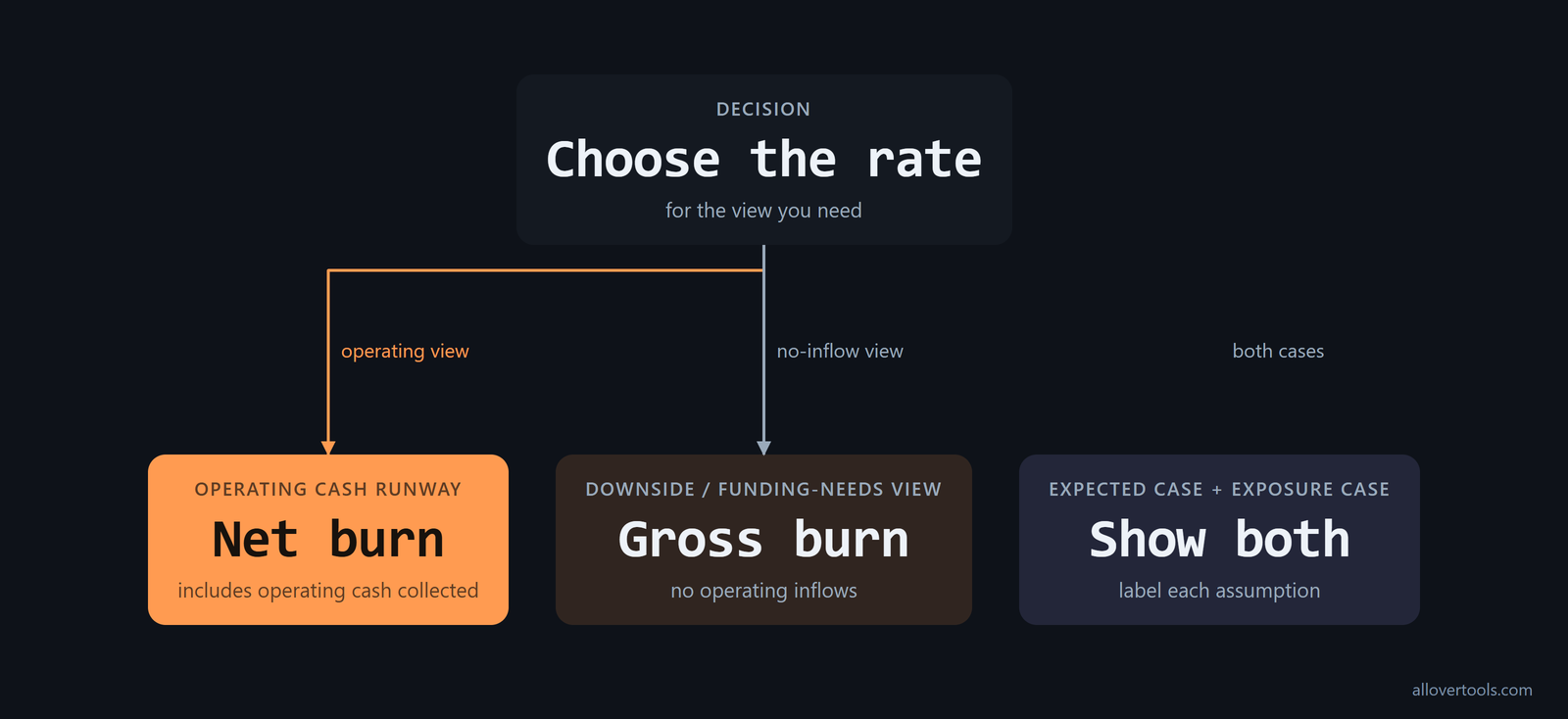
Show both when the audience needs the expected case and the exposure case. The useful comparison is the assumption each runway number represents. Put the period and cash basis beside each figure so your reader can compare them without guessing.
Frequently asked questions
Can gross burn be used to calculate cash runway?
Yes, as a labeled downside view: divide cash balance by gross burn to estimate coverage if operating inflows are unavailable. For runway that includes expected operating cash collected, use positive net burn instead.
Why is net burn negative when revenue is higher than expenses?
Net burn is expenses minus operating cash collected, so it becomes negative when collections exceed expenses. The calculator treats that as not burning cash rather than a finite depletion runway.
Should an investor update show gross burn or net burn?
Show net burn with its period and cash basis when the question is how quickly cash is shrinking, and pair it with gross burn when a no-inflow downside view is useful. Label the assumptions beside both figures.
Do quarterly inputs need to be converted before calculating runway?
Yes. Revenue and expenses must cover the same period, then both must be normalized to monthly amounts before subtracting one from the other and dividing cash by net burn.
What is included in gross burn?
Gross burn is the total cash operating expenses for the chosen period, normalized to a month for this article. It doesn't offset those expenses with operating cash collected.