To reduce cpc google ads costs without losing conversions, compare click cost with the result after the click. CPC is ad spend divided by clicks, while conversion rate is conversions divided by clicks times 100. Keep spend, clicks, and conversions tied to the same campaign, period, and conversion definition. The goal is a workable cost-to-conversion trade-off, not the cheapest click.
Examples use chosen values, not benchmarks.
How to reduce CPC Google Ads costs without losing conversions
Start with both. A lower cost per click helps when your traffic produces acceptable conversions for your campaign's goal.
Keep spend and clicks in the same campaign and period, then match conversions to that scope. Use one conversion definition. Otherwise, a neat formula can compare mismatched rows.
Need the arithmetic? Open the CPC Calculator, then check your post-click rate with the Conversion Rate Calculator.
Read CPC and conversion rate together
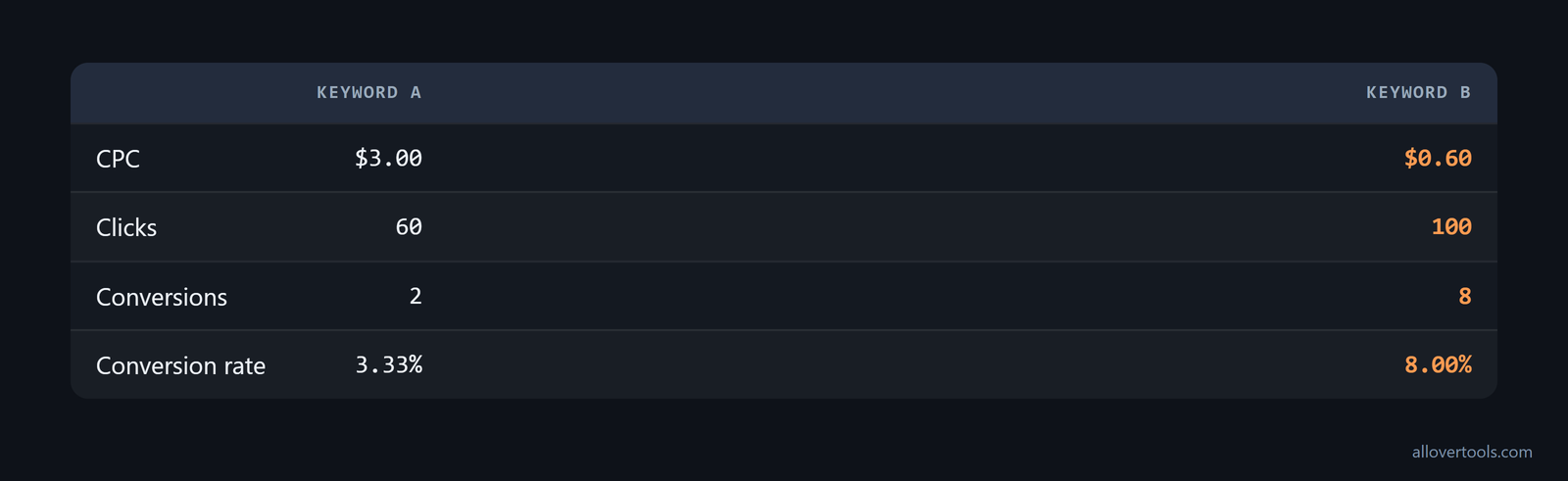
CPC tells you the click cost. Conversion rate shows the result after it. Use two snapshots. They use chosen values, not a benchmark.
Keyword A.
$180 / 60 clicks = $3.00 CPC.
2 conversions / 60 clicks x 100 = 3.33% conversion rate.

Keyword B.
$60 / 100 clicks = $0.60 CPC.
8 conversions / 100 clicks x 100 = 8.00% conversion rate.
Keyword A costs more per click and converts less often in this sample. Before you change the bid, review its intent and tracking, plus your landing-page alignment.
Find high-CPC, low-conversion keywords before changing bids
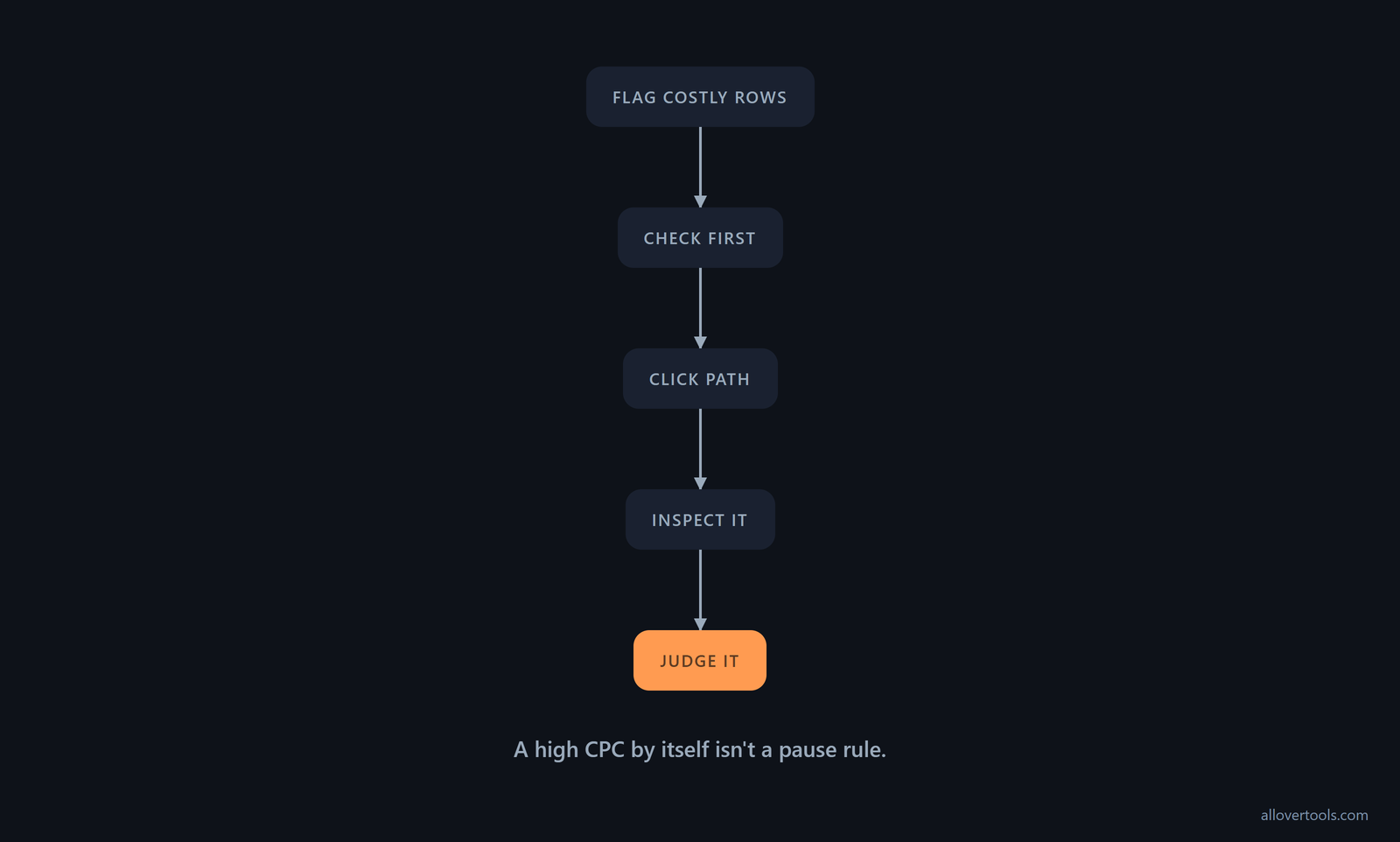
Use one reporting period, then sort or group keywords by CPC and conversion outcome. Flag costly rows. Review weak results. A high CPC by itself isn't a pause rule.
First find where the expensive clicks are coming from. Compare top and other positions, then break the report out by day of week, device, and geography. The top slot is often much more expensive than the bottom slot, and these cuts can reveal CPC outliers hidden by the account average. If a segment costs more than the resulting clicks are worth, lower its bids or add a bid adjustment, following Google's segmentation guidance, instead of cutting every segment at once.
Check that each conversion in your report is tied to the intended click. Then follow the path from search intent to ad to landing page. What should you check first? Does the click match the offer and action the campaign is meant to produce?
Keyword A is a chosen review candidate because its CPC is $3.00 and its conversion rate is 3.33%. Inspect it rather than pausing it automatically. A keyword with too little comparable data needs more review.
Check the measurement before calling a keyword poor
Match spend, clicks, and conversions to one reporting period and one conversion definition. A delayed conversion signal can make the recorded rate look low. Check first. Check the click path before calling the keyword poor.
Call a keyword poor only after checking its conversion definition, reporting window, and click path, because a delayed signal can make good traffic look weak in the report before any bid change. Record the pre-change CPC and conversion rate before changing anything.
Reducing exposure differs from deleting a keyword. Log your action. Then judge it against the campaign's conversion goal.
Reduce bids on poor performers one change at a time
Record the current row. Then change the bid. A bid controls exposure; it doesn't repair conversion quality.
Bid cuts don't move CPC and click volume in a straight line. In one example, an 18% decrease in bid lowered average CPC by 50%, while clicks fell only 10%, as Google's bid guidance explains. Use that relationship to test smaller increments. After each change, record CPC, clicks, and conversions, and look for a point where CPC drops sharply but conversions remain relatively stable.
Max CPC and actual CPC aren't the same. The maximum CPC bid is the most you're willing to pay, but the auction often charges less: it asks only what is needed to hold Ad Rank and any ad formats shown with the ad, such as sitelinks. That amount is actual CPC. A max-bid change lowers the ceiling, while the amount charged still depends on the auction requirement, as Google's bid explanation defines it.
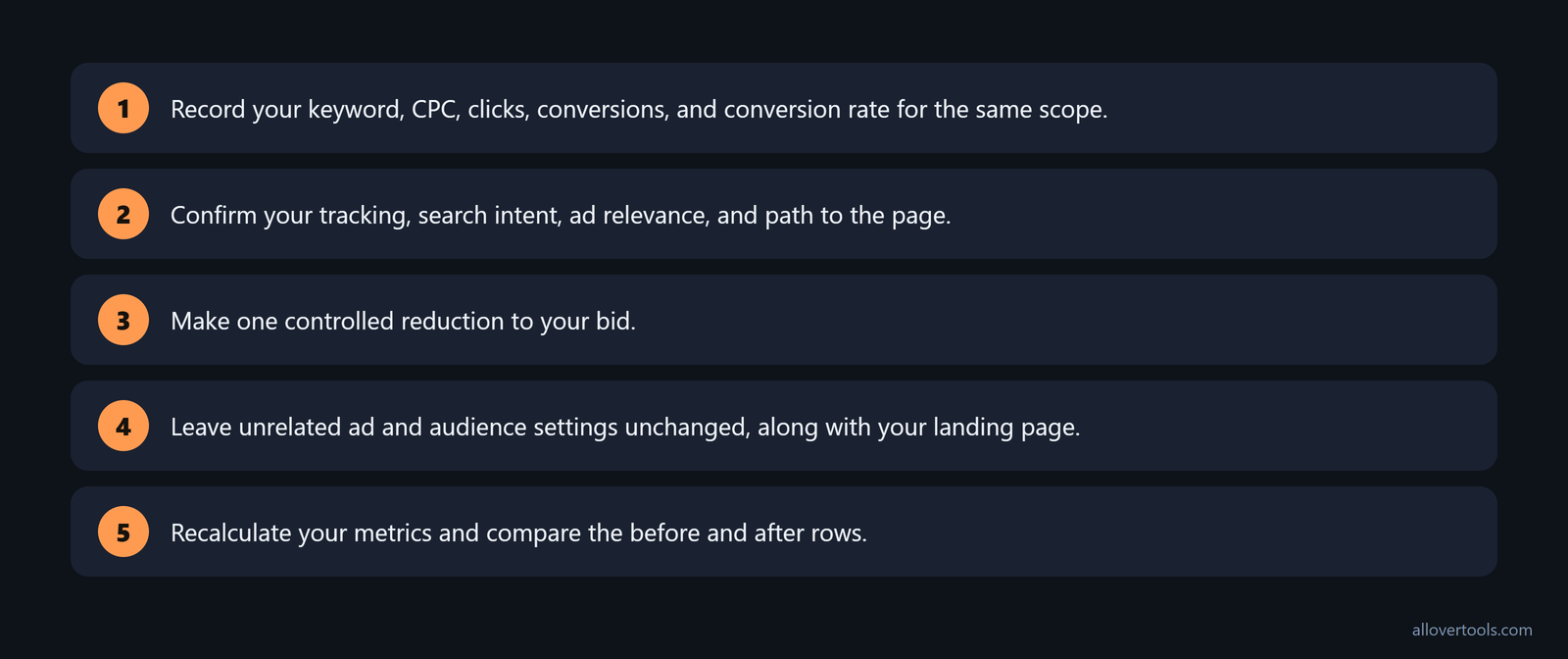
- Record your keyword, CPC, clicks, conversions, and conversion rate for the same scope.
- Confirm your tracking, search intent, ad relevance, and path to the page.
- Make one controlled reduction to your bid.
- Leave unrelated ad and audience settings unchanged, along with your landing page.
- Recalculate your metrics and compare the before and after rows.
The Target CPC - optional control in the CPC Calculator compares an entered figure. It doesn't recommend a bid. You can use the tool to recalculate spend divided by clicks.
To optimize cpc bids, make your change after the relevance and tracking checks, so the test has a clear starting point. Lowering every expensive keyword can remove converting traffic. Changing several levers at once makes the result hard to explain.
Use a smaller, logged change when the keyword still converts
If your keyword still converts, keep the change small and log it. Put the before row, after row, bid change, and reporting scope in the same campaign record.
Keep the converting keyword under review instead of pausing it automatically. Reverse or reassess the change when lower click cost comes with an unacceptable loss of conversion quality.
Don't build a Search or Display test around Enhanced CPC. Effective the week of March 31, 2025, it's no longer available for those campaign types, according to Google's automated-bidding guidance. Remove it from legacy checklists, update the test setup, and choose a currently available Smart Bidding strategy or manual CPC where needed before recording the setup.
Use Target CPC only where it's available. It sets bids to seek as many valuable clicks as possible at the target CPC, though some clicks may cost more or less. It can be set at campaign or ad group level and is available only on Demand Gen campaigns, as the current Target CPC rule states. Search campaigns therefore need a different bidding approach when CPC control is the objective.
Increase bids on low-CPC, high-conversion keywords carefully
Test a controlled bid increase when a low-CPC, high-conversion keyword has limited exposure and your budget supports more traffic. Keyword B has chosen values of $0.60 CPC, 100 clicks, and 8 conversions, an 8.00% conversion rate.
Record starting CPC, clicks, conversions, conversion rate, and available spend, then check whether added clicks preserve the conversion signal and whether spend rises faster than conversions.
Your lowest CPC isn't automatically the best outcome. More clicks help only when conversion quality stays acceptable.
Protect the budget while expanding a useful keyword
Set your spending boundary. Keep the conversion definition fixed. Stop or reverse the bid change if extra traffic raises cost without a matching conversion signal.
There's no universal bid percentage. A calculator can check ratios, but can't choose the bid.
Improve Quality Score, ad relevance, and landing page experience
Check relevance before another bid change, then group related search intent, use the keyword's language in the ad, and make the ad promise match the landing page, so your page answers the query with a clear conversion action.
Your message should carry from query to ad to page. Make the next action visible, and remove an unnecessary step between the click and conversion.

Check the landing page against a post-click checklist, then read it alongside CPC and conversion rate. The page should meet these conditions:
- Load in 4 seconds or less.
- Match the keywords used in the ad that brought the visitor there.
- Include a strong, relevant call to action (CTA).
- Use attractive visuals.
- Work well on mobile devices.
- Offer something valuable, such as an e-book or webinar.
- Make it easy for users to get back to the main site.
Use this checklist to look for a page problem before treating high CPC as a bid problem. The landing-page checklist linked here sets these standards, so check them before changing the bid: this landing-page checklist.
Review expected click response, ad relevance, and the landing page's experience as separate quality-score-related checks. An edit can change these inputs without guaranteeing a lower CPC.
When CPC changes, look at the full Ad Rank context instead of blaming the bid alone. Ad Rank depends on the bid, Quality Score, auction competitiveness, ad format, and the expected impact of ad expansions; context-specific factors matter too, as Google's Ad Rank explanation sets out. When you annotate a CPC movement, note which inputs changed. The headline bid is only one part of the score.
For the click-response ratio, open the CTR Calculator. Compare the CTR and post-click results from the Conversion Rate Calculator with CPC for the same period.
Read CTR and conversion rate as different signals
CTR is the click signal. Conversion rate is the result after the click. When you see a stronger CTR with no improvement in conversion rate, check for a promise or targeting mismatch.
If you see a stronger conversion rate with stable CPC, review traffic quality or landing-page alignment. A lower CPC with falling conversions isn't a successful optimization by itself.
Use these patterns to choose your next inspection, but don't treat them as proof when several inputs changed.
Test incremental bid changes with one consistent scorecard
You test an incremental bid change by capturing a baseline and choosing one main lever, such as the bid. Keep the campaign, reporting period, and conversion definition consistent. Compare clicks, spend, CTR, conversion rate, and ROAS together.

In the Marketing Metrics Calculator, choose Currency. Set Attribution assumption to the model already reflected in your entered figures. Enter your rows under Campaign, Spend, Impressions, Clicks, Conversions, and Revenue.
Choose Add campaign row when another row is needed, then choose Calculate metrics. The Results table shows ROAS, CPM, CPC, plus CTR and Conv. rate. The Numerators and denominators table shows each calculation's source values.
Choose Copy results or Download CSV to preserve the record. For the revenue ratio, use the ROAS Calculator to check revenue divided by spend.
Use cpc cost control to keep one scope and one comparison.
The calculators use browser-entered figures. The code shows no ad-platform connection or network submission of those figures.
Keep the cause of the change visible
Keep the cause visible by recording the changed input, unchanged scope, baseline metrics, and after metrics, so a later CPC or conversion-rate movement has a clear record you can audit later. If the bid changes together with ad, audience, or landing-page settings, the movement can't be assigned cleanly to one change.
Monitor average CPC over time with matching periods
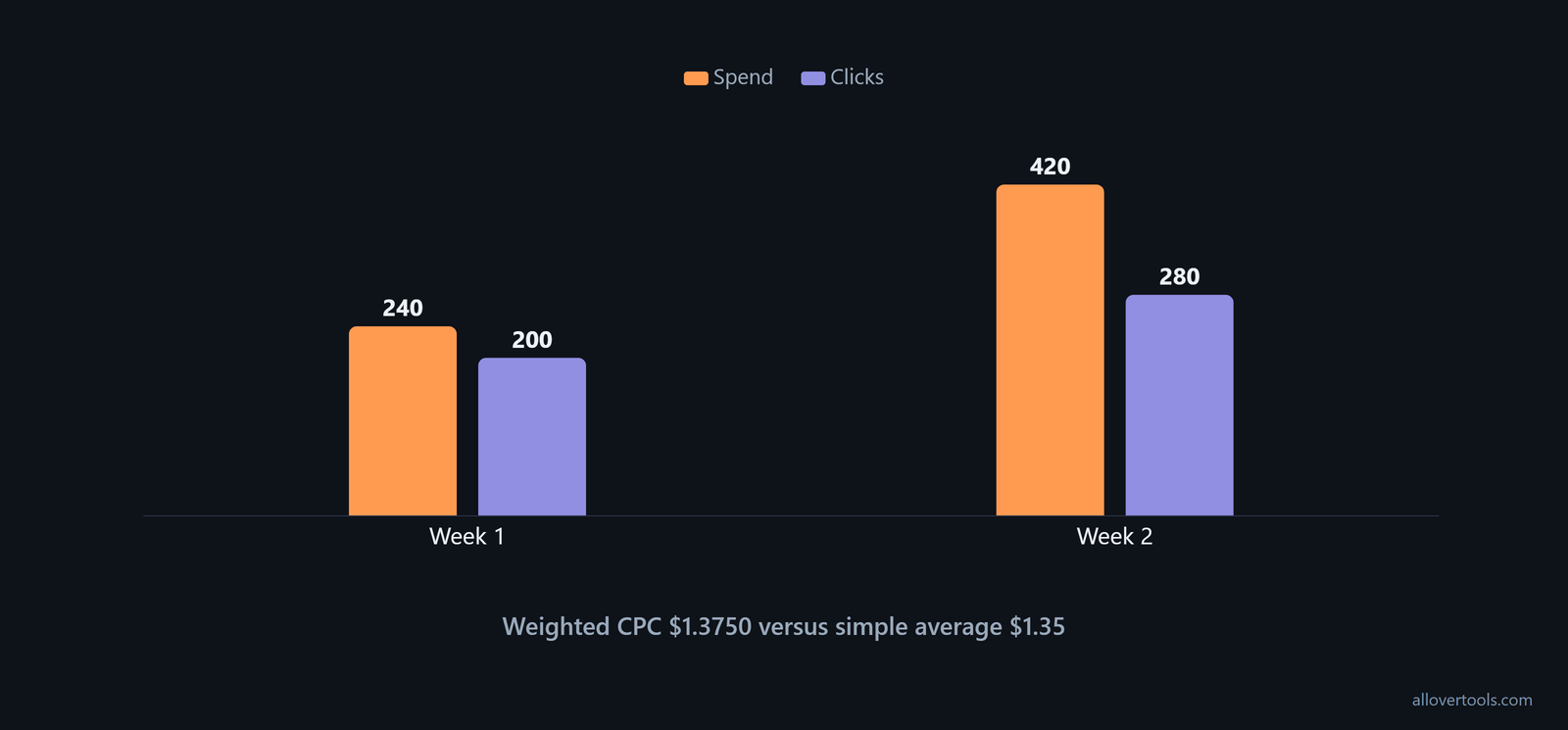
You monitor average CPC for each matching period as total ad spend divided by total clicks. Averaging separate CPCs can mislead when the periods contain different click totals.
Week 1: $240 / 200 clicks = $1.20 CPC
Week 2: $420 / 280 clicks = $1.50 CPC
Combined: ($240 + $420) / (200 + 280)
         = $660 / 480 = $1.3750 CPC
Simple average: ($1.20 + $1.50) / 2 = $1.35
These are chosen values. The aggregate is $1.3750 because Week 2 has more clicks and therefore more weight.
For each period, record your spend and clicks. Also record its conversion result, click rate, and ROAS. Annotate bid or relevance changes. Compare the sequence with the campaign's own baseline, not an outside benchmark.
For same-period arithmetic, use the CPC Calculator. You can use the Marketing Metrics Calculator for a row scorecard.
Decide whether the lower CPC is worth keeping
You keep a lower CPC when conversions and conversion rate hold or improve at acceptable quality for the campaign's goal and the same conversion definition. A falling CPC with falling conversions needs a quality or volume check.
A rising CPC with a stronger conversion rate may be an intentional trade-off. Check the same definition and period first.
Before-and-after CPC example on chosen campaign data
This uses chosen values, not a real account. The rows illustrate a controlled bid and relevance workflow; they don't prove that one change caused every result.
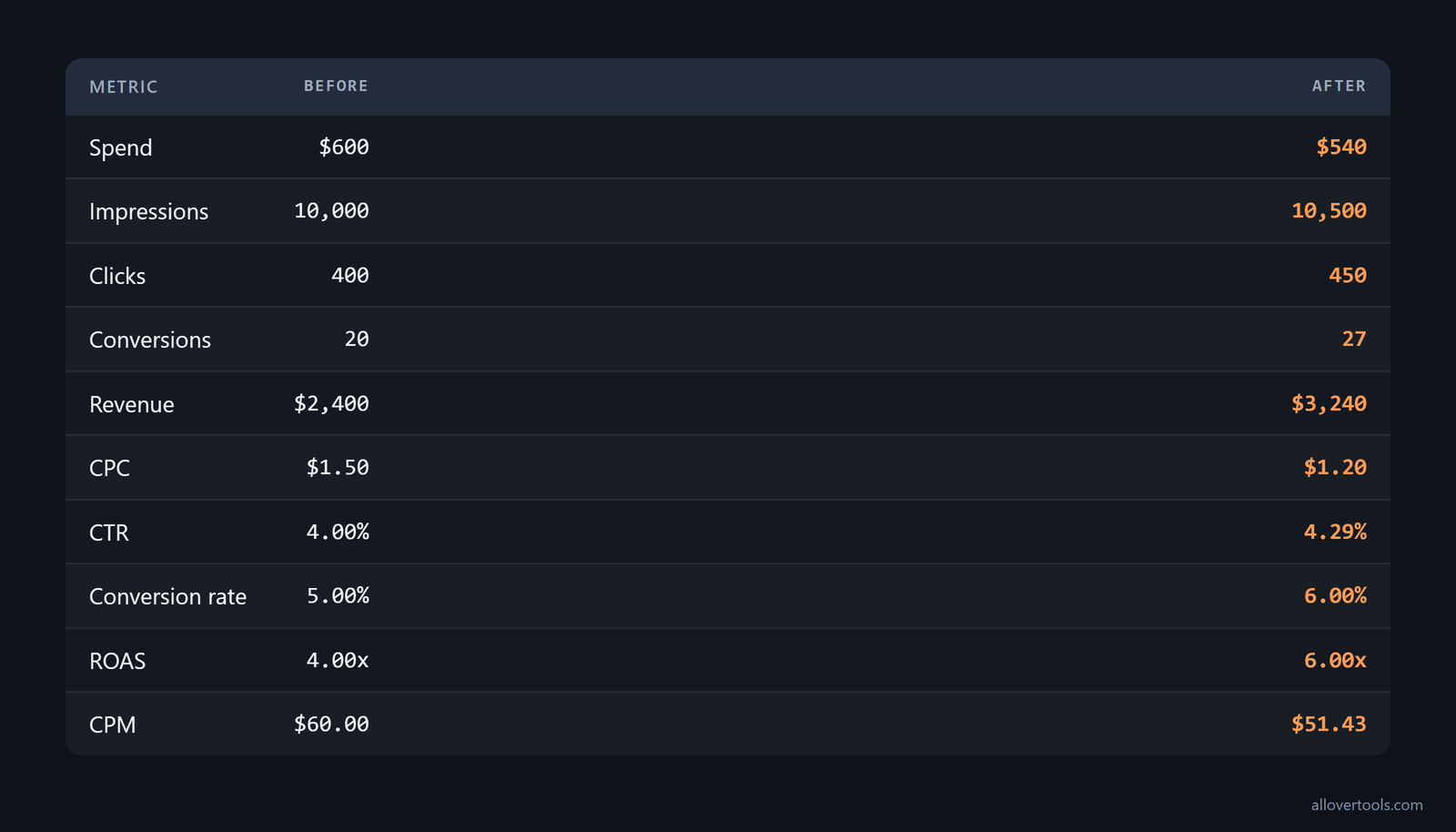
Before.
Spend: $600 | Impressions: 10,000 | Clicks: 400.
Conversions: 20 | Revenue: $2,400.
CPC: $600 / 400 = $1.50.
CTR: 400 / 10,000 x 100 = 4.00%.
Conversion rate: 20 / 400 x 100 = 5.00%.
ROAS: $2,400 / $600 = 4.00x.
CPM: $600 / 10,000 x 1,000 = $60.00.

After.
Spend: $540 | Impressions: 10,500 | Clicks: 450.
Conversions: 27 | Revenue: $3,240.
CPC: $540 / 450 = $1.20.
CTR: 450 / 10,500 x 100 = 4.285714%, shown as 4.29%.
Conversion rate: 27 / 450 x 100 = 6.00%.
ROAS: $3,240 / $540 = 6.00x.
CPM: $540 / 10,500 x 1,000 = $51.428571, shown as $51.43.
Map your Before and After rows to Campaign, Spend, Impressions, Clicks, Conversions, and Revenue in the Marketing Metrics Calculator, then choose Calculate metrics. Verify CPC, CTR, conversion rate, and ROAS with the dedicated CPC Calculator, CTR Calculator, Conversion Rate Calculator, and ROAS Calculator.
Read the change without declaring victory too early
The sample shows spend falling from $600 to $540, clicks rising from 400 to 450, and conversions rising from 20 to 27. You can read the CPC falling from $1.50 to $1.20, CTR from 4.00% to 4.29%, and conversion rate from 5.00% to 6.00%.
ROAS moves from 4.00x to 6.00x, and CPM falls from $60.00 to $51.43. Compare both rows under the same period and fixed conversion definition, because a nice before-and-after result is weak evidence when the measuring rules changed during the test. Keep the adjustment only when lower CPC comes with acceptable conversion quality.
Shift budget to cheaper Google Ads networks
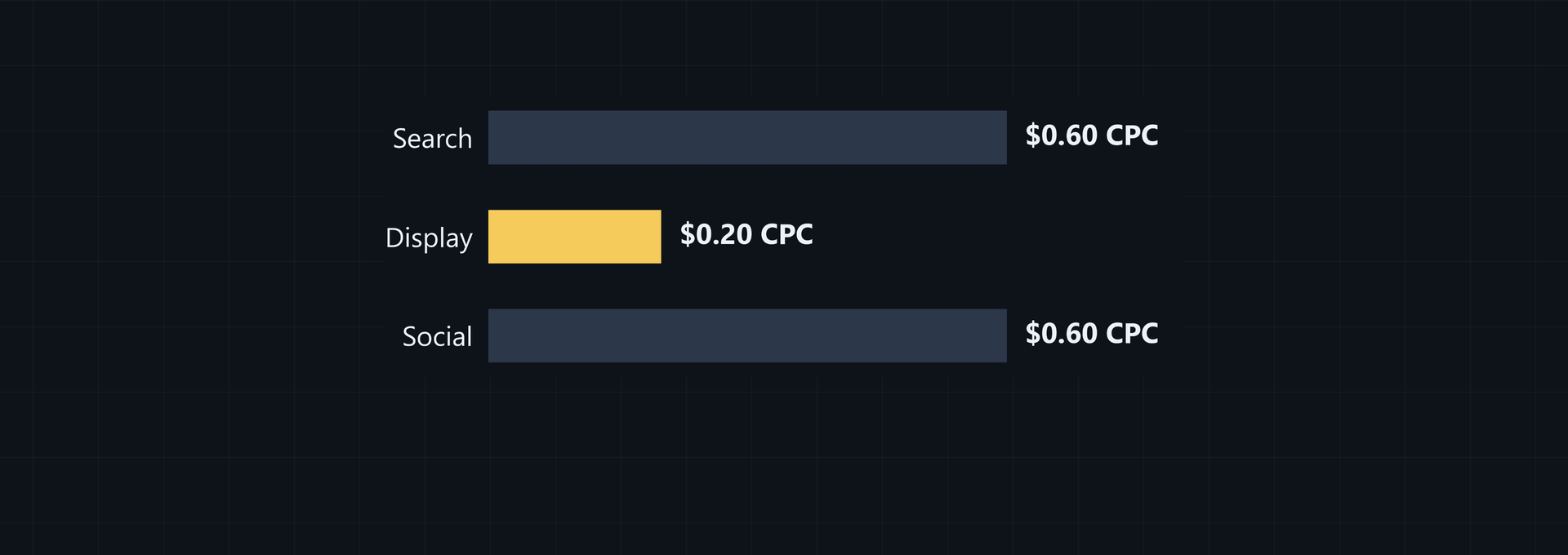
To lower account CPC, you can change where part of the budget buys clicks instead of only squeezing Search bids. In the comparison, Google Display campaigns average $0.34 CPC versus $5.26 for Search ads, so use those figures as the stated cross-network difference, not as a benchmark for your campaign. Protect high-intent Search keywords that convert well. Then test cheaper placements for incremental traffic and compare CPC and conversions before moving more budget, as this cross-network comparison describes.
| Campaign type | CPC in the comparison | Use of the figure |
|---|---|---|
| Google Display | $0.34 average | Use cheaper placements to test incremental traffic. |
| Search ads | $5.26 | Keep high-intent keywords that convert well. |
Search Partners can show ads on additional sites with an online search feature owned by Google. Their clicks can historically trend cheaper because those sites may be less competitive. Treat this as a placement hypothesis to measure. Keep Search Partner results separate from core Search rows so a lower average doesn't hide a weaker conversion result.
Performance Max and Demand Gen can put ads on the Search Network and on other placements, including the Display Network or Gmail. These campaign types also tend to produce a cheaper cost per click overall. Compare placements using the same conversion definition and reporting period, then shift budget only after comparing the lower CPC with the conversion result.
Frequently asked questions
How can I reduce CPC in Google Ads without losing conversions?
Audit high-CPC, low-conversion keywords, improve relevance around the ad and landing page, then make incremental bid changes while tracking CPC with CTR and conversion rate. A lower CPC helps only when conversion quality remains acceptable for the same period and definition.
Should I lower the bid on every high-CPC keyword?
No. Check conversion tracking and search intent first, then inspect ad relevance and the landing page's alignment. Lower exposure on a costly weak performer, but keep reviewing a high-CPC keyword that produces acceptable conversions for the campaign's goal.
Can improving Quality Score lower CPC?
Improving relevance and the landing page's experience can change the quality inputs around an ad, but no single edit guarantees a lower CPC. Verify the effect with CPC, then compare CTR with conversion rate from the same reporting scope.
How should I track average CPC over time?
For each matching period, record total spend and total clicks, then calculate aggregate CPC as total spend divided by total clicks. Don't use a simple average when the periods contain different numbers of clicks.
Is a lower CPC always better?
No. A lower CPC can still be a poor result if clicks stop converting or conversion quality falls. Read CPC with CTR, conversion rate, and ROAS under the same attribution and period definitions.