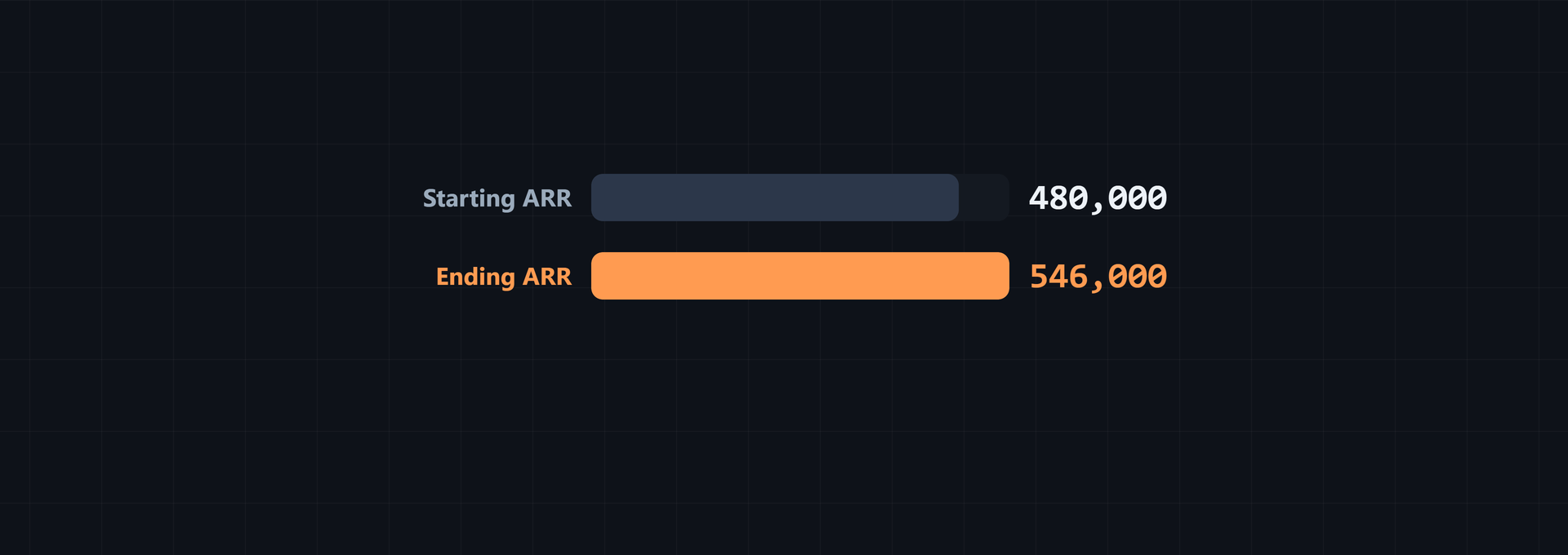
ARR forecasting SaaS starts with the recurring contracts already in place. It estimates how that base changes as new customers sign, existing customers expand or contract, and other customers churn. The result is a run-rate view of future revenue by month or year. It is not recognized revenue or cash collected, so those need separate schedules.
What ARR forecasting shows for a SaaS business
ARR is the annualized run rate of recurring subscription revenue. Recognized revenue follows accounting timing, while cash collected follows payment timing. A forecast rolls the starting recurring base forward, adds gains, and subtracts losses.
Check ARR against monthly recurring revenue and average revenue per user when you assess a forecast. SaaS revenue forecasting uses all three: ARR is the annualized run rate, MRR is the monthly run rate, and ARPU is the average revenue per user, according to CFO forecasting guidance. Reconcile the three views before treating a larger ARR figure as stronger growth.
ARR = recurring revenue per billing period × billing periods per year × subscriptionsCount the recurring subscription charge. Leave out one-time fees, setup charges, non-recurring discounts, usage overage, and other non-recurring revenue. ARR helps with ARR based revenue projections and ARR for growth planning, but it does not show collection timing, expenses, profit, or cash runway. The ARR Calculator can annualize a recurring charge before it goes into the forecast.
Build the starting ARR base from current contracts
List the active contracts at the forecast start date. For each one, separate the recurring subscription charge from one-time and usage items, convert it to a common period, and add the annualized amounts. The result should tie back to the accounts in the contract list.
Some contract bases include more than subscription fees. One disclosed ARR method includes term licenses, SaaS, utility software, maintenance related to perpetual and term licenses, extended maintenance contracts, and managed services, while excluding perpetual licenses and professional services. For varied contract terms, it annualizes by dividing total contract value by the number of days in the contract term and multiplying by 365, as this ARR definition describes. Apply that scope before adding contract lines. Otherwise, the opening base will mix recurring and non-recurring value.
For one example, enter $2,500 in Recurring revenue per billing period. Choose Monthly (12 periods/year) in Billing period, leave Number of identical subscriptions (optional) at 6, and select Calculate ARR.
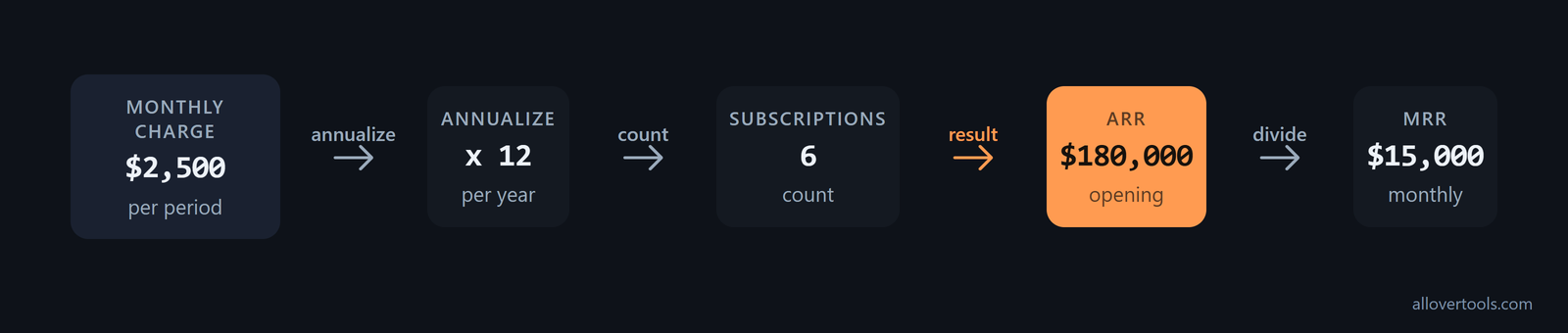
ARR = $2,500 × 12 × 6 = $180,000
MRR = $180,000 ÷ 12 = $15,000
Currency symbol changes the display, not the calculation. Quarterly, annual, weekly, and Custom cycle length… change the annualization factor. For a custom cycle, use 365.25 ÷ Days per billing cycle. The calculator uses the values entered into it and does not connect to billing records.
Split SaaS ARR from broader subscription ARR
Hybrid software businesses should keep the cloud-hosted run rate separate from the broader recurring subscription base. A public-company disclosure defines Subscription ARR as recurring subscription offerings such as term licenses and SaaS. SaaS ARR covers only the cloud-hosted portion of Subscription ARR and uses the same calculation method, as the filing's metric split shows. Use separate lines when the contract list contains both types. The forecast can then show whether movement comes from SaaS or another recurring software stream, while keeping a total ARR line for the full recurring base. Do not label the broader subscription figure SaaS ARR when it includes term-license or other non-cloud recurring offerings.
Normalize each contract before adding it
Multiply a monthly charge by 12, a quarterly charge by 4, and an annual charge by 1. Keep one-time fees and non-recurring discounts outside the base. If billing periods are mixed, the opening figure will be inconsistent. The same happens when a per-customer charge is mistaken for the company total.
Check the opening base for omissions
- List active subscriptions and plan quantities.
- Check start or renewal status, agreed downgrades, and canceled accounts.
- Record the source period and assumptions beside each contract.
Use a subscription count of 1 for a total-company amount. Remove canceled contracts from the base. Keep the source record beside each value so the next forecast period can be reconciled.
Forecast ARR with new sales, expansion, churn, and contraction
Use one ARR bridge for each forecast period. The SaaS Metrics Calculator keeps starting recurring revenue, new business, expansion, contraction, and churned recurring revenue in separate fields.
Ending ARR = Starting ARR + New business ARR + Expansion ARR
             − Contraction ARR − Churned ARR
New business comes from brand-new customers. Expansion comes from an upgrade or upsell by an active customer. Contraction is a downgrade where the customer stays. Churn is a full cancellation. That split keeps a new logo from being counted as an upgrade and makes losses easier to inspect.
Set Period type to Annual. Enter starting recurring revenue of $180,000, new business recurring revenue of $48,000, expansion recurring revenue of $18,000, contraction recurring revenue of $6,000, and churned recurring revenue of $12,000.
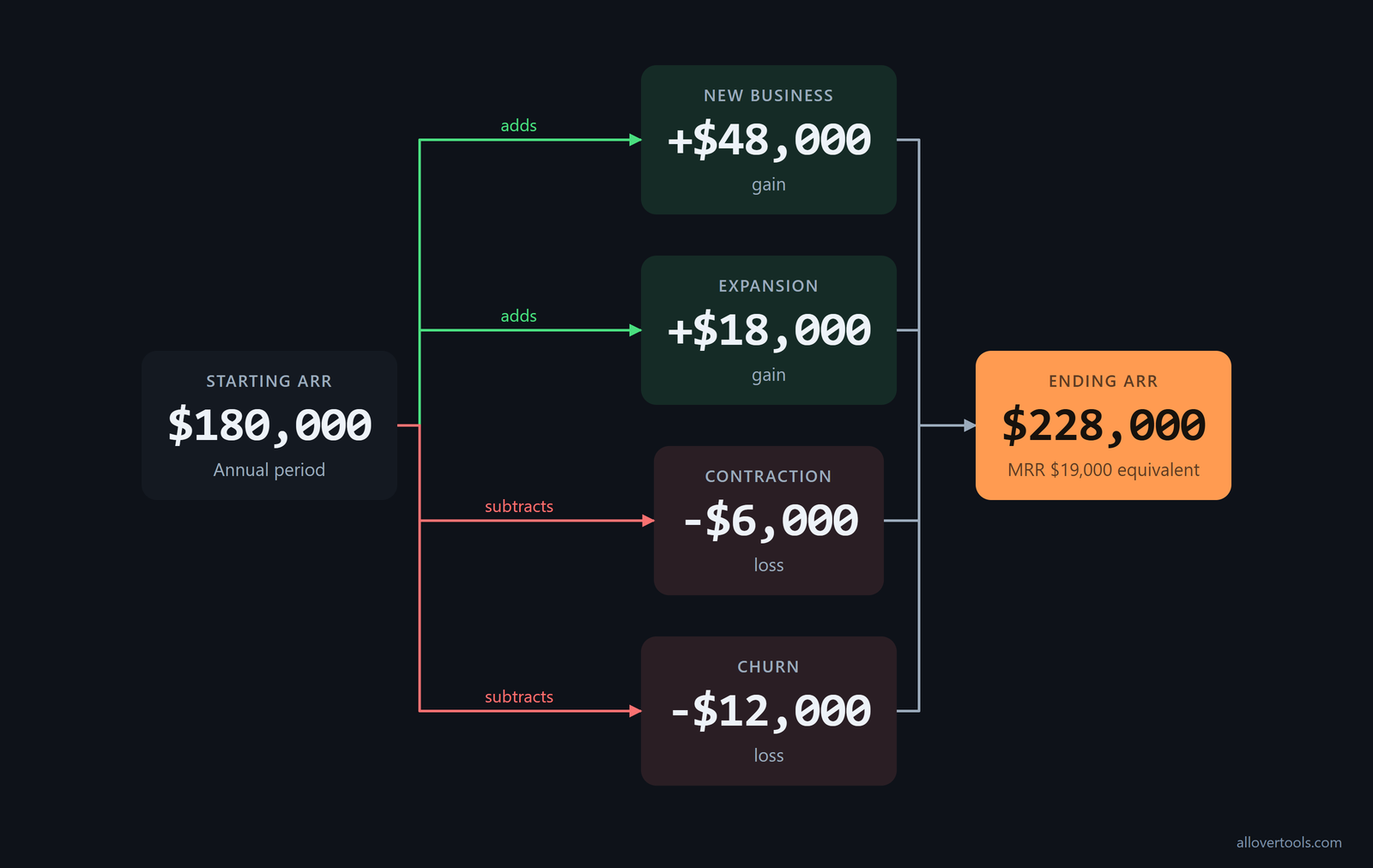
Ending ARR = $180,000 + $48,000 + $18,000 − $6,000 − $12,000
           = $228,000
Net new ARR = $48,000 + $18,000 − $6,000 − $12,000
            = $48,000
MRR equivalent = $228,000 ÷ 12 = $19,000
To connect an ARR pipeline to future revenue, give new business its own conversion and timing assumptions. Pipeline is possible future movement, not booked ARR.
Choose a bottoms-up or top-down ARR forecast
Pick the method that fits the evidence you have, and use the other one to test it. A bottoms-up ARR forecast starts with details such as pipeline and sales capacity. A top-down forecast applies momentum rates, such as new and churn as a percentage of beginning ARR, based on historical patterns and strategic changes. Either method can feed a monthly momentum ARR table that separates new, expansion, contraction, and churn, as this forecasting guide explains. Use bottoms-up inputs when the pipeline and capacity are known; use top-down rates when historical momentum is better evidence. Compare the outputs before choosing the planning case.
Make the new ARR traceable to the funnel instead of using a generic growth percentage. Write the driver as New MRR = Leads × Lead-to-customer conversion rate × Average new MRR per customer. Put that New MRR into the monthly waterfall. Ending MRR equals starting MRR plus new, expansion, and reactivation, minus contraction and churn. Multiply ending MRR by 12 to get ARR. This pipeline-driven model shows which lead, conversion, or deal-size assumption changed the new-business line.
Separate new ARR from expansion ARR
Label every forecast line by the account event: new logo, existing-account upgrade, downgrade, or full cancellation. An upgrade goes into expansion. A full cancellation goes into churn. A smaller continuing contract goes into contraction.
Replace blended churn with cohort retention curves
One churn rate assumes every customer behaves the same way. Retention curves keep customers who signed up in the same month together and show what each cohort does over time. Anchor the curves to Net Revenue Retention and Gross Revenue Retention, then connect them to the revenue bridge. Expansion and churn can follow observed cohort behavior instead of one aggregate assumption, as this cohort modeling guidance recommends. The forecast can then keep early churn and later expansion from being flattened into one percentage.
Break those curves out further when behavior varies by acquisition period, company size, industry, contract value, or lead source. Analyze cohorts such as Q1 2023 or Q2 2023. Model ARR retention for each segment, then layer new customer acquisition onto the retained and expanded base. The cohort forecasting method uses these slices to show how much ARR from each cohort remains and grows in later periods. Keep the same segment labels in the account data and forecast table so each retention assumption can be checked against its source group.
Make conservative, base, and optimistic cases
All three cases below start at $180,000 ARR. Running the bridge with different assumptions gives these ending values:
| Case | New | Expansion | Contraction | Churn | Ending ARR |
|---|---|---|---|---|---|
| Conservative | $36,000 | $10,000 | $8,000 | $24,000 | $194,000 |
| Base | $48,000 | $18,000 | $6,000 | $12,000 | $228,000 |
| Optimistic | $60,000 | $24,000 | $4,000 | $8,000 | $252,000 |
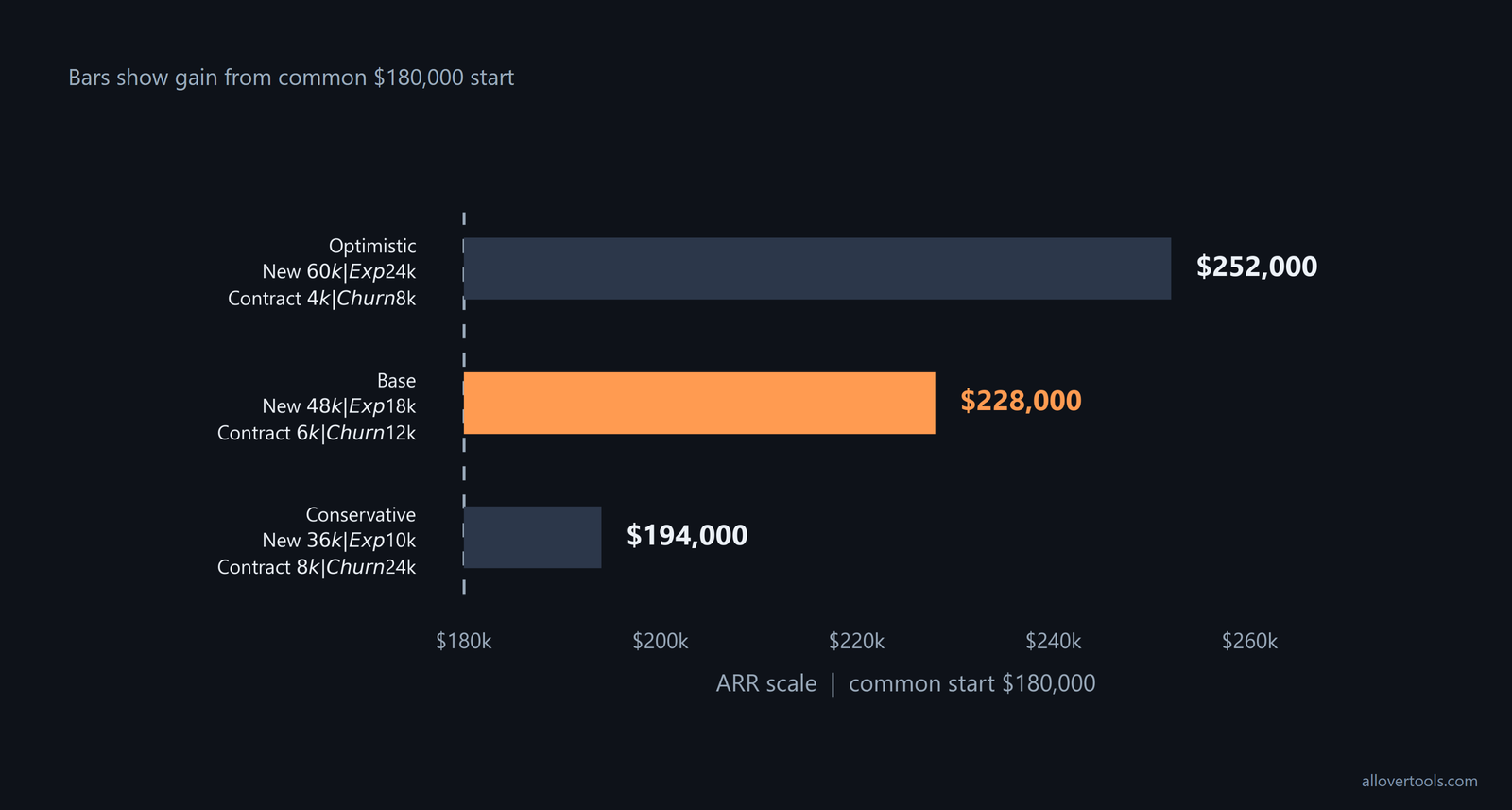
These are assumption sets, not predictions. Change sales timing, upgrade volume, contraction, and churn separately. A stronger sales case should not quietly assume lower losses as well.
Use measured Net Revenue Retention to check the existing-base line. With current ARR of $10M and trailing NRR of 120%, the existing base would be expected to produce approximately $12M in 12 months before new customers are added. The new-logo target is the gap between that projected result and the overall ARR goal, as the NRR example demonstrates. Keep new business separate from the baseline so expansion is not counted twice.
Roll ARR forward month by month and year by year
Set up a recurring-revenue table where each row begins with the prior row's ending MRR. Apply new, expansion, contraction, and churn movements, then carry the result into the next row. At a monthly snapshot, ARR is ending MRR x 12.
Separate contracted ARR from live ARR
Signed ARR and live ARR are separate forecast states when implementation delays billing or use. Track CARR, contracted ARR, for the total contracted run rate, and LARR, live ARR, for customers whose implementations are complete and billing has begun. Translate ARR to revenue from the live figure instead of treating every signed contract as active, following the CARR and LARR guidance. Then account for the lag between signature and go-live in the ARR-to-revenue bridge, as the go-live guidance requires. The same modeling guidance pairs beginning-of-month ARR divided by 12 with a go-live adjustment. The monthly revenue line then reflects when the contract becomes live, not when it was merely signed. Keep CARR and LARR visible in the schedule for enterprise or complex-onboarding accounts.
For a conservative revenue bridge, divide forecast ARR at the beginning of the month by 12, especially when contracts can start mid-month. That avoids overstating the month's revenue in the run-rate table. The beginning-of-month heuristic is practical and conservative. This is a revenue forecast, not a cash-collection schedule, so payment timing belongs in the cash model.
Use the prior ending MRR as the next starting MRR
The example below uses chosen monthly values. Each movement is assigned to the month when it starts, upgrades, downgrades, or cancels under the selected modeling convention.
Month 1: $15,000 + $2,000 + $500 − $200 − $800 = $16,500 MRR
         ARR = $16,500 × 12 = $198,000

Month 2: $16,500 + $1,800 + $600 − $300 − $900 = $17,700 MRR
         ARR = $17,700 × 12 = $212,400

Month 3: $17,700 + $2,200 + $700 − $250 − $1,000 = $19,350 MRR
         ARR = $19,350 × 12 = $232,200
Check for negative ending revenue, duplicate accounts, seasonality hidden inside a flat monthly assumption, and timing differences between bookings, activation, billing, and cancellation. The SaaS Metrics Calculator has Monthly and Annual choices. Its annualized monthly growth is a rough projection, not a forecast.
Project early-stage cohorts with account-level data
Early-stage forecasts can use monthly signup cohorts at the account level instead of one blended retention line. Add dimensions such as acquisition channel and pricing plan. Record each cohort's MRR at months 0, 1, 3, 6, 9, and 12, and tag new business, expansion, contraction, and churn events. Chart each cohort's remaining MRR by month. Project each cohort forward with its own retention curve and expansion rate, then aggregate and multiply by twelve to annualize. This cohort-and-AI workflow provides training data for AI or advanced analytics and can smooth volatile retention data. Keep the event tags on the underlying cohort records so the projected curve stays tied to account behavior.
Convert the monthly table into annual checkpoints
Use month 12's ending MRR x 12 as the year-end ARR checkpoint, then compare it with opening ARR. Year-end ARR is the run rate at that month, not the sum of monthly ARR. Record renewals and annual billing separately from the run-rate calculation.
Connect ARR scenarios to burn, cash runway, and valuation
An ARR scenario supplies a recurring-revenue assumption. A cash model still needs monthly cash collected, expenses, and cash balance. Valuation models then discount explicit cash flows. The Burn Rate Calculator checks period-level burn, while the Cash Runway Calculator projects cash as revenue and expenses change.
Decide first whether the model is for fundraising, board planning, or an operating cadence. Gather baselines for bookings, MRR or ARR, cohorts, upgrades, downgrades, and churn. Map the revenue drivers and choose the forecast method. Add headcount, hosting, support, research and development, and sales and marketing, then build the scenarios. Each month, import actuals, run a variance check, and note why each assumption changed. This modeling workflow keeps ARR inside the wider operating model instead of leaving it as a static annual calculation.
Use cohort retention to explain valuation and variance
Treat cohort retention as a valuation lever as well as a churn input. Track gross and net revenue retention by start-month cohort. Break dashboards out by customer size and go-to-market motion, and write a one-paragraph explanation whenever the forecast beats or misses actuals. The operating guidance also uses the bridge (New + Expansion) - (Churn + Contraction) = Net New ARR and turns forecasted ARR per month into recognized revenue by dividing by 12. Use that rolling monthly cadence and variance explanation to check whether the retention assumptions still hold, following the operator's reporting guidance.
Translate ARR into a cash runway assumption
Use MRR or another chosen collection input for the revenue line. Do not place ARR directly into a monthly cash calculation. With Current cash balance of $360,000, Revenue for this period of $19,000, and Total expenses for this period of $55,000, select Monthly (12 periods/year) in the Burn Rate Calculator:
Gross burn = $55,000 per month
Net burn = $55,000 − $19,000 = $36,000 per month
Flat-runway check = $360,000 ÷ $36,000 = 10.00 months
For the projection, enter $360,000 in Current cash balance, choose 12 months for Months to show in projection table, enter $19,000 for Monthly revenue (month 1), $55,000 for Monthly expenses / burn (month 1), 3% for Monthly revenue growth rate, and 1% for Monthly expense growth rate.
Simulation result = 10.07 months
First month with cash at or below zero = month 11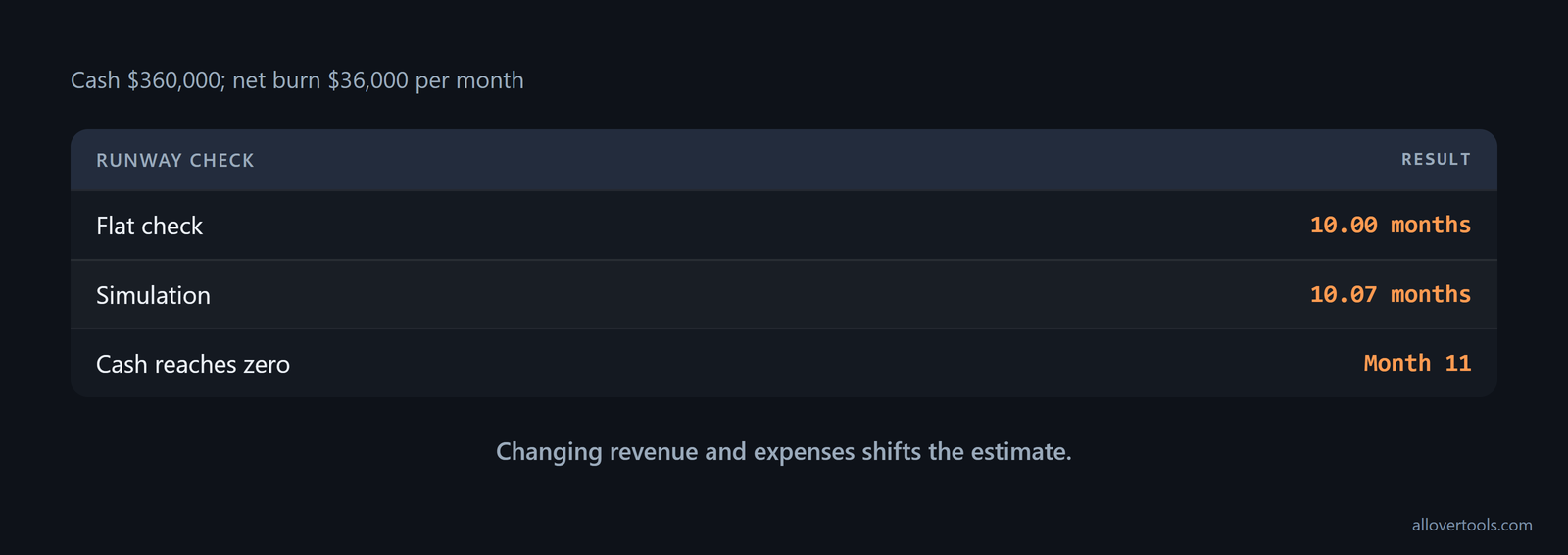
The projection changes revenue and expenses each month, subtracts net burn from running cash, and interpolates depletion within the first depleted month. That is why the projection table gives a better runway view than dividing cash by ARR. ARR is not cash collected.
Discount explicit cash flows for an NPV view
Use Dated cash flows (custom schedule) or Recurring cash flows in the Cash Flow Valuation Calculator when the schedule fits. For a simple annual series, choose By period (Year 0, 1, 2, …) in the NPV Calculator.
For an illustration, enter a period length of 1 year, Year 0 of -$120,000, Year 1 of $60,000, Year 2 of $80,000, Year 3 of $100,000, and an annual discount rate of 10%. Negative cash flows are outflows; positive cash flows are inflows.
NPV = −120,000 + 60,000/1.1 + 80,000/1.1² + 100,000/1.1³
    = $75,792.64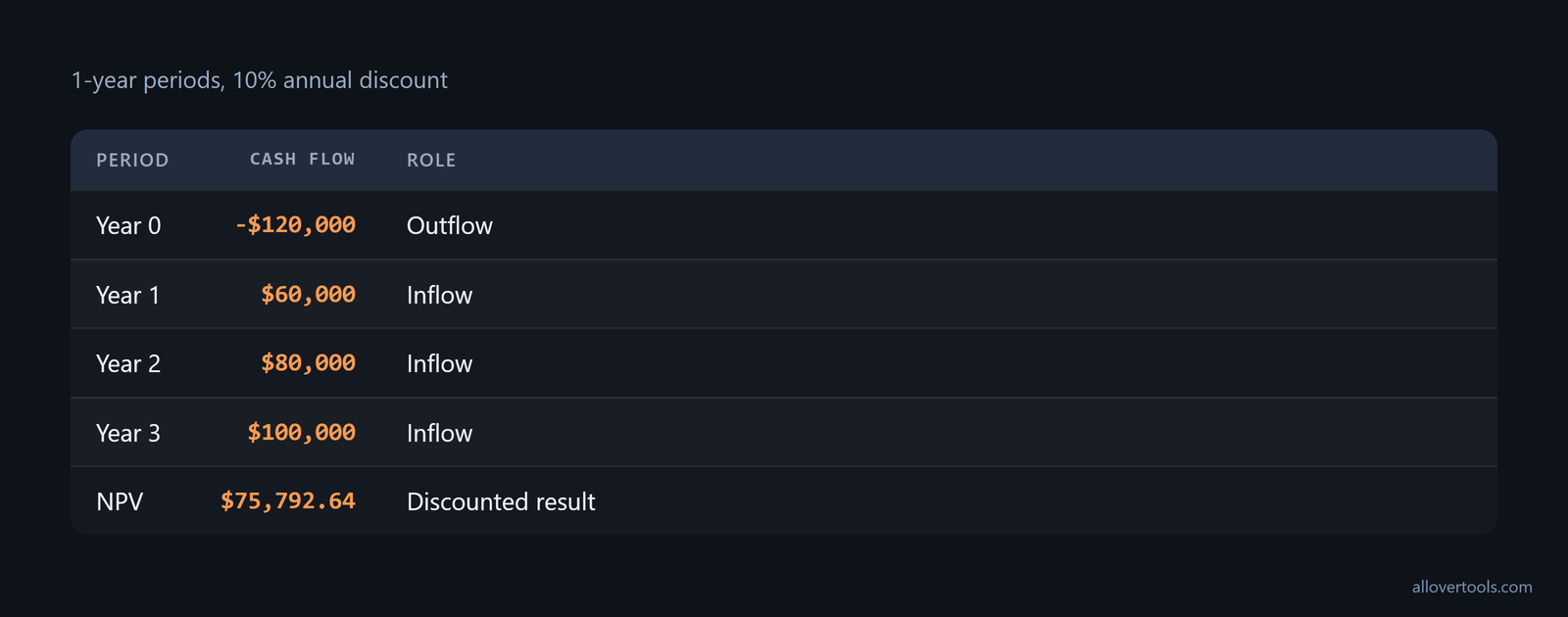
These are entered cash flows, not a claim that ARR equals cash flow. The calculators use the supplied values and rate rather than live data.
Know the limits and uncertainty of ARR forecasting
ARR is a run-rate measure, not revenue recognition or cash. Annualization can mislead when contracts are short, usage-based, discounted, paused, or billed on non-standard cycles. Churn and expansion also depend on timing. Pipeline is not booked ARR.
Do not compare ARR as though everyone uses the same definition. A public software company states that ARR is not standardized, may not be comparable with similarly titled measures at other companies, should be reviewed independently of revenue, and is not a forecast or a measure that accounts for seasonality. Treat each company's definition and calculation as its own reporting rule; the SEC disclosure makes that limitation explicit. When comparing periods, use the source contract scope and the company's own calculation rather than importing another company's ARR definition.
The forecast depends on assumptions about conversion, renewal, pricing, hiring, expenses, collections, and payment timing. Missing or zero denominators can make supporting SaaS metrics undefined. Compounding a monthly growth rate over 12 months is only a rough projection.
Combine ARR with other revenue forecasting methods
ARR gives one view of the revenue forecast. Historical financial forecasting uses past data and growth rates. Length-of-sales-cycle forecasting fits companies with established sales cycles. Test market analysis can help with new products or markets, while multivariable analysis can include marketing efforts, seasonality, inflation, interest rates, and expected supply and demand. Combine the selected method with the ARR bridge when the company's stage or data availability calls for it, as this revenue projections guide describes. The extra method can expose demand or macro variables that an ARR run rate does not capture.
Review the opening base against the contracts. Compare each movement category with actual account changes, then refresh the conservative, base, and optimistic cases. Put cash, not ARR, into runway and NPV models. The results are scenario outputs from entered values, not predictions or benchmarks.
Frequently asked questions
How do you forecast ARR for a SaaS company?
Start with annualized recurring revenue from active contracts. Add new business and expansion ARR, then subtract contraction and churn. Roll the bridge forward by month or year, with cash and recognized revenue in separate models.
What is the formula for ARR forecasting with churn and expansion?
Ending ARR equals starting ARR plus new ARR plus expansion ARR minus contraction ARR minus churned ARR. Upgrades are expansion from existing accounts. Full cancellations are churn.
Can ARR be used to calculate cash runway?
ARR alone cannot calculate runway. Runway needs cash on hand, cash collected, expenses, and burn. Use ARR or MRR as a revenue assumption, convert it to a cash-collection schedule, and calculate net burn and runway.
How do ARR scenarios affect SaaS valuation?
Each ARR scenario can imply a different cash-flow schedule, but ARR is not a cash flow. Enter the chosen cash flows and discount rate into an NPV or cash-flow valuation model, then compare the present values.