To understand billable hours utilization, start with how much of a working week goes to client work that can be invoiced. Sort tasks into billable and non-billable time, then calculate the rate from one tracked period. The same figure can guide weekly and annual targets and show how much non-billable work your hourly rate must cover. The examples use fixed freelance and agency scenarios.
What counts as billable vs non-billable hours?
Billable work follows the client agreement
Billable work is client-specific work that falls within the agreed scope and can be included on the invoice. In the freelance marketer example, that means 10 hours of client strategy, 6 hours of copy revisions, and 2 hours of a client reporting call, but only when the engagement allows that call to be billed.
Scope, retainer terms, and invoicing rules settle the edge cases. Working directly with a client does not make a task billable by itself. Internal rework and unapproved extra work can still take time without being invoiceable, so retain the entry and record the invoice treatment separately.
Non-billable time is part of the workday
Non-billable time keeps the business running or helps win work, but it is not charged to this client. The scenario includes 4 hours of admin, 3 hours writing sales proposals, 2 hours on the freelancer's own marketing, and 1 hour of bookkeeping.
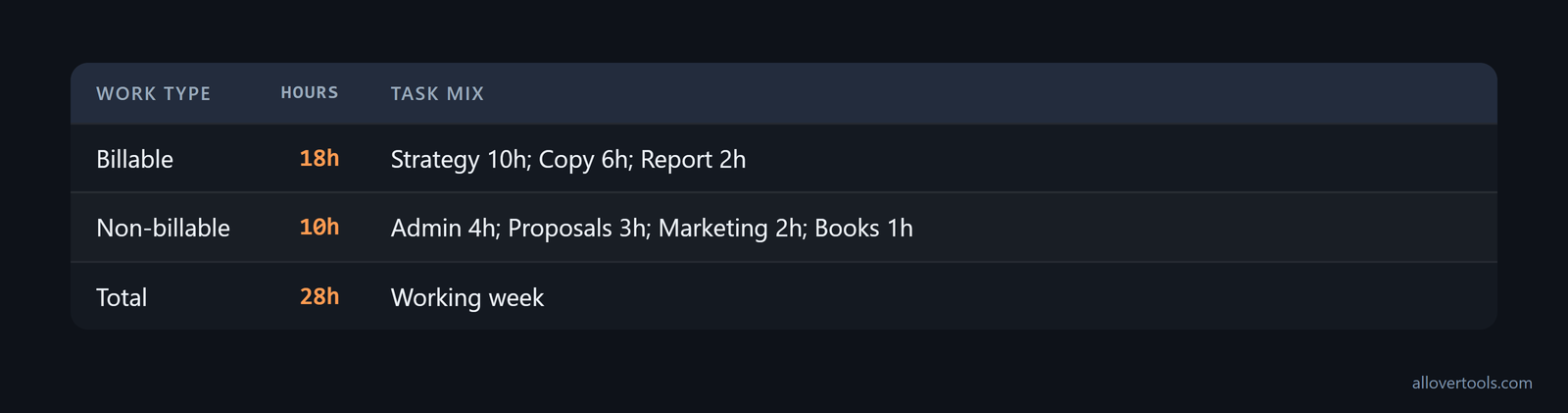
Billable:     10 + 6 + 2 = 18 hours
Non-billable: 4 + 3 + 2 + 1 = 10 hours
Working time: 18 + 10 = 28 hours
The 10 non-billable hours belong in the denominator. That is the practical difference in billable vs non billable hours. Removing admin or sales time makes utilization look better than the schedule allows. The 18 billable hours and 10 non-billable hours describe this example, not a standard split.
How do you calculate utilization rate?
The utilization rate formula
The utilization rate formula is:
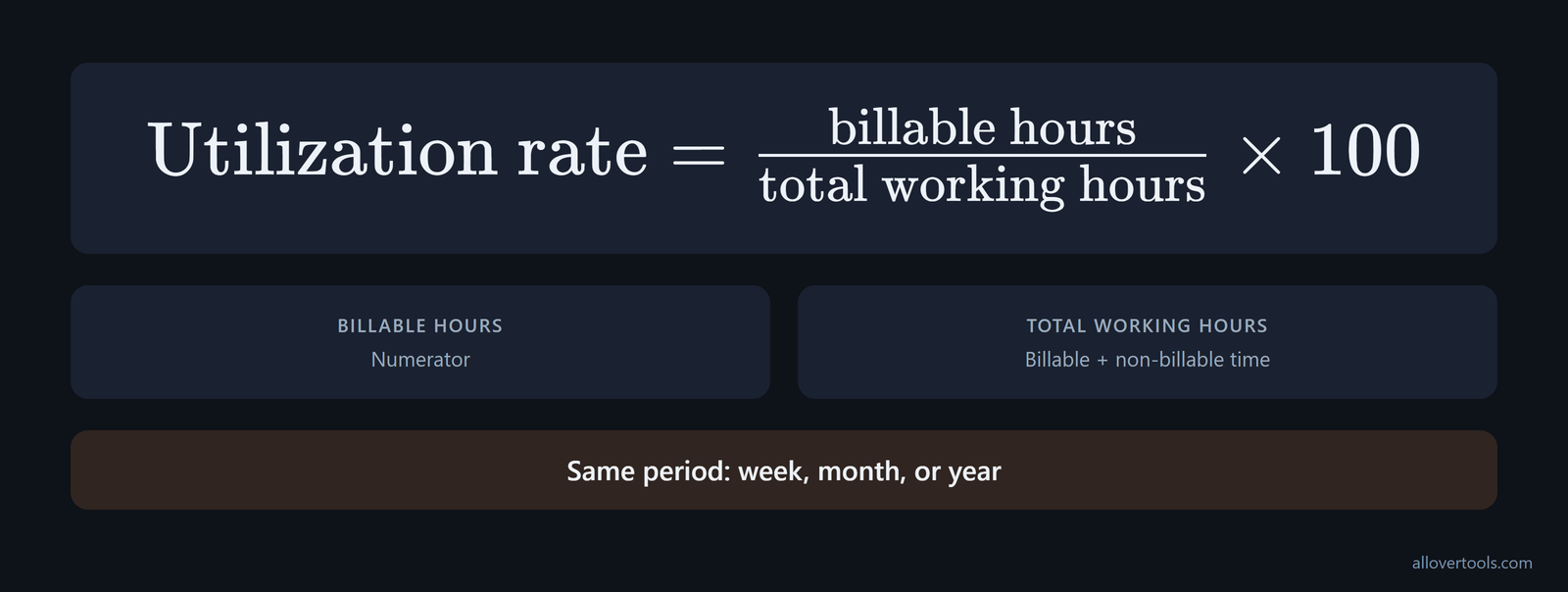
Billable hours / total working hours × 100Total working hours means billable plus non-billable working time for the same period. Do not divide by calendar hours. The numerator and denominator must cover the same week, month, or year.
Define the denominator before comparing utilization with another team. Some firms include all paid hours, including PTO and holidays. Others remove leave and use only working hours. That means the same 70% target can describe different capacity. A sample of 312 billable hours divided by 480 available hours gives 65%, as this denominator guidance explains.
Base the calculation on actual working capacity, not a theoretical 40 hours multiplied by 52 weeks. Public holidays, approved time off, and planned leave reduce the hours a person is available to work. If you leave those hours in the denominator, utilization looks lower than it is and staffing decisions can be distorted. That is the capacity rule in this utilization guide.
Keep billable utilization and resource utilization separate. Billable utilization counts available hours spent on revenue-generating client work. Resource utilization also includes productive training, internal projects, and business development. this agency metric explanation covers the distinction, so a team can see revenue delivery and internal investment instead of reducing both to one percentage.
For the freelance week:
18 / 28 × 100 = 64.285714%
Displayed: 64.29%
The non-billable share is also visible:
10 / 28 × 100 = 35.714286%
Displayed: 35.71%
A freelance week and an agency week
An agency scenario uses 24 hours of client delivery, 6 hours of internal operations, 4 hours of proposals, 2 hours of training, and 2 hours of team meetings. Client delivery is billable in this scenario; the other categories are non-billable.
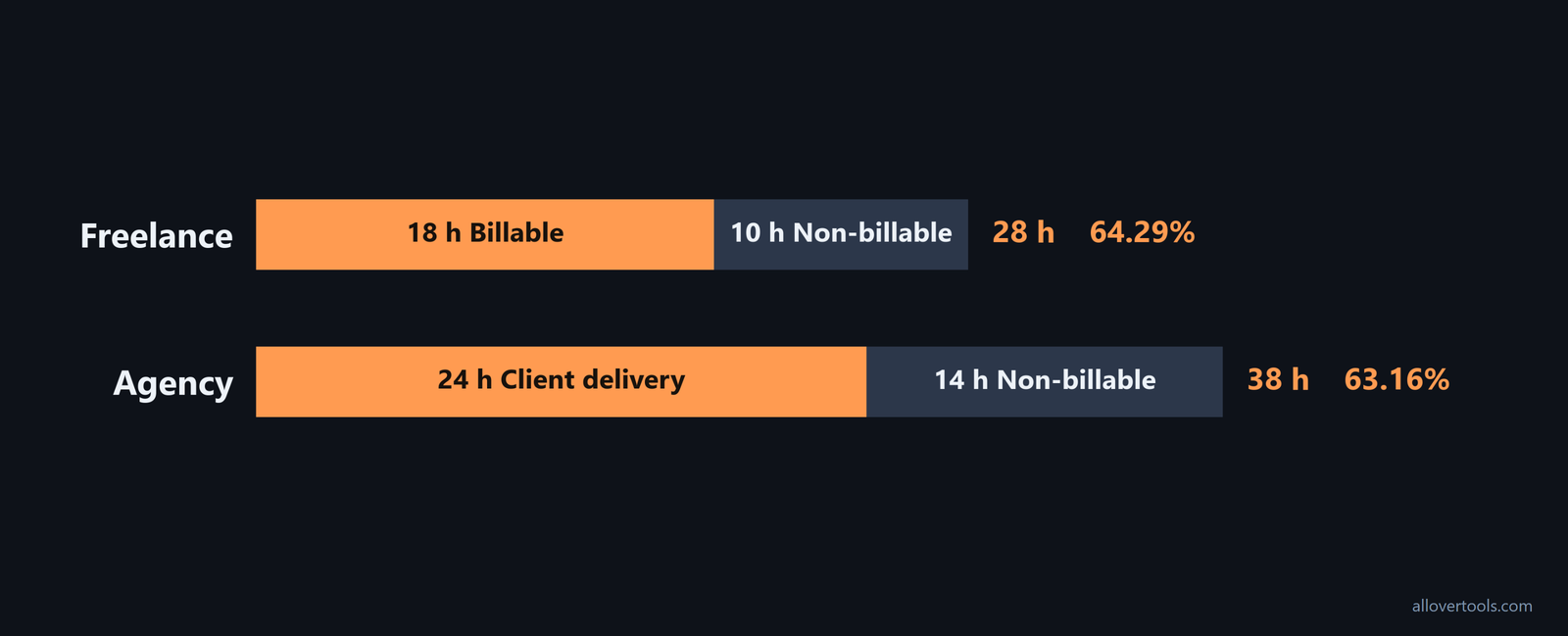
Billable:     24 hours
Non-billable: 6 + 4 + 2 + 2 = 14 hours
Total:        24 + 14 = 38 hours
Utilization:  24 / 38 × 100 = 63.157895%
Displayed:    63.16%
The percentage only tells you something when the team labels time consistently and follows a stated rule for write-offs. There is no generic "good" utilization percentage to copy. Start with a tracked baseline and account for available capacity, leave, and recurring internal work when setting a planning assumption.
A solo freelancer should usually plan for a lower band than a fully staffed delivery role. A healthy solo-freelancer utilization rate is roughly 50% to 70%. A typical month is near 60% after admin, sales, marketing, and learning are counted; one example records 94 billable hours out of 152 total hours, or 62% utilization, in this freelancer benchmark. Use the non-billable share you track to set the assumption. Not every working hour can be invoiceable.
For a solo practitioner or consultant, 60% to 80% is the sustainable range described by this utilization calculator. On a 40-hour week, that is 24 to 32 billable hours. Below 60% often means marketing or admin is taking too much time. Staying above 85% for an extended period is usually a burnout signal because marketing, learning, and rest have been squeezed out.
How many billable hours should you plan per week and year?
Turn capacity into a weekly target
Set a weekly billable-hour target by multiplying the working hours you can schedule by a utilization assumption:
Weekly target = planned working hours per week × utilizationThe result is a planning target, not an invoice promise. Admin, sales, breaks, leave, and internal work reduce the billable portion. In this example, 28 x (18 / 28) gives 18 billable hours, which answers how many billable hours per week the scenario can plan.
For dated shifts that need to be combined into daily and weekly totals, use the Timesheet Calculator. It supports a selected time zone, week-start day, break policy, and daily and weekly thresholds. Those are calculation inputs, not jurisdiction-specific rules.
Turn the same assumption into an annual target
Use the same assumption for annual planning:
Annual target = total working hours per year × utilizationExtend the freelance week across 46 working weeks:
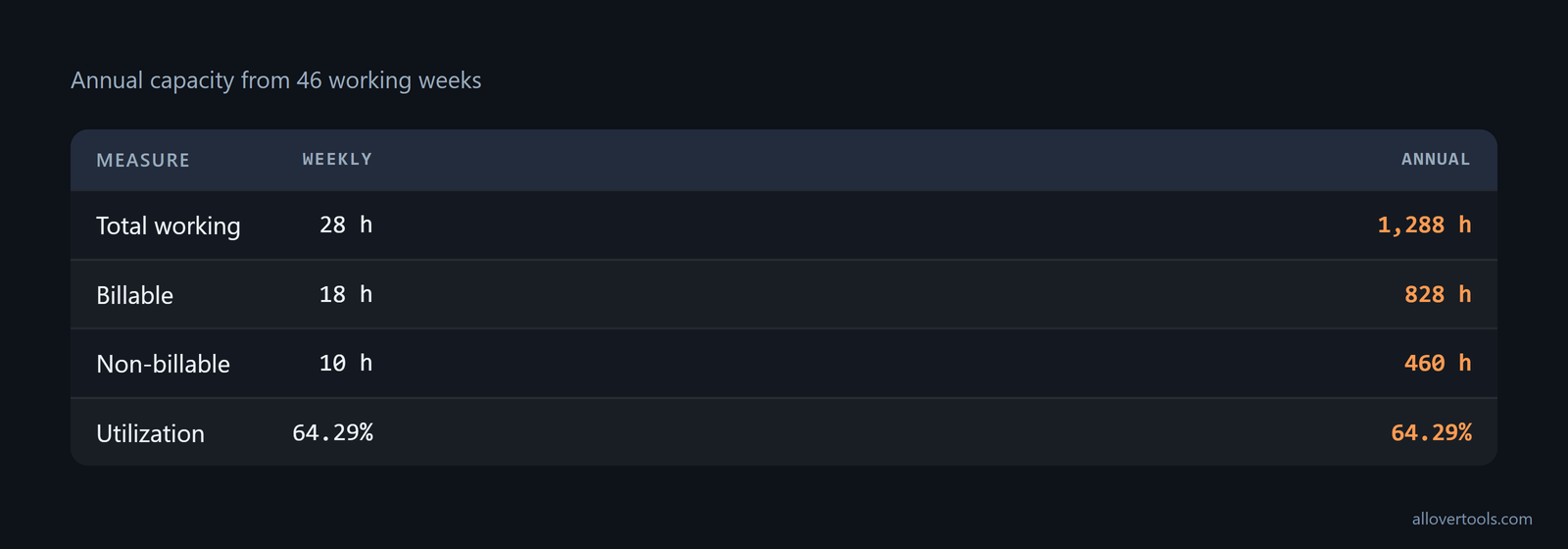
Total working hours: 28 × 46 = 1,288
Billable hours:      18 × 46 = 828
Non-billable hours:  10 × 46 = 460
Utilization:         828 / 1,288 × 100 = 64.285714%
Displayed:            64.29%
Remove planned leave or unavailable weeks before setting an annual target. If tracked results keep differing from the assumption, revise the target. The 46-week example is capacity arithmetic, not a benchmark.
For an agency, compare delivered utilization with scheduled utilization. Delivered utilization uses billable hours that were actually worked and recorded, so it can expose pipeline gaps, write-offs, and operational overhead that a plan may hide. Bennett Financials publishes agency benchmarks in the 50% to 65% range. Nymble practitioner data points to 65% to 75% delivered utilization as optimal, as these delivered benchmarks describe.
A high result does not prove that capacity is healthy. In Asana's case, XYZ Marketing Agency found an average utilization rate of 95%, and employees were overworked. The rate was contributing to missed deadlines and lower work quality because too little time remained for training, meetings, and professional development. The 95% agency case points to the response: adjust workload and targets when a high rate removes essential non-billable work.
How to set utilization targets by role, industry, and agency size
Set targets based on the work a role is expected to do, not on a single firm-wide percentage. Delivery staff can carry more billable time than people responsible for management, sales, strategy, or internal operations. The table gives separate ranges for role, agency size, industry, and maturity. Use the row that matches the planning decision.
| Context | Billable utilization figure |
|---|---|
| Individual contributors | 70% to 80% billable. Team leads: 50% to 65%. Account management and sales: near zero. Firm-wide averages are around 60% to 70%, according to role benchmarks. |
| UK agencies with £1m+ revenue | About 65% firm-wide. Production staff: 75% to 85%. Founders and directors: 30% to 50%, in the BenchPress 2023 survey summarized by the survey data. |
| Agency size | 70% to 85% for 1 to 10 people; 60% to 75% for 11 to 50; 65% to 70% for 50-plus, based on the size ranges compiled from TMetric. |
| Industry | Professional services: 70% to 75%; creative and marketing agencies: 75% to 85%; IT services and software development: 75% to 80%; manufacturing and production: 80% to 90%, in the industry ranges. |
| Professional-services maturity | In 2025, the average was 66.4% across 509 organizations with combined $63 billion in services revenue. High-performing firms averaged 75.0%, and the top maturity level averaged 81.2%, as reported in the SPI benchmark. |
A global professional-services reference point is around 69% billable utilization, according to this global benchmark. Use these figures as comparison points for a matching role and operating model. Then test the chosen assumption against your own delivered hours, leave, internal work, and revenue requirement.
How to track billable time with timesheets
A timesheet entry that survives invoicing
To track billable time accurately, start an entry when work begins. Record the client, project, and task, then mark the entry billable or non-billable. Stop or correct it when the task ends. Review uncategorized time each day and reconcile the period before invoicing.
Keep worked billable time and invoiced time as separate fields so write-offs remain visible. In this example:
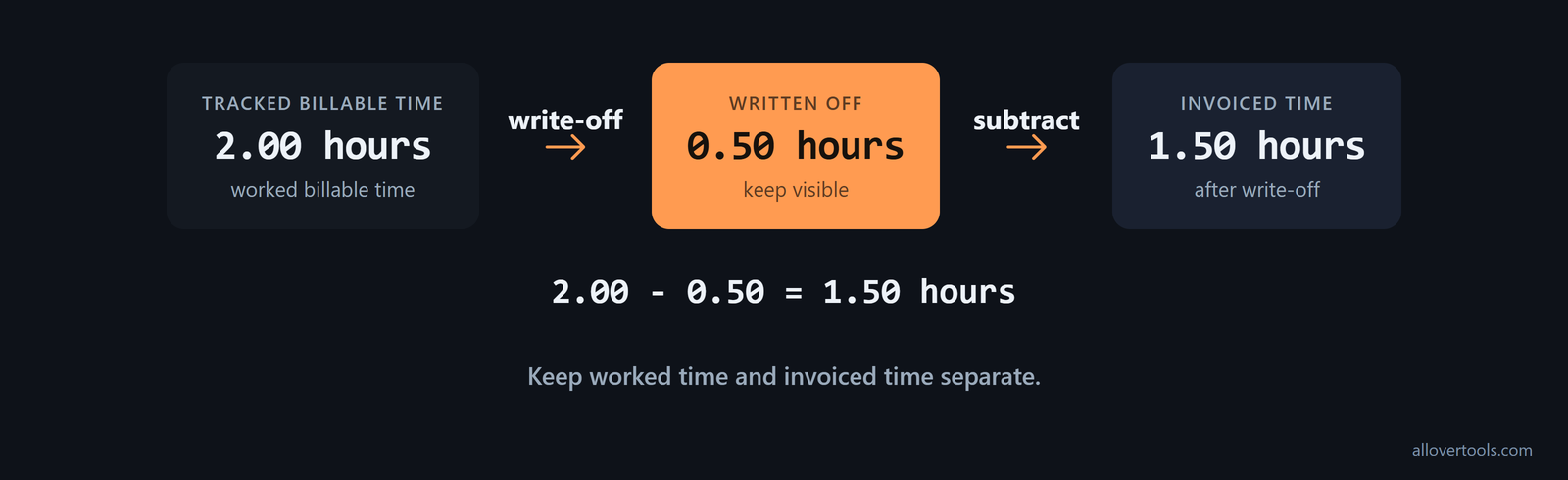
Tracked billable time: 2.00 hours
Written off:          0.50 hours
Invoiced time:        2.00 - 0.50 = 1.50 hours
Keep the 0.50 hours visible. Utilization and invoice realization answer different questions. Before comparing the metric with invoice results, state whether it measures client-specific worked time or hours actually invoiced.
Compare utilization with realization when judging agency performance. Most agencies run at 55% to 65% blended utilization. The best-performing agencies reach 70% to 80% utilization and keep realization above 85%; the agency benchmark defines realization as the share of billable hours that are actually invoiced and collected. A higher worked-time percentage still does not show whether that time becomes collected revenue, so keep write-offs and discounts visible in the second metric.
Pick a rounding policy before adding entries together. The Timesheet Calculator combines dated shifts into daily and weekly totals. It calculates in the browser from entered values; its files contain no fetch, XMLHttpRequest, sendBeacon, or form post with the visitor's time data.
Rounding and increments
For punch times, the Work Hours Calculator labels its controls Round each start/end time, Rounding interval (minutes), No rounding - use times exactly as entered, Nearest interval, Up to next interval, and Down to previous interval. When rounding is enabled, the interval must be from 1 to 60 minutes.
Nearest chooses the closest interval. Up rounds to the next interval, while Down rounds to the previous one. No rounding leaves the entered times unchanged. With the shift 09:07-10:14 and nearest 15-minute rounding:
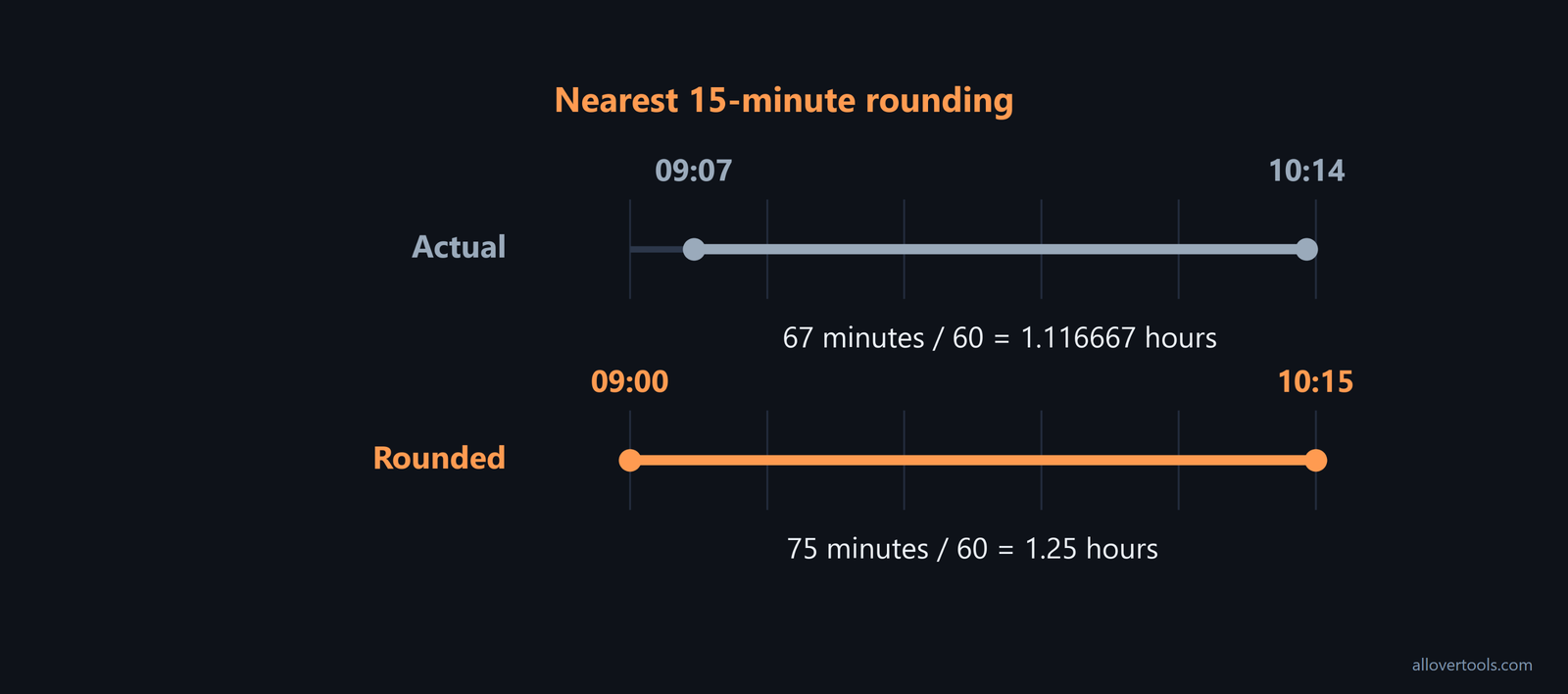
Actual elapsed time: 67 minutes / 60 = 1.116667 hours
Rounded times:       09:00-10:15
Rounded elapsed:     75 minutes / 60 = 1.25 hours
Rounding can increase or reduce recorded time. State the rule and apply it consistently. The Work Hours Calculator calculates the entered punch times in the browser. Its files contain no fetch, XMLHttpRequest, sendBeacon, or form post with the visitor's time data, and it does not fetch external time-clock, payroll, or jurisdictional data.
How utilization changes the hourly rate you need
Required rate formula and worked inputs
The rate calculation charges non-billable time to the work that can be billed:
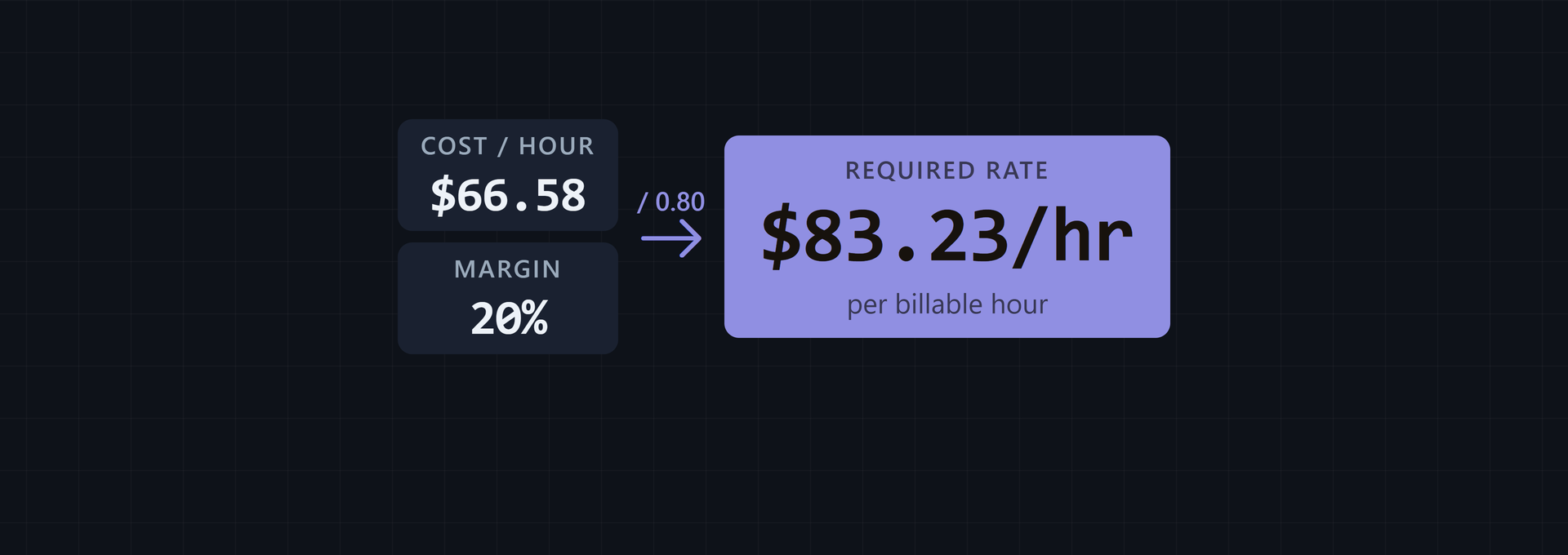
Required rate = (income target + annual business expenses)
                / (total working hours per year × utilization rate as a decimal)
Use these inputs with the labels in the Billable Hourly Rate Calculator:
Annual income target:          $72,000
Annual business expenses:      $12,000
Total working hours per year:  1,288
Utilization rate:               64.285714%
The intermediate values are:
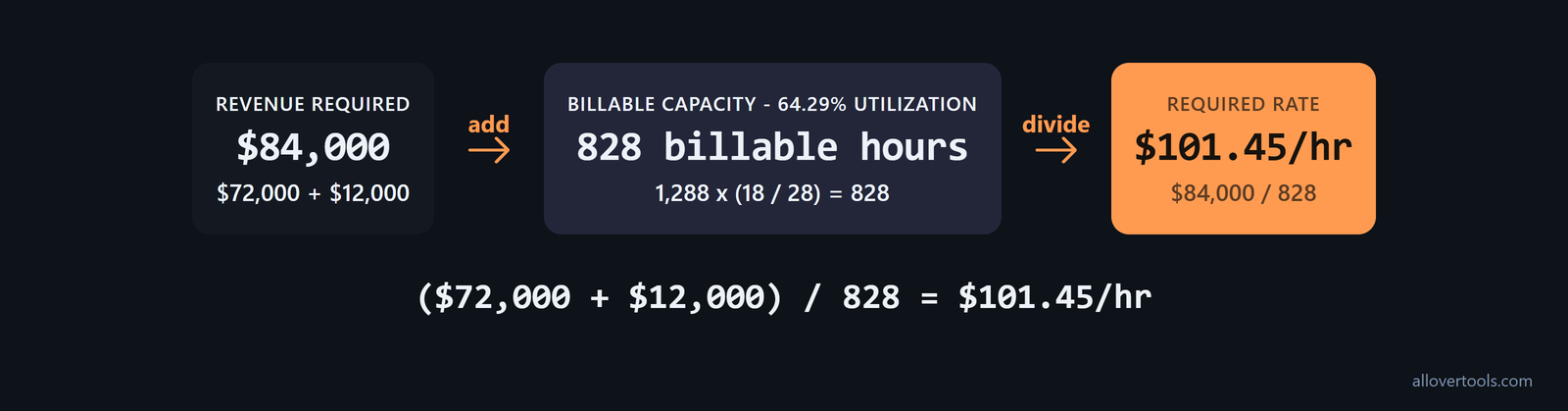
Total revenue required: $72,000 + $12,000 = $84,000
Billable hours:         1,288 × (18 / 28) = 828
Required rate:           $84,000 / 828 = $101.449275...
Displayed rate:          $101.45/hr
The Billable Hourly Rate Calculator is the billable hours calculator for this pricing step. It accepts Annual income target and Annual business expenses of zero or more, Total working hours per year greater than zero, and Utilization rate greater than zero and up to 100. It uses typed numbers and shows the formula and assumptions. The controls are Calculate rate, Copy result, Download result (.txt), and Reset.
The calculator does not fetch market rates, industry benchmarks, competitor pricing, or external financial records. Its script contains no request with the entered values, so the calculation stays in the browser.
What changes when utilization changes
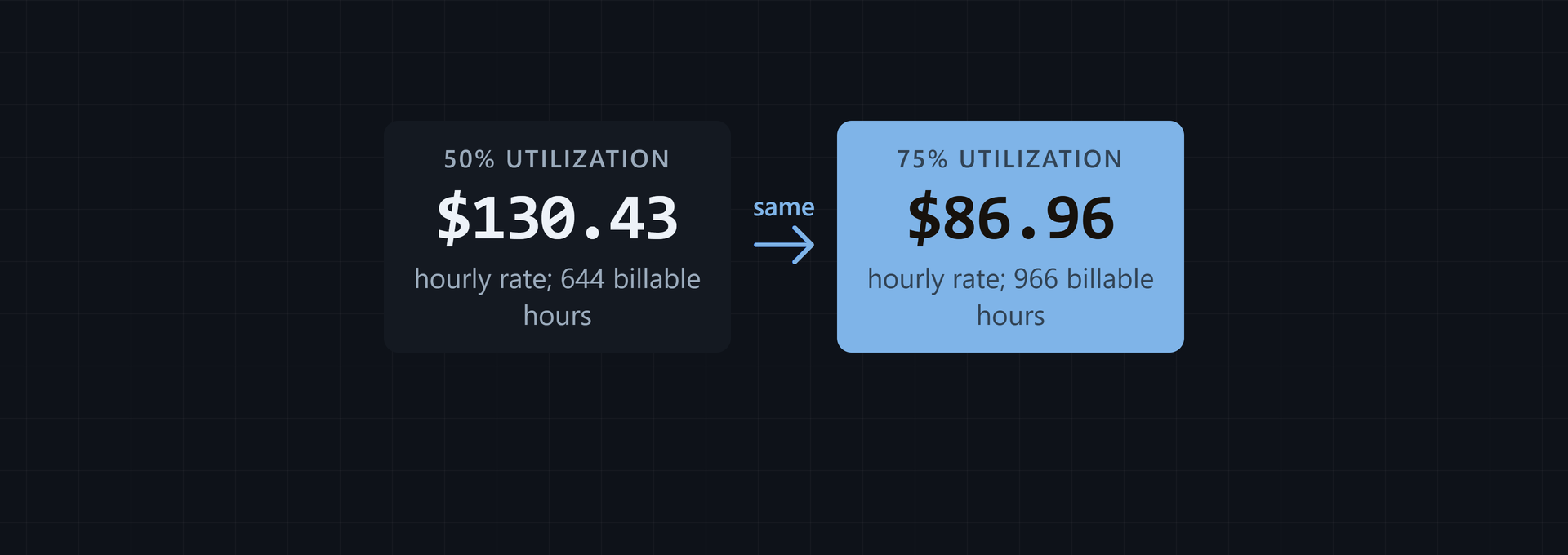
Keep the $84,000 revenue requirement and 1,288 working hours constant. Changing utilization changes the billable denominator:
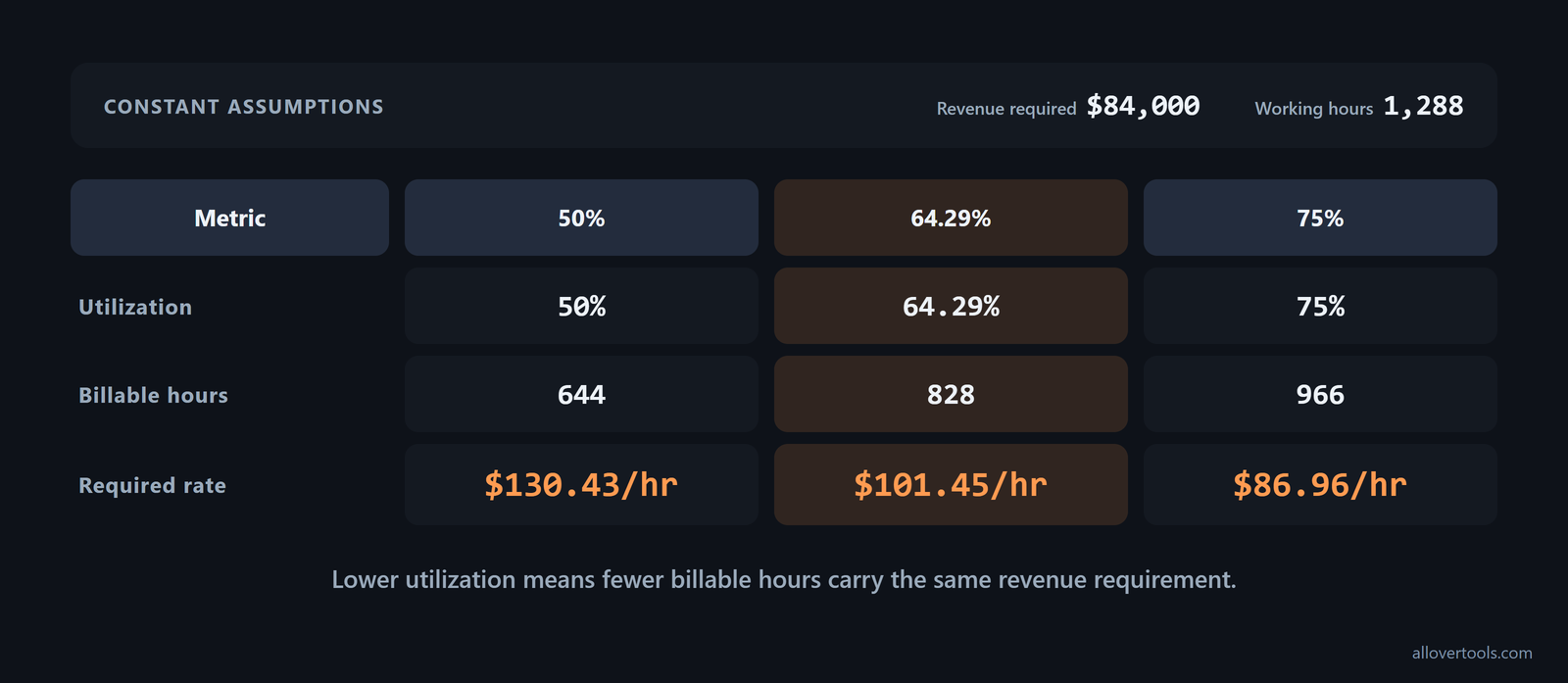
50%:          1,288 × 0.50 = 644 billable hours
              $84,000 / 644 = $130.434783 → $130.43/hr

64.285714%:   1,288 × 0.64285714 = 828 billable hours
              $84,000 / 828 = $101.449275 → $101.45/hr

75%:          1,288 × 0.75 = 966 billable hours
              $84,000 / 966 = $86.956522 → $86.96/hr
These are arithmetic scenarios, not market rates or personal pricing advice. For effective utilization for freelancers, compare the billable capacity left after non-billable work with the revenue that capacity must cover. When utilization falls, fewer billable hours carry the same income target and expenses, so the required rate rises.
Across a team, the increase can be substantial. At a 15-person agency billing a $150 per hour blended rate, increasing blended utilization by 10 percentage points is worth roughly $270,000 in additional annual revenue capacity, assuming team size and hourly rate stay constant, as shown in this revenue example. Use the same multiplication logic to test a target change, then check realization before treating that capacity as collected revenue.
Frequently asked questions
What is a good billable utilization rate for a freelancer?
There is no universal percentage. Track billable and non-billable time over the same period, then choose an assumption that leaves room for the admin, sales, leave, and internal work your business actually has.
How do I calculate my billable hours utilization?
Divide billable hours by total working hours for the same period and multiply by 100. Total working hours includes both billable client work and non-billable business time.
How many billable hours should I target each week?
Multiply the working hours you can realistically schedule by your utilization assumption. Compare the target with timesheet totals and adjust for leave, sales, admin, and other recurring non-billable work.
Do write-offs count as billable hours?
Keep worked billable time and invoiced time as separate fields. Record the write-off instead of deleting it, then state whether your utilization metric measures client-specific worked time or hours actually invoiced.
How does utilization affect a billable hourly rate?
A lower utilization leaves fewer billable hours to cover the same income target and expenses, so the required rate rises. Use required rate = (income target + expenses) / (working hours x utilization as a decimal).