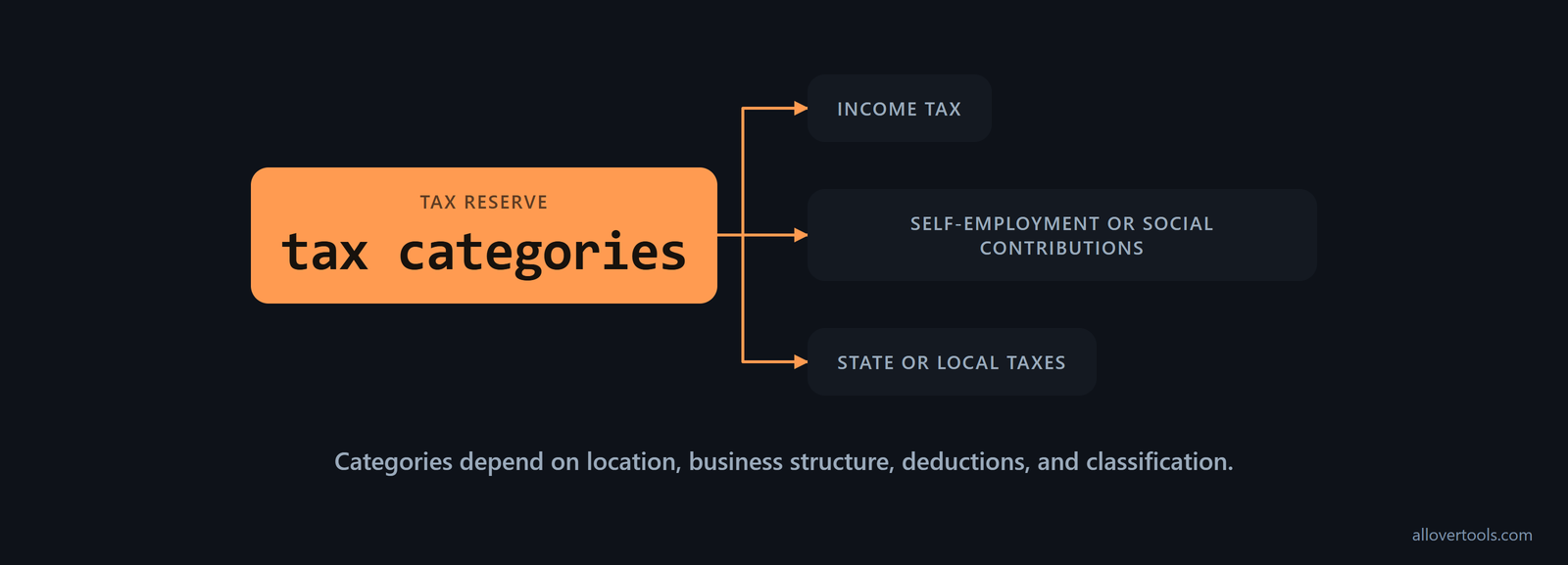
Billable rate tax planning starts with a simple problem: a rate can cover operating costs and still leave too little after tax. A self-employed professional may need a reserve for income tax, self-employment or social contributions, plus applicable state or local taxes. The exact obligations depend on location, business structure, deductions, and how the work is classified.
What self-employed taxes belong in a billable rate?
The rate needs to leave enough money for the taxes that apply to the work and for the intended income. Those taxes may include income tax, self-employment or social contributions, and state or local taxes. The categories depend on the jurisdiction, business structure, deductions, and how the work is classified.
For U.S. self-employment, start with the profit threshold and tax base before choosing a reserve percentage. Net earnings of $400 or more generally trigger self-employment tax, and generally 92.35% of those net earnings is subject to the 15.3% rate: 12.4% Social Security and 2.9% Medicare. Treat net earnings as gross self-employment income minus ordinary and necessary business expenses. Compute self-employment tax separately on Schedule SE, then add it to income tax, as the IRS self-employment tax guidance explains.
A side business with annual net profit below $400 still has to be reported and may still be subject to income tax, but it does not owe self-employment tax below that threshold. Once net profit reaches $400, include that obligation in the reserve. The side-hustle tax explanation sets out the distinction.
Base the reserve on profit, not on whether a client sends a Form 1099. Self-employment tax applies once net earnings reach $400, even without a 1099. It can also apply to a side business alongside a full-time job. Include that self-employed portion in the rate, then consider how it interacts with wage withholding from the main job, as this self-employment tax guidance explains.
A planning reserve is an estimate, not a tax bill or a universal legal rate. Use a percentage to build a pricing scenario, then ask an accountant and check the relevant official guidance before adopting the rate and payment schedule.
How much tax reserve should you set aside?
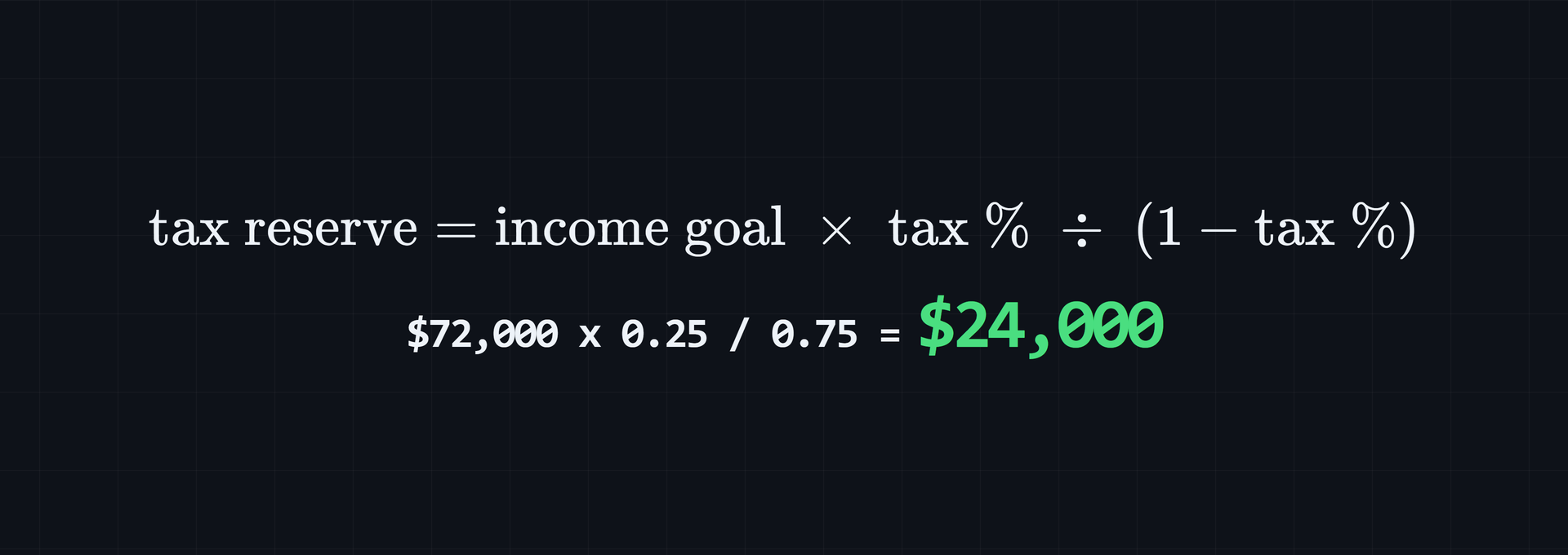
The tax reserve is the amount kept each year for expected tax payments. For an after-tax income goal, use:
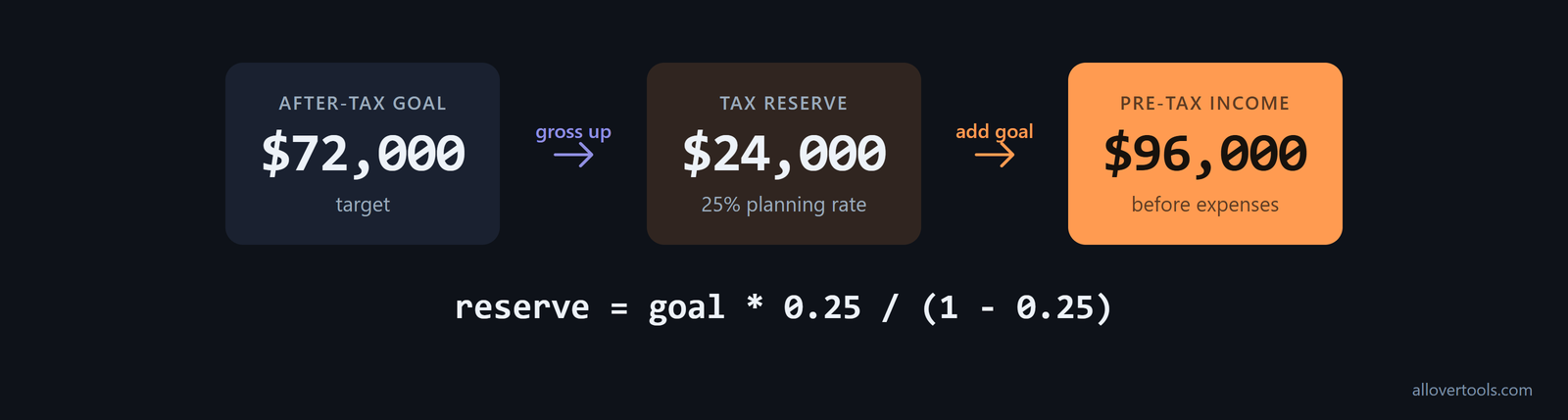
Tax reserve = after-tax income goal × tax percentage ÷ (1 − tax percentage)The percentage applies to the pre-tax amount, which includes both the goal and the reserve. Using a $72,000 after-tax goal and a 25% planning percentage:
$72,000 × 0.25 ÷ 0.75 = $24,000 tax reserve
$72,000 + $24,000 = $96,000 pre-tax income before operating expenses
Start with a range, not a fixed percentage. Several tax-preparation firms and calculators put the common reserve at 25% to 30% of net income. Lower earners may be closer to 20%, while higher earners or people with fewer deductions may need 35% or more. The right percentage depends on income level, deductions, credits, and location. Match the assumption to the income definition in the worksheet and confirm it with an accountant, as this tax set-aside range explains.
Federal estimates also change with profit, so use a different percentage for each income target. These figures combine self-employment and income tax after the qualified business income deduction and exclude state tax. They come from the 2026 federal tax estimates:
| Self-employment profit | Combined federal tax set-aside | Specific detail |
|---|---|---|
| $20,000 | About 15% of profit | |
| $60,000 | About 20.1% of profit ($12,037) | 2026 self-employment tax: $8,477.73; example uses $75,000 of 1099 income and $15,000 of expenses |
| $200,000 | About 27% of profit |
Use gross revenue as a second check: (target take-home + business expenses) ÷ (1 − tax reserve percentage). The tax reserve percentage is the combined estimate of self-employment, federal, and state taxes. Use this direct gross-up to check the reserve-first calculation when the target is take-home pay, following this gross-up formula.
Keep the reserve separate from operating expenses in the worksheet. The calculator combines both figures in its Annual business expenses field, but the split keeps the overhead and tax decisions visible. Review the 25% assumption with an accountant and official guidance; it is not a rate for every jurisdiction.
Separate the tax reserve from operating expenses
For this example, record $12,000 of operating expenses and a $24,000 tax reserve. The calculator expense input is their sum:

Operating expenses: $12,000
Tax reserve:        $24,000
Annual expenses:    $36,000
Keeping the figures separate makes later reconciliation easier, even though the rate formula adds them together.
How to add a tax reserve to the billable rate formula
The calculator uses this formula:
Required rate = (Income target + Annual expenses)
                ÷ (Working hours per year × Utilization rate as a decimal)
The tool has no separate tax input. Enter the desired after-tax income goal in Annual income target, then enter operating expenses plus the tax reserve in Annual business expenses. The linked Billable Hourly Rate Calculator uses those values and shows the intermediate results.
Enter the figures in this order: Annual income target, Annual business expenses, Total working hours per year, Utilization rate (%), and the optional Currency symbol. Select Calculate rate when the fields are complete. Utilization converts total working hours into billable hours, so 70% becomes 0.70 in the formula.
Check utilization before you accept the rate. Most freelancers bill only 50% to 60% of their working hours. An established solo consultant may assume 50% to 70%. Another calculator example reduces 2,080 standard working hours to about 1,226.5 annual billable hours. Compare the result at the lower end before treating a 70% to 80% assumption as normal. Optimistic utilization can cause underpricing even when the tax reserve math is correct, as this hourly-rate benchmark shows.
With these inputs, billable hours are 2,000 × 0.70 = 1,400. Total revenue required is $72,000 + $36,000 = $108,000. The required billable hourly rate is $108,000 ÷ 1,400 = $77.14/hr after display rounding.
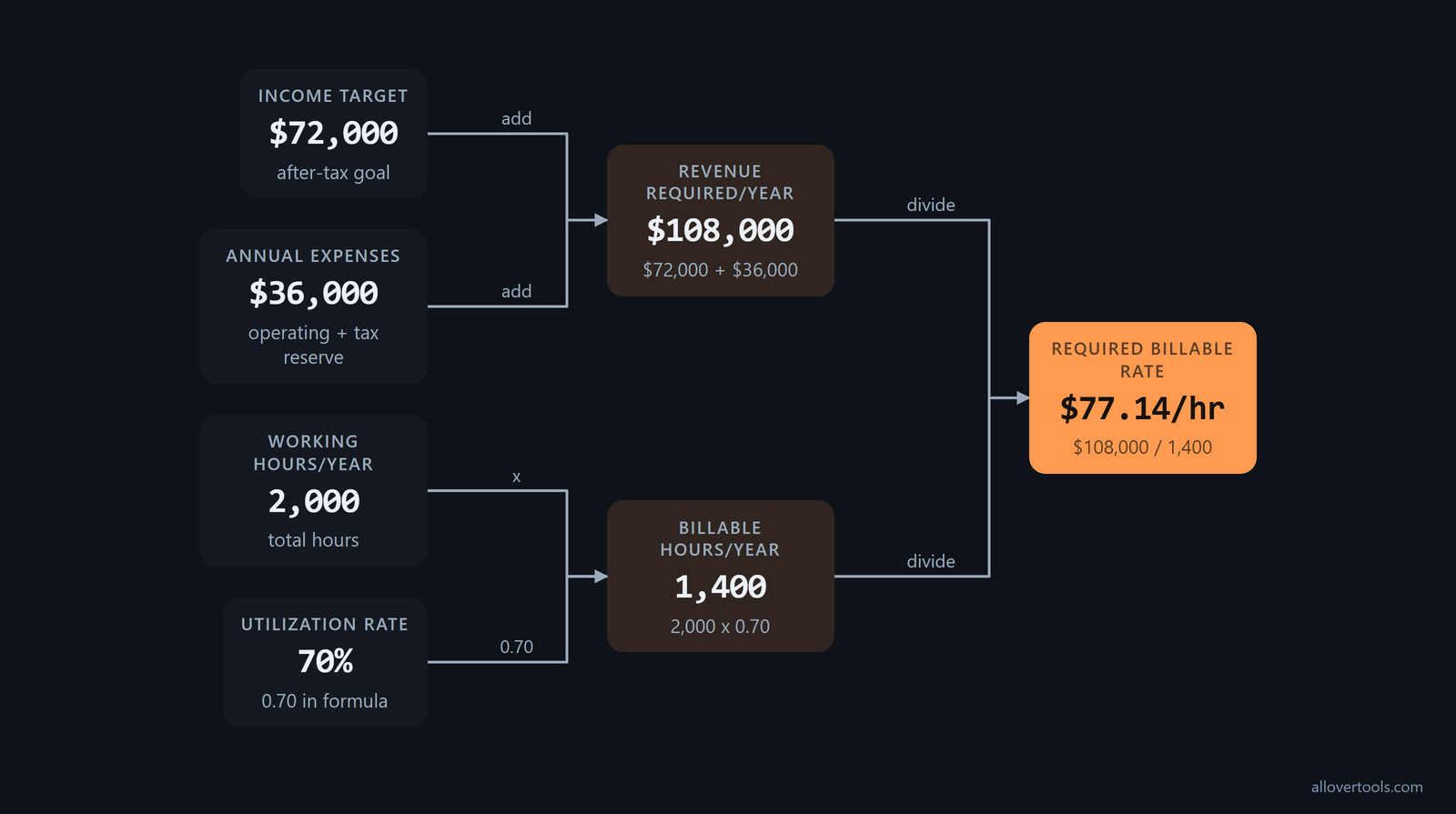
The result labels are Required billable hourly rate, Billable hours per year, and Total revenue required per year. When an input or the currency selection changes, the current result is hidden until the calculation runs again. Empty, non-numeric, or out-of-range values stop the calculation. The script reads entered values only. It makes no fetch, XMLHttpRequest, sendBeacon, or form post with the visitor's content, so the calculation stays in the browser.
Worked calculator entry
These values are for illustration. Enter them into the calculator to reproduce the scenario:
Annual income target:       $72,000
Annual business expenses:   $36,000
Total working hours/year:   2,000
Utilization rate (%):       70
Currency symbol:            $

Billable hours per year:    2,000 × 0.70 = 1,400
Total revenue required/year: $72,000 + $36,000 = $108,000
Required billable hourly rate: $108,000 ÷ 1,400 = $77.14/hr
How different tax percentages change post-tax income
Use the same $72,000 after-tax goal, $12,000 operating expenses, 2,000 working hours, and 70% utilization in each scenario. Billable hours stay at 1,400. The planning percentage changes the reserve, annual expenses, total revenue, and required rate.
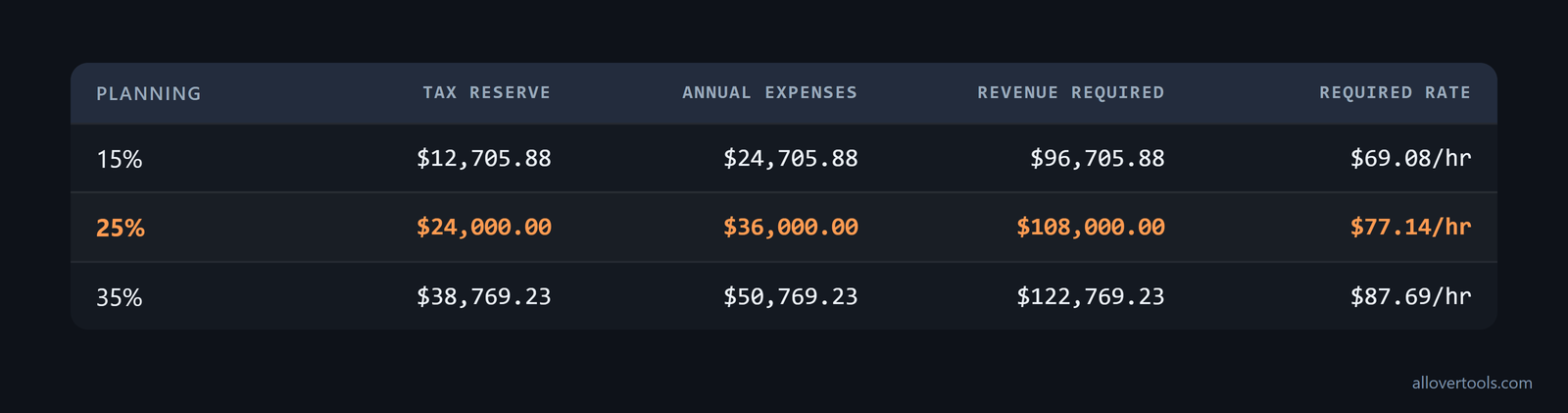
Planning   Tax reserve   Annual expenses   Revenue required   Required rate
15%        $12,705.88    $24,705.88        $96,705.88          $69.08/hr
25%        $24,000.00    $36,000.00        $108,000.00         $77.14/hr
35%        $38,769.23    $50,769.23        $122,769.23         $87.69/hr
For example, the 15% reserve is $72,000 × 0.15 ÷ 0.85 = $12,705.88. The 25% and 35% rows use the same reserve formula. If the assumptions hold, each scenario leaves the $72,000 goal after the assumed reserve and the $12,000 operating costs.
Without a reserve, the comparison is ($72,000 + $12,000) ÷ 1,400 = $60.00/hr. That is $17.14/hr below the 25% reserve scenario. These are scenario calculations, not tax brackets, forecasts, benchmarks, or personalized tax advice. Actual taxable income and payments can differ.
Read the result as a pre-tax requirement
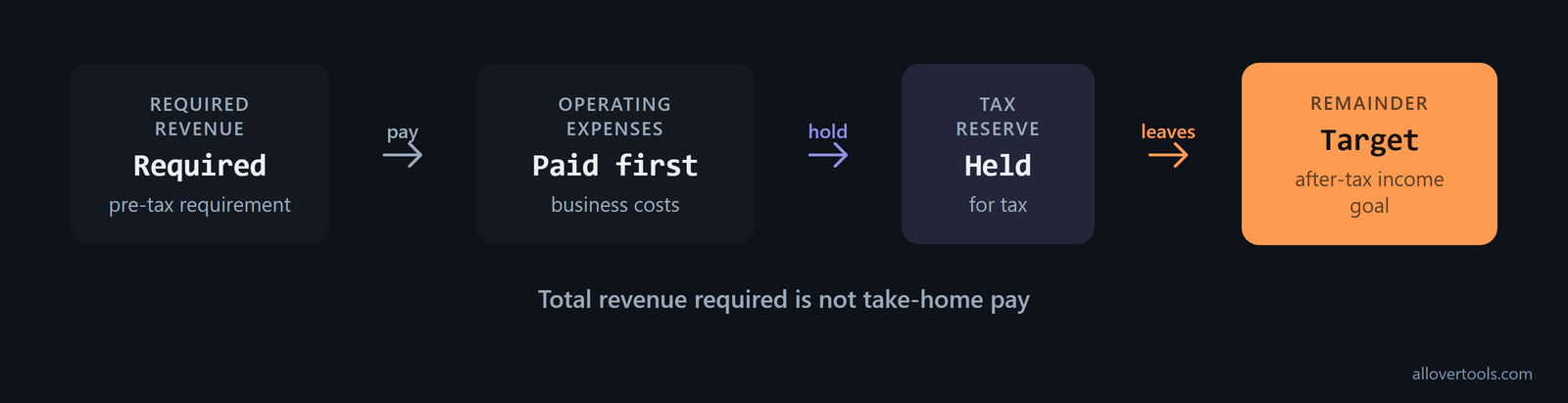
The rate first produces revenue. Operating expenses are paid, and the reserve is held for tax. Only under these assumptions does the remainder meet the target. The calculator's Total revenue required is not the same thing as take-home pay.
How to track actual tax payments against the reserve
Keep a running record with one line for each period. Record collected revenue, operating expenses, reserve added, tax payment or tax liability, and reserve balance. Record a payment when it is made. An unpaid invoice is not cash available for the reserve.
Move the reserve when cash arrives, not at quarter-end. For each payment, calculate profit as revenue minus associated business expenses. Transfer roughly 25% to 35% of that profit to a dedicated high-yield savings or tax account when the payment clears, and leave it there until quarterly estimates or year-end tax bills are due. This per-payment process keeps the annual assumption available as cash, as this reserve workflow recommends.
If expected federal income tax for the year is $1,000 or more, keep enough reserve for quarterly estimated payments. Self-employed people are generally required to make them to avoid a large amount due at tax time or penalties, according to this quarterly-payment guidance. The schedule changes the cash-flow check: the reserve must be available when the quarterly estimate is due, not only when the annual return is filed.
Compare the balance with tax notices, filed calculations, and accountant guidance. At a review point, calculate:
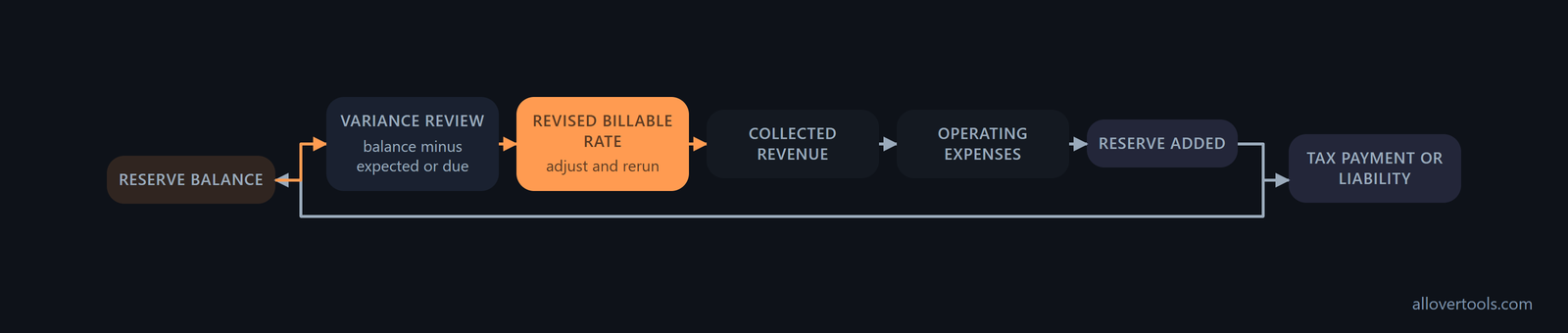
Variance = reserve balance − amount currently expected or dueIf a gap keeps appearing, adjust the planning percentage or annual reserve and rerun the billable rate. Do not spend the reserve, mix taxes collected on behalf of a customer with the business's own income, or keep old assumptions in the rate after actual payments show that they no longer fit.
Use actual payments to revise the next rate
Before quoting new work, compare the ledger with accountant or official figures. Update the annual tax reserve, add it to operating expenses, and recalculate the required rate. Keep the prior scenario so any change in the tax assumption remains visible.
How to avoid an underpriced post-tax income goal
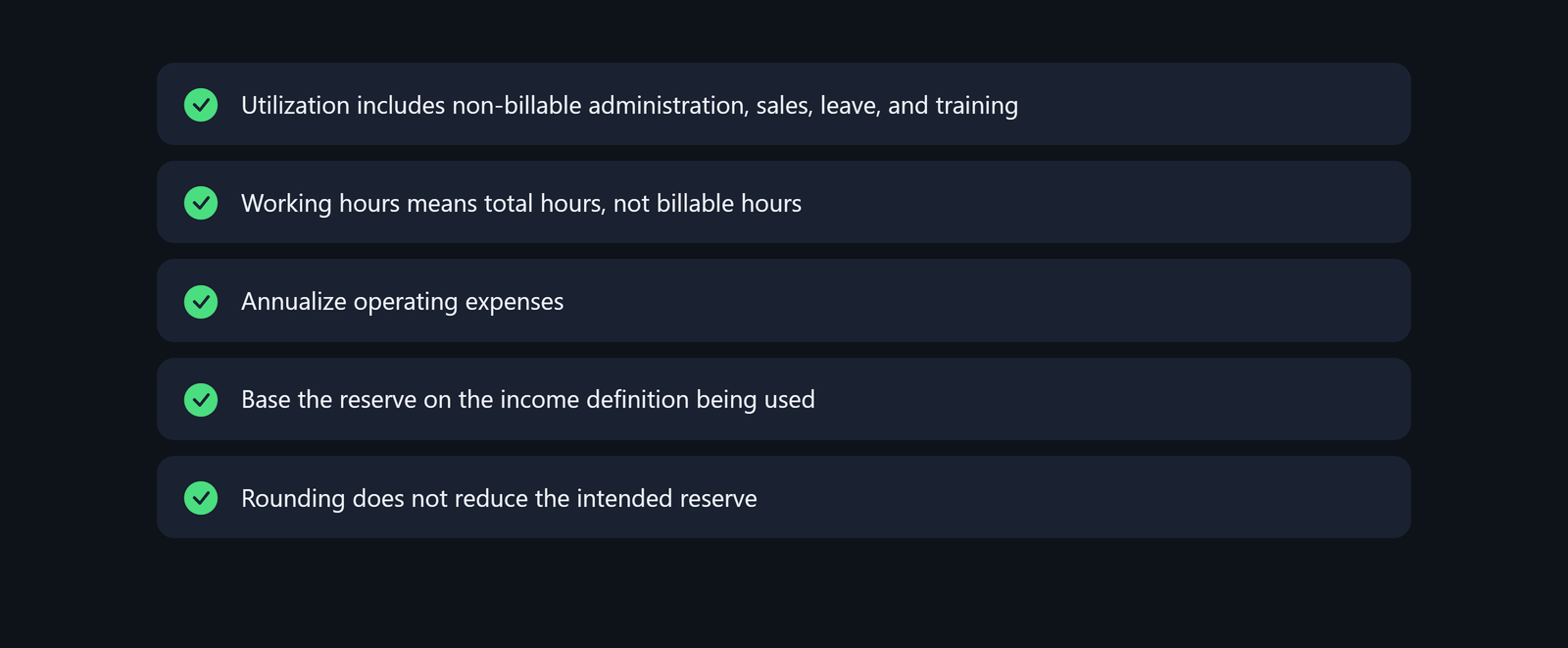
Check the assumptions behind the rate. Utilization needs to include non-billable administration, sales, leave, and training. Working hours means total hours, not billable hours. Annualize operating expenses, base the reserve on the income definition being used, and make sure rounding does not reduce the intended reserve.
Add self-funded benefits to the annual cost base before dividing by billable hours. Include health insurance and retirement contributions with taxes and business expenses. That keeps the income target high enough to cover post-tax cash and benefits, instead of treating those costs as personal savings, as this self-employed rate guide describes.
Add a target margin after break-even
A tax-inclusive break-even rate is the floor when the business also needs surplus for growth, emergencies, and savings. One billable-rate method defines Break-Even Rate as (Salary × (1 + Taxes%) + Overhead) ÷ Billable Hours. It then defines Recommended Rate as Break-Even Rate ÷ (1 − Target Margin%). Apply the target margin after the income, tax, and overhead cost base is covered; it is not a substitute for the tax reserve. A 10% to 20% target margin is an example of this separate layer. Run the margin as a second scenario after entering the tax reserve, then compare that recommended rate with the calculator's required rate using this billable-rate method.
If lower utilization or higher expenses are plausible, rerun the scenario with those inputs. Compare the result with the minimum rate that can be quoted profitably. An accountant should confirm the tax categories, deductible treatment, estimated or prepayment obligations, and reserve percentage using the relevant jurisdiction and records. Check official guidance for the applicable rules. No universal percentage or pricing recommendation applies here.
Frequently asked questions
How do I include taxes in my hourly rate?
Add an annual tax reserve to operating expenses, then divide the income target plus that combined total by total working hours multiplied by utilization. If the target is after tax, derive the reserve as goal × tax percentage ÷ (1 − tax percentage), then verify the percentage.
What tax percentage should I use for self-employed pricing?
No universal percentage applies. Use a documented planning assumption based on prior records, an accountant, and official guidance, then compare it with actual liabilities and payments.
Does the Billable Hourly Rate Calculator have a tax input?
The tool does not show a separate tax field. Keep the tax reserve visible in the worksheet, add it to the Annual business expenses value, and use the resulting rate for the scenario.
Why is my post-tax income below my goal after I set a reserve?
The reserve may be too low for the actual obligation, or utilization, expenses, collections, or the taxable-income definition may differ from the scenario. Compare the ledger with current accountant or official figures and rerun the calculation with updated inputs.