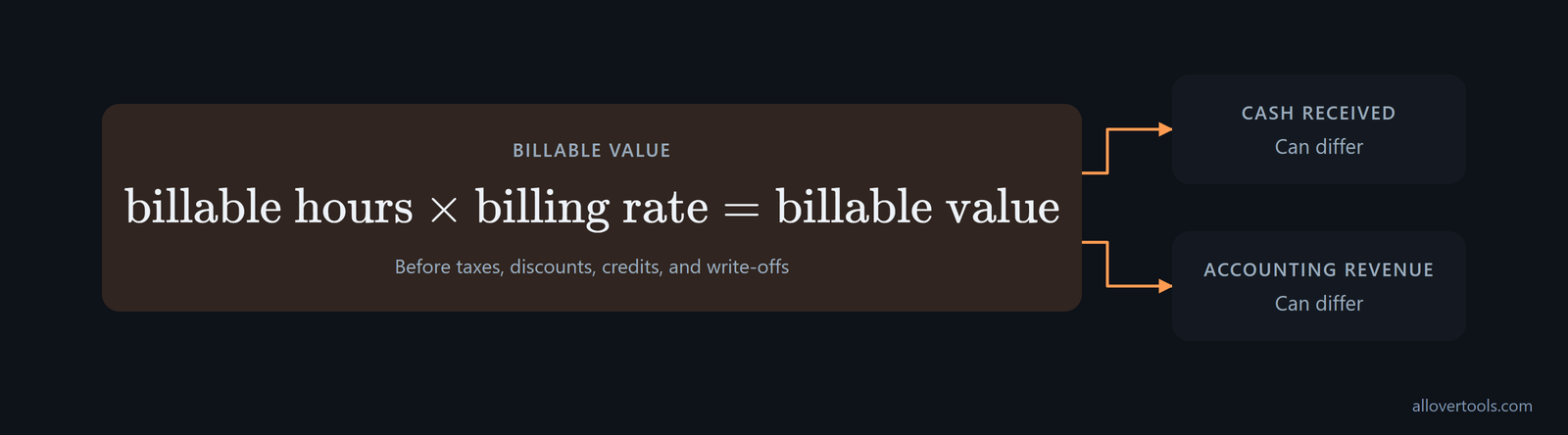
A billable value calculation turns approved client time into a chargeable amount. Multiply the billable hours by the billing rate that applies to the client, project, role, or contract line. That gives the work's value before invoice adjustments. It is not the same as cash received or recognized revenue, which can follow different payment and accounting rules.
What billable value means
Billable value is the amount of client work that can be charged under the applicable rate. The basic relationship is billable value = billable hours × billing rate. The rate must match the client, project, role, or contract line attached to the hours.
The calculation happens before adjustments. Cash received and accounting revenue can differ because of invoice timing, credits, write-offs, collection status, or the accounting and contract rules in use.
Start with the nominal rate, then check what turns into revenue. Utilization is billable hours divided by available hours. Realization is the share of completed work that becomes cash at the standard rate. Effective rate is revenue divided by all hours worked, including unbilled time. With a $250 rack rate, 90% rate realization and 93% hours realization produce an effective rate of roughly $209 per hour. At 1,880 available hours and 70% utilization, that gives 1,316 billable hours and about $275,000 in annual revenue per delivery person, as the utilization guidance shows. Compare those realized figures with the calculator's nominal rate before treating the calculated value as expected earnings.
Billable value can rise without more total hours if a larger share is billed and each billed hour earns more. In 8am's data, large law firms billed nearly 12% more hours while logging slightly fewer, so the share of recorded hours billed rose from 44% to 49%. Revenue per billed hour rose between 3% and 5% across all firm sizes studied, according to the 8am industry data. For each period, record billed-hour share and revenue per billed hour alongside the raw hours total.
Calculate billable value with one billing rate
Start with approved billable time. Total the hours, convert minutes to decimal hours, multiply by the applicable hourly rate, and round the currency result at the invoice line or final-total stage required by the invoicing rule. This gives the amount before taxes, discounts, credits, or write-offs.
The one-rate calculation
Use the same work and billing period for both inputs:
Billable value = Billable hours × Billing rate
18.00 hours × $85.00/hour = $1,530.00
The pre-adjustment billable amount is $1,530.00. The rate and time period must refer to the same work and billing unit.
For a weekly projection, use the same two inputs for the period: 45 hours worked at a 70% billable rate gives 31.5 billable hours, and 31.5 hours at $250 per hour produce $7,875 in weekly revenue. This shows how the billable percentage changes weekly value; it does not treat every worked hour as invoiceable, following this weekly calculation.

Use a rate calculator for annual capacity
If annual assumptions are part of the rate decision, use the Billable Hourly Rate Calculator. It shows Annual income target, Annual business expenses, Total working hours per year, Utilization rate (%), and Currency symbol. Currency symbol changes display formatting only; it does not convert the amounts.
Enter the four annual planning inputs, choose Currency symbol, and click Calculate rate. The result shows Required billable hourly rate, Billable hours per year, Total revenue required per year, the formula, and the assumptions table. Reset clears the displayed calculation. Copy result and Download result (.txt) retain it in plain text.
The calculation uses browser-entered values only and makes no network request with visitor content. It plans a rate from annual capacity assumptions; it does not calculate a client invoice from time entries.
Before using a rate in a proposal, check it against a cost floor. Express base salary as an hourly cost, multiply it by roughly 1.25 to 1.45 for payroll taxes, benefits, insurance, and equipment, then allocate overhead such as rent, administration, recruiting, sales, and unbilled management time. That overhead is commonly 60% to 120% of direct labor. Compare the displayed rate with the fully loaded delivery cost described in the cost-based rate guidance.
Handle projects with multiple roles and billing rates
With different role rates, calculate the project line by line unless the contract explicitly defines one blended rate. Multiply each role's billable hours by that role's rate, then add the line values. This keeps the invoice tied to the approved time records.
One line for each role
One project can have three role rates:
| Role | Days | Hours/day | Rate | Line amount |
|---|---|---|---|---|
| Strategy | 2 | 4.00 | $120.00 | $960.00 |
| Design | 3 | 6.50 | $85.00 | $1,657.50 |
| QA | 1.5 | 3.00 | $70.00 | $315.00 |
Strategy: 2 × 4.00 = 8.00 hours; 8.00 × $120.00 = $960.00
Design: 3 × 6.50 = 19.50 hours; 19.50 × $85.00 = $1,657.50
QA: 1.5 × 3.00 = 4.50 hours; 4.50 × $70.00 = $315.00
Total hours: 8.00 + 19.50 + 4.50 = 32.00
Total value: $960.00 + $1,657.50 + $315.00 = $2,932.50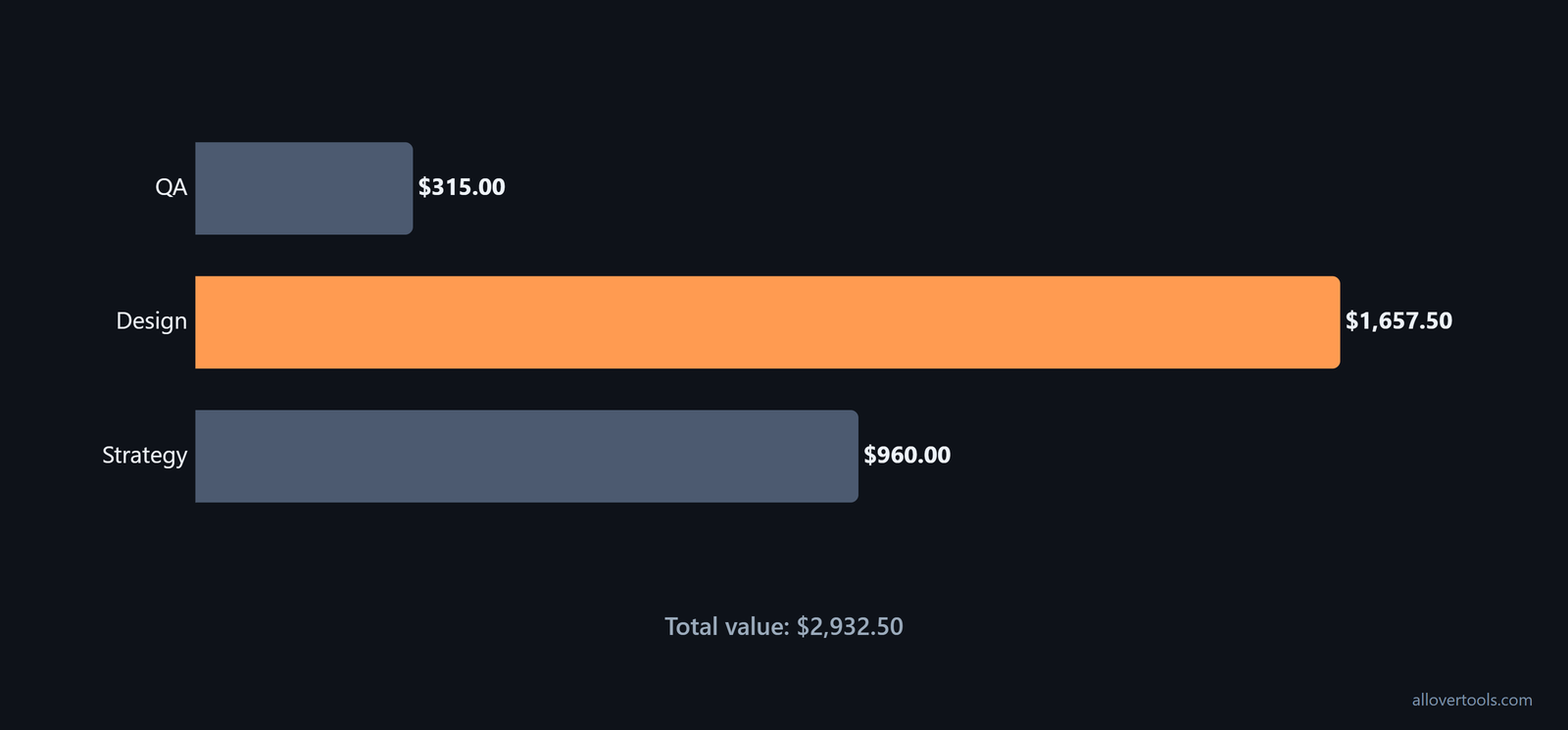
The day count is only a time-entry shortcut. Billing uses the underlying hours, so 1.5 days at 3.00 hours per day remains 4.50 hours. Applying the highest or lowest role rate to all 32.00 hours would discard the role-level calculation.
For a separate project-profit check, the Business Profit Calculator uses Project revenue, Direct / material costs, Labor hours, Labor rate per hour, and Allocated overhead. It does not store role-level client time.
When a blended rate is acceptable
Use a blended rate only when the agreement defines one rate for the project or service. Otherwise, keep the role-level lines so the invoice can be checked against the approved time data.
For multi-role reporting, divide total billable amount by total approved billable hours to get the blended billable rate. Twenty specialist hours at $180 are $3,600; 12 coordinator hours at $120 are $1,440. Together, they total $5,040 across 32 hours, giving a $157.50 blended rate. Keep that client-facing price separate from the effective billing rate, which divides billed revenue by a chosen time base. Include non-billable hours in that denominator only when measuring internal yield, as the blended-rate example distinguishes.
A fixed fee can use the same calculation. Estimate the hours, multiply them by a target effective rate, and add contingency. The result can be compared with the hourly scenario, and it gives the project a target effective rate to check after delivery. Without that check, it is "a guess with a decimal point on it," in the fixed-fee guidance.
Convert decimal hours, round correctly, and record write-offs
Turn minutes into decimal hours by dividing them by 60. Keep that precision through the multiplication, then apply the stated billing-rounding rule consistently. Do not round 2.75 hours up to 3.00 before calculating the amount.
Decimal time from minutes
For an entry of 2 hours and 45 minutes:
45 minutes ÷ 60 = 0.75 hours
2 hours + 0.75 hours = 2.75 hours
2.75 hours × $95.00/hour = $261.25
The calculated value is $261.25 before any invoice adjustment. Retain the full time-entry precision until the line or final-total rounding point required by the contract.
Some contracts use six-minute increments instead of exact minute conversion. Most firms track billable hours in 0.1-hour units and round to the nearest tenth. A 22-minute call becomes 0.4 hours, or $60 at a $150 hourly rate. In the same chart, 1-6 minutes maps to 0.1 hours and $15.00, while 55-60 minutes maps to 1.0 hour and $150.00. Check the contract's increment before comparing a time total with the invoice, using the increment chart.

Write-offs are a separate adjustment
Show the original calculated value, then record the write-off separately:
Base: 18.00 hours × $85.00 = $1,530.00
Write-off: 2.00 hours
Billed hours: 18.00 − 2.00 = 16.00 hours
Billed amount: 16.00 × $85.00 = $1,360.00
Reduction: $1,530.00 − $1,360.00 = $170.00
The Billable Hourly Rate Calculator has no write-off or invoice-adjustment input. It does not model unpaid invoices, seasonal demand, negotiation, or taxes.
Use utilization to plan the rate you need
The Billable Hourly Rate Calculator is for annual planning, not for turning client time entries into an invoice. Utilization is the share of working hours available to bill, so it changes the rate required to cover the same annual revenue requirement. It is a planning scenario, not a guarantee of demand.
Read the annual calculator output
Enter these values in Annual income target, Annual business expenses, Total working hours per year, and Utilization rate (%):
Annual income target: $90,000
Annual business expenses: $12,000
Total working hours per year: 2,000
Utilization rate (%): 70%
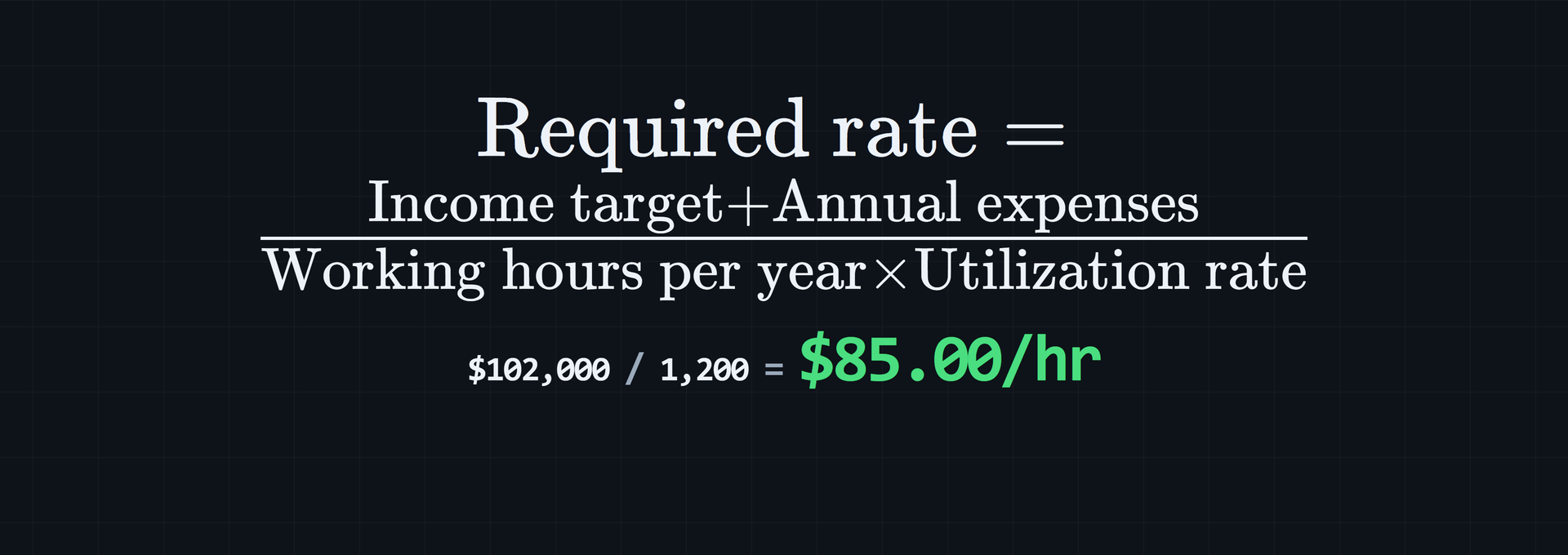
The formula is Required rate = (Income target + Annual expenses) ÷ (Working hours per year × Utilization rate). The percentage becomes 0.70 when billable hours are calculated.
Total revenue required per year: $90,000 + $12,000 = $102,000.00
Billable hours per year: 2,000 × 0.70 = 1,400
Required billable hourly rate: $102,000.00 ÷ 1,400 = $72.86/hr
Read Required billable hourly rate, Billable hours per year, and Total revenue required per year. Keep the assumptions table with the rate so the period and inputs remain attached to the displayed result.
Compare utilization scenarios
With the $102,000.00 annual revenue requirement unchanged, the planning scenarios are:
| Utilization | Billable hours | Required rate |
|---|---|---|
| 60% | 2,000 × 0.60 = 1,200 | $102,000.00 ÷ 1,200 = $85.00/hr |
| 70% | 2,000 × 0.70 = 1,400 | $102,000.00 ÷ 1,400 = $72.86/hr |
| 80% | 2,000 × 0.80 = 1,600 | $102,000.00 ÷ 1,600 = $63.75/hr |
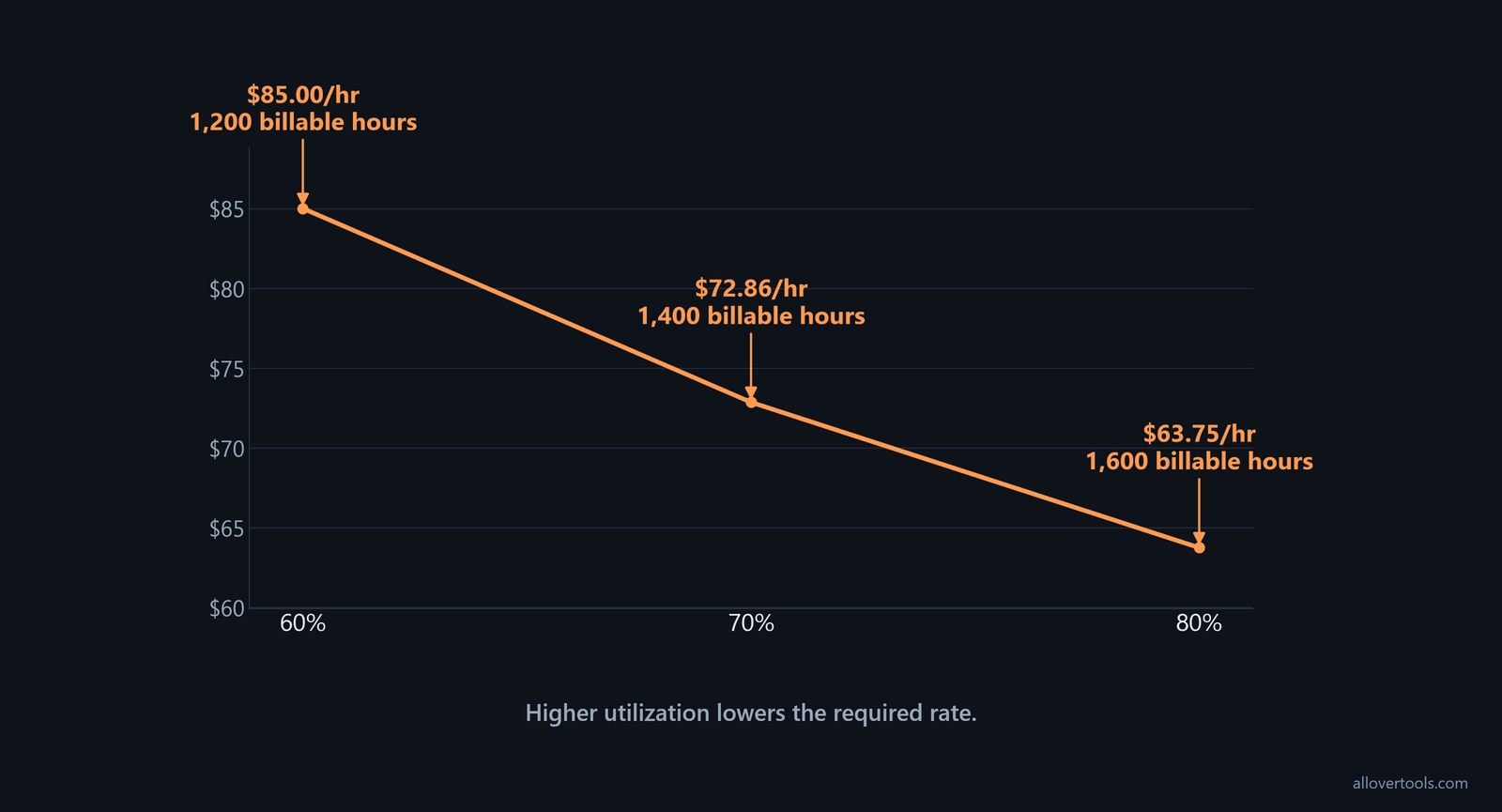
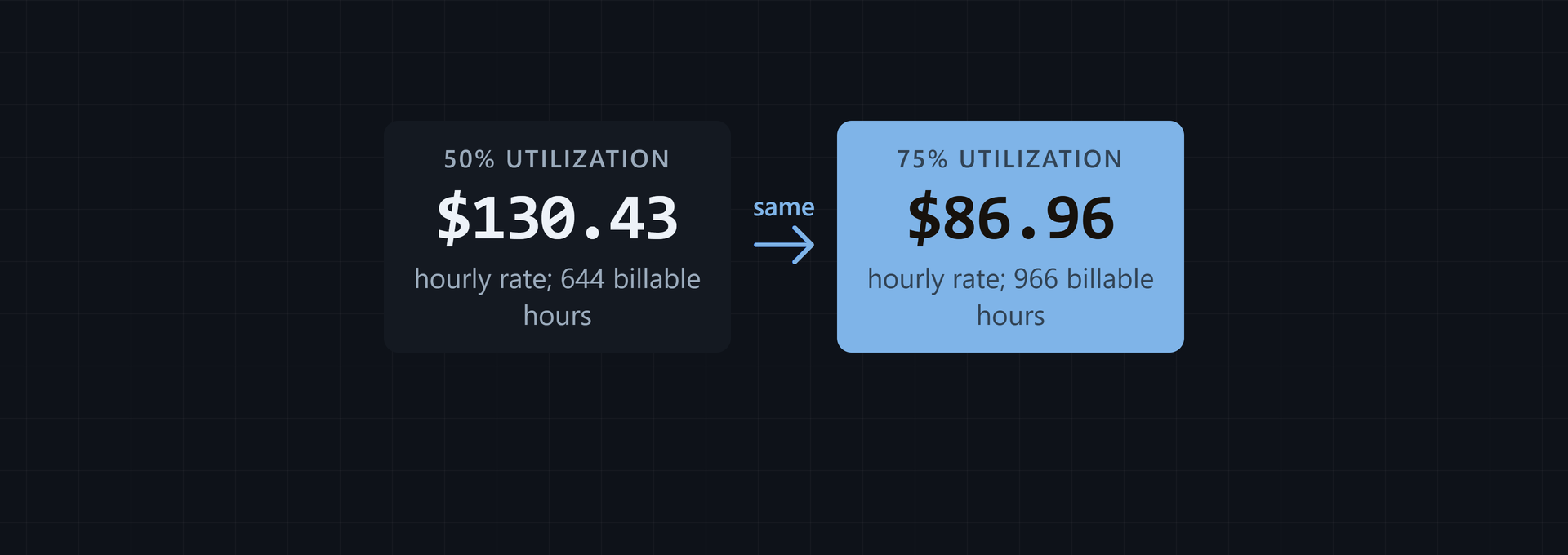
Lower utilization raises the required rate because fewer hours are available to bill. The tool accepts income and expenses of 0 or more, working hours greater than 0, and utilization greater than 0 and no higher than 100.
Use a realistic planning range when stress-testing utilization. Many professional services firms target 70% to 80% billable utilization as a healthy pricing and capacity-planning benchmark. The TSIA benchmark warns that assuming too much billable time can make a rate look sound on paper but fail in practice.
For an individual, run the calculation at 60% to 80% billable time instead of assuming near-100% billing. That is the range the individual utilization guidance suggests, depending on the field.
Name the denominator whenever you record utilization. The numerator is client-billable hours. Recorded hours, fixed capacity hours, and absence-adjusted working hours give different percentages for the same person. For example, 32 billable hours against 40 fixed capacity hours is 80% utilization. Put that denominator beside the percentage so capacity comparisons remain meaningful, as the denominator guidance requires.
A quarterly staffing view shows the effect. In a 12-person remote marketing agency billing $120.00 per hour and carrying a fully loaded account-manager cost of $45.00 per hour, one manager has 520 total paid hours, 40 hours of PTO and holidays, 480 available working hours, 312 billable hours, and 168 non-billable hours. Billable utilization on available hours is 312 ÷ 480 = 65%, and the revenue generated is 312 × $120.00 = $37,440.00, according to the agency example. Use available hours for this calculation and keep paid time, leave, and non-billable time visible in the record.
Check an invoice against time data
Freeze the invoice period first. Open the time records, filter them to the client and project, and group entries by role or rate. Convert any minutes to decimal hours. Recompute each line as hours × rate, add the lines, and compare the subtotal with the invoice.
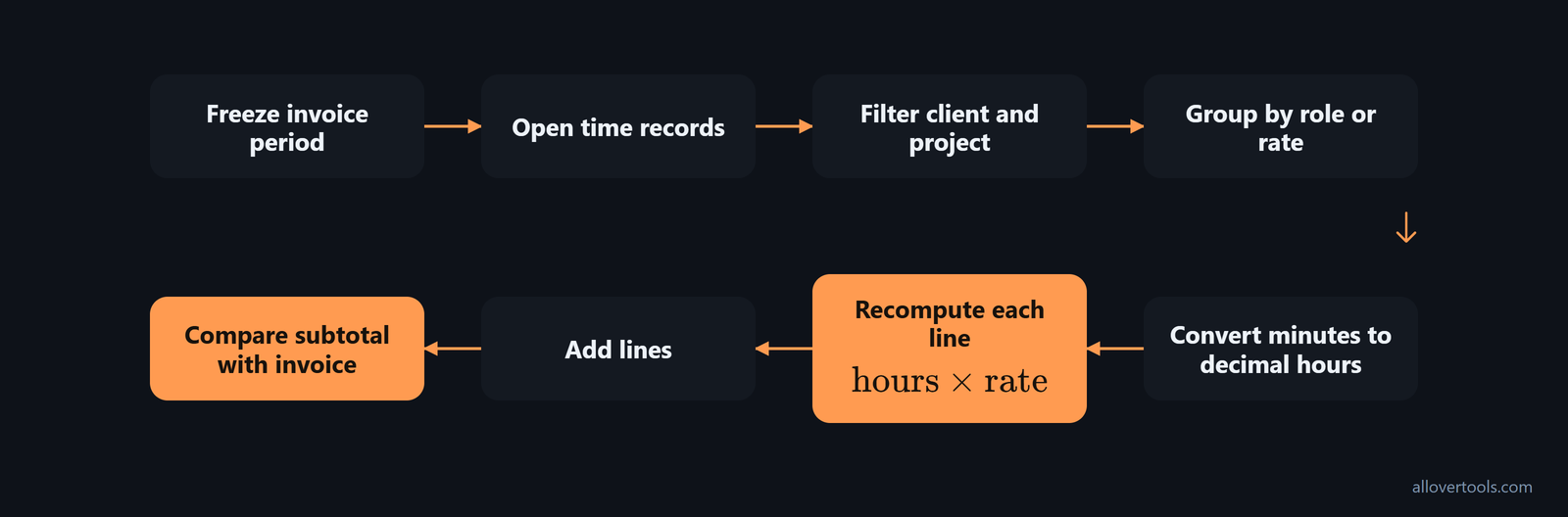
Write a note for every difference, such as an approved write-off, credit, discount, or contract cap. Check that the invoice uses the same client, period, currency display, rate, and rounding rule as the source time data.
Store the time-entry total, line calculations, adjustments, and final invoice total together. That leaves the original billable value beside the reason for the final invoice amount.
Track billable value by client and period
Use one tracking record for each client and project period. Record these fields in order:
- Client
- Project
- Invoice period
- Role or rate
- Approved billable hours
- Calculated billable value
- Write-offs or other adjustments
- Invoiced amount
- Payment status
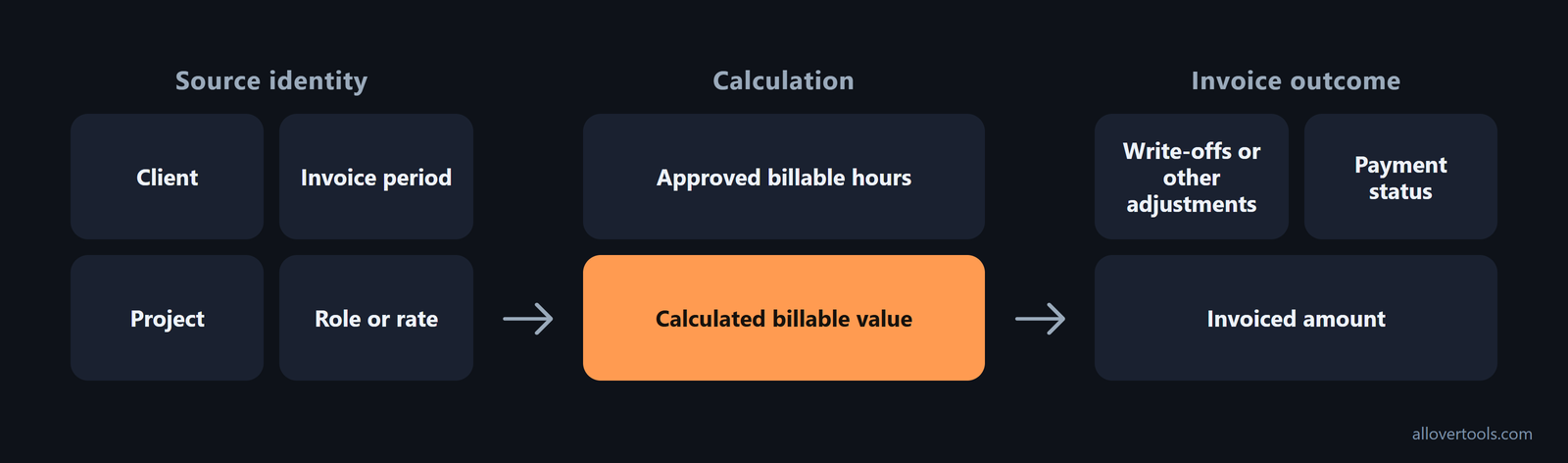
A client-and-period tracking record
Store the original approved entries under the record, then total them by client, project, role or rate, and invoice period. Sum hours and calculated value from those entries rather than copying rounded invoice displays. Put adjustments beside the calculated value instead of overwriting it.
For a separate profitability view, the Business Profit Calculator has Monthly, Quarterly, Annual, Per project, and Per unit labels in its Period control. Its scenario table can compare calculated results, but neither tool provides a client ledger. Use the Billable Hourly Rate Calculator when the period review also needs annual working hours and utilization assumptions.
Keep four pricing and billing KPIs with the client-period record: billable utilization, realization rate, full-price close rate, and discount leakage. Billable utilization is the share of available time billed. Realization is how much completed work becomes cash at the standard rate. Full-price close rate is how often standard rates are achieved, while discount leakage is the amount discounts take from theoretical billable value. A pricing view should combine cost-to-serve, utilization, realization, and renewal discipline, following the pricing KPI framework.
Billable value is not automatically recognized revenue
The time-and-rate total is billable value. Recognized revenue is the amount recorded under the applicable accounting and contract rules. Timing, credits, write-offs, and collection status can make the figures differ; there is no single accounting treatment for every situation.
Understand the revenue ceiling of billable hours
The billable-hour model limits revenue because time and rate are the two multiplying inputs: "Time × Rate = Revenue." A mid-sized consulting firm can price junior consultants at $150 per hour, seniors at $250 per hour, and partners at $400 per hour. A 200-hour process-optimization project using those levels totals $43,000. The example shows how role mix changes project value even when total project hours stay fixed.
Annual capacity still limits the result. Even at 80% utilization, a consultant with a $250 hourly rate maxes out around $400,000 in annual billable revenue. Use that ceiling when reading an annual billable value calculation. Increasing the rate or the share of hours that can be billed changes the output, but the model remains tied to available capacity.
Value-based pricing offers another way to set the project fee when hours do not fully represent the work's value. For strategic or revenue work, the suggested anchor is 10% to 30% of first-year value. For cost-reduction work, the suggested anchor is 1 to 2 times the annual cost of the problem. These are value-based pricing heuristics, not replacements for the hour estimate used to understand delivery capacity.
Compare the value-based fee with the time-and-rate result before choosing the pricing model. The hourly calculation gives the result from the listed roles, hours, and rates. The value-based anchors tie a fee to first-year value or cost avoided instead of only to time. The contrast comes from the billable-hour comparison.
Frequently asked questions
How do you calculate billable value from hours and a rate?
Convert the approved billable time to hours, then multiply by the applicable billing rate. For different rates, calculate each role or line separately and add the results.
What is the billable amount formula for a project with multiple rates?
For multiple rates, billable value = sum of (billable hours for each role × that role's rate). Use a single blended rate only when the contract defines it.
Should decimal hours be rounded before calculating an invoice total?
Convert minutes by dividing by 60, keep the decimal through the multiplication, and apply the contract's rounding rule consistently at the line or final-total stage.
Is billable value the same as recognized revenue?
No. Billable value is the time-and-rate calculation, while recognized revenue is the accounting record and may differ because of timing or adjustments.