To calculate freelance hourly rate, add your desired annual income target to annual business expenses, then divide by realistic billable hours. The result is a minimum planning floor for the assumptions you enter, not a universal market quote. It needs to cover the income target and the time spent running the business.
What should a freelance hourly rate cover?
The calculation needs four inputs: desired annual income or profit, annual business costs, total working hours, and the share of those hours that can be billed. Together, they show how much revenue the business needs and how many hours can produce it.
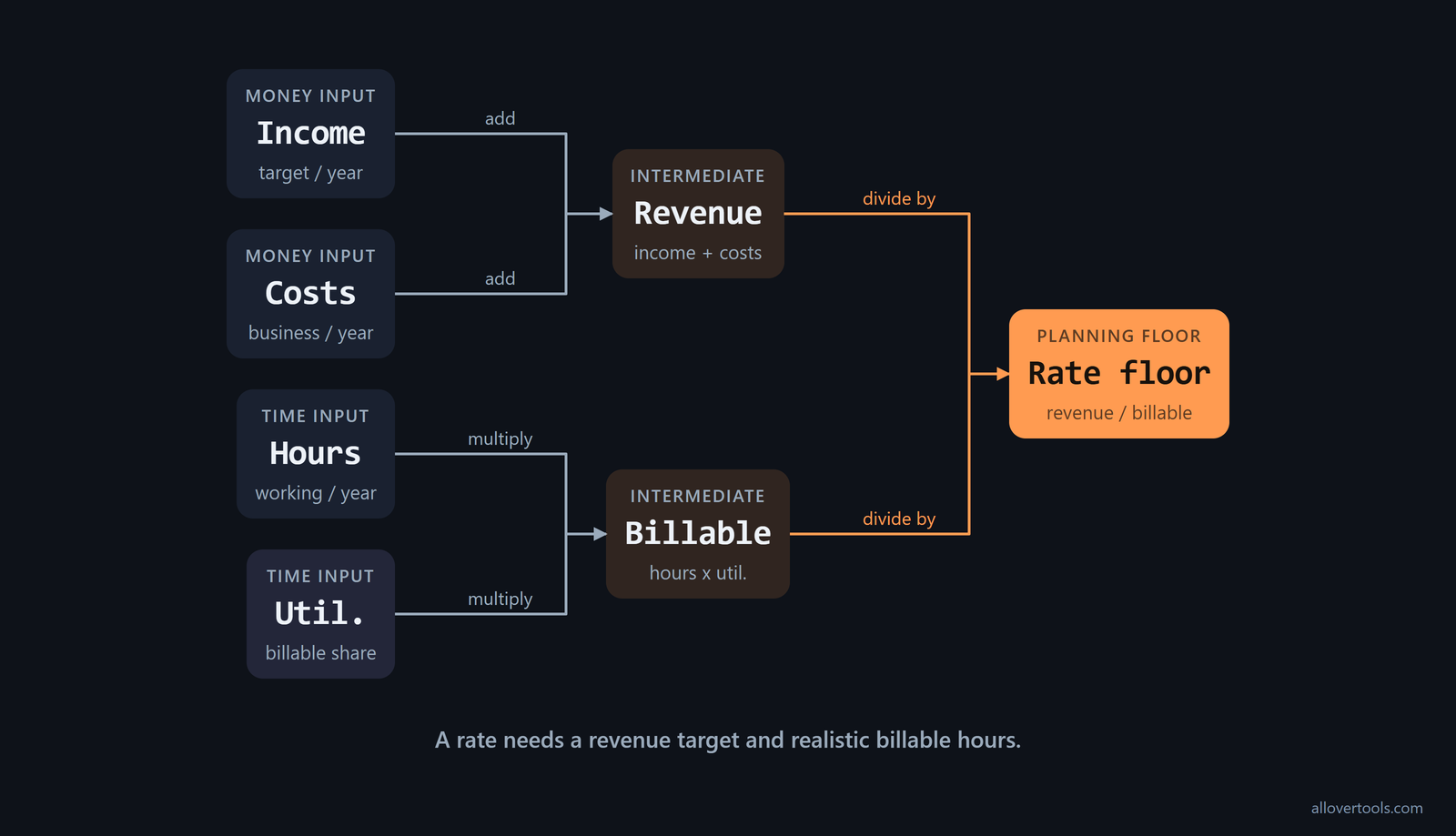
Total working hours include every hour in the work schedule. Billable hours are the smaller portion that can be charged to a client. The difference matters because admin and business development still take time, even when they do not appear on an invoice.
Separate personal and business costs
Keep business costs separate from personal or household spending. Software, insurance, equipment, and office overhead belong on the business list. In the example here, the $18,000 annual business-cost total belongs in Annual business expenses, while the $72,000 desired income target belongs in income.
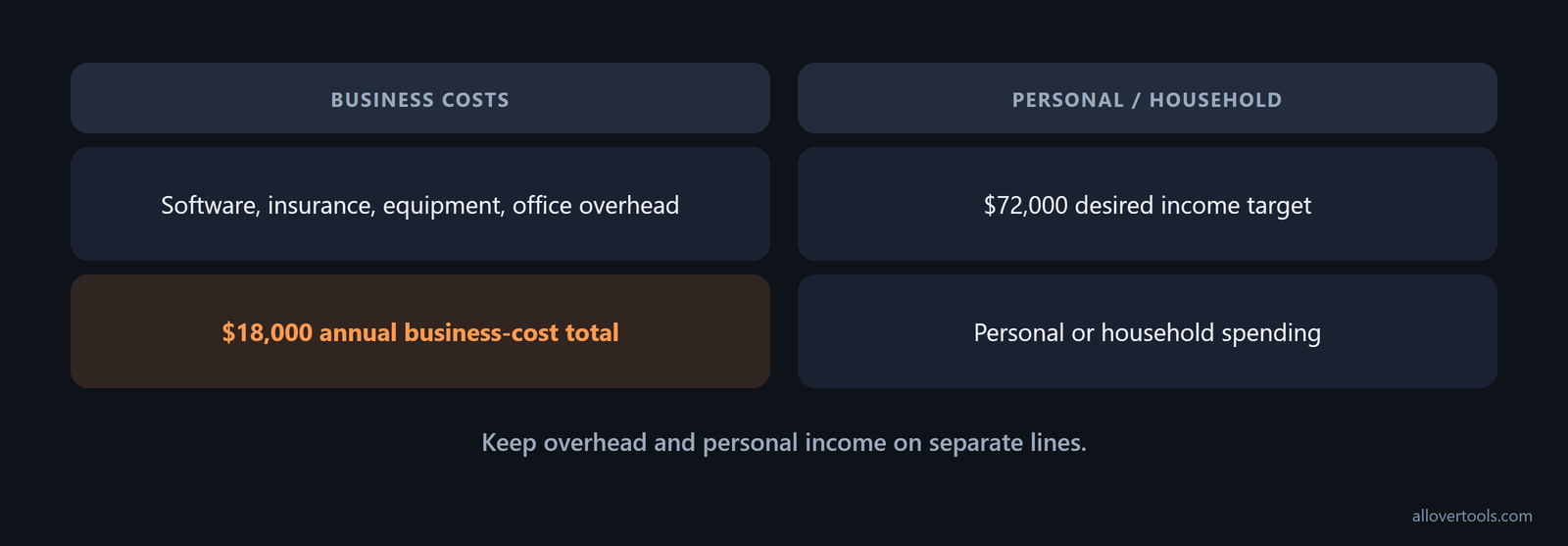
When the categories are mixed, it becomes difficult to see what the rate is funding. Separate lines also make the annual review easier because overhead can change without changing the personal target.
Include retirement savings and large equipment purchases in the annual income or expense target. The planning list should cover health care, retirement savings, big equipment purchases, housing, bills, groceries, entertainment, travel, and business expenses, as this cost checklist shows. Set the retirement contribution and future hardware replacement aside as annual amounts, so they do not turn into surprises after you quote the rate.
If clients come through a marketplace, give the freelance platform fee its own business-cost line. You can budget it for the year or subtract it from usable revenue. Either way, the rate has to cover it along with insurance, taxes, equipment, software, and marketing, which Upwork's cost guidance includes.
What is the minimum hourly rate formula?
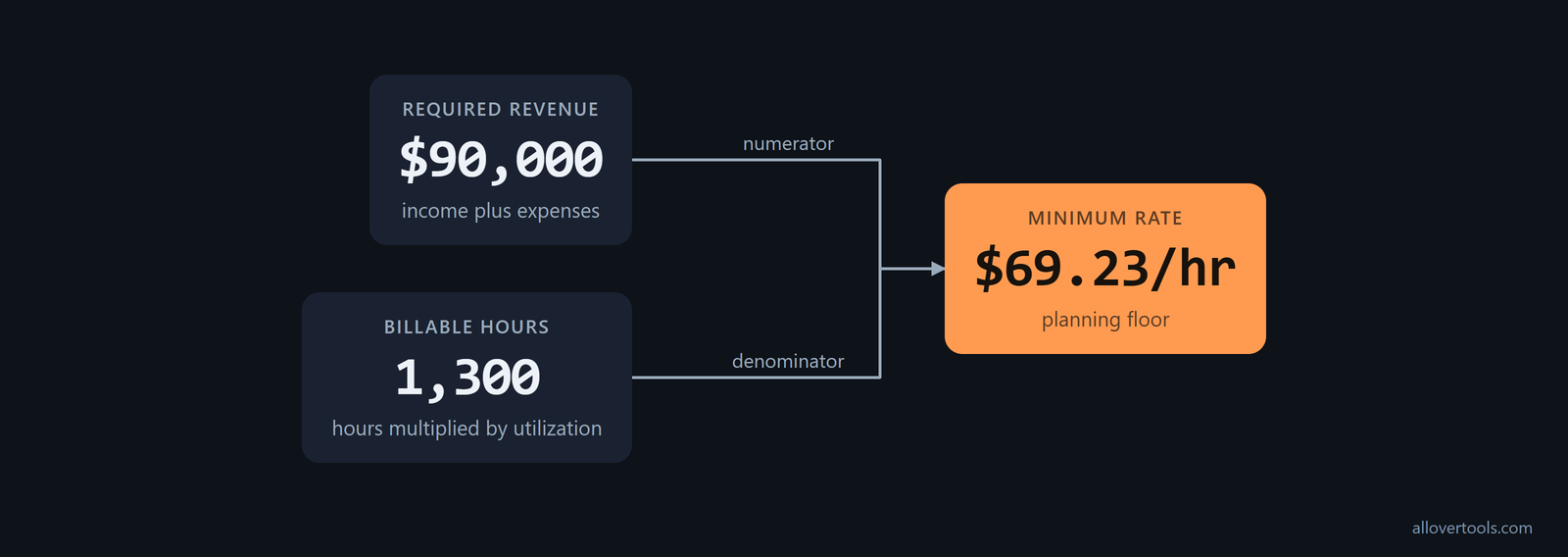
The minimum hourly rate calculation uses this cost-plus formula:
Required rate = (Income target + Annual expenses) ÷
                (Working hours per year × Utilization rate as a decimal)
Billable hours equal working hours multiplied by utilization. The denominator is not every hour on the calendar. It is the part of the planned work time that can support an invoice.
Read the result as a bill-rate floor, not as personal take-home pay per hour. In U.S. self-employed pricing, the cost base can include target income, overhead, a benefits substitute, and a tax reserve before you divide it by billable hours. That distinction in Everhour's rate explanation matters when you read the output.
Run the cost-plus calculation
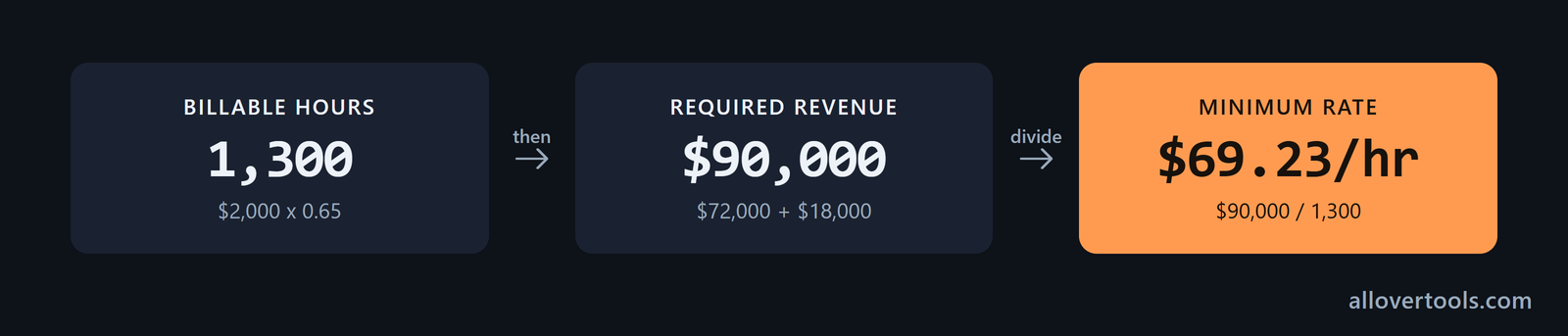
Use the chosen freelance developer example: a $72,000 income target, $18,000 in annual business expenses, 2,000 total working hours, and 65% utilization. The arithmetic is:
$2,000 × 0.65 = 1,300 billable hours
$72,000 + $18,000 = $90,000 required revenue
$90,000 ÷ 1,300 = $69.230769...
$69.230769... → $69.23/hr after rounding to cents
The $90,000 is the required revenue, and $69.23 is the minimum rate for these assumptions. The values are illustrative, not a benchmark or recommended rate. The calculator shows the same intermediate values and assumptions table.
Add a buffer for slow periods, unexpected costs, and profit before turning the break-even floor into a quote. Harvest defines its recommended rate as break-even plus a 20% buffer for taxes, slow periods, and profit. For planning, multiply the computed floor by 1.2. Use a larger or smaller buffer if the current client pipeline is more or less volatile, but keep the floor visible too: Harvest's rate distinction separates the two numbers.
How many billable hours per year can you use?
Build total working hours from the schedule rather than treating every weekday as billable. A schedule of 40 hours per week across 50 working weeks gives 2,000 total working hours. At 65% utilization, that becomes 1,300 billable hours.
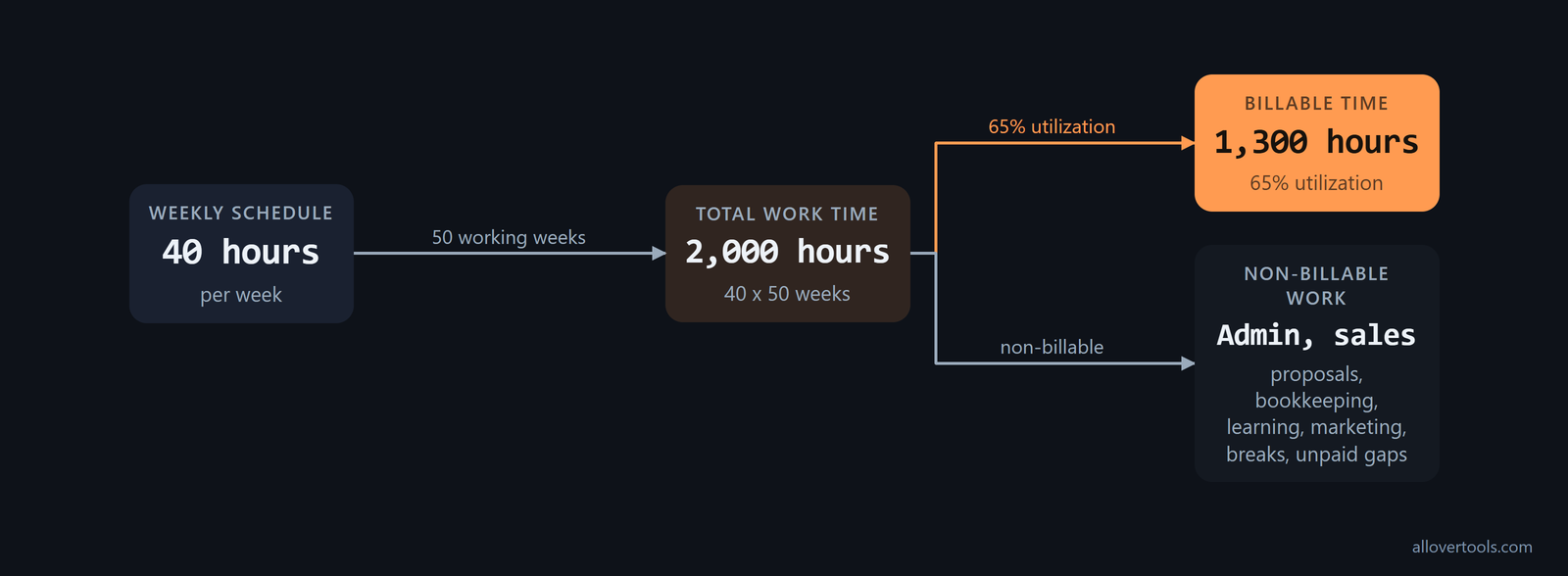
Utilization has to cover admin, sales, proposals, bookkeeping, learning, marketing, breaks, and unpaid gaps. It is the billable share of total work, not an extra charge added to the rate.
Use observed utilization figures to check the percentage you choose. These benchmarks give you a starting range for the denominator. Compare them with your time records before accepting the result:
| Reference point | Figure | Use in the plan |
|---|---|---|
| Typical freelance split | 60% billable / 40% non-billable | Starting check for a full work schedule |
| Target billable hours per year | 1,000-1,500 hours | Sanity check after admin, sales, and business development |
| Admin, marketing, and client communication | 20-30% of working time | Check whether recorded non-billable time is understated |
The figures appear together in the utilization benchmarks. Start with 60% billable and 40% non-billable, then compare the annual total with 1,000-1,500 hours. A plan that reports only 10% non-billable time deserves a closer look against the 20-40% ranges described there.
Keep time overhead separate from cost overhead. Some calculators use an overhead percentage to estimate non-billable time. A higher percentage raises the estimated non-billable time but does not change the calculated hourly rate. Put business costs and tax buffers in the numerator, and do not count the same overhead as both money and time. Flavio Copes' calculator notes this distinction and calls it gross-up math, not tax advice.
Use a lower schedule when the calendar demands it
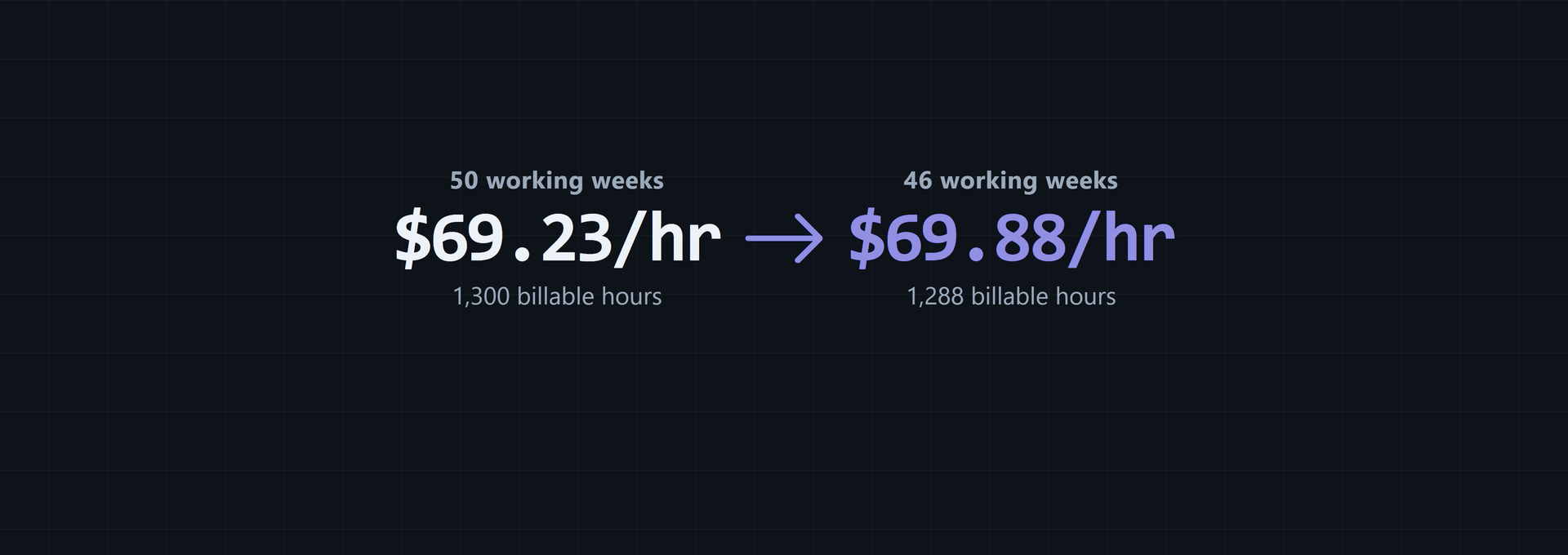
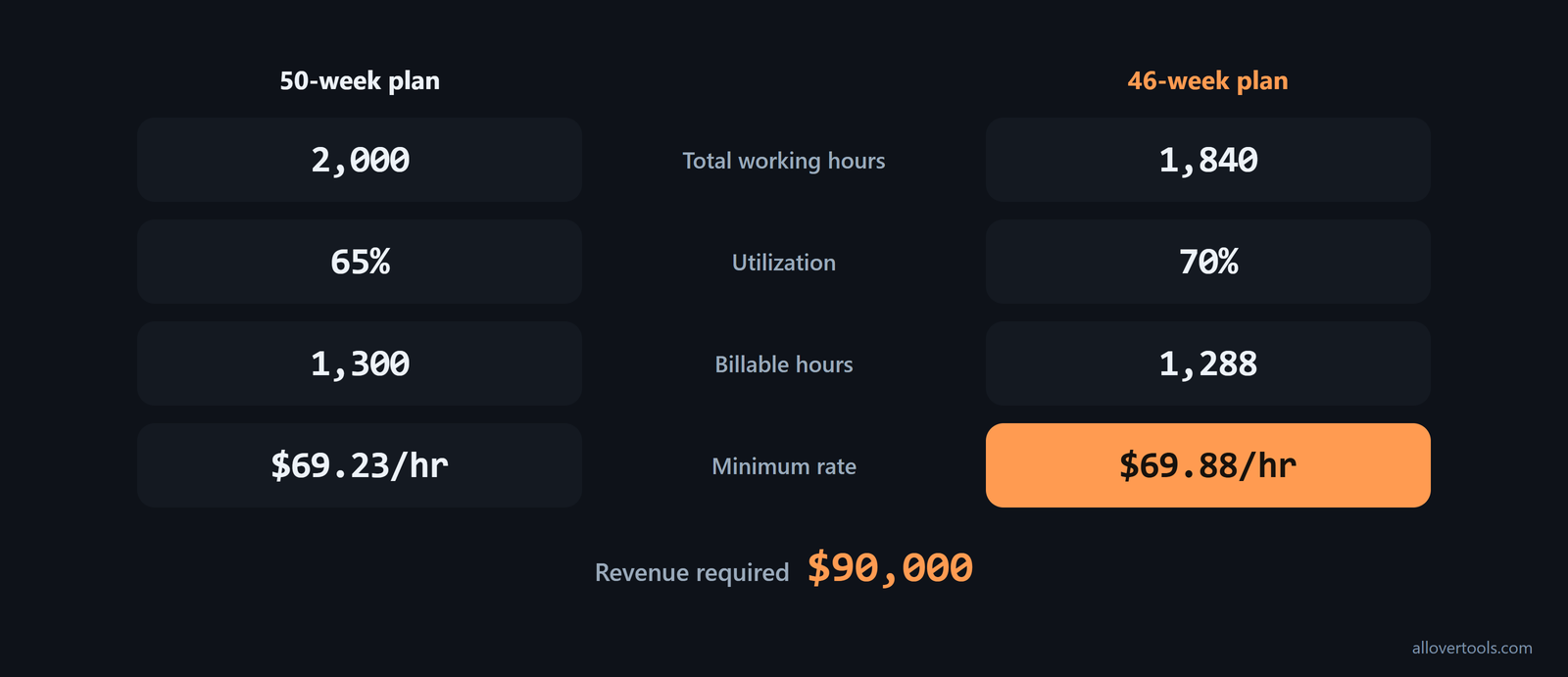
With 40 hours per week across 46 working weeks, total working hours fall to 1,840. At 70% utilization, there are 1,288 billable hours:
40 × 46 = 1,840 total working hours
1,840 × 0.70 = 1,288 billable hours
$90,000 ÷ 1,288 = $69.875776...
$69.875776... → $69.88/hr after rounding
The $90,000 revenue requirement has not changed. Fewer billable hours mean the same amount has to be earned in less client time, so the minimum rate rises to $69.88.
Subtract holidays and personal or sick days before you turn the schedule into annual hours. Time off changes the denominator even when the income target stays fixed. Clockify's worked example reports 1,864 total annual work hours and a $40 minimum hourly rate from a $73,680 target annual income, and its calculator workflow asks for estimated holidays and personal or sick days explicitly.
How do taxes, benefits, and personal costs change the rate?
The tool uses the numbers entered. It does not estimate tax liability, benefits, or deductions for a particular jurisdiction. Add explicit annual reserves to the planning worksheet before choosing a rate.
If the plan starts with take-home pay, work backward from that number. Divide desired take-home by (1 - effective tax rate) to find the profit needed before tax. Add annual business expenses to get the revenue that must be invoiced, then divide by billable hours per year, calculated as billable hours per week multiplied by the weeks actually worked. Moda's take-home method uses this chain and keeps pre-tax profit separate from invoiced revenue.
For a U.S. plan, enter self-employment tax separately before deciding that the rate is sufficient. Appizy lists a 15.3% self-employment tax rate for Social Security and Medicare. Use it as a common starting figure for the U.S. self-employment component, then add any additional income tax shown in the calculator's tax input.
Make the benefits reserve large enough to replace the employment package you are leaving behind, rather than covering only a minimal insurance payment. A dedicated benefits substitute can hold separate annual reserves for health insurance, paid leave, and retirement contributions, following the cost-plus structure in Everhour's benefits example.
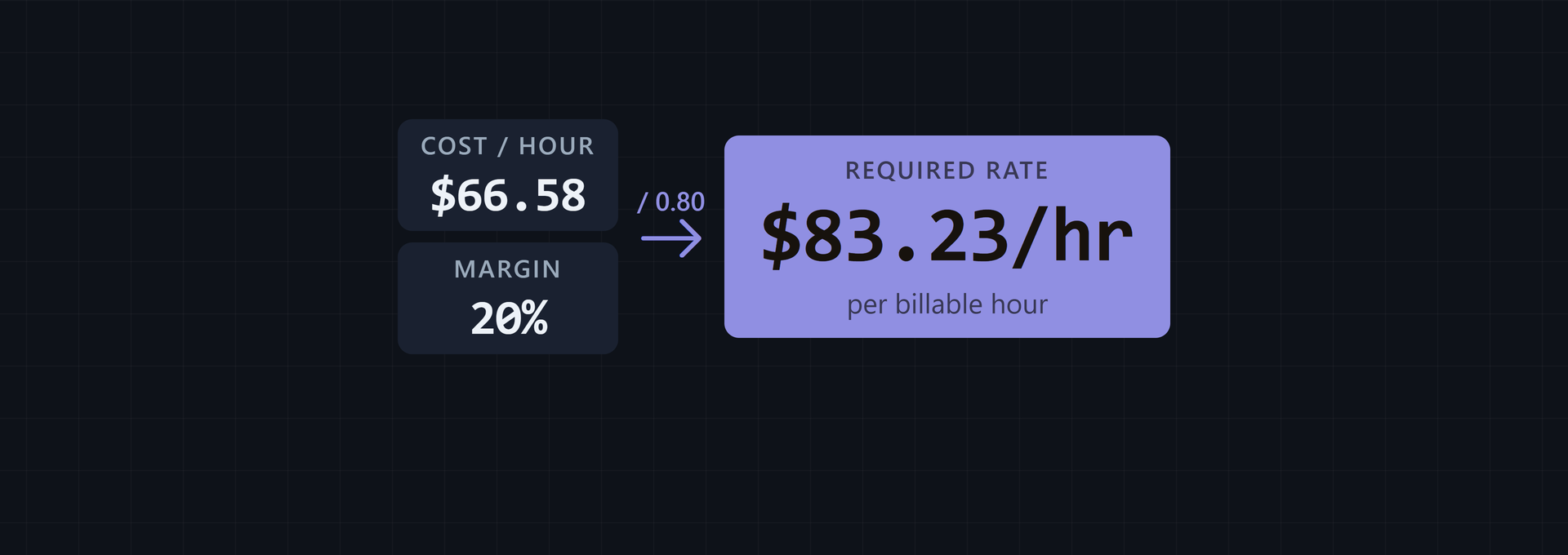
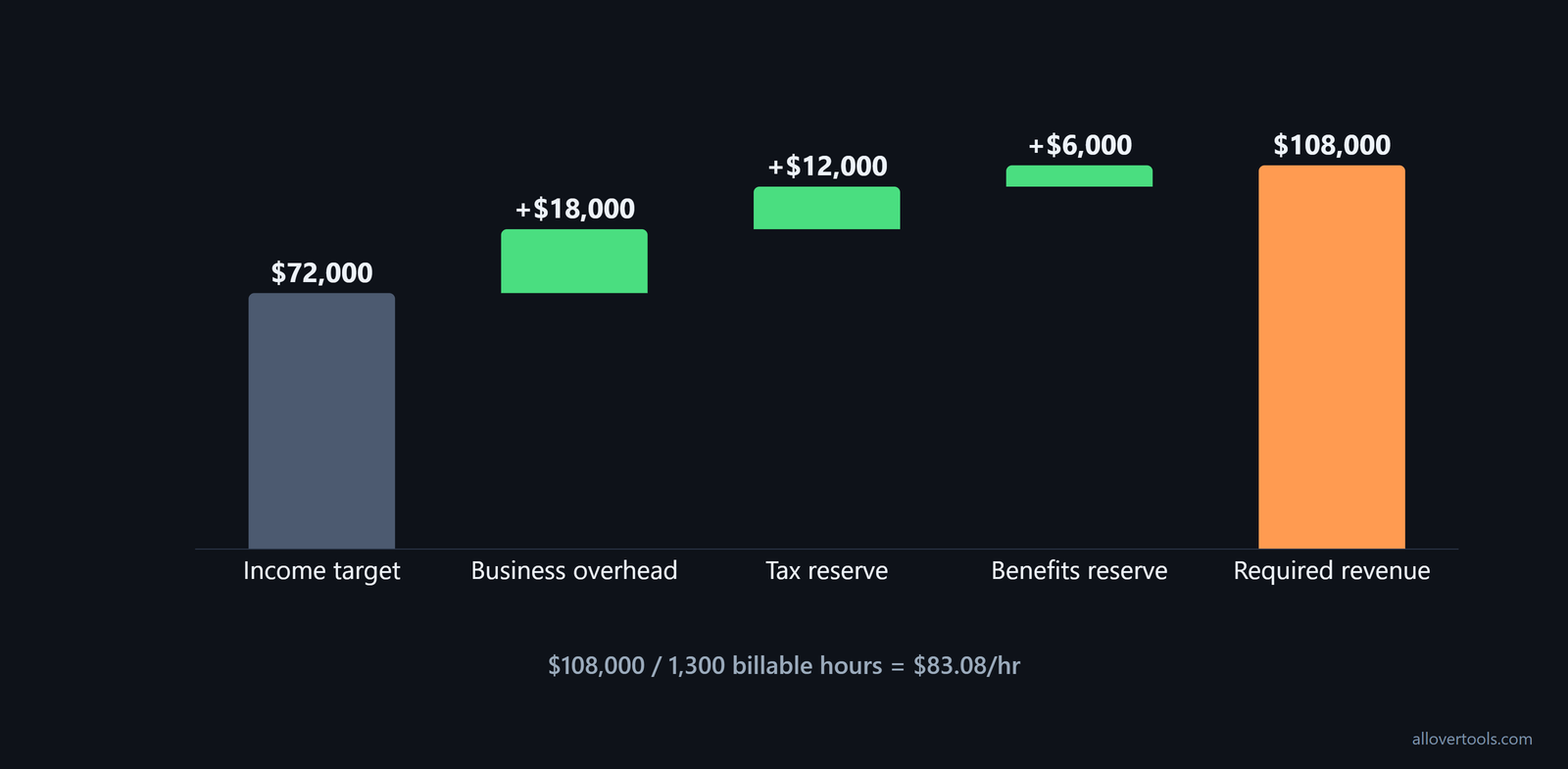
For the all-in illustration, set aside $12,000 for taxes and $6,000 for benefits, alongside $18,000 of business overhead. That makes the planning amount $36,000. If Annual business expenses is being used for the combined reserve, the calculation becomes:
$72,000 + $36,000 = $108,000 required revenue
$108,000 ÷ 1,300 = $83.076923...
$83.076923... → $83.08/hr after rounding
These are planning values, not tax advice. If Annual business expenses is not being used for an all-in reserve, calculate the adjustment separately. Personal living costs still belong in the income target, not in overhead.
Compare the fully loaded plan with a case that includes substantial tax and benefit reserves. One U.S. example uses $96,000 of target income, $14,400 of overhead, $25,200 for self-funded benefits, and $32,400 for tax reserves. That produces a $168,000 annual cost base. Divided by 1,400 billable hours, it gives a required hourly rate of $120.00. The example shows why leaving out tax and benefits reserves can put the floor well below the amount needed to fund the full plan: Everhour's fully loaded case.
Keep the reserve visible
Record business overhead, tax reserve, benefits reserve, and desired personal income as separate lines before combining any inputs. That makes it clear whether a later change comes from costs, the income target, or available billable time.
What happens when your income target changes?
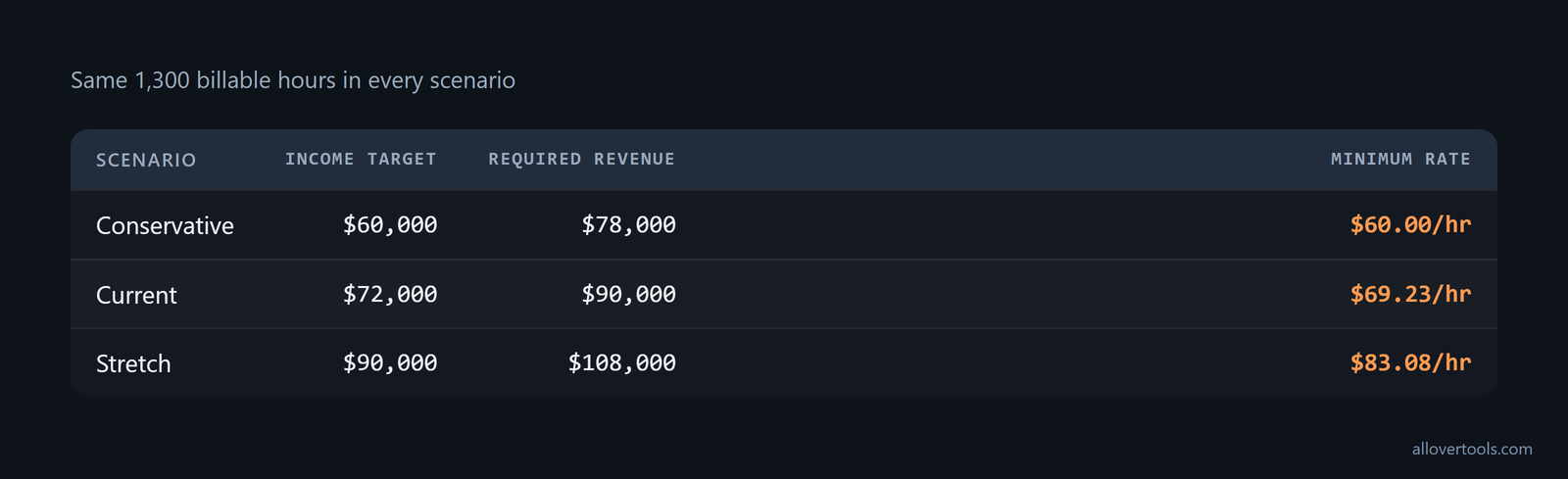
Keep annual business expenses at $18,000, total working hours at 2,000, and utilization at 65%. Billable hours stay at 1,300, so the table shows only the effect of changing the income target.
| Income target | Required revenue | Minimum rate |
|---|---|---|
| $60,000 | $78,000 | $60.00/hr |
| $72,000 | $90,000 | $69.23/hr |
| $90,000 | $108,000 | $83.08/hr |
These are scenario values, not market rates. Testing a conservative, current, and stretch target shows how the income target changes the floor. Changing utilization or annual expenses can move it just as directly.
Treat the result as a floor
The calculated amount is the minimum rate for the stated assumptions. A quote can differ because of scope, payment terms, project risk, or a different income target. Those are separate pricing decisions.
Convert the hourly floor into the units clients actually buy, while keeping the assumption behind it. A day rate is the hourly rate multiplied by 8; adjust it for half-days or retainers. If only 6 hours of an 8-hour day are genuinely billable, keep that in the schedule instead of treating the full 8 hours as invoiced time, as Flavio Copes' rate outputs explain.
Once you have the internal floor, compare it with the market. Check what similar freelancers charge and adjust for experience, complexity, and value delivered. If the market will not support the required floor, change the scope or the plan rather than accepting a rate that misses the target. Upwork's pricing guidance treats market comparison as a separate step after the cost calculation.
How to use the billable hourly rate calculator
Use the Billable Hourly Rate Calculator to keep the formula, intermediate values, and assumptions together while testing different inputs.
- Enter Annual income target, Annual business expenses, Total working hours per year, and Utilization rate (%).
- Choose Currency symbol if needed. It changes display formatting only and does not convert the amounts.
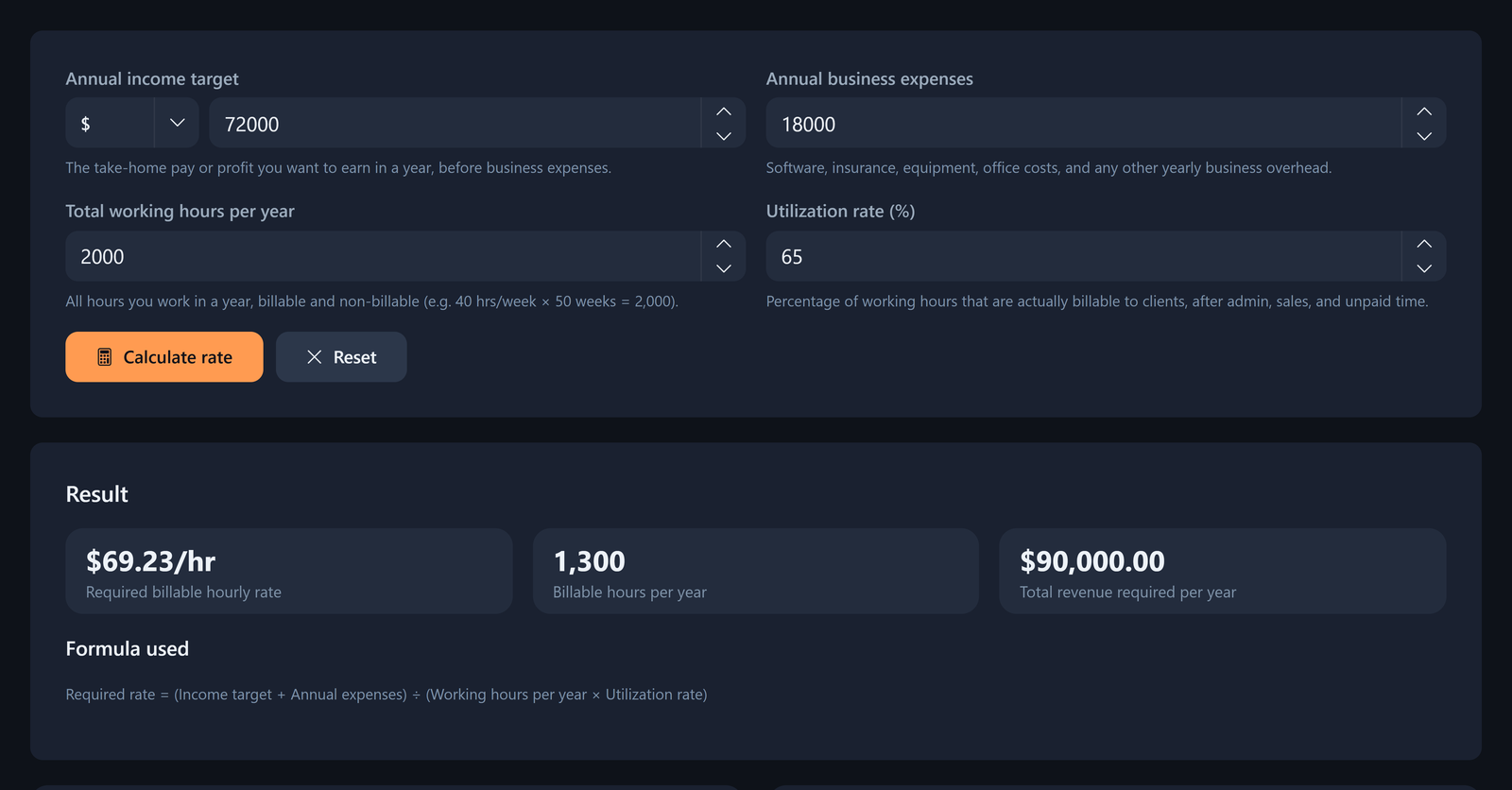
- Select Calculate rate. Read Required billable hourly rate, Billable hours per year, and Total revenue required per year.
- Review the assumptions table, which repeats the inputs and computed values.
- Use Copy result or Download result (.txt) to keep the plain-text calculation. Reset clears the form.
For the base example, enter $72,000, $18,000, 2,000, and 65%. The outputs should be $69.23/hr, 1,300 billable hours, and $90,000 in total revenue required after display rounding.
The code accepts income and expenses of 0 or more, working hours greater than 0, and utilization greater than 0 through 100. Empty, non-numeric, infinite, or out-of-range entries stop the calculation. The calculation uses the entered values in the browser and contains no request that sends the calculation data online. Copy result and Download result (.txt) are browser actions.
Run one scenario, then change one input
Change one assumption at a time, then select Calculate rate again. Test the income target, annual expenses, working hours, or utilization separately so the displayed billable hours, revenue requirement, and rate show what changed.
What mistakes cause freelance underpricing?
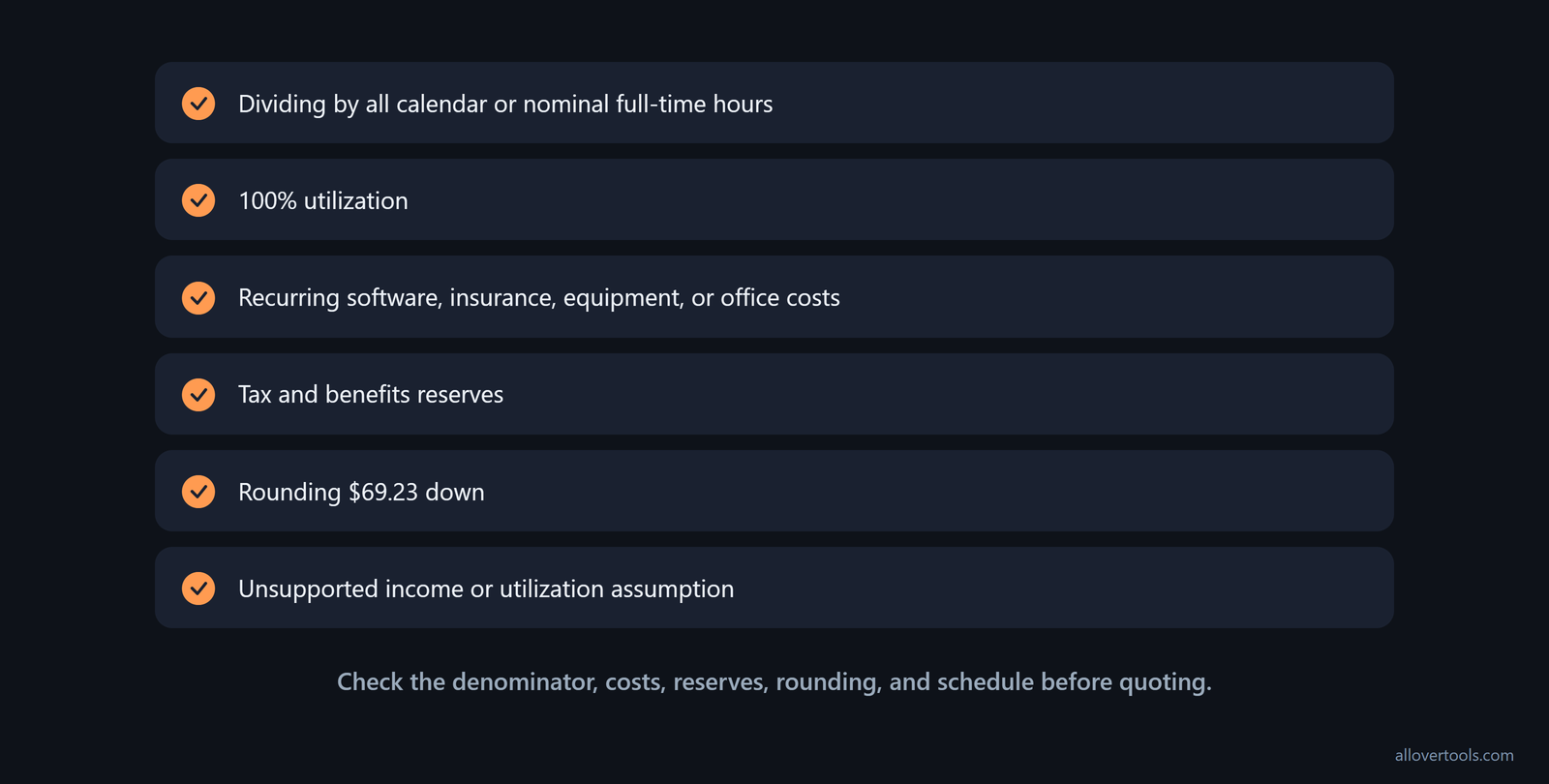
Most underpricing mistakes change either the amount that must be earned or the number of hours available to earn it:
- Dividing by all calendar or nominal full-time hours instead of billable hours understates the rate.
- Using 100% utilization leaves no time for admin, sales, or unpaid gaps.
- Forgetting recurring software, insurance, equipment, or office costs lowers required revenue.
- Mixing personal spending into business expenses makes the source of the target unclear.
- Leaving out tax and benefits reserves makes the revenue requirement too low for the chosen plan.
- Rounding $69.23 down before quoting changes the stated floor.
- Using an income or utilization assumption that the schedule cannot support makes the result work on paper only.
Fix the input, recompute billable hours or required revenue, and keep the resulting floor visible.
Check the denominator first
Inspect working hours and utilization before deciding that the rate is too high. A smaller realistic billable-hours denominator is often the direct reason the required rate rises.
When should you revisit your freelance rate?
Review the rate each year. Rebuild the business-cost list, refresh the income target, review tax and benefits reserves, compare planned with actual working and billable hours, and rerun the scenarios. Revisit it sooner after a major change in workload, time off, overhead, or the type of work being sold.
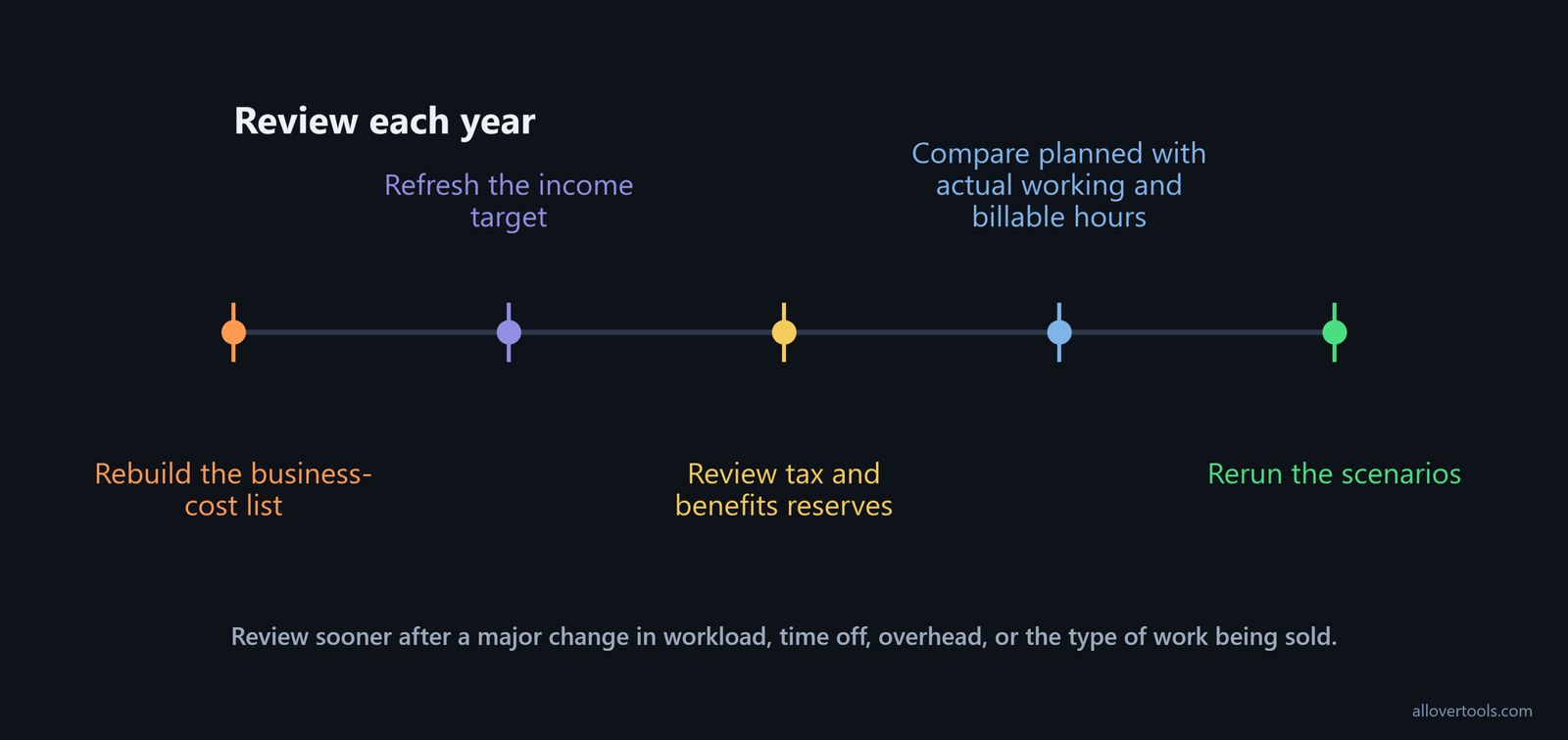
Review the rate every 6 months while skills, demand, or the client mix is changing. Compare actual billable hours and realized income with the assumptions. Then update the floor and typical quoted rate as the track record and demand grow. Xero's review guidance sets the six-month cadence and ties pricing changes to growing skills and demand.
Frequently asked questions
What is a good minimum hourly rate for a freelancer?
There is no single rate for every freelancer. Calculate the floor from the income target, annual costs, and billable hours the schedule can support. Treat the result as a planning minimum, not a market quote.
Should taxes and benefits be included in a freelance hourly rate?
Yes. Include explicit annual reserves in the revenue requirement, but remember that the calculator does not estimate tax or benefit amounts. Keep those reserves itemized and state whether they are combined with the Annual business expenses input.
Why is my freelance hourly rate higher when I work fewer weeks?
Fewer working weeks reduce total working hours and billable hours after utilization is applied. If the income target and expenses stay fixed, the same required revenue divided by fewer billable hours produces a higher minimum rate.
Does the billable hourly rate calculator send my numbers online?
No. Its script uses the entered values in the browser and contains no request that sends visitor-entered content. Copy result and Download result (.txt) are local browser actions.