To measure business profitability, calculate gross, operating, and net profit as a percentage of revenue. Use matching figures for one period: revenue, COGS, operating expenses, and, when the calculation includes it, an estimated tax rate. Each percentage describes what remains after a particular cost layer.
Profitability starts with a simple accounting relationship: net profit is total income minus total expenses when income is higher than expenses. Gross, operating, and net margins apply that relationship at different cost layers. Break-even is where income and expenses are equal. Keeping that accounting definition in view ties each percentage to the amounts behind it.
Which profitability ratios should a business track?
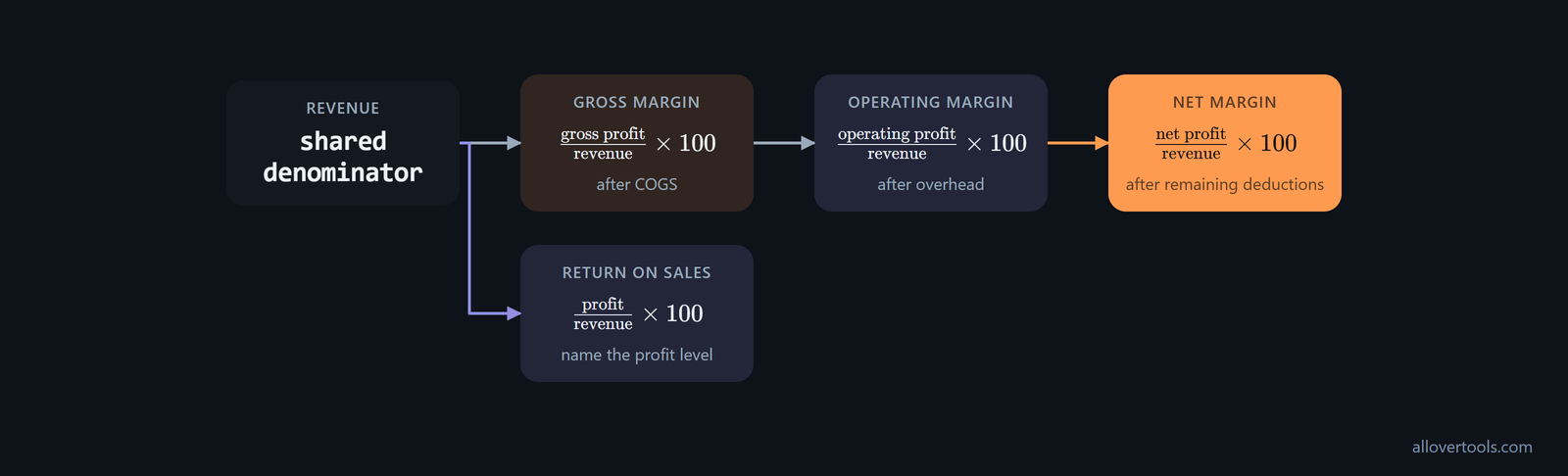
A profitability ratio is profit at a chosen layer divided by revenue, multiplied by 100. The gross profit ratio shows what remains after COGS. The operating profit margin ratio goes one layer further, after operating expenses or overhead. Net profit margin shows what remains after the deductions included in the chosen accounting view.
Read the ratios as separate layers. Gross margin describes the result before overhead, operating margin includes overhead, and net margin includes the remaining deductions in the calculation. Return-on-sales style metrics use the same profit-over-revenue pattern. Name the profit level each time; a gross ratio and a net ratio do not describe the same cost layer.
For a small business, start with gross margin, operating margin, and net profit margin. There are many other profitability ratios, but these three are often treated as the most important starting point because they cover the direct-cost, operating-cost, and final-profit layers. Cash flow margin, ROA, ROE, and ROIC also appear in the ratio overview. Add them when they answer a separate question; not every ratio needs equal weight.
Choose a ratio by the decision it needs to support. Margin ratios show how much of each sales dollar remains after specified costs, which helps with pricing and spending decisions. Return ratios show how effectively assets or equity generate profit, so they help assess whether the capital in the business is earning a good return. The distinction in the margin-and-return guide helps keep a return ratio from standing in for a pricing or cost-control measure.
If a business depends on equipment, property, or other resources, add return on assets to the margin view. Calculate it as (Net Income Before Taxes divided by Total Assets) x 100. A higher ROA indicates more efficient use of the asset base to generate profit. Compare it with operating or net margin when profitability depends on the capital tied up in manufacturing, transport, or property. the ROA guidance describes the ratio as a link between earnings and total assets, not another version of profit divided by revenue.
Return on equity and invested capital
Use owner-focused returns when the question is whether capital in the business is earning enough, rather than whether sales alone are profitable. Return on equity is net income divided by average shareholder's equity. Return on investment is (net profit from investment, cost of investment) divided by cost of investment, while return on invested capital is net income divided by invested capital. Two businesses can have similar net margins but different ROE if one requires much more capital. For an owner-managed firm, compare these returns when deciding whether to keep money in the business, pay down debt, or make external investments. the owner-return guidance defines these measures.
EBIT and EBITDA margins for operating comparisons
Add an EBIT or EBITDA margin if financing or asset age makes operating comparisons harder. An EBIT margin uses earnings before interest and taxes over revenue. An EBITDA margin uses EBITDA over revenue. These measures remove interest and, in the EBITDA case, depreciation and amortization, so they show core operations before financing and non-cash charges. Accrual income statements provide EBIT, EBT, and net income as earnings measures for profitability ratios. Xero's profitability glossary includes EBITDA alongside gross, operating, and net margins, ROA, and ROE. Keep the result beside operating and net margin because it answers a different operating-comparison question.
How to calculate gross profit ratio and operating margin
Use one reporting period for every input. The formulas are:
Gross profit = revenue - COGS
Gross profit ratio = gross profit / revenue x 100
Operating profit = gross profit - operating expenses / overhead
Operating profit margin ratio = operating profit / revenue x 100
COGS is the direct-cost layer for what was sold. Operating expenses or overhead sit outside that layer. Keep the classification consistent between periods. Revenue must be greater than zero, and COGS and operating expenses must be non-negative.
In the Business Profit Calculator, choose COGS & gross profit / margin for the gross layer. Choose Net profit margin when operating expenses or overhead are also part of the calculation. Enter Revenue and Cost of goods sold (COGS), choose a Period label, and click Calculate. The first mode displays gross profit and gross margin. The net mode displays gross, operating, and net outputs. For a direct revenue-versus-direct-cost check, use the Gross Margin Calculator.
Use these percentages when testing prices and sales targets. Profitability calculations also help analyse realistic price levels, profit margins, and sales revenue; break-even analysis gives you a sales target. Adjust the selling price or cost structure until the margin and break-even sales level match the owner's income goal. QuickBooks' pricing guidance connects profitability calculations with those everyday decisions.
One-year gross and operating ratio example
Use these annual values as an illustration, not as a benchmark:
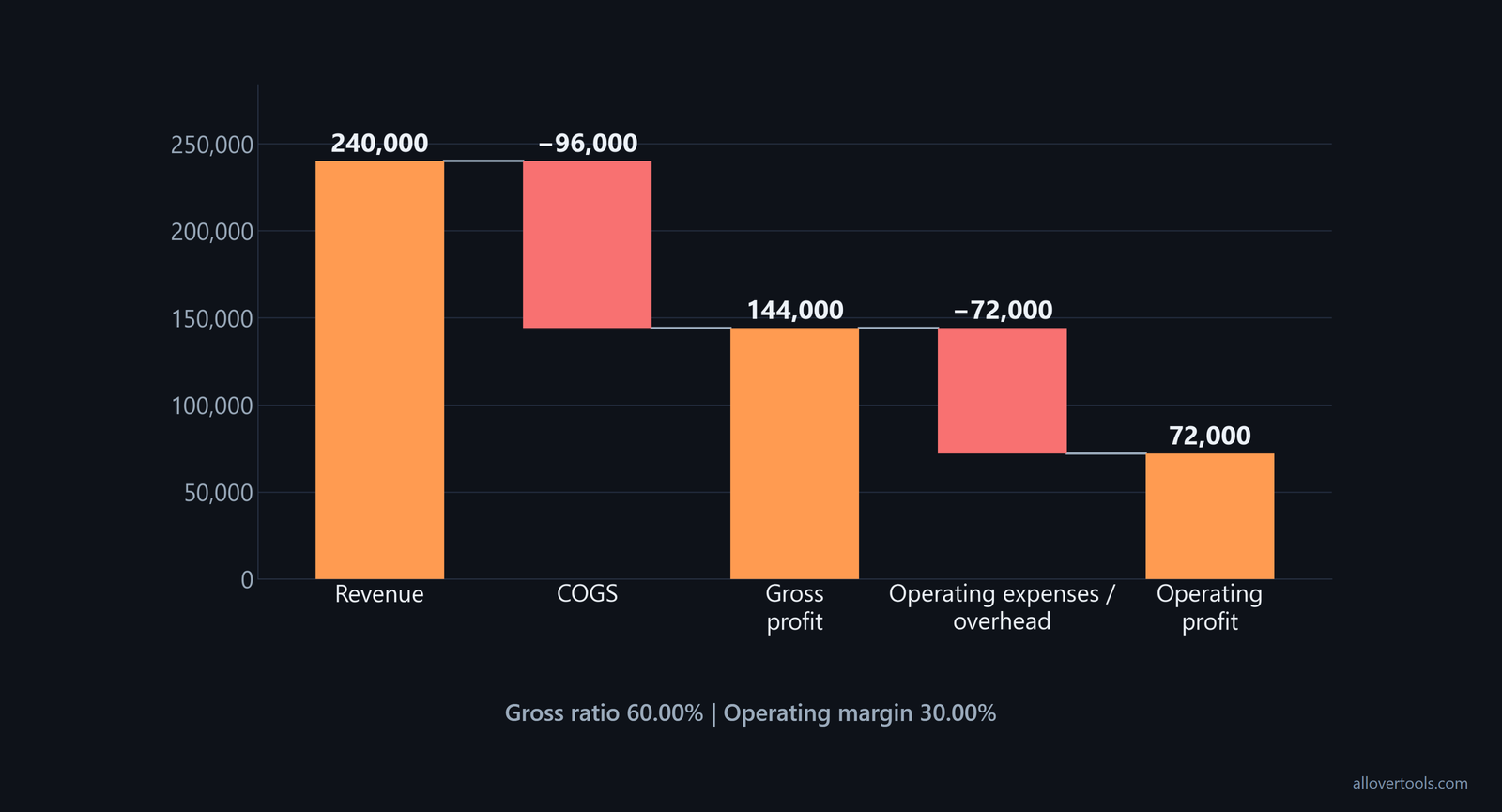
Revenue: 240,000
COGS: 96,000
Operating expenses / overhead: 72,000

Gross profit = 240,000 - 96,000 = 144,000
Gross profit ratio = 144,000 / 240,000 x 100 = 60.00%

Operating profit = 144,000 - 72,000 = 72,000
Operating margin = 72,000 / 240,000 x 100 = 30.00%
After COGS, 60.00% of revenue remains. After overhead, 30.00% remains.
How to calculate net profit margin and return on sales
Net profit margin is net profit divided by revenue, multiplied by 100, after the deductions included in the chosen accounting view. The Business Profit Calculator's net mode uses this sequence:
Gross profit = Revenue - COGS
Operating profit = gross profit - Operating expenses / overhead
Estimated tax amount = operating profit x Estimated tax rate % (optional), when operating profit is positive
Net profit = operating profit - estimated tax
Return on sales describes this type of profit-over-revenue measure, so name the profit level. Here, net profit margin is the net-profit return-on-sales measure. Gross and operating margins are earlier layers based on the same revenue.
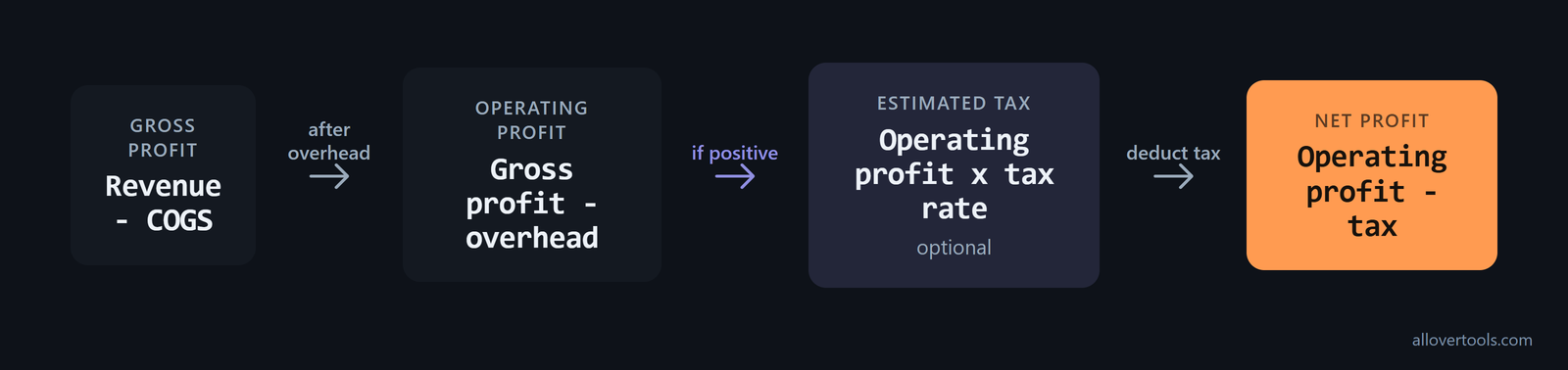
The Net Profit Margin Calculator uses amount fields for Revenue, Operating expenses, Interest expense, and Tax expense. This keeps interest and tax separate from operating profit. The tax in the Business Profit Calculator is an estimate, not tax liability.
With an after-tax profitability ratio, calculate the average tax rate from the period's financials instead of using a rough assumption: average tax rate = total tax expense divided by pre-tax income. Use that rate consistently when comparing after-tax net margin, ROA, or ROE. After-tax measures require the firm's average tax rate, as the finance text notes. Changes in tax rules or credits can move that rate independently of operating performance.
Net margin from the same annual figures
Keep the revenue basis unchanged and apply a 25% estimated tax rate:
Revenue: 240,000
COGS: 96,000
Operating expenses / overhead: 72,000
Estimated tax rate: 25%

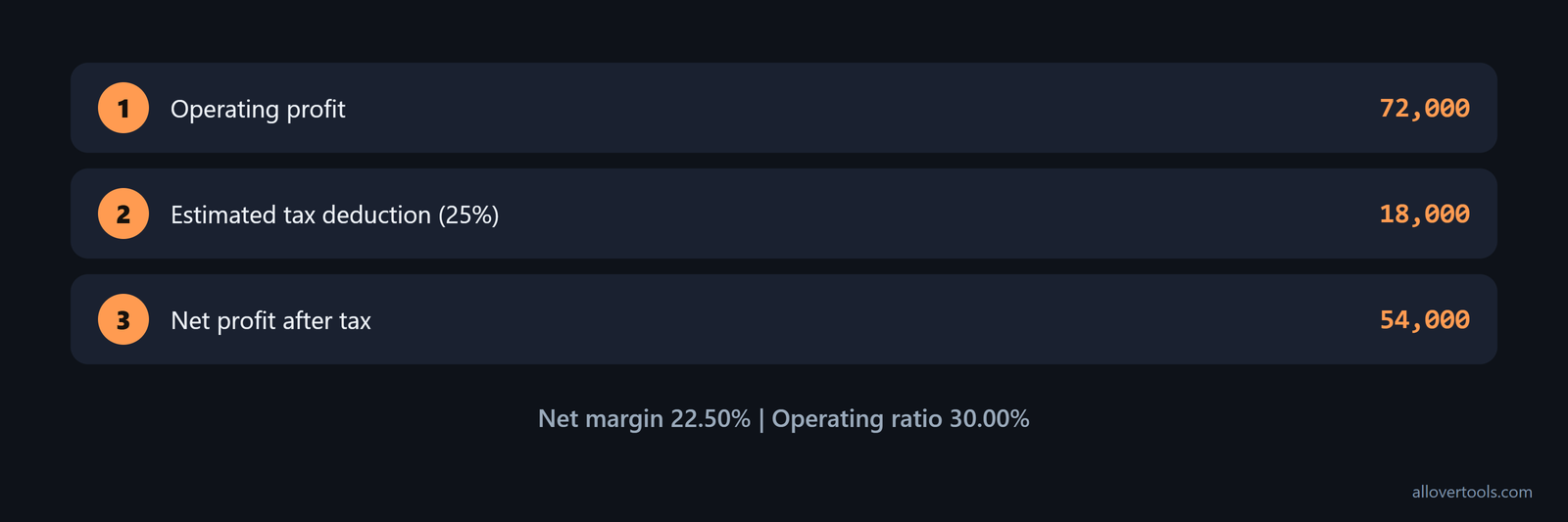
Operating profit = 144,000 - 72,000 = 72,000
Estimated tax = 72,000 x 25% = 18,000
Net profit = 72,000 - 18,000 = 54,000
Net profit margin = 54,000 / 240,000 x 100 = 22.50%
The net ratio is lower than the 30.00% operating ratio because the estimated tax is an additional deduction.
How to choose periods and analyse profitability trends
Match the period across revenue, COGS, operating expenses, and any tax or interest amounts. Use monthly data for a monthly view, quarterly data for a quarterly view, and annual totals for an annual view. The calculator's Period control offers Monthly, Quarterly, Annual, Per project, and Per unit. It uses the selection as a label, but it does not convert or annualise the figures.
Run the calculation for each period and record the gross, operating, and net ratios. Click Add to scenario table after each result. Use Export scenario table (.csv) if a local comparison file is useful. Keep the revenue and profit amounts beside the percentages.
Use net margin as a monthly operating check when you need an early warning. At month-end, divide net profit by total revenue and multiply by 100. Compare the result with the prior three months. Set an internal trigger for review if the ratio drops or keeps eroding. That gives the percentage a job beyond the annual summary: it prompts an investigation into overhead or revenue changes. Xero's monthly guidance recommends monthly net profit margin tracking to spot problems before they become serious.
A three-month trend example
These monthly values use a 25% estimated tax rate in all three rows.
| Period | Revenue | COGS | OpEx | Gross | Operating | Net |
|---|---|---|---|---|---|---|

| Month 1 | 20,000 | 8,000 | 7,000 | 60.00% | 25.00% | 18.75% |
| Month 2 | 22,000 | 9,020 | 6,600 | 59.00% | 29.00% | 21.75% |
| Month 3 | 24,000 | 9,120 | 7,200 | 62.00% | 32.00% | 24.00% |
Month 2's gross ratio dips while the operating and net ratios rise. That is a mixed result, so inspect COGS and overhead together. Month 3 improves across all three layers.
For an aggregate view, add the inputs first:
Total revenue = 20,000 + 22,000 + 24,000 = 66,000
Total COGS = 8,000 + 9,020 + 9,120 = 26,140
Total OpEx = 7,000 + 6,600 + 7,200 = 20,800
Gross profit = 66,000 - 26,140 = 39,860
Operating profit = 39,860 - 20,800 = 19,060
Estimated tax = 19,060 x 25% = 4,765
Net profit = 19,060 - 4,765 = 14,295

Gross ratio = 39,860 / 66,000 x 100 = 60.39%
Operating ratio = 19,060 / 66,000 x 100 = 28.88%
Net ratio = 14,295 / 66,000 x 100 = 21.66%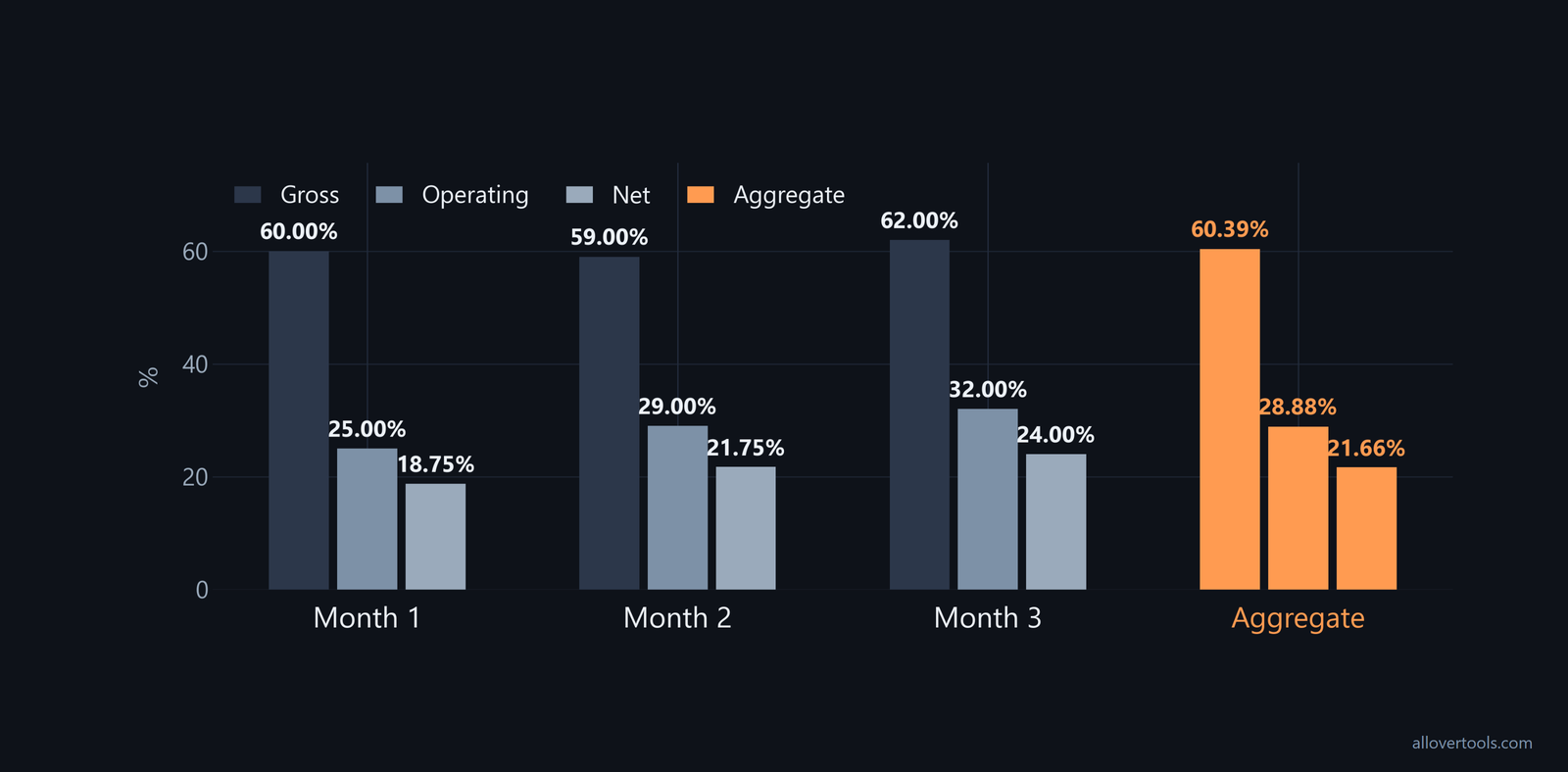
Aggregate ratios use total profit divided by total revenue, not a simple average of the three monthly percentages. Compare like-for-like periods, and define the prior period clearly before reading a change.
How to compare with past performance
Compare the same ratio layer, period length, revenue definition, and cost classification with the prior period. If gross margin falls while operating margin rises, inspect COGS, overhead, sales mix, and one-off items before calling the result an improvement or deterioration.
How margins connect to break-even sales
A margin shows what each sale contributes. Break-even analysis works out how many sales the business needs to be profitable. Break-even is where expenses and revenue are equal, so the business is making neither a profit nor a loss. It can be calculated in sales dollars or units using fixed and variable expenses. For units, use Break-Even Point for Units Sold = Fixed Expenses divided by (Unit Sales Price, Unit Variable Expenses). Follow the unit formula in the break-even guidance. Use the margin layers to check whether a price covers direct and overhead costs. Then use the break-even result as the minimum sales target.
What profitability ratios leave out
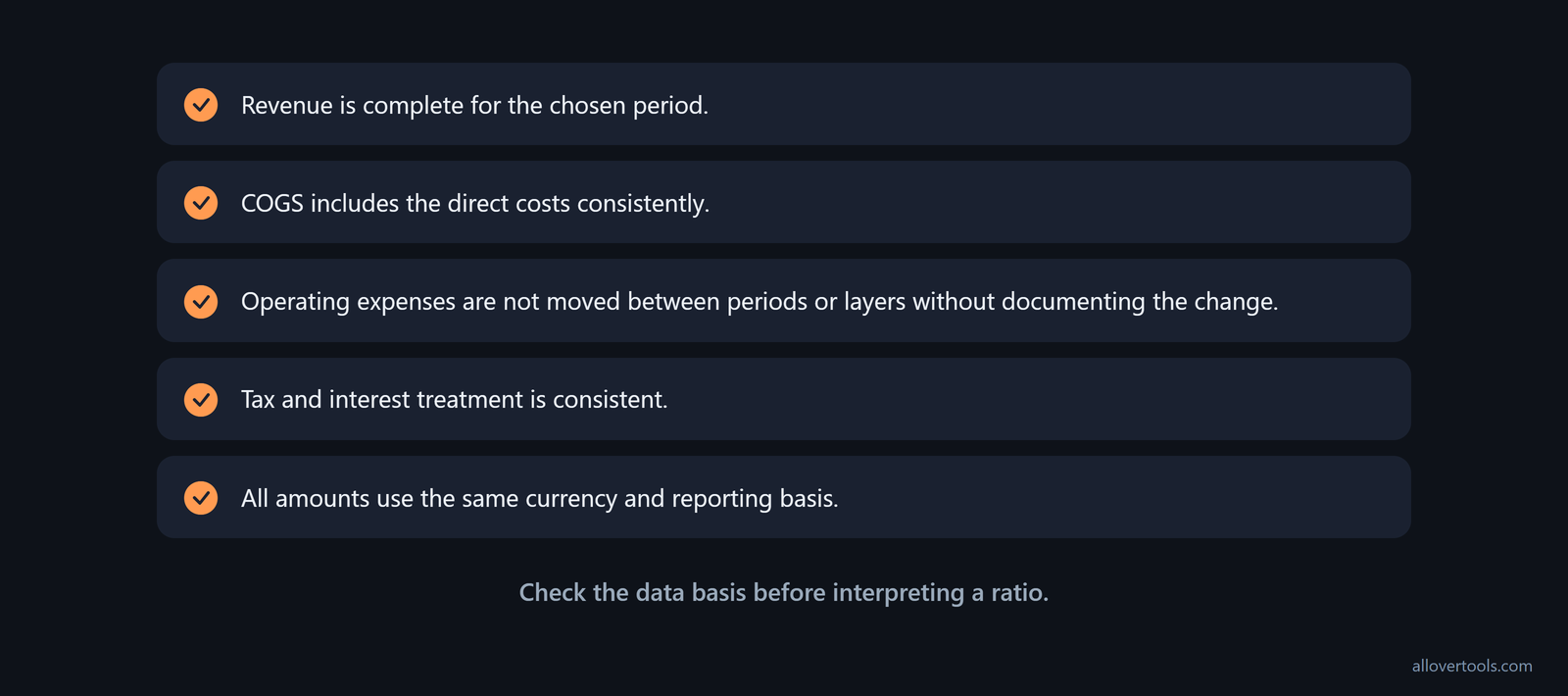
Check these points before calculating:
- Revenue is complete for the chosen period.
- COGS includes the direct costs consistently.
- Operating expenses are not moved between periods or layers without documenting the change.
- Tax and interest treatment is consistent.
- All amounts use the same currency and reporting basis.
Ratios do not show cash timing, debt burden, volume, customer concentration, capacity, seasonality, or whether the result includes a one-time sale or cost. A higher ratio is not automatically healthier if revenue is shrinking or essential spending was deferred. Keep the profit amounts beside each percentage, note unusual events, and compare the business with its own prior like-for-like results instead of an unspecified target.
The Business Profit Calculator checks that revenue is above zero, cost inputs are non-negative, and the estimated tax rate is below 100%. It calculates the result from values entered in the browser and makes no network request with those values. It does not replace accounting records or determine tax liability.
Pair profit margins with cash flow margin when collection timing or non-cash expenses could hide the cash result. Cash flow margin is operating cash flow divided by sales; it shows the share of revenue that becomes operating cash, alongside the accounting-profit view. the profitability-ratio reference lists cash flow margin alongside gross, operating, pretax, and net margins, as well as ROA, ROE, and ROIC. Use the cash flow statement for the same period, and keep the cash-based result beside the accrual-based ratios when collections are slow or non-cash expenses are heavy.
Pair profitability with liquidity and leverage
Keep a small dashboard that pairs profitability with ratios showing whether the business can support it. MYOB's six suggested financial ratios for small businesses include quick ratio, debt-to-equity ratio, working capital ratio, gross profit ratio, inventory ratio, and return on equity. the small-business ratio guide places gross profit ratio and ROE alongside liquidity, leverage, and efficiency measures. A strong margin with weak liquidity or excessive leverage still signals risk. Review these non-profitability ratios with the profitability results instead of using margins in isolation. Track them beside the three core margins so profitability is tested against cash availability and capital structure.
A ratio needs its denominator and context
For each result, name the profit layer and period, keep the revenue and profit amounts, note unusual items, and confirm that the cost classification matches the comparison period. Without those details, two identical-looking percentages can describe different business situations.
How to test future profitability before committing resources
Use forward-looking statements when a new product, contract, or other business change could alter the current ratio picture. A cash flow statement describes income and expenses for a specific period, while a pro forma statement measures future profitability. Project-specific income or cash flow statements can be prepared for upcoming contracts or changes. Estimate future revenue and costs, calculate the expected gross, operating, and net margins and cash flows, and compare them with the existing business before committing resources. Apply the same revenue-and-cost discipline to these forecasts as to historical ratios. the forward-looking guidance shows how this extends ratio analysis beyond historical results.
Per-client profit and future projects
Business-wide margins can hide an unprofitable client or a pipeline that will weaken the overall result. Calculate per-client profit as revenue from the client minus direct costs and allocated overhead, then use that result to focus on high-value customers. Review the mix of future projects as another profitability indicator, assessing whether the pipeline would sustain or improve current margins. This moves the analysis beyond aggregate business ratios and checks whether future work would sustain or improve margins. Net profit margin, gross profit margin, operating expenses, per-client profit, and future projects appear together as five profit indicators.
Frequently asked questions
Is return on sales the same as net profit margin?
Return on sales is a profit-to-revenue measure, so the answer depends on which profit is used. Net profit margin is the net-profit version. Gross and operating margins use earlier profit layers.
What is a good profitability ratio for a small business?
There is no context-free target here. Compare the same ratio across the business's own like-for-like periods, then inspect the revenue, cost mix, and one-off items behind any change.
Can I compare monthly and annual profit margins?
Only if the reporting basis and contents line up. The calculator's Period control labels a result; it does not turn monthly figures into annual figures. For an annual view, aggregate the underlying amounts.
Why can gross margin rise while net margin falls?
Gross margin uses revenue and COGS. Net margin also includes operating expenses and the deductions in the net calculation. If those later costs rise, net margin can fall while gross margin improves.