The profit margin formula turns a business's profit into a percentage of its revenue. Divide the right profit figure by revenue from the same period, then multiply by 100. This article works through gross, operating, and net margins, using one small-business example before showing how a target margin changes the selling price.
What does a profit margin percentage mean?
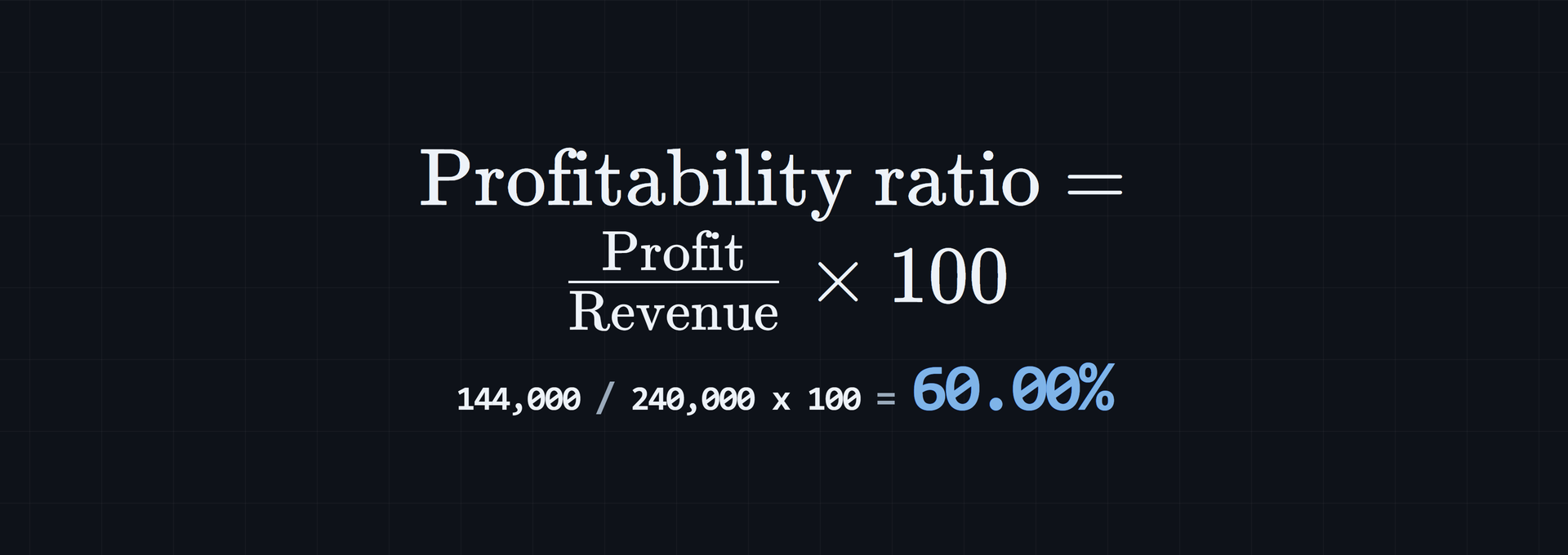
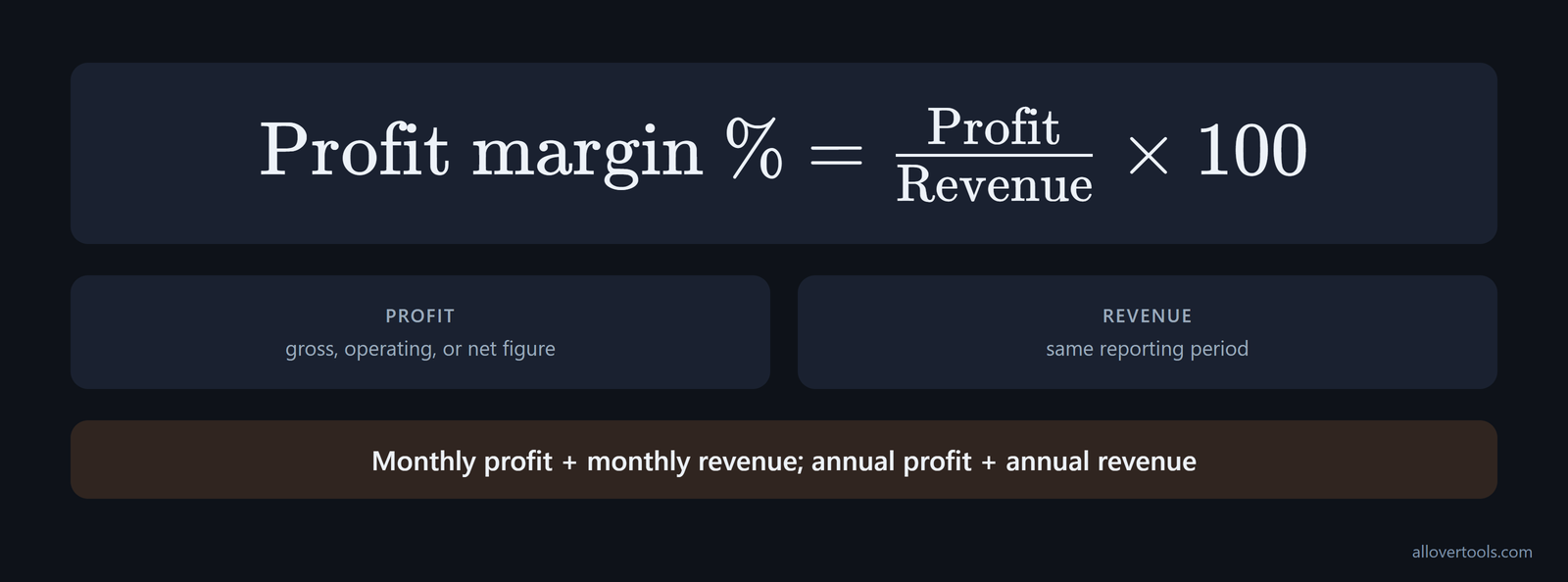
Profit margin expresses profit as a percentage of revenue: Profit margin % = Profit / Revenue x 100. The denominator must cover the same reporting period as the profit figure. Monthly profit belongs with monthly revenue, not annual revenue.
A positive percentage is the share of revenue left after the costs included in that calculation. Zero means break-even at that profit level. A negative percentage means the included costs exceed revenue. Gross, operating, and net margin answer different questions because each uses a different profit figure.
A 35% profit margin means the business keeps $0.35 for every dollar of sales, as this margin explanation puts it. To find the profit represented by a revenue figure, convert the margin to a decimal and multiply it by the revenue base. Keep the named profit layer the same.
Use revenue from the same period
Pair monthly profit with monthly revenue, and annual profit with annual revenue. The division still works when the periods differ, but the result no longer describes one period and can mislead the comparison.
Choose the profit figure before calculating
Use gross profit to inspect the direct cost of products or services. Operating profit includes operating expenses, so it gives a fuller view of the operation. Net profit includes the remaining deductions used in the calculation. Label the profit figure before interpreting the percentage.
Match the margin type to the decision. Gross profit margin usually applies to a single product or service, not the organization as a whole, so it helps with product pricing and mix decisions, as this QuickBooks guide explains. For external investors and lenders, net profit margin is usually more important because it is net income after tax divided by revenue and reflects profit after all expenses and taxes, according to this profit-margin guide.
Gross profit margin formula
For the direct-cost layer, use these formulas:
Gross profit = Revenue - COGS
Gross profit margin % = Gross profit / Revenue x 100
COGS is the direct cost tied to what was sold. The Business Profit Calculator labels the input Cost of goods sold (COGS), while the Gross Margin Calculator uses Direct cost. Gross margin shows what remains before operating expenses, interest, and tax. It helps assess the economics of delivering a product or service, but it is not the final business margin.
For a manual calculation, use the inputs in this order: find COGS and revenue, subtract the cost from revenue to get gross profit, divide gross profit by revenue, then multiply by 100. The margin calculation method sets out the same sequence and keeps the numerator and denominator visible at each step.
- Find COGS.
- Find revenue.
- Calculate gross profit: revenue minus cost.
- Divide gross profit by revenue.
- Multiply the result by 100.
Using Revenue = $50,000 and Direct cost = $30,000:

Gross profit = $50,000 - $30,000 = $20,000
Gross margin = $20,000 / $50,000 x 100 = 40%
A high gross margin can shrink once the other cost layers are included. One worked case uses $500,000 of gross profit and $700,000 of revenue, giving a 71.4% gross margin; the calculation appears in this profit-margin example. Treat that result as a direct-cost measure. Check operating expenses, interest, and tax before calling the business broadly profitable.
The formula also works at a public-company scale: ($10.5 billion / $40 billion) x 100 = 26.25% gross profit margin, as this larger worked example shows. The figures change, but the denominator is still revenue and the numerator is still gross profit. You can compare the result with the small-business example using the same method.
Enter Revenue greater than 0 and a Direct cost or COGS of 0 or more. The gross-margin tool also rejects Direct cost above Revenue, since that would make gross profit negative.
Formula and meaning
Revenue is the denominator in both calculations. A higher gross margin leaves more revenue after direct costs. It does not account for overhead, interest, or tax.
What to enter in a gross-margin calculator
In the Gross Margin Calculator, enter Revenue and Direct cost, then choose Currency symbol and Period. Click Calculate to see gross profit, gross margin, and direct cost as a percentage of revenue. The page uses the values entered there. It does not fetch live rates or market data, and its output is not an accounting record. The result can be copied or downloaded.
Operating and net profit margin formulas
Operating and net margins use the same revenue denominator, but they include more costs. Operating profit is:
Operating profit = Revenue - COGS - Operating expenses
Operating profit = Gross profit - Operating expenses
Operating profit margin % = Operating profit / Revenue x 100
Net profit then subtracts the interest and tax expenses included in the calculation:
Net profit = Operating profit - Interest expense - Tax expense
Net profit margin % = Net profit / Revenue x 100
SG&A makes operating expenses more specific. Write the operating-margin expression as [(Revenue - COGS - SG&A expenses) / Revenue] x 100. SG&A means selling, general, and administrative expenses such as salaries, rent, and advertising, as this margin reference describes. Use the line-item grouping shown on the income statement rather than moving those costs into COGS.
Pretax profit margin as a separate layer
Pretax margin sits between operating and net margin when interest and tax need separate treatment. Calculate it as (Gross profit - (Operating expenses + Interest expenses)) / Revenue x 100. It includes gains, losses, revenue, and expenses from nonoperating business activities before tax. That separates operating and financing performance from tax planning. This layer is useful when comparing businesses across jurisdictions or when tax effects would distort operating comparisons, as this pretax-margin guide explains. Label it pretax rather than treating it as either operating or net margin.
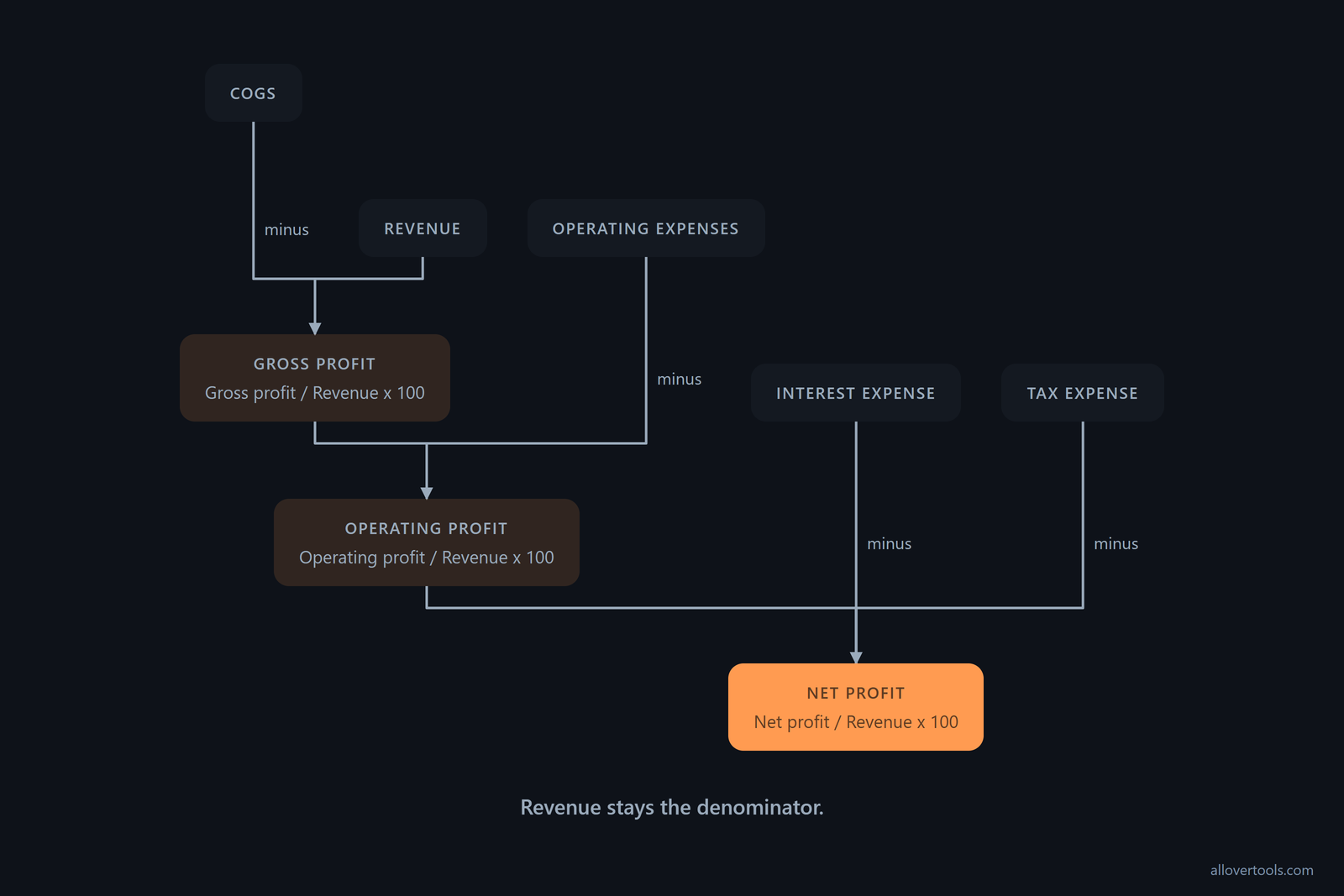
The standalone Net Profit Margin Calculator has fields for Operating expenses, Interest expense, and Tax expense. The Business Profit Calculator's Net profit margin mode has fields for Revenue, Cost of goods sold (COGS), Operating expenses / overhead, and an optional Estimated tax rate % (optional). It applies the estimated tax only when operating profit is positive, so the result is an estimate, not a tax liability. Keep every input on the same period. Revenue must be greater than 0, and cost inputs must be 0 or more.
Operating profit margin
Operating profit is what remains after COGS and operating expenses. Operating margin therefore shows more about day-to-day efficiency than gross margin when overhead matters. Financing and tax are still outside this layer.
Net profit margin
Net profit is the operating result less the interest and tax included in the calculation. Name those deductions, because a net figure is only useful when its cost treatment is clear. The Net Profit Margin Calculator fits the calculation that uses Revenue, Operating expenses, Interest expense, and Tax expense for one period.
Exclude dividends paid from the net profit margin calculation. Dividends are not an expense here, so the margin uses profit before distributions to owners or shareholders, as the distribution rule makes clear. Owner-managed businesses should keep those distributions separate from operating costs when assembling the profit figure.
Nonoperating items can move pretax and net margins even when core trading performance is unchanged. Pretax margin includes nonoperating gains, losses, revenue, and expenses. Net margin includes all expenses, gains, and losses plus tax obligations in its numerator before division by revenue. Asset sales, restructuring charges, and investment gains can create an unusually high or low result, so check the income statement for one-off items before using a single period as the operating baseline, as this margin definition explains.
Net margin is also used in broader ratio analysis. In the DuPont method, it is net income divided by net sales and is one of the core profitability ratios used to decompose return on equity. Margin sits alongside asset turnover and leverage in the explanation of ROE, so a change in margin is one part of a shareholder-return analysis rather than an isolated score, according to the DuPont method.
Worked small-business example: from revenue to net margin
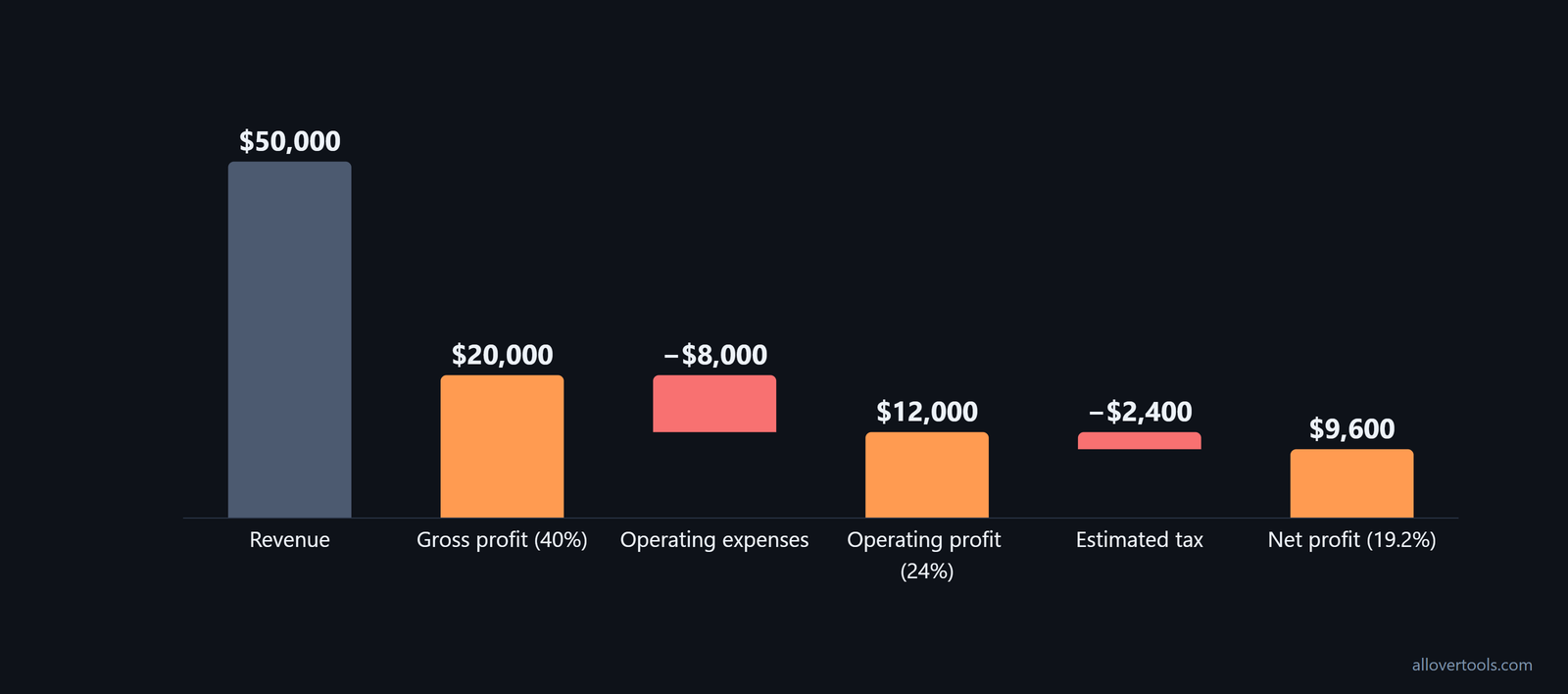
These are chosen monthly values, not a benchmark for any type of business. In the Business Profit Calculator, select Net profit margin and set Period to Monthly.
Enter one period and three profit layers
| Input | Chosen value |
|---|---|
| Revenue | $50,000 |
| Cost of goods sold (COGS) | $30,000 |
| Operating expenses / overhead | $8,000 |
| Estimated tax rate % (optional) | 20% |
All four values describe the same month. Enter them in the corresponding controls, click Calculate, and compare the result rows with the arithmetic below.
Check each percentage against the formula
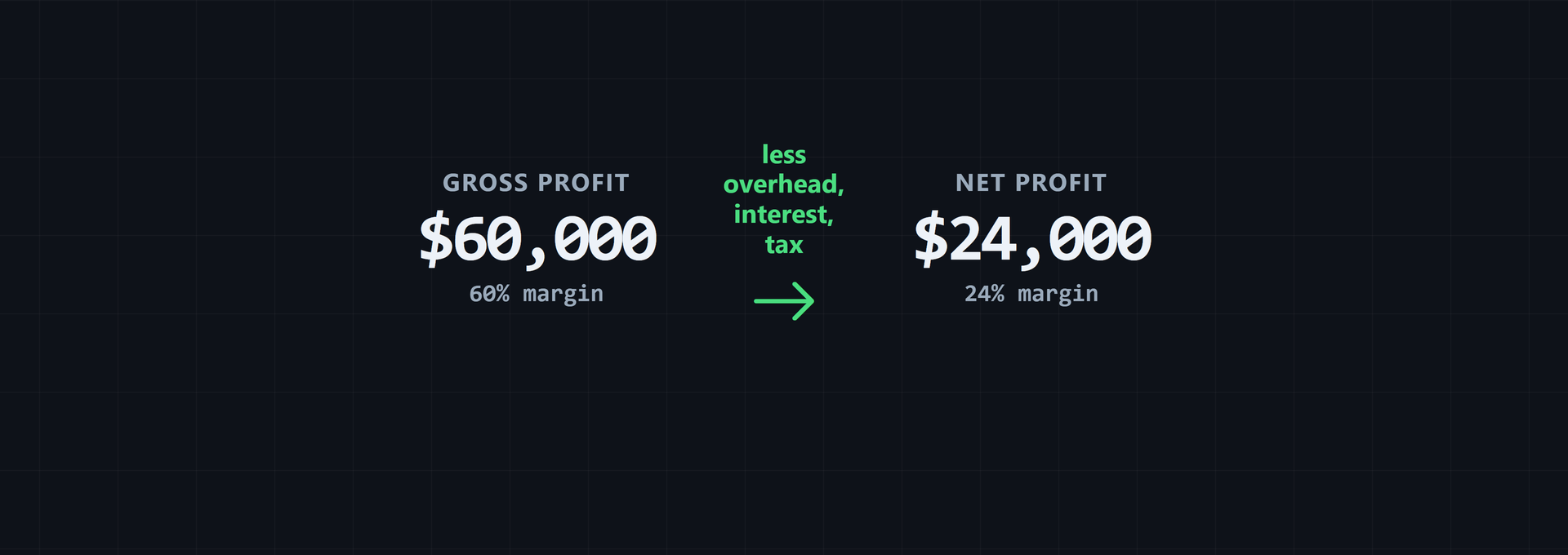
Gross profit = $50,000 - $30,000 = $20,000
Gross margin = $20,000 / $50,000 x 100 = 40%

Operating profit = $20,000 - $8,000 = $12,000
Operating margin = $12,000 / $50,000 x 100 = 24%

Estimated tax = $12,000 x 20% = $2,400
Net profit = $12,000 - $2,400 = $9,600
Net margin = $9,600 / $50,000 x 100 = 19.2%
The percentage falls as more costs enter the calculation. Label each result gross, operating, or net. The Business Profit Calculator calculates from the values entered in the browser. Those figures are not sent through fetch, XMLHttpRequest, sendBeacon, or a form post. The result does not replace accounting records or determine tax liability.
A spreadsheet can repeat the same calculation each month. Put revenue in Column A, COGS in Column B, profit in Column C as A2 - B2, and margin in Column D as (C2/A2) x 100, following this spreadsheet workflow.
- Column A: revenue.
- Column B: COGS.
- Column C: profit = A2 - B2.
- Column D: margin percentage = (C2/A2) x 100.
For operating or net margin, add the relevant cost columns and adjust the profit formula before dividing by the same revenue column. This layout shows whether a margin change came from revenue, COGS, or the additional costs included in the selected profit layer.
Check any result that looks unusually high. One example uses $50,000 in sales and $20,000 in total expenses, leaving $30,000 of net profit and a 60% net profit margin: 30,000 / 50,000 x 100. That figure can point to missing costs, such as unpaid owner labor or underreported overhead. Compare the inputs with industry norms before treating it as a reliable operating result, as this net-margin example illustrates.
Profit margin vs markup: the denominator changes
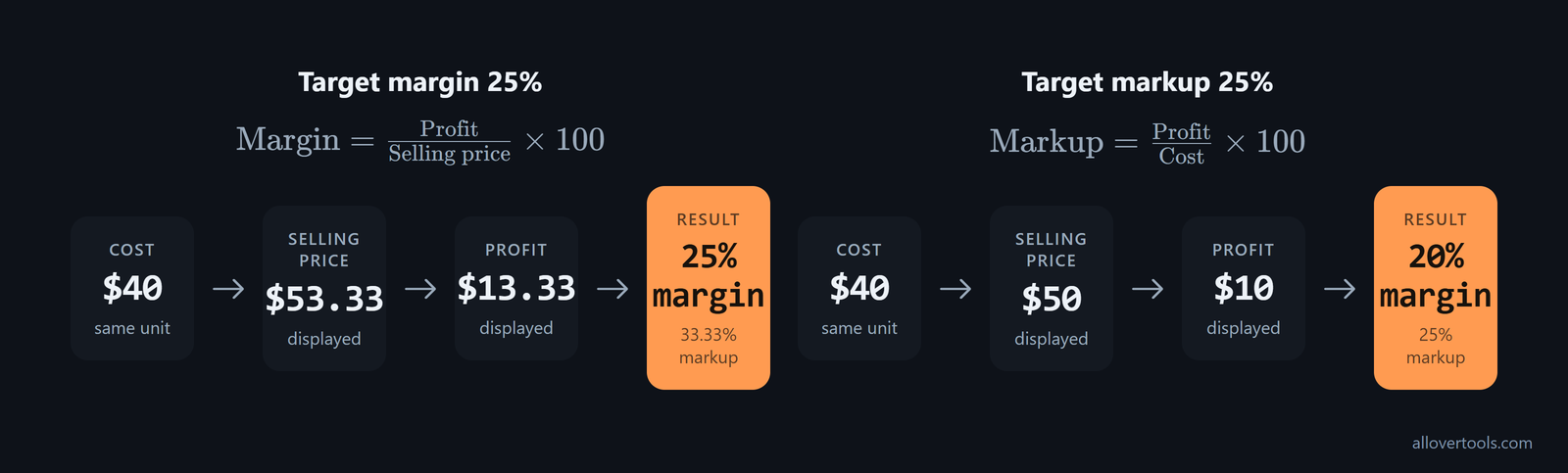
Margin divides profit by selling price or revenue. Markup divides profit by cost. Because the denominator changes, the same dollar profit can produce two different percentages.
Margin uses price; markup uses cost
Margin % = Profit / Selling price x 100
Markup % = Profit / Cost x 100
Take a unit Cost of $40 and a target margin of 25%. Solve for the price first:
A target margin changes the selling price
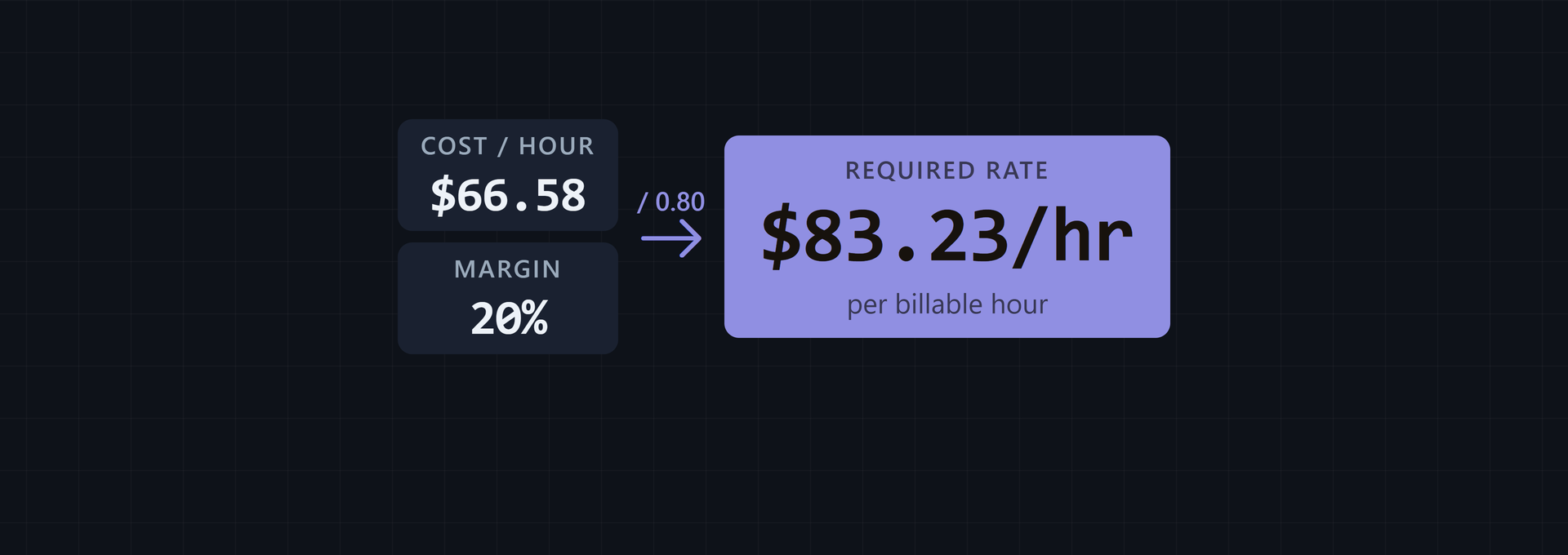
Selling price = $40 / (1 - 0.25) = $53.3333...
Displayed selling price = $53.33
Profit = $53.3333... - $40 = $13.3333... = $13.33 displayed
Markup = $13.3333... / $40 x 100 = 33.3333... = 33.33% displayed
Margin = 25%
A common mistake is to treat 25% as markup: $40 x 1.25 = $50. That gives $10 profit and a margin of $10 / $50 x 100 = 20%, not 25%. In the Markup Calculator, choose Cost + selling price, Cost + target markup %, or Selling price + target margin % based on the values available. Its target margin must be below 100%.
How to use target margins to guide pricing
For a unit cost and a defined target margin, use this formula:
Target selling price = Unit cost / (1 - target margin as a decimal)You can rearrange the equation for revenue planning. With margin expressed as a percentage, use Revenue = 100 x Profit / Margin to find the revenue needed for a desired profit at a stated margin, as the rearranged margin formula shows. Use the same named profit layer in both inputs: a target net profit belongs with a net margin, while a target gross profit belongs with a gross margin.
Set the target before setting the price
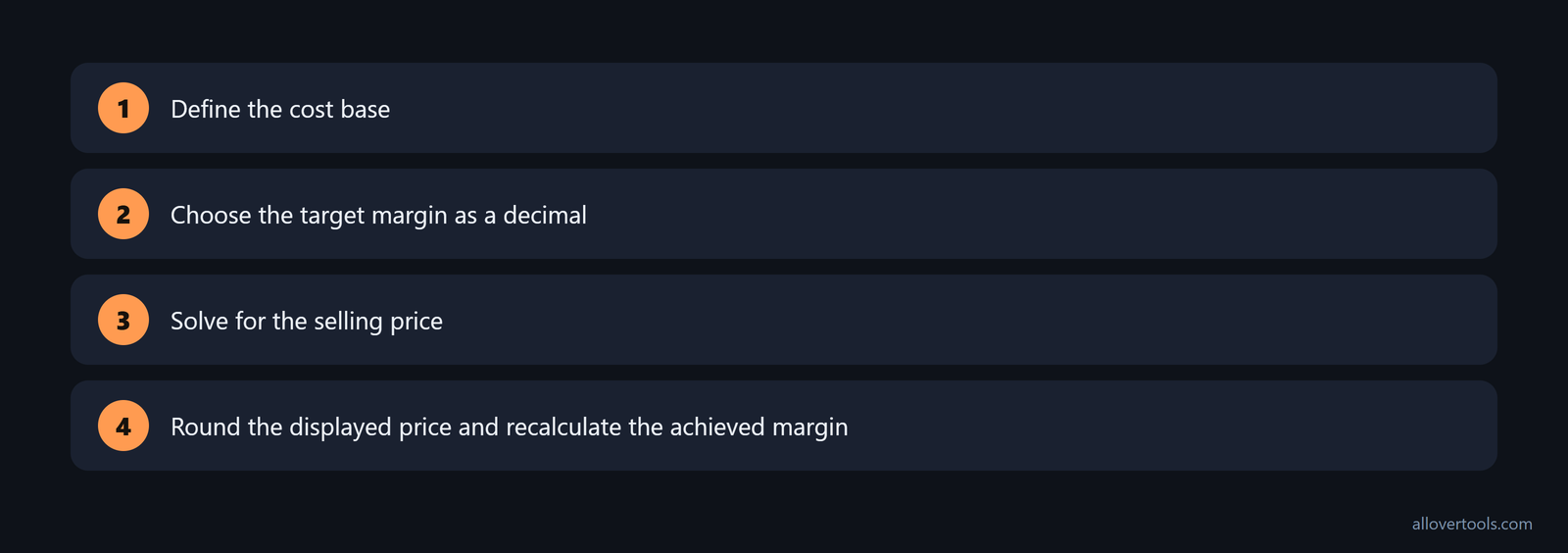
- Define the cost base, such as the direct cost used for a gross-margin target.
- Choose the target margin as a decimal.
- Solve for the selling price.
- Round the displayed price, then recalculate the achieved margin from price and cost.
Use the Markup Calculator for a unit cost and target margin. Then test the business-level margin with the relevant profit figure and same-period revenue in the Business Profit Calculator.
Know what the target does not prove
A target gross margin leaves operating costs, interest, and tax untested, so it does not guarantee the same operating or net margin. Revenue cannot be zero in the margin formula. A target margin of 100% or more has no finite price in the markup tool. Mixing reporting periods can mislead the result, and rounding the displayed price can create a small difference from the unrounded target.
If a contract, covenant, or compliance document uses the unqualified term profit margin, name the margin layer before applying the number. The legal reference treats profit margin, also called net profit margin, as the percentage of revenue remaining after costs and gives (Revenue - COGS) / Revenue x 100 for net profit margin. It separately describes gross profit margin as using only COGS and excluding operating and nonoperating expenses. Use the definition stated in the document rather than assuming that "profit margin" always refers to the same numerator.
Frequently asked questions
What is the simplest profit margin formula?
Profit margin % = Profit / Revenue x 100. Profit and revenue must cover the same period. The result also depends on whether the profit is gross, operating, or net.
How do I calculate gross profit margin from revenue and COGS?
Subtract COGS from revenue to get gross profit. Divide that result by revenue and multiply by 100. Operating, financing, and tax deductions are not included.
What is the difference between operating margin and net margin?
Operating margin uses profit after COGS and operating expenses. Net margin uses the remaining profit after the interest and tax deductions included in the calculation. Both use revenue as the denominator.
Is a 25% markup the same as a 25% profit margin?
No. Markup divides profit by cost, while margin divides profit by selling price. With a $40 cost, a 25% markup gives a $50 price and a 20% margin. A 25% margin needs a $53.33 price before rounding.
How do I use a target profit margin to set a selling price?
Use Selling price = Cost / (1 - target margin as a decimal), then recalculate the margin from the rounded price. Keep the target below 100% and state whether it is a gross, operating, or net target.