The minimum hourly rate formula turns annual business expenses and a desired profit into a per-billable-hour floor. It is: minimum hourly rate = (annual business expenses + desired annual profit) ÷ annual billable hours. Annual billable hours equal total working hours x utilization rate ÷ 100. The result is the lowest rate that covers those inputs, not a market quote or a target rate with extra margin.
What the minimum hourly rate formula includes
The formula has three inputs: annual business expenses, desired annual profit, and annual billable hours. Add the first two to get the revenue the business needs, then divide by the hours that can actually be invoiced.
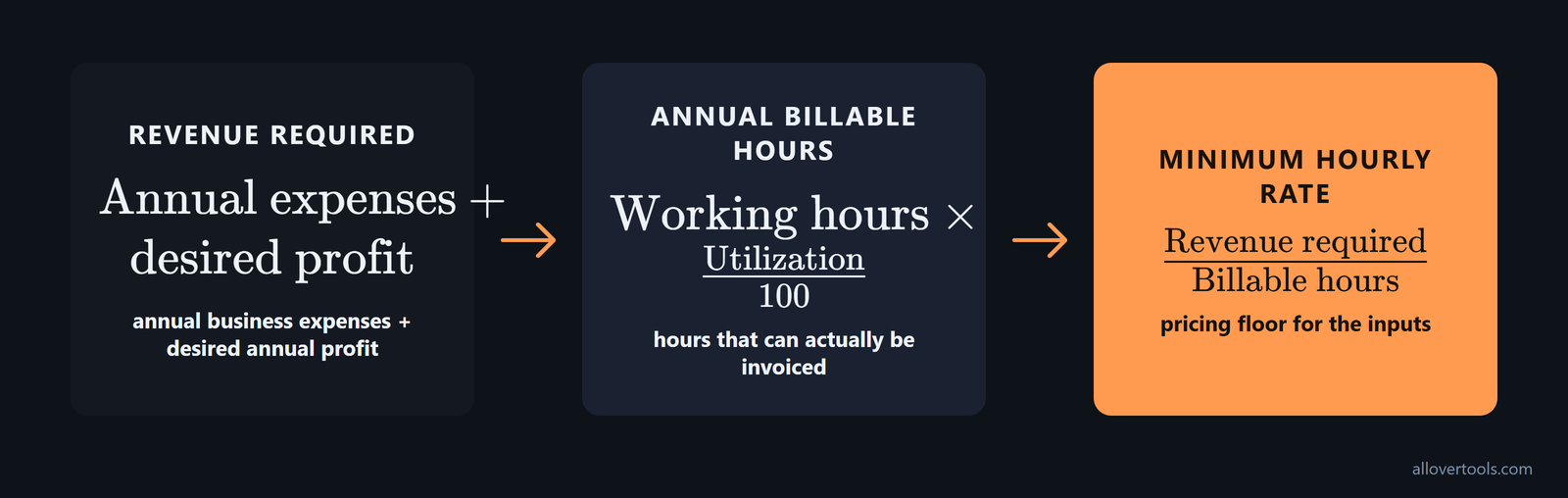
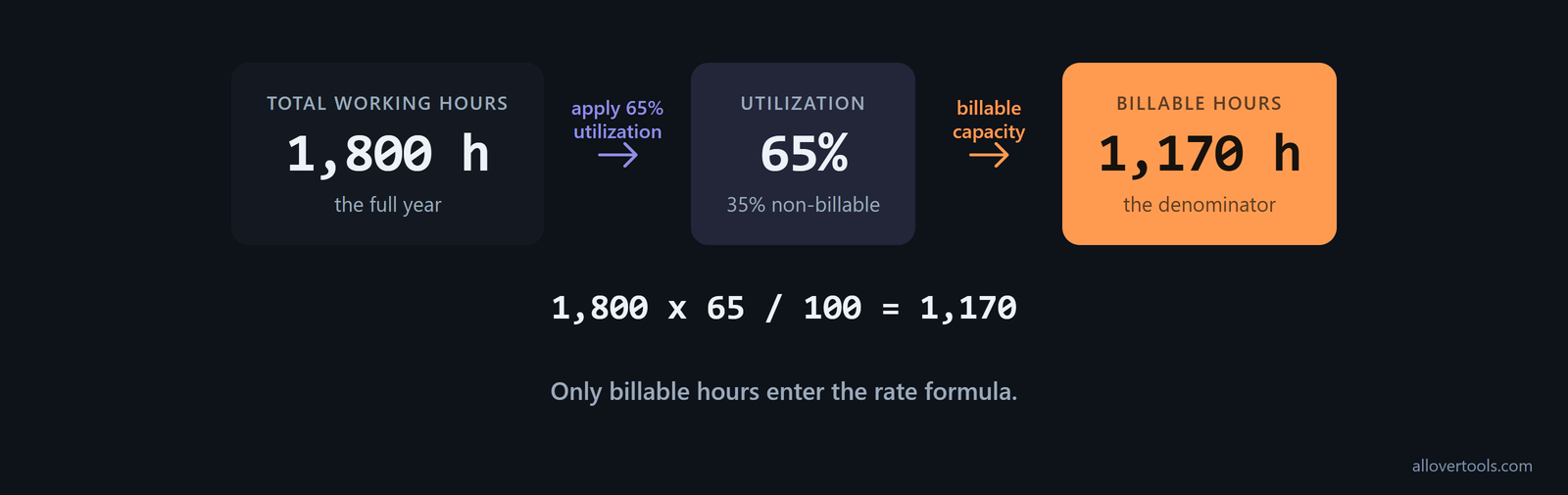
Annual billable hours equal total working hours x utilization rate ÷ 100. At 65% utilization, 65 out of every 100 working hours count as billable in this scenario. The rest can cover administration, sales, or leave.
The result is a floor for the inputs entered. It does not predict what clients will accept or add a separate buffer for scope changes, uncertainty, or negotiation.
Build the annual expenses and desired profit inputs
Use yearly amounts before doing the division. The calculator maps desired profit to Annual income target and overhead to Annual business expenses. Both controls accept zero or greater, so an empty category should be zero only when it has no cost.
Keep the periods consistent in the annual expenses plus profit per billable hour calculation. List every cost the rate must fund, then check that no cost appears in more than one category.
Before dividing, spell out the cost stack for U.S. self-employed pricing: target income + overhead + benefits substitute + tax reserve. Business expenses, federal self-employment tax reserves, and income-tax reserves come first, as cost-plus guidance sets out.
Keep self-employment taxes, benefits, retirement savings, and profit margins as separate inputs, along with desired salary, business expenses, and billable hours. This keeps benefits and retirement savings from being taken out of profit later; the calculator description includes all of these parts in its hourly-rate formula.
- Fund benefits and retirement savings before counting what remains as profit.
- Include self-employment taxes and other tax reserves before dividing by billable hours.
List every annual business expense
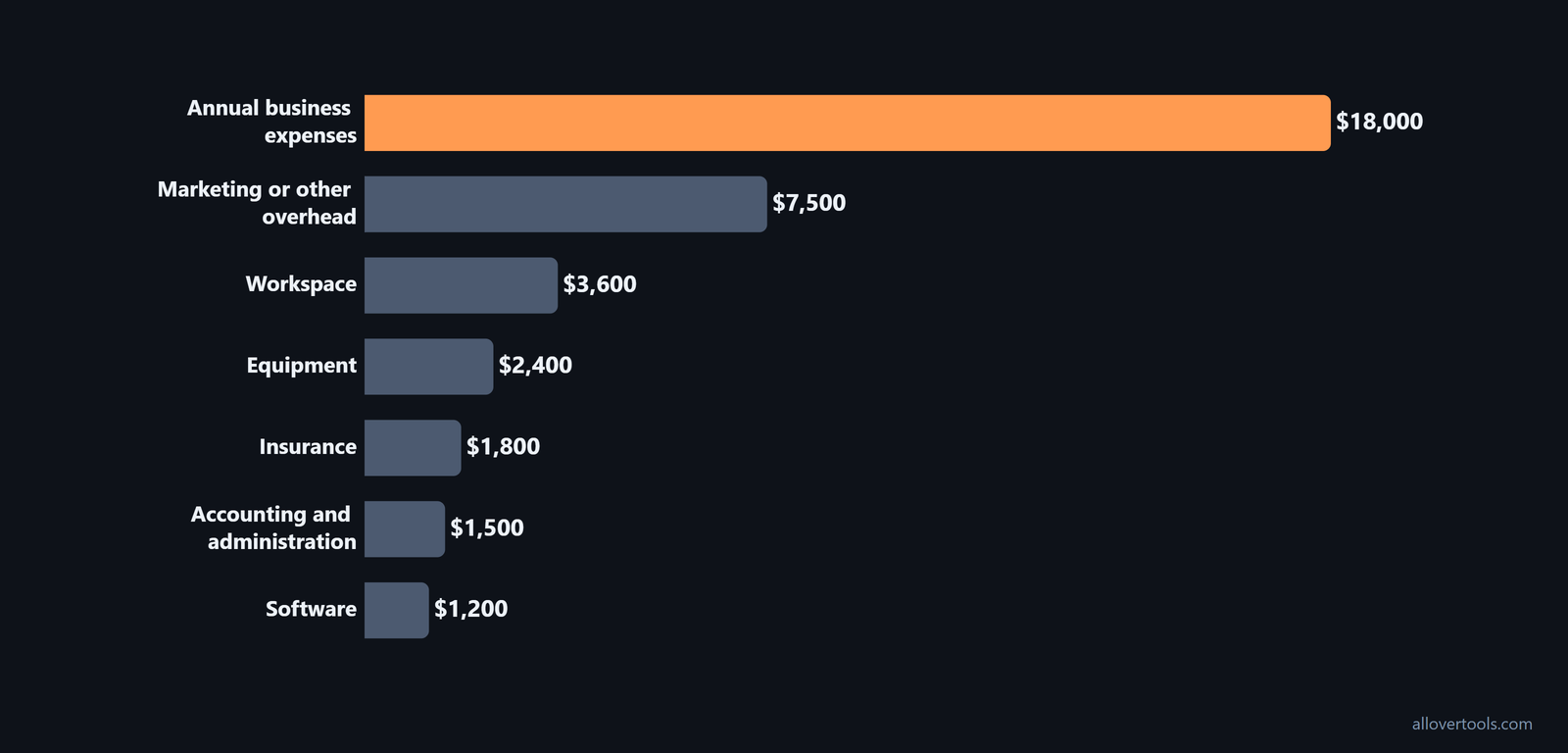
The worked example uses these amounts:
Software:                         $1,200
Insurance:                        $1,800
Equipment:                        $2,400
Workspace:                        $3,600
Accounting and administration:    $1,500
Marketing or other overhead:      $7,500
                                  -------
Annual business expenses:        $18,000
The total is $18,000. Include recurring overhead and planned replacements or services that the rate needs to fund. Leaving out an annual cost makes the floor too low. Counting one twice makes it too high.
Set a desired annual profit
Desired profit is the annual amount the business needs to produce after the expenses are covered. In this scenario, it is $72,000, separate from the $18,000 expense total.
Desired annual profit:       $72,000
Annual business expenses:    $18,000
Total revenue required:      $90,000
The addition is $72,000 + $18,000 = $90,000. The $72,000 figure is an input for this scenario, not a benchmark or recommendation. Dividing only the profit figure would leave the annual expenses uncovered.
Start with desired take-home when that is the number you need to reach. Divide desired take-home by (1 - effective tax rate) to get the profit needed before tax. Add annual business expenses to get the revenue that must be invoiced, then divide by annual billable hours; this take-home-first method makes the tax gross-up part of the calculation.
If a rate covers salary but not overhead, add the expenses before deciding whether it works. One example adds $37,764 in annual expenses to a $50,000 annual salary. That produces an adjusted yearly salary of $87,764; divided by 1,864 work hours, the minimum hourly rate is $47, as shown in Clockify's expense example.
Estimate realistic billable hours
The denominator is billable hours, not every hour worked. Administration, sales, marketing, training, leave, and unpaid coordination reduce the hours that can be invoiced. The billable hours assumptions in formula should reflect the schedule being priced, not an ideal week.
For this example, use 1,800 total working hours per year and 65% utilization. Record how both figures were formed. Overestimating either one makes the denominator too large and the minimum rate too low.
Before you accept the denominator, compare it with published planning ranges. Many solo freelancers plan around 1,200 to 1,500 billable hours per year because those hours are client-paid work only. Another calculator puts typical annual billable hours at 1,000 to 1,500 after administration, sales, and business development; compare the 1,200 to 1,500 benchmark with the 1,000 to 1,500 range.
| Planning check | Billable hours per year | What the range accounts for |
|---|---|---|
| Solo freelancer benchmark | 1,200-1,500 | Client-paid work only |
| Calculator benchmark | 1,000-1,500 | Administration, sales, and business development |
For a new freelancer without measured time data, start with 60% billable and 40% non-billable. That split reflects the typical hourly breakdown described in Upwork's 60/40 guidance.
Separate total working hours from billable hours
Apply the utilization percentage to total working hours:
1,800 total working hours × 65 ÷ 100
= 1,170 billable hours
The 35% non-billable share is the part of this schedule left for non-invoiced work. It is not a universal assumption. If the actual schedule has more or less non-billable time, change the utilization input.
Do not divide a take-home target by a full-time employee calendar. A freelancer seeking $60,000 take-home might get $29 per hour by dividing $60,000 by 2,080. The required rate is $60-$80 per hour, depending on billable hours and expense levels; the 2,080-hour example shows why total working hours cannot replace billable hours in the denominator.
Run the minimum hourly rate calculation
Enter the four inputs in the Billable Hourly Rate Calculator to see the intermediate values and check the denominator:
- Annual income target: $72,000.
- Annual business expenses: $18,000.
- Total working hours per year: 1,800.
- Utilization rate (%): 65.
Leave Currency symbol at $. It changes the display format only and does not convert the amounts. Click Calculate rate after entering the values.
The tool calculates from the entered values in the browser. Its code makes no fetch, XMLHttpRequest, sendBeacon, or visitor-content form post, so the calculation content is not sent to a server by the tool.
Check the formula with the chosen values
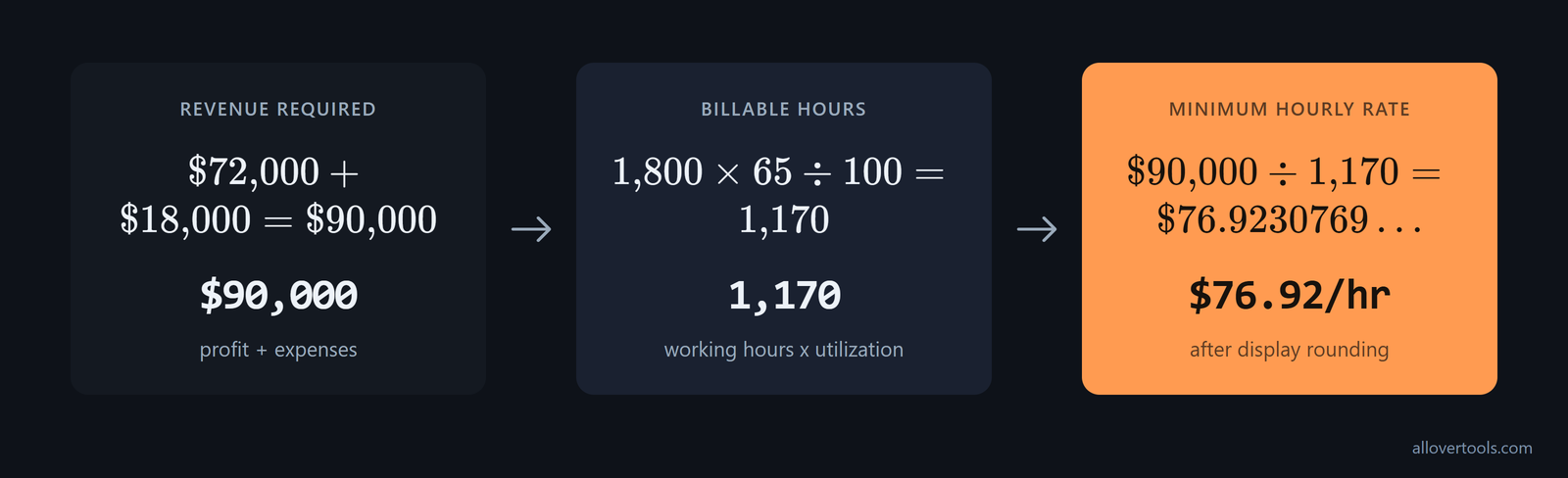
With the inputs beside each intermediate result:
Revenue required = $72,000 + $18,000
                 = $90,000

Billable hours = 1,800 × 65 ÷ 100
               = 1,170

Minimum hourly rate = $90,000 ÷ 1,170
                    = $76.9230769...
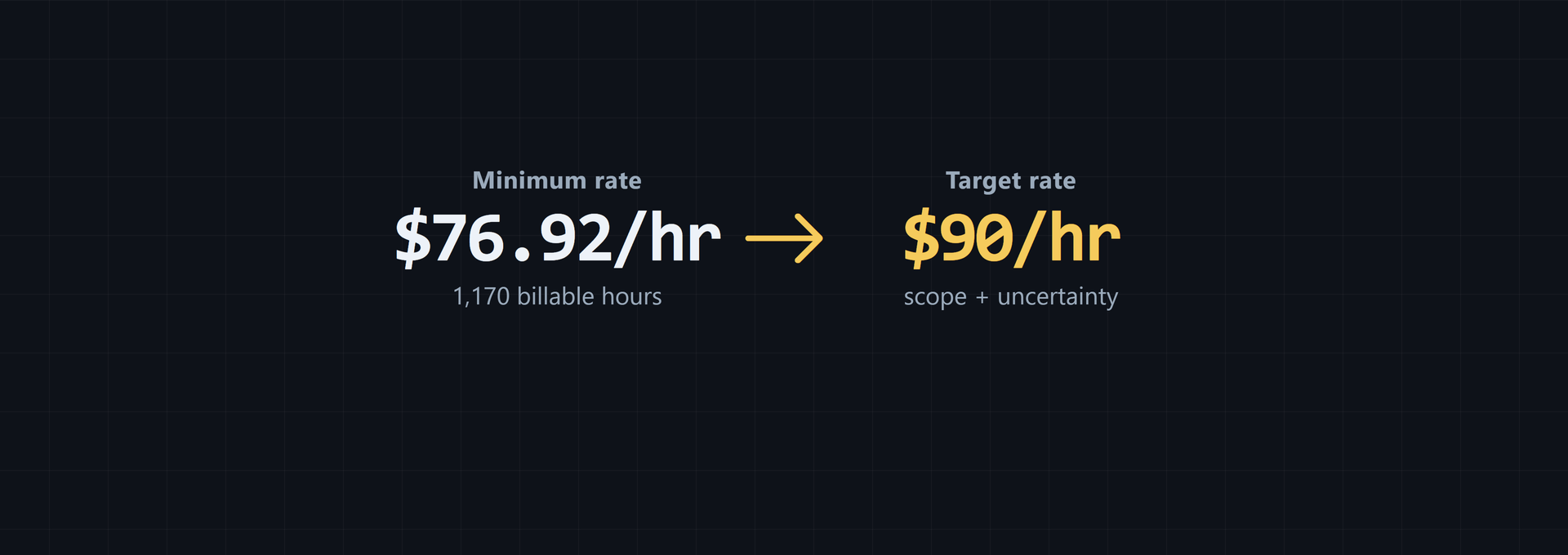
                    = $76.92/hr after display rounding
These are the same values used by the calculator. Its result labels are Required billable hourly rate, Billable hours per year, and Total revenue required per year. It also displays the formula and an assumptions table.
After calculating, Copy result keeps the calculation as plain text, Download result (.txt) saves it as a text file, and Reset clears the fields and hides the result. The tool displays $76.92/hr; the unrounded division is $76.9230769...
Separate the minimum rate from the target rate
The minimum rate is the floor for the inputs already entered. In this example, charging below $76.92/hr means 1,170 billable hours will not produce the chosen $72,000 profit after $18,000 in expenses.
The full cost stack can put the minimum at $120.00/hr before any premium. In one example, $96,000 of income is combined with $14,400 of overhead, $25,200 of self-funded benefits, and $32,400 of tax reserves. The annual cost base is $168,000, and 1,400 billable hours bring the required rate to $120.00, as the full-stack example demonstrates.
| Cost-stack input | Amount |
|---|---|
| Target income | $96,000 |
| Overhead | $14,400 |
| Self-funded benefits | $25,200 |
| Tax reserves | $32,400 |
| Annual cost base | $168,000 |
| Billable hours | 1,400 |
| Required rate | $120.00/hr |
Use the complete stack to test whether current expenses and desired profit are funded. If those inputs stay the same, any ideal or market-adjusted rate has to be above this $120.00/hr floor.
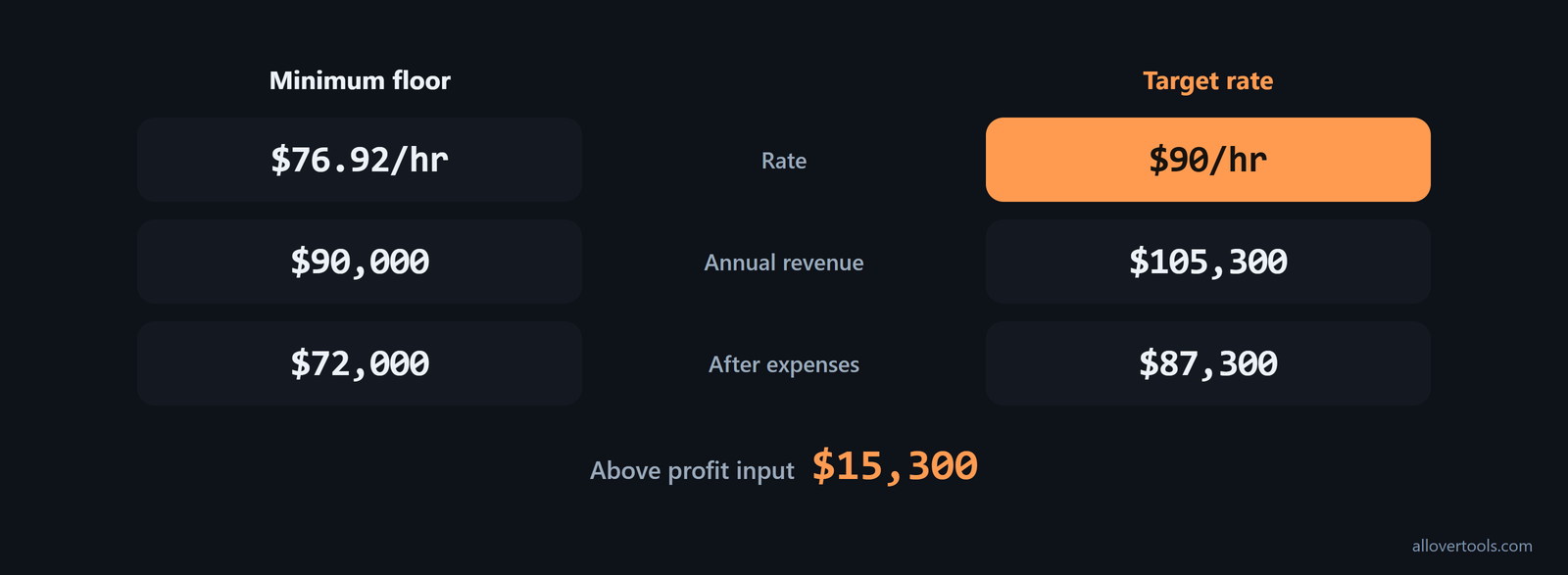
A target or proposal rate is set above that floor for scope, uncertainty, or a desired buffer. The minimum formula does not choose it. If the target rate is $90/hr:
1,170 billable hours × $90/hr = $105,300 annual revenue
$105,300 − $18,000 expenses = $87,300 after expenses
$87,300 − $72,000 desired profit = $15,300 above the profit input
The $90/hr target still needs a scope check. The floor sets a baseline freelance hourly rate because it shows what the stated cost and profit assumptions require.
When moving from the floor to a target, show the increase. A break-even rate is (target income + business expenses) divided by billable hours. A recommended rate can then be set at break-even plus a 20% buffer for taxes, slow periods, and profit, following Harvest's 20% buffer.
Treat the computed minimum as the first pricing step, not the whole proposal decision. Once the floor is set, add market positioning, specialization, and negotiation considerations; minimum-rate guidance describes the calculation as an initial step toward determining a rate.
Stress-test the floor and recalculate it each year
Change one assumption at a time to see what moves the pricing floor for services. Keep the $72,000 profit, $18,000 expenses, and 1,800 total working hours unless the scenario changes one of them.
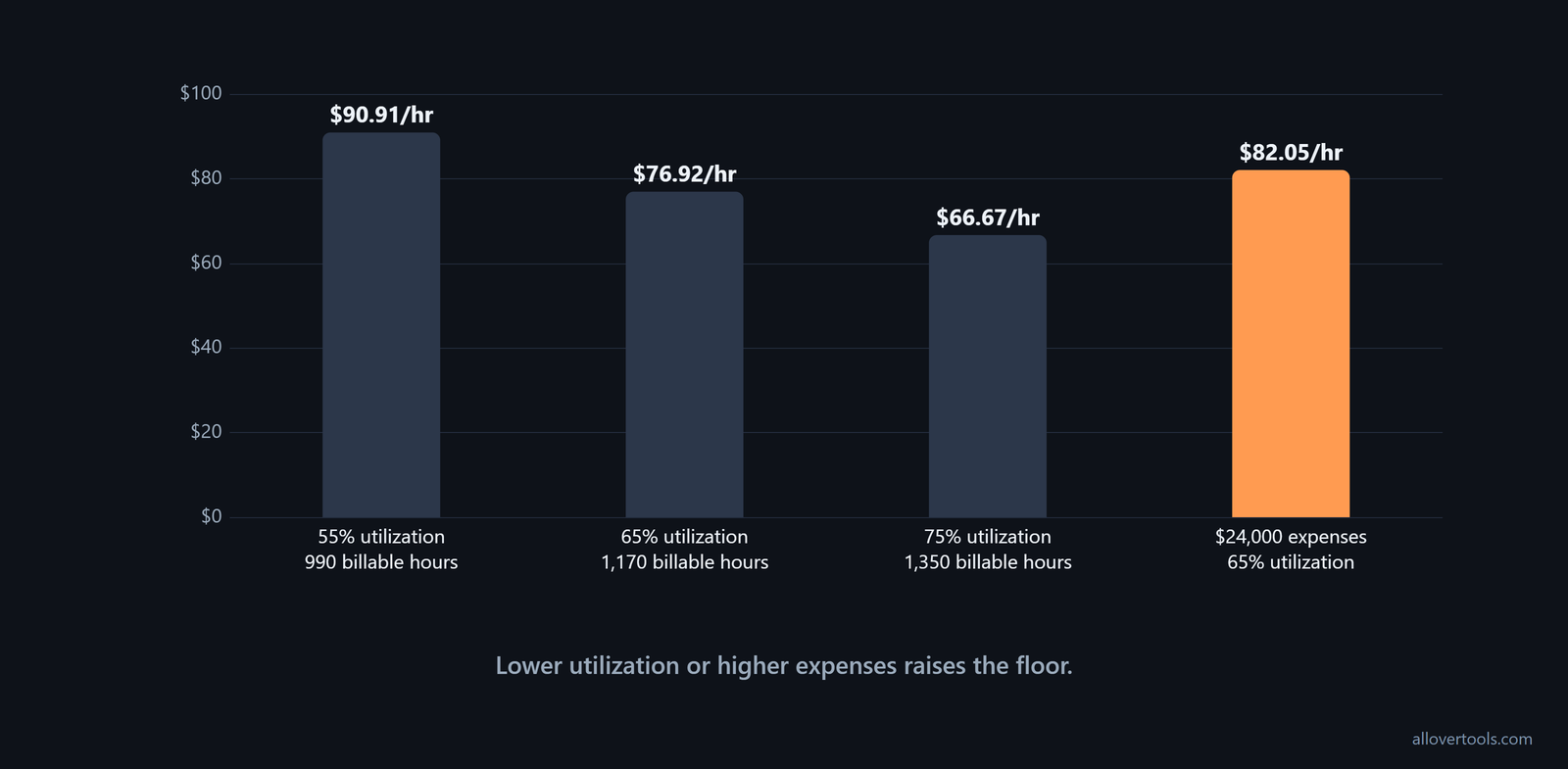
Change one assumption at a time
55% utilization → 1,800 × 55 ÷ 100 = 990 billable hours
                 $90,000 ÷ 990 = $90.91/hr

75% utilization → 1,800 × 75 ÷ 100 = 1,350 billable hours
                 $90,000 ÷ 1,350 = $66.67/hr

$24,000 expenses → $72,000 + $24,000 = $96,000 revenue required
                   $96,000 ÷ 1,170 billable hours = $82.05/hr
The 55% case raises the floor because fewer hours carry the same revenue requirement. The 75% case lowers it because more hours carry it. Higher expenses raise the floor even when utilization stays at 65%.
Keep the threshold current
Compare every proposed rate with the current floor. If a rate is lower, the intended profit or cost coverage has changed. Revise the inputs instead of treating the old result as coverage.
Recalculate at least annually and whenever annual expenses, desired profit, total working hours, or utilization changes. The arithmetic can be correct while the inputs are out of date.
For U.S. freelancers, keep self-employment tax on its own line when you refresh the model. One sustainable-rate breakdown uses 15.3% self-employment taxes on top as a concrete benchmark tied to IRS self-employment tax guidelines. Use that 15.3% benchmark in the tax-reserve input when it matches the scenario being priced.
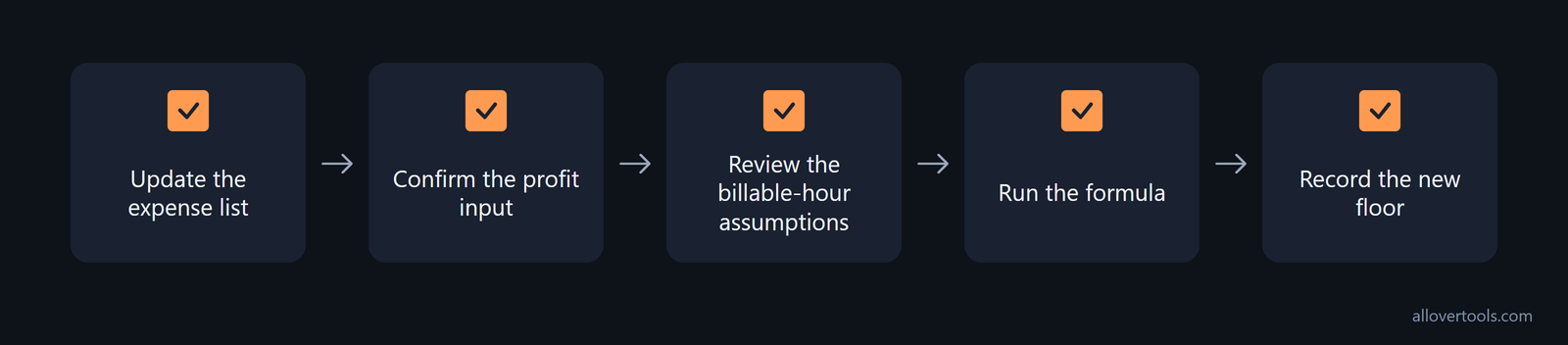
- Update the expense list.
- Confirm the profit input.
- Review the billable-hour assumptions.
- Run the formula.
- Record the new floor.
Frequently asked questions
How do I calculate a minimum hourly rate from annual expenses?
Add annual business expenses to desired annual profit, then divide by annual billable hours. Annual billable hours equal total working hours multiplied by utilization divided by 100.
Should desired profit be added to business expenses?
Yes. The two figures make up the annual revenue requirement. Dividing only the profit figure would leave overhead uncovered.
What happens if I overestimate my billable hours?
The denominator becomes too large and the calculated minimum becomes too low. Include non-billable work in total hours and use a utilization assumption that matches the schedule being priced.
Can I charge below my minimum hourly rate?
You can choose to change the business decision, but the original assumptions will no longer be covered by that rate. Treat the calculated minimum as the threshold and revise the inputs when the intended profit or cost coverage changes.
When should I recalculate my minimum hourly rate?
Recalculate at least once each year and whenever annual expenses, desired profit, total working hours, or utilization changes. This keeps the pricing floor tied to current assumptions instead of an outdated worksheet.