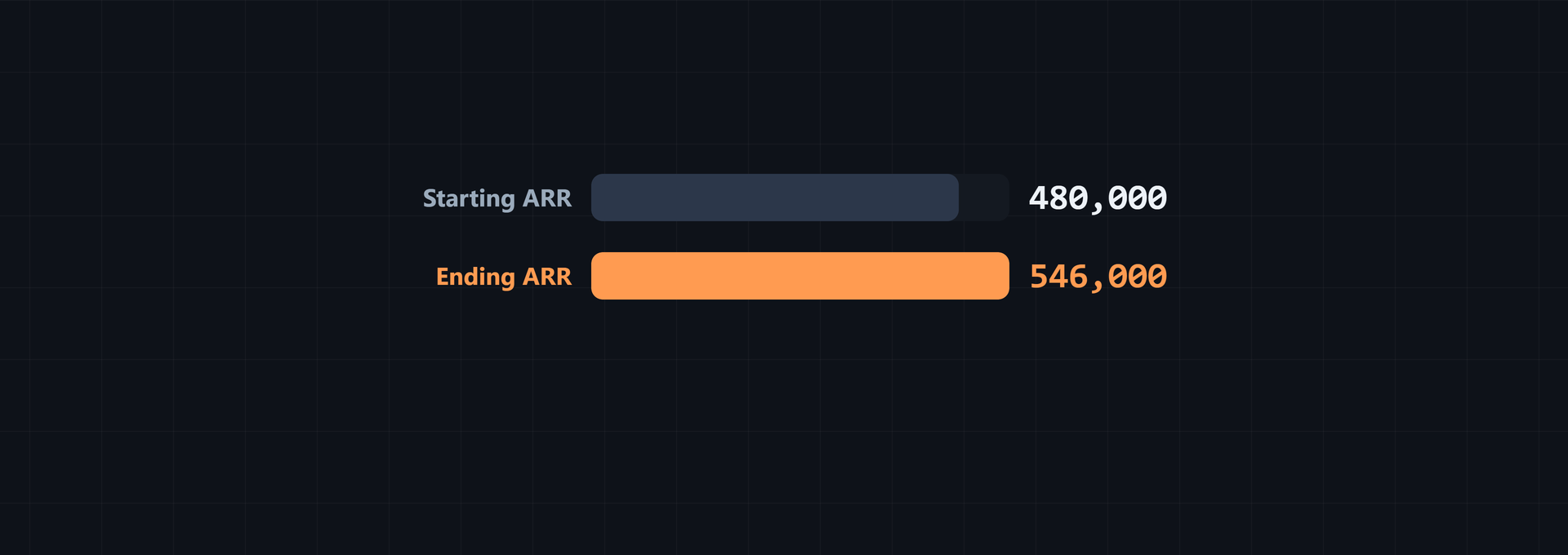
MRR to ARR conversion is simple: multiply monthly recurring revenue by 12, then divide ARR by 12 to reverse the calculation. This article explains the formula, shows how to normalize billing cycles, walks through month-end revenue movements, and checks the results in the calculators. The examples use fixed values for the calculation, not a company forecast. Keep the recurring revenue scope and currency basis consistent.
What is MRR and how does it relate to ARR?
Monthly Recurring Revenue (MRR) is recurring SaaS revenue expressed as a one-month amount. Annual Recurring Revenue (ARR) is the annual run rate for the same recurring revenue base. Use these formulas:
ARR = MRR × 12
MRR = ARR ÷ 12
ARR equals MRR x 12 when the input is a monthly recurring run rate, both measures cover the same recurring scope, and the calculation does not mix billing cycles or currencies. With $4,200 MRR:
Use ARR as a forward-looking operating metric, not as revenue recognized under ASC 606. It annualizes the recurring revenue from active contracts at a point in time. Recognized revenue follows accounting rules for when revenue is earned and realized, so deferrals, implementation phases, or ramp schedules can leave recognized revenue below ARR, as this ARR explanation sets out.
Before comparing an ARR figure with another company's, check how it was defined. Definitions vary by company. Datadog defines ARR as the annualized revenue run-rate of subscription agreements from all customers at a point in time, calculated from MRR multiplied by 12, with usage revenue included. Some public SaaS filers include usage-based revenue; others annualize only contracted minimums or subscription fees. Use the company's own filing or investor definition for the comparison, according to the company-definition example.
ARR is not a probability-weighted forecast. It represents the annualized value of active recurring contracts if current customers, pricing, and contracts stay the same. It does not include expected churn or upsell, so an imminent renewal, price change, or planned customer migration can break that assumption, as Stripe's run-rate guidance explains.
ARR = MRR x 12 works exactly when contract mix and usage stay stable. Before treating a month's annualized MRR as contracted ARR, check usage-based pricing, ramped multi-year deals, mid-month starts and churn, seasonal usage, and FX translation. A temporary usage spike, seasonal month, or ramp can overstate sustainable contracted ARR. Currency movement can also change translated MRR without changing the underlying contract, according to the stability conditions.
$4,200 × 12 = $50,400 ARR
$50,400 ÷ 12 = $4,200 MRR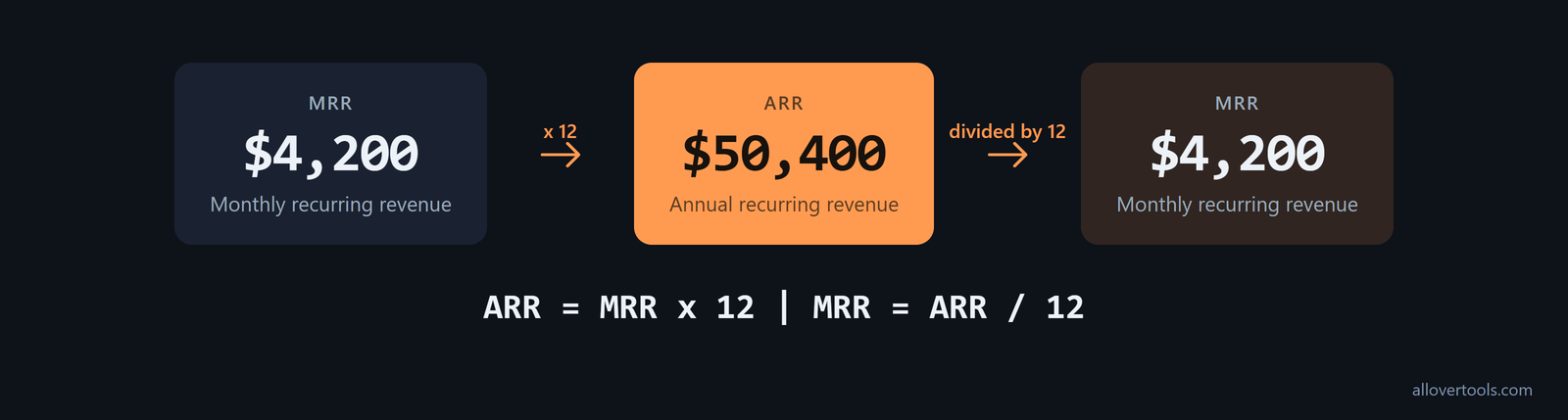
This normalization applies to recurring revenue only. Leave one-time fees, setup charges, and non-recurring discounts out of the amount being annualized. The MRR equals ARR divided by 12 relationship then stays tied to a recurring run rate.
How do you normalize billing cycles to MRR?
For a non-monthly subscription, identify the recurring revenue per billing period, multiply it by the number of billing periods per year to get ARR, then divide ARR by 12 to get MRR. The ARR Calculator offers these Billing period choices and factors: Monthly (12 periods/year), Quarterly (4 periods/year), Semi-annual (2 periods/year), Annual (1 period/year), and Weekly (52 periods/year).
Use the contract value, not the invoice, for normalization. An annual subscription paid upfront contributes one twelfth of its annual value to MRR every month. It does not add a full year of MRR in the invoice month and zero in the other eleven. A $12,000 annual subscription therefore contributes $1,000 to MRR each month and $12,000 to ARR, regardless of cash collection timing, as the contract-counting rule makes clear.
Use the same annual-value rule for multi-year contracts. A $36,000 three-year contract contributes $12,000 of ARR while active. Count one year of recurring value, not the whole term. Counting the total contract value would triple that deal in ARR and turn the metric into total contract value rather than annual run rate, as the multi-year example shows.
Number of identical subscriptions (optional) multiplies the per-subscription amount. Currency symbol changes the display only; it does not convert the amount. For an unlisted cycle, choose Custom cycle length..., enter a whole-number Days per billing cycle, and use 365.25 ÷ days as the periods-per-year factor.
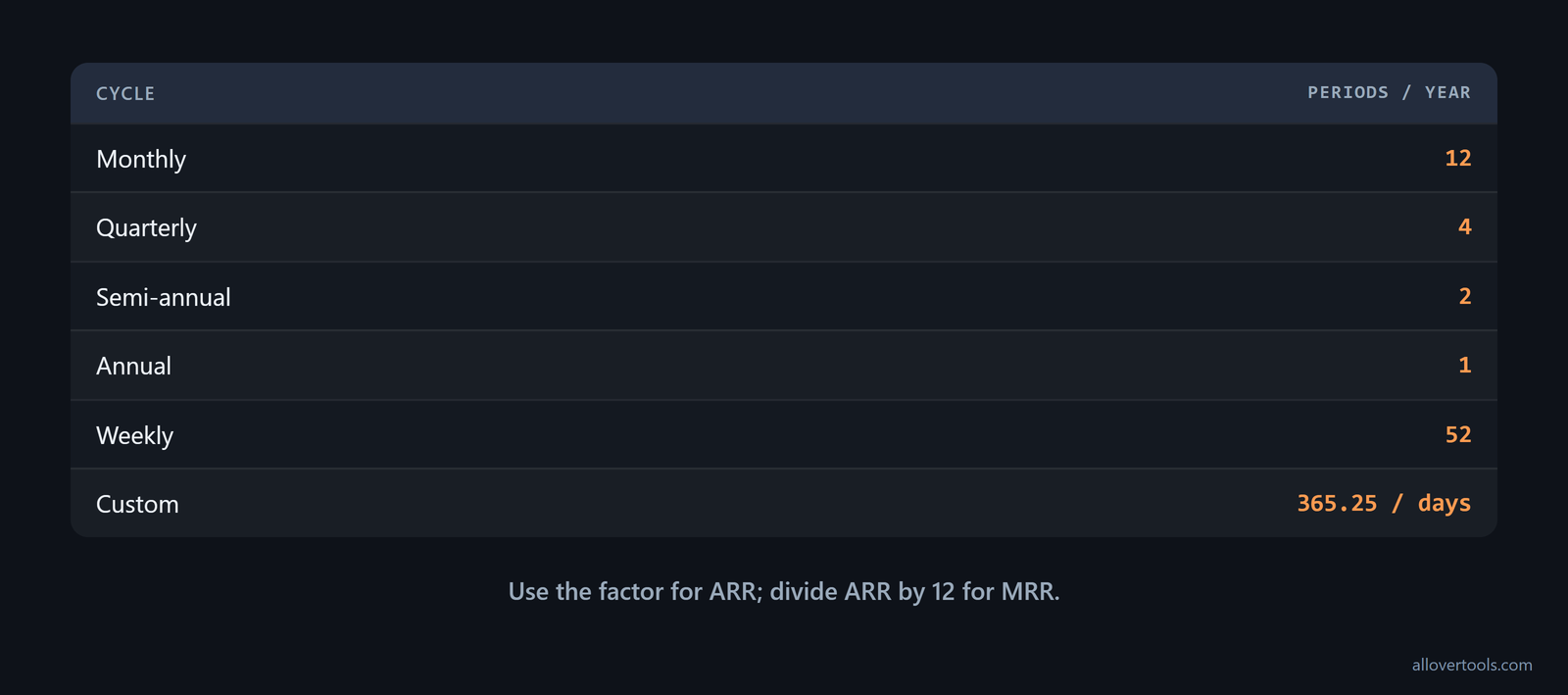
Monthly, quarterly, annual, and custom cycles
| Billing period | Periods per year |
|---|---|
| Monthly | 12 |
| Quarterly | 4 |
| Semi-annual | 2 |
| Annual | 1 |
| Weekly | 52 |
Use $450 per billing period, 45 Days per billing cycle, and 1 subscription. The annual factor is 365.25 ÷ 45 = 8.116666.... The calculations are:
ARR = $450 × 8.116666… × 1 = $3,652.50
MRR = $3,652.50 ÷ 12 = $304.38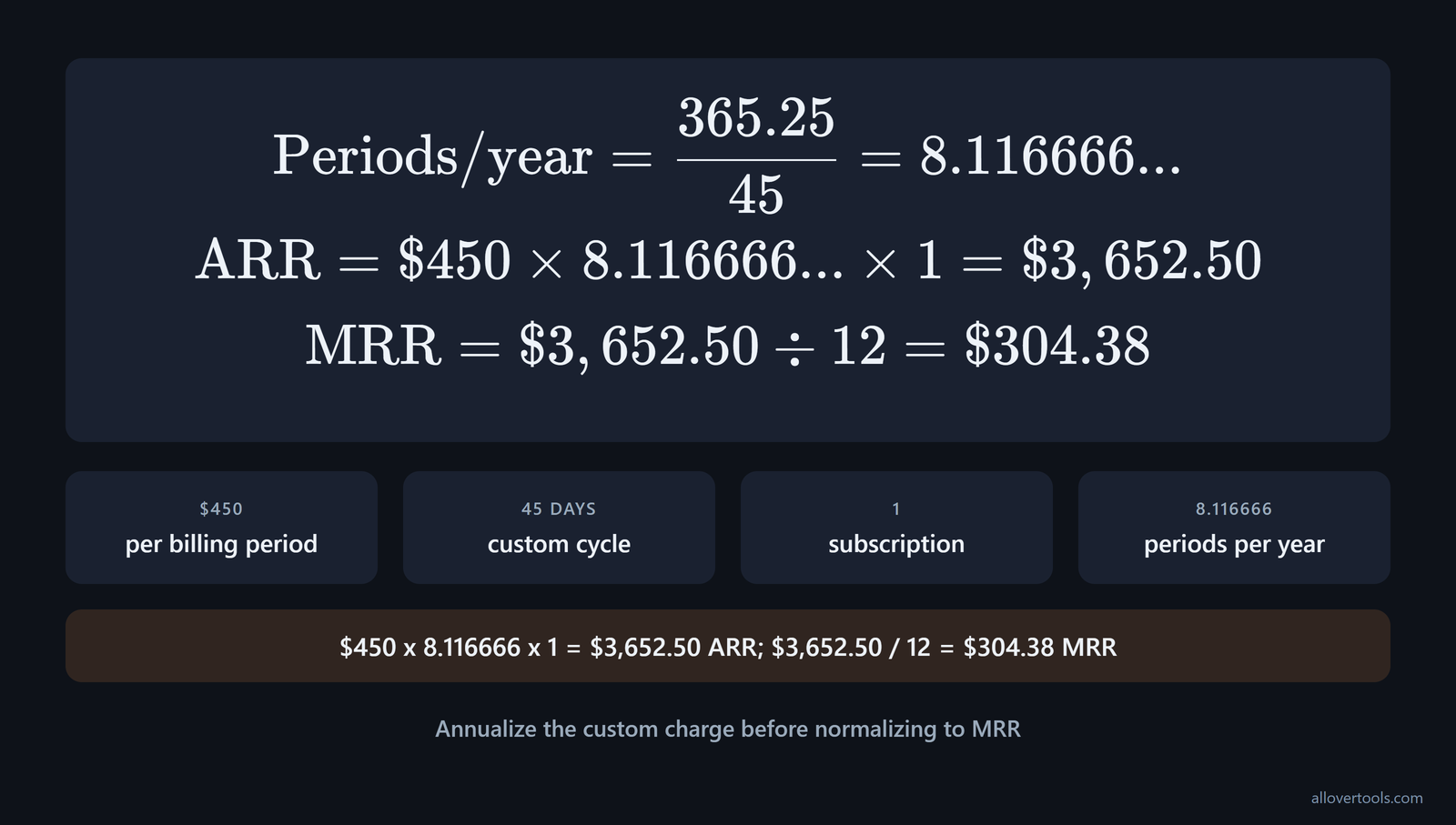
The $3,652.50 figure is an annualized run rate, not the $450 collected on one renewal date. Normalize every portfolio row before comparing or totaling monthly, quarterly, annual, and custom-cycle subscriptions.
Set the treatment for each billing cadence before the portfolio grows. Write down how monthly, quarterly, semi-annual, annual, and other cadences convert to MRR and ARR, then use that treatment every month. This keeps period-to-period ARR = MRR x 12 comparisons consistent and supports audits and investor due diligence, following CRV's normalization policy.
How to convert MRR to ARR: a chosen portfolio example
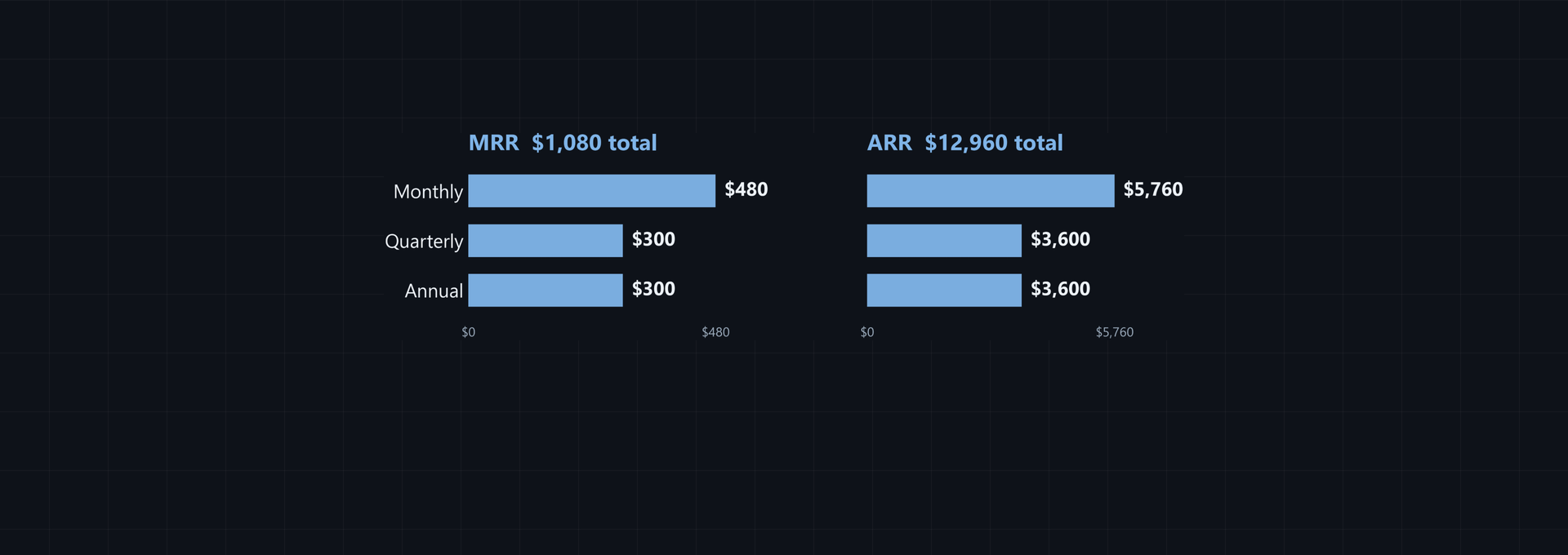
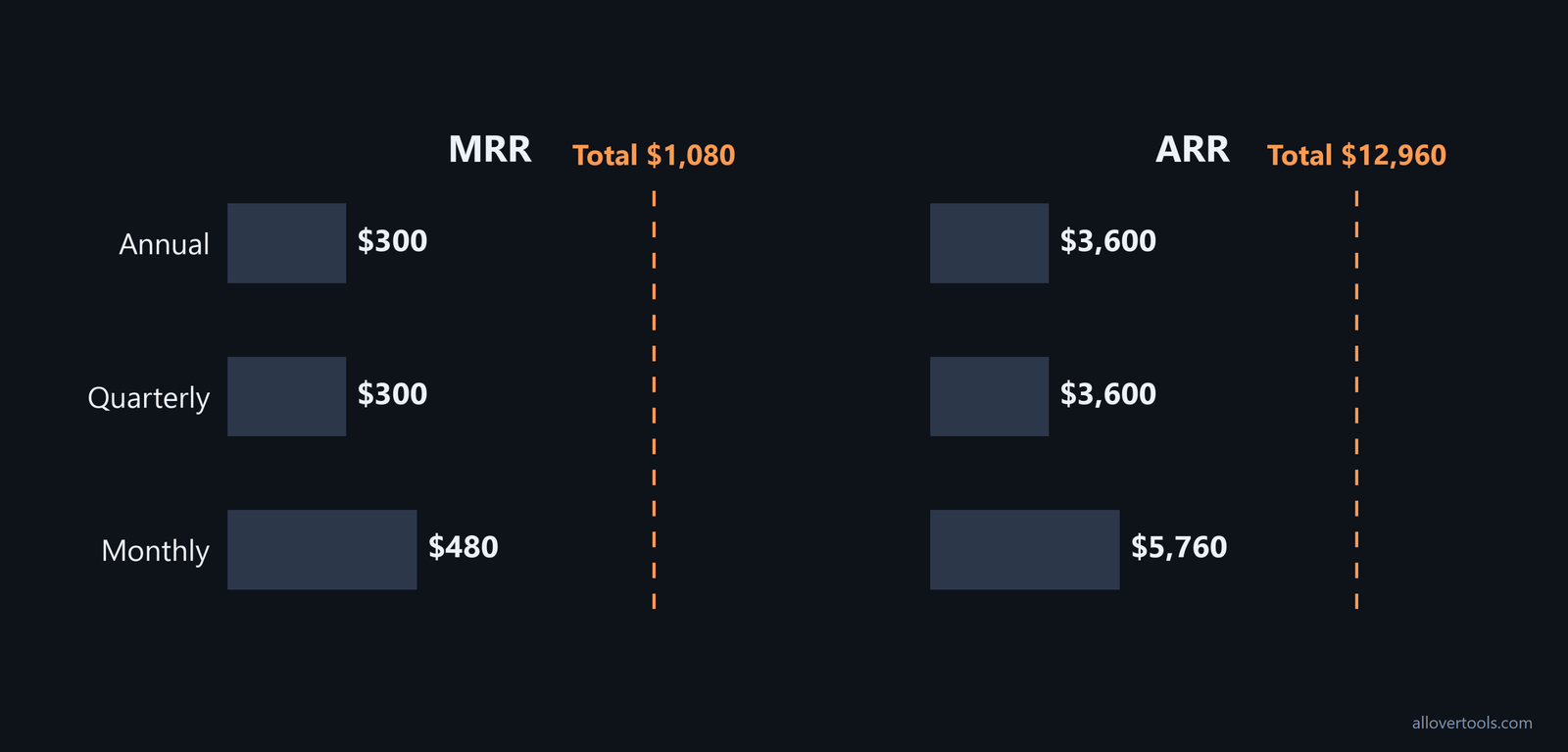
These values illustrate a portfolio with different billing cycles. Each row uses the charge for its own billing period, applies the matching factor, and multiplies by the subscription count. That is how to convert MRR into ARR without mixing raw monthly, quarterly, and annual charges.
Three chosen subscription rows
| Recurring revenue per billing period | Billing period | Subscriptions | ARR calculation | ARR | MRR |
|---|---|---|---|---|---|
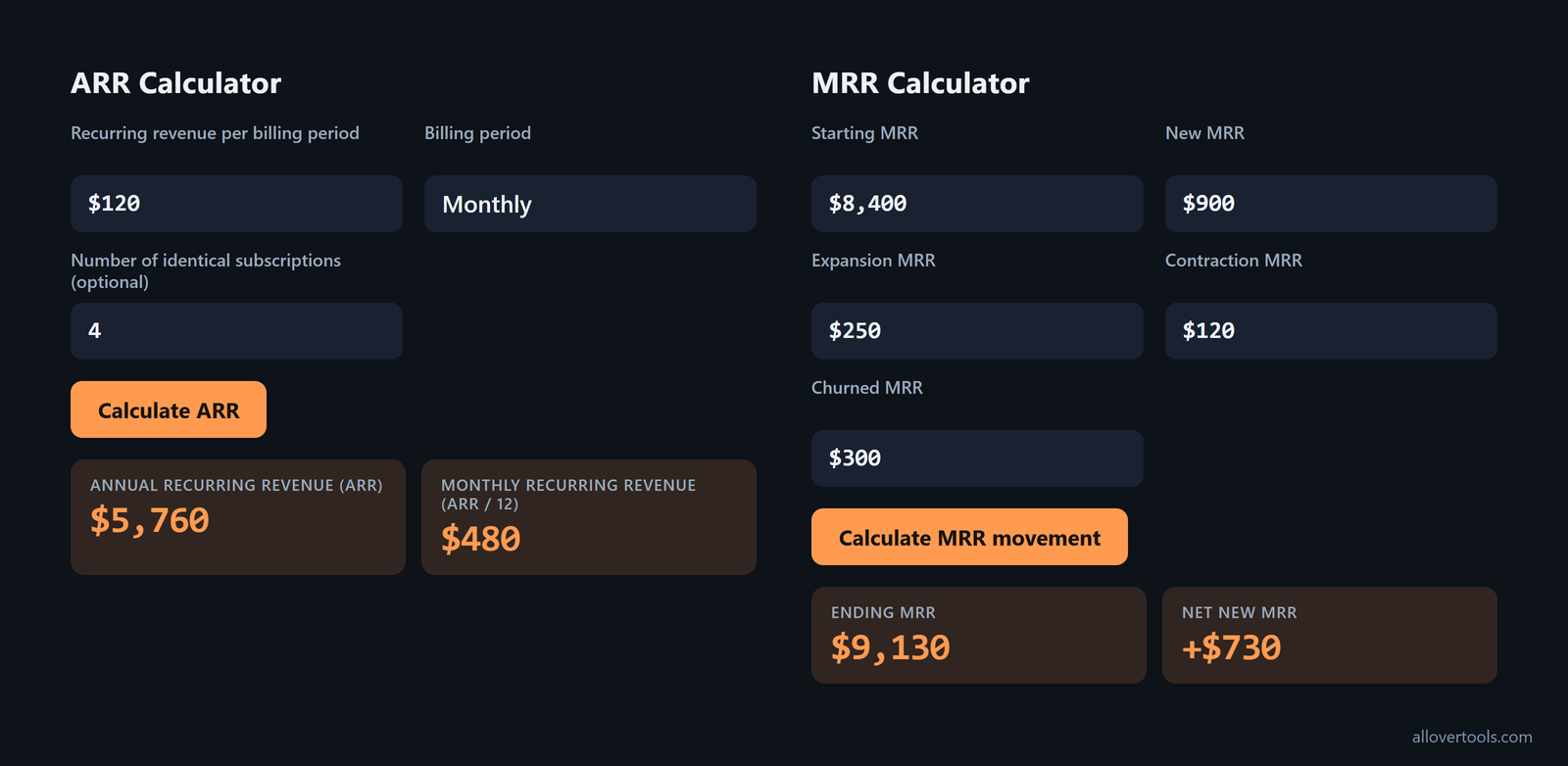
| $120 | Monthly | 4 | $120 x 12 x 4 | $5,760 | $480 |
| $300 | Quarterly | 3 | $300 x 4 x 3 | $3,600 | $300 |
| $1,800 | Annual | 2 | $1,800 x 1 x 2 | $3,600 | $300 |
The portfolio totals are ARR = $5,760 + $3,600 + $3,600 = $12,960 and MRR = $480 + $300 + $300 = $1,080. The totals check in both directions:
$1,080 × 12 = $12,960
$12,960 ÷ 12 = $1,080
Adding the raw $120, $300, and $1,800 charges would mix different billing periods. To reproduce a row, use the ARR Calculator and enter Recurring revenue per billing period, Billing period, and Number of identical subscriptions (optional), then select Calculate ARR. Compare the displayed Annual Recurring Revenue (ARR), Monthly Recurring Revenue (ARR ÷ 12), Billing periods per year, ARR, and MRR (ARR / 12) with the table.
Reverse the total from ARR to MRR
Use the portfolio total for the reverse conversion. Since $12,960 ARR covers the same recurring scope as the three rows, divide it by 12:
$12,960 ÷ 12 = $1,080 MRRThe reverse conversion requires ARR to be expressed on an annualized basis for the same recurring revenue base. An annual charge can be part of that ARR after normalization, but its raw invoice amount is not monthly revenue by itself.
Do not add annual contract values to this normalized total. Once an annual contract has been divided by 12 into MRR, ARR is simply MRR x 12. Adding those annual contract values separately counts the same recurring base twice and overstates ARR, as the double-counting warning notes.
How do churn and expansion change month-end ARR?
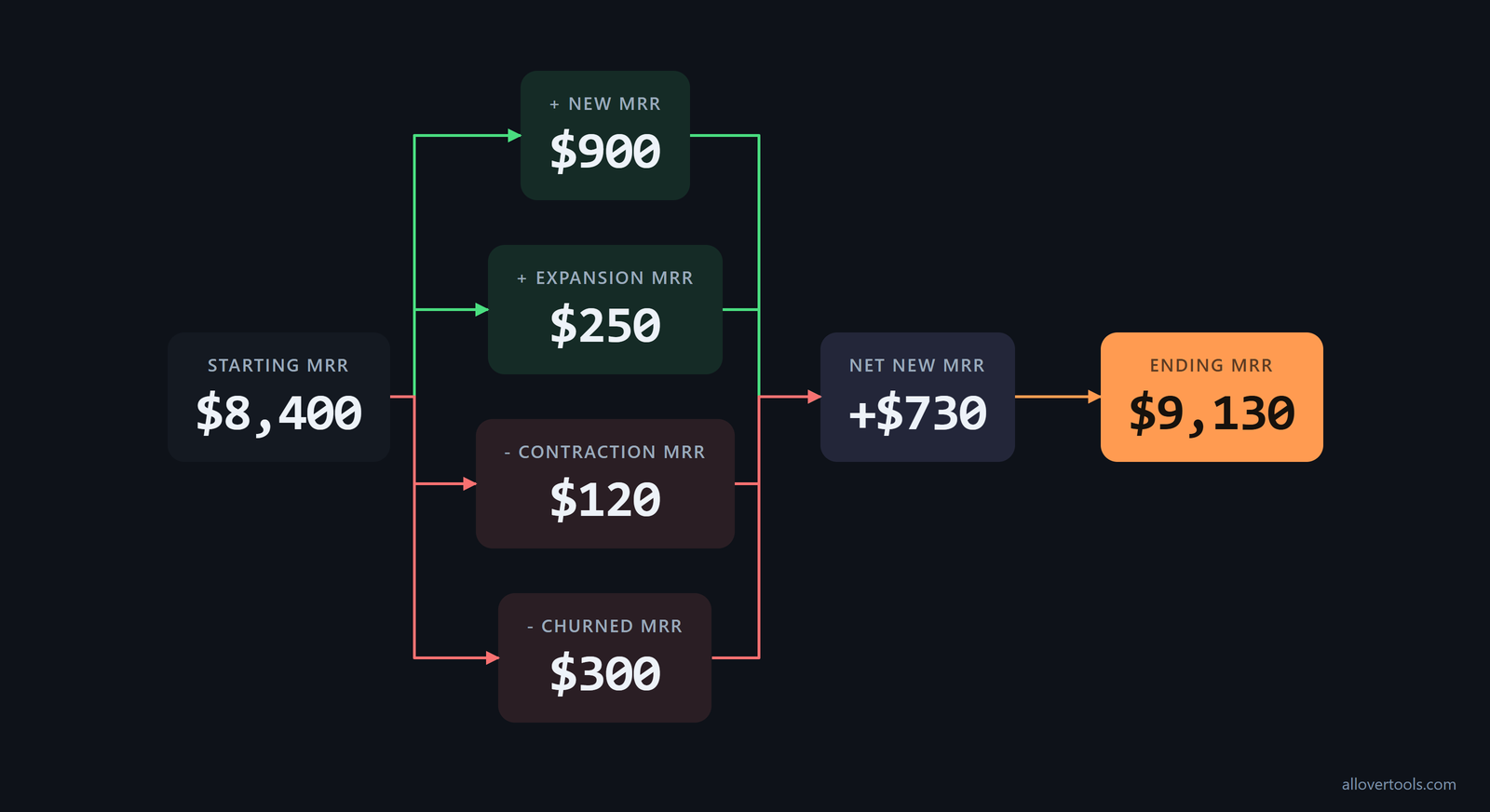
A month-end report starts with opening MRR and separates New MRR, Expansion MRR, Contraction MRR, and Churned MRR before annualizing the ending figure. Expansion can offset churn in the total, but contraction and full cancellation remain separate movements.
Build the month-end movement bridge
Enter these values as positive amounts in the MRR Calculator:
- Starting MRR: $8,400
- New MRR: $900
- Expansion MRR: $250
- Contraction MRR: $120
- Churned MRR: $300
Keep the gains and losses separate, then combine them:
Net New MRR = $900 + $250 − $120 − $300 = $730
Ending MRR = $8,400 + $730 = $9,130
Net MRR Growth Rate = $730 ÷ $8,400 × 100 = 8.69%
Gross MRR Churn Rate = $300 ÷ $8,400 × 100 = 3.57%
Contraction is revenue lost when an existing subscriber pays less. Churned MRR is revenue lost when a subscriber cancels. For these inputs, Gross Revenue Retention is ($8,400 - $300 - $120) ÷ $8,400 x 100 = 95.00%, and Net Revenue Retention is ($8,400 - $300 - $120 + $250) ÷ $8,400 x 100 = 97.98%. Use the MRR Calculator to build the movement bridge from the five inputs.
Annualize the ending, not the opening, MRR
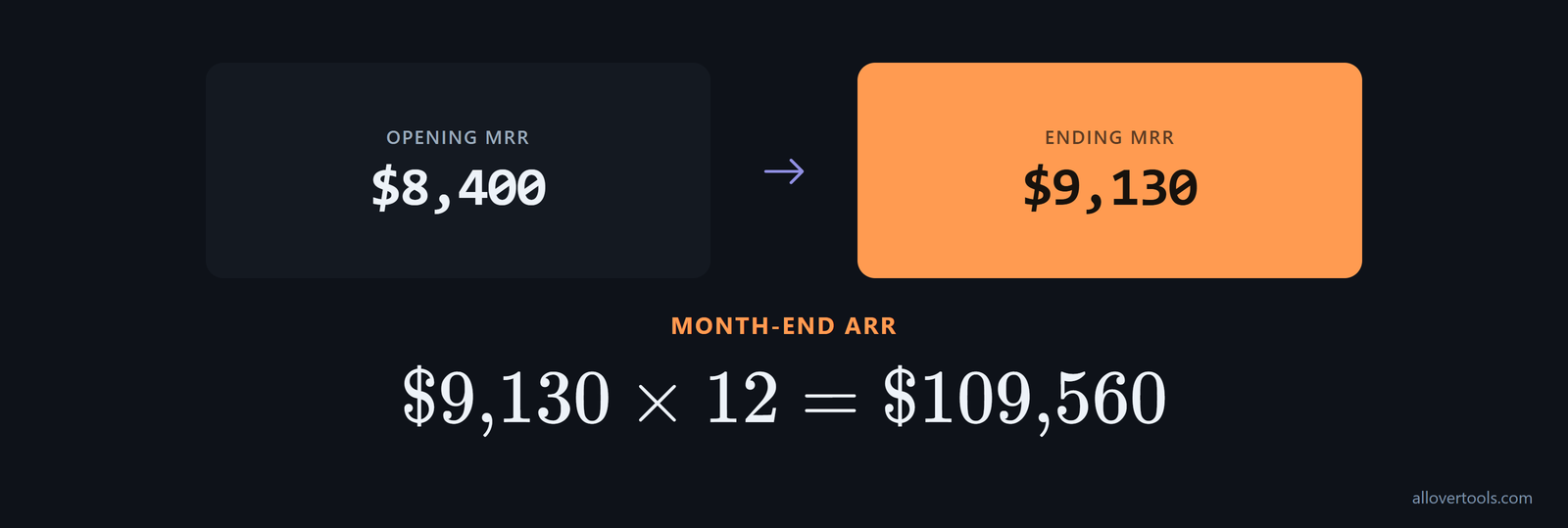
Month-end ARR uses the ending MRR of $9,130, not the opening $8,400:
$9,130 × 12 = $109,560 month-end ARRLabel the reporting period and state whether each figure is monthly or annual. For a report that needs MRR and ARR alongside other SaaS measures, the SaaS Metrics Calculator uses ending recurring revenue as MRR under its Monthly rule and calculates ARR as ending recurring revenue x 12. Under its Annual rule, ending recurring revenue is ARR and MRR is ending recurring revenue ÷ 12.
How to check the conversion with the calculators
In the ARR Calculator, enter Recurring revenue per billing period, choose Currency symbol and Billing period, optionally enter Days per billing cycle for Custom cycle length..., set Number of identical subscriptions (optional), and select Calculate ARR. Compare the displayed ARR and MRR with the hand calculation. Use Copy result or Download result (.txt) if the result needs to move into another record.
For movement reporting, enter Starting MRR, New MRR, Expansion MRR, Contraction MRR, and Churned MRR in the MRR Calculator, then select Calculate MRR movement. Read Ending MRR and Net New MRR and compare them with the movement bridge. ARR inputs require a revenue amount of 0 or more. Custom days and subscription count must be whole numbers of at least 1. MRR churn cannot exceed Starting MRR, and contraction cannot exceed Starting MRR plus New MRR plus Expansion MRR.
Reproduce the portfolio rows
Run the three ARR Calculator rows separately. Check $5,760 ARR and $480 MRR for the monthly row, $3,600 ARR and $300 MRR for the quarterly row, and $3,600 ARR and $300 MRR for the annual row before adding the outputs.
The calculator scripts process the values entered in the browser. They do not connect to a billing system, fetch live records, or convert currencies. Changing the currency symbol changes the display, while the calculation keeps the entered amount.
What should MRR-based ARR reporting include?
Month-end and investor reporting checklist
Pick the reporting metric that fits the decision and audience. MRR suits early-stage, SMB, and monthly-billed SaaS because it is sensitive at small scale. ARR suits enterprise, annual-contract SaaS, and valuation conversations because it is smoother at large scale, according to this stage-based guidance.
Use MRR and ARR at different time scales, and do not treat one as a replacement for the other. MRR is the month-to-month snapshot for tracking churn, expansion, and short-term operational adjustments. ARR is the annual view for strategic planning, investor reporting, and company valuation, as the operational split explains.
- State the as-of date or reporting period.
- Define the recurring-only scope and what it excludes.
- Show ending MRR and derived ARR = ending MRR x 12.
- Attach the movement bridge for new business, expansion, contraction, and churn.
- Keep billing-cycle normalization consistent across periods.
- Label ARR as an annualized run rate derived from MRR, not cash collected or a forecast.
Limits of the simple MRR x 12 approach
Decide how to handle usage-based pricing before annualizing it. A single month's consumption spike can inflate MRR, and multiplying it by 12 can produce ARR that does not match contracted minimums or typical usage. If usage revenue is included in ARR, document how it is smoothed or normalized for reporting. Datadog's stated ARR definition explicitly includes usage revenue in its MRR-based calculation, according to the usage-based warning.
In a multi-entity group, separate foreign-exchange movement from recurring growth. Month-end MRR translated into the reporting currency can change solely because exchange rates moved. Multiplying that volatile translated figure by 12 can misstate contracted ARR unless the FX effect is separated from true recurring-growth movements, as the FX caution requires.
When annual billing dominates the portfolio, an annual-subscription approach can also be valid. ARR can be defined as total annual subscription revenue + expansion revenue - contraction revenue - churned revenue, while MRR x 12 remains a quick estimate. Use the annualized subscription-based method when the reporting process starts with annual revenue streams, following Tabs' alternative formula.
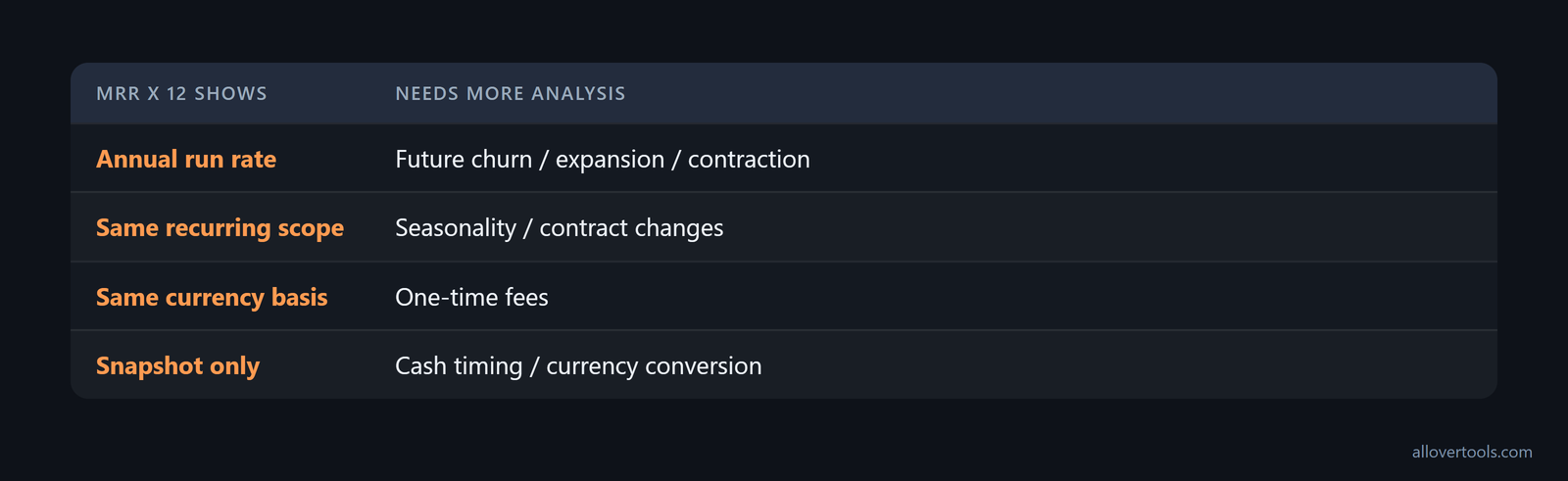
MRR x 12 is a snapshot. It does not model future churn, expansion, contraction, seasonality, contract changes, one-time fees, or the timing of cash receipts. It does not convert currencies either. Use a movement calculation when the report needs to show how the ending figure changed. Use the SaaS Metrics Calculator when the same period also needs customer, churn, spend, cash, or other SaaS metrics.
Frequently asked questions
How do I convert MRR to ARR?
Multiply monthly recurring revenue by 12. The $4,200 MRR example becomes $50,400 ARR. Leave one-time and non-recurring amounts out of the MRR input.
How do I convert ARR back to MRR?
Divide ARR by 12 when ARR represents the same recurring revenue base on an annualized basis. The portfolio converts $12,960 ARR to $1,080 MRR.
Should month-end ARR use starting MRR or ending MRR?
Use ending MRR after adding new and expansion MRR and subtracting contraction and churned MRR. Multiply that month-end figure by 12, label the reporting period, and show the movement bridge.
Does ARR always equal MRR times 12?
It does when MRR is a normalized monthly recurring run rate for the same scope and ARR is its annualized equivalent. Billing-cycle mismatches, one-time revenue, currency conversion, and changing recurring revenue make a simple multiplication misleading.
Can I convert quarterly or custom-cycle revenue to MRR?
Yes. Annualize the recurring charge with the applicable periods-per-year factor, then divide by 12. The ARR Calculator supports quarterly, annual, weekly, and custom cycles. Custom cycles use 365.25 divided by Days per billing cycle.